
Virtuelles Home Staging für Immobilien
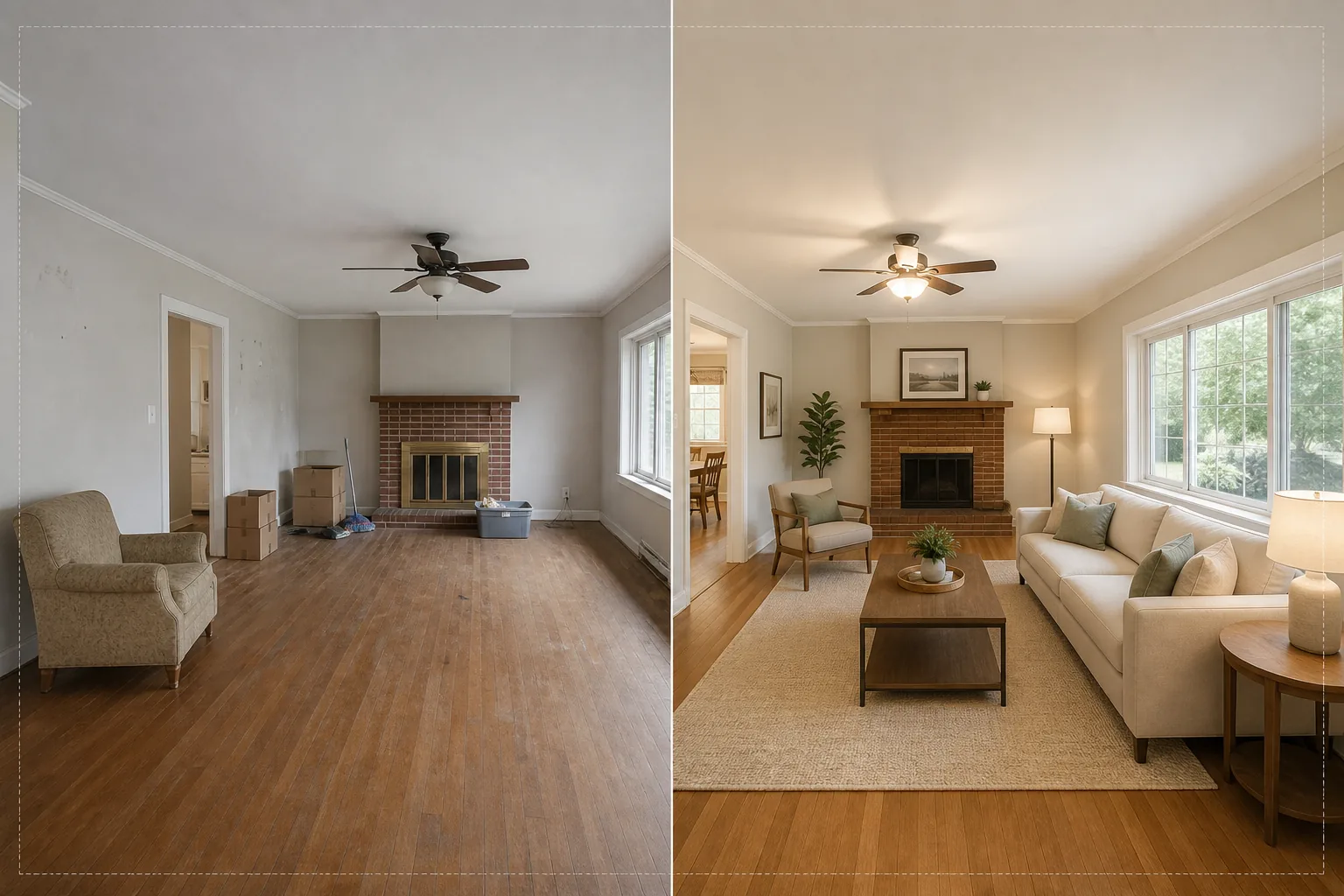
Inszenieren Sie leere Räume mit fotorealistischen Möbeln und Dekor, ohne ein einziges echtes Möbelstück zu bewegen. Diese Vorlage nutzt AI Fill, um Sofas, Tische, Teppiche und Kunstwerke in leeren Räumen zu platzieren, während Magic Eraser vorhandenes Durcheinander, alte Möbel und persönliche Gegenstände entfernt, bevor die Inszenierung beginnt. Das Ergebnis ist ein warmes, einladendes Exposéfoto, das Käufern hilft, sich selbst in dem Raum wohnen zu sehen.
Diese Vorlage kostenlos testenReal Estate template preview
Was diese Vorlage leistet
Sie löst die größte Herausforderung der Immobilienfotografie: leere oder vollgestellte Räume wie ein Zuhause wirken zu lassen. Magic Eraser entfernt zunächst jegliches vorhandene Durcheinander — alte Möbel, Umzugskartons, persönliche Gegenstände, Wandflecken und Kratzspuren auf Böden. Anschließend platziert AI Fill kontextgerechte Möbel im gereinigten Raum und passt den Stil an die Architektur an. Ein modernes Loft erhält Mid-Century-Möbel mit industriellen Akzenten, während ein traditionelles Kolonialhaus klassische gepolsterte Möbel und warme Holztöne bekommt. Beleuchtung und Schatten der virtuellen Möbel werden aus dem vorhandenen Fensterlicht im Foto berechnet, sodass die Inszenierung physisch präsent wirkt und nicht aufgeklebt.
Vorlageneinstellungen
| Inszenierungsstil | Modern, Traditionell, Skandinavisch, Mid-Century oder Coastal |
| Raumtyp | Automatisch erkannt (Wohnzimmer, Schlafzimmer, Esszimmer, Büro, Küche) |
| Entfernung von Durcheinander | Automatisches Entfernen von Kartons, persönlichen Gegenständen und alten Möbeln vor der Inszenierung |
| Schattendarstellung | Angepasst an Richtung und Intensität des vorhandenen Fensterlichts |
| Ausgabeauflösung | 4000×3000px (MLS-konform bei 300 DPI) |
| Farbtemperatur | Warmer Innenraum (3200K–4000K passend zu typischer Innenbeleuchtung) |
So verwenden Sie diese Vorlage
Laden Sie das Foto des leeren oder vollgestellten Raums hoch
Laden Sie ein Weitwinkelfoto des Raums hoch. Fotografieren Sie aus einer Ecke, um zwei Wände und den Boden zu erfassen und so die realistischste Inszenierung zu erzielen. Die Vorlage funktioniert mit Fotos von Smartphones, DSLRs und professionellen Immobilienkameras, einschließlich Ultraweitwinkelobjektiven.
Vorhandenes Durcheinander entfernen
Magic Eraser erkennt und entfernt automatisch Umzugskartons, alte Möbel, persönliche Fotos an Wänden und Unordnung auf dem Boden. Die KI rekonstruiert Bodenbelag, Wandfarbe und Sockelleisten hinter entfernten Objekten, sodass der Raum sauber und leer erscheint.
Mit virtuellen Möbeln inszenieren
AI Fill platziert Möbel passend zum erkannten Raumtyp und gewählten Stil. Ein Wohnzimmer erhält ein Sofa, einen Couchtisch, einen Teppich, Beistelltische und Wandkunst. Ein Schlafzimmer bekommt ein Bett, Nachttische, Lampen und dekorative Kissen. Die Möbel werden an die Raummaße angepasst und werfen realistische Schatten.
Für MLS und Inserate exportieren
Laden Sie das inszenierte Foto in 4000×3000px herunter, bereit für MLS-Uploads, Zillow, Realtor.com und gedruckte Broschüren. Das Bild enthält Metadaten-Tags für eine einfache Katalogisierung in Ihrem Inserate-Verwaltungssystem.
Profi-Tipps für beste Ergebnisse
- ✓Fotografieren Sie aus einer Ecke in etwa 1,20 m Höhe — so erfassen Sie zwei Wände und genügend Bodenfläche, damit die KI Möbel mit korrekter Perspektive und Bodenkontaktschatten platzieren kann.
- ✓Schalten Sie vor dem Fotografieren alle Lichter im Raum ein. Die KI nutzt sichtbare Lichtquellen und Fensterglanzlichter, um zu berechnen, wo Schatten auf den inszenierten Möbeln liegen sollen.
- ✓Verwenden Sie bei Inseraten mit mehreren Räumen in allen Räumen denselben Inszenierungsstil, um eine stimmige Designgeschichte zu schaffen, die wirkt, als hätte ein echter Innenausstatter das gesamte Haus eingerichtet.
Tools
Häufige Fragen
Ist virtuelles Home Staging mit den MLS-Regeln konform?
+
Die meisten MLS-Systeme erlauben virtuell inszenierte Fotos, solange sie als solche gekennzeichnet sind. Die Vorlage fügt die Kennzeichnung nicht automatisch hinzu — prüfen Sie Ihre lokalen MLS-Regeln und fügen Sie beim Hochladen einen Hinweis wie 'Virtuell inszeniert' hinzu.
Kann ich eine Außenterrasse oder einen Balkon inszenieren?
+
Ja. Die Vorlage erkennt Außenwohnbereiche und inszeniert sie mit passenden Terrassenmöbeln, Pflanzkübeln und Outdoor-Teppichen. Die Lichtberechnungen berücksichtigen den offenen Himmel und direktes Sonnenlicht statt des Umgebungslichts im Innenraum.
Wie realistisch sind die Möbel?
+
Die inszenierten Möbel werfen Schatten, die zur vorhandenen Lichtrichtung des Raums passen, stehen mit korrekter Perspektive auf der Bodenebene und reflektieren die Umgebungsfarbe der umliegenden Wände. Aus normaler Betrachtungsentfernung ist die Inszenierung von einem möblierten Foto nicht zu unterscheiden.
Inszenieren Sie jeden Raum in Sekunden, nicht in Stunden
Laden Sie Fotos leerer Räume hoch und erhalten Sie wunderschön möblierte Inseratbilder, die Käufer in jeden Raum verlieben lassen.
Kostenlos testenRelated templates
More real estate templates for your workflow.
Professionelle Immobilienfotovorlage für MLS-Angebote. HDR-ähnliche Verbesserung, Himmelsersetzung, Beseitigung von Unordnung und Farbkorrektur für Immobilienfotos, die sich schneller verkaufen.
Verbessern Sie Architektur-Außenfotos mit Korrektur senkrechter Linien, Himmelaustausch, Entfernung von Autos und Passanten sowie Farbabstimmung zur goldenen Stunde für Inserate und Portfolios.
Verwandeln Sie Airbnb- und Ferienmietfotos mit Raumaufhellung, Beseitigung von Unordnung, Color correction und Korrektur von Weitwinkelobjektivverzerrungen für höhere Buchungsraten.
Verbessern Sie die Fotos Ihres Innenarchitektur-Portfolios durch Raumaufhellung, Beseitigung von Unordnung, Schärfung der Materialtextur und farbgenaue Wiedergabe von Oberflächen und Stoffen.
Verbessern Sie Drohnen-Luftaufnahmen durch Himmelsersatz, Hervorhebung von Grundstücksgrenzen, Farbbrillanz Boost und Entfernung von Ablenkungen für Immobilien- und Landvermessungen.
Bereinigen, verbessern und standardisieren Sie Grundrissbilder für Immobilienangebote durch Fleckenentfernung, Linienschärfung und einheitliches Styling.