
Innenarchitektur-Portfolio
Präsentieren Sie Innenarchitekturprojekte in der visuellen Qualität, die sie verdienen. Diese Vorlage hellt Räume auf, um den Verlauf des natürlichen Lichts zu zeigen, entfernt Bauschutt und persönliche Gegenstände, verbessert Materialtexturen von Holz, Stein und Stoff und korrigiert die Farbgenauigkeit, sodass Oberflächen den Vorgaben des Designers entsprechen.
Diese Vorlage kostenlos testenReal Estate template preview
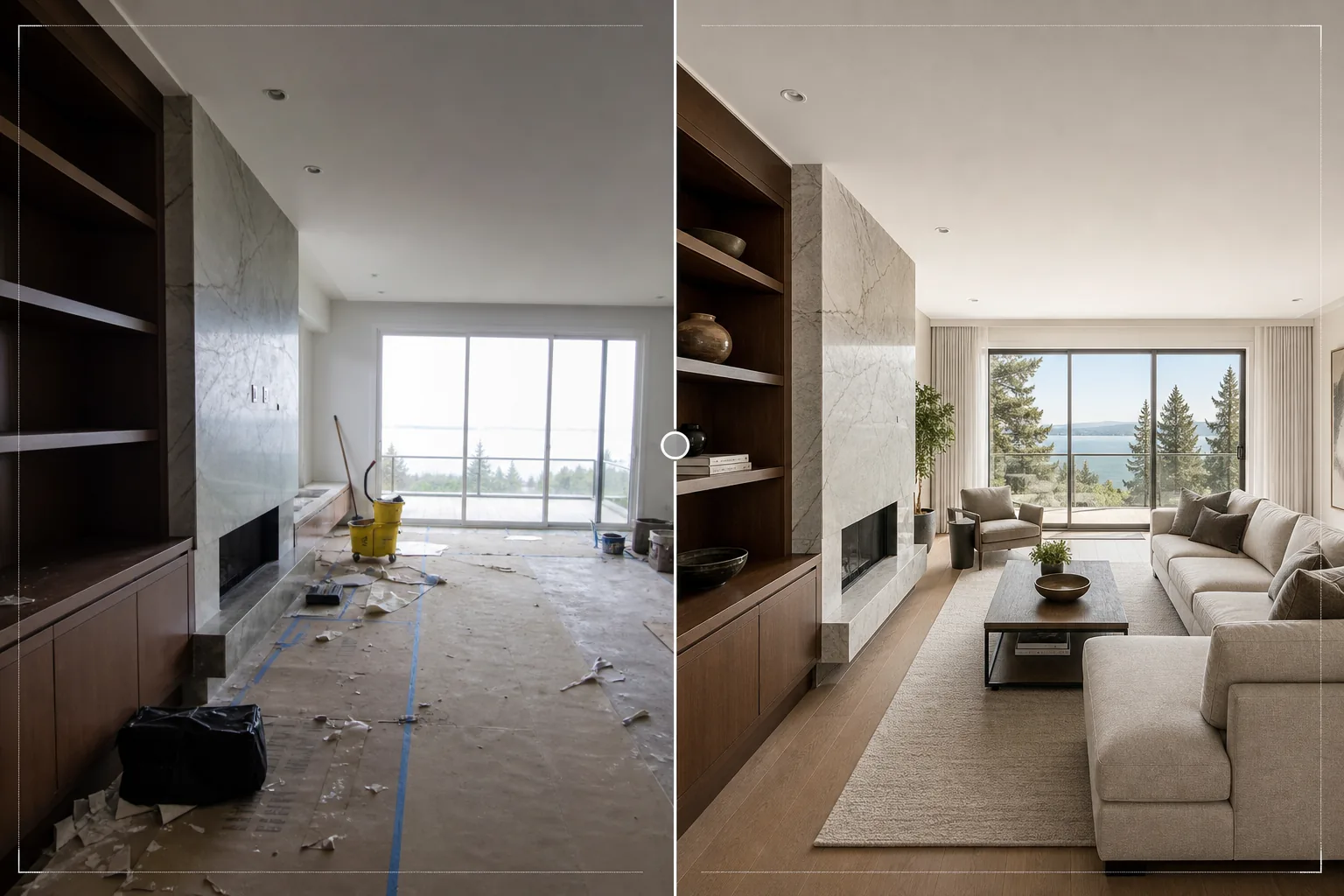
Was diese Vorlage leistet
Verfeinert Fotos von Innenarchitekturprojekten für Portfolios, Houzz-Profile, Instagram-Feeds und Kundenpräsentationen. Innenarchitekturfotografie erfordert eine genaue Wiedergabe der Material- und Farbwahl des Designers – ein Nussbaumboden sollte wie Nussbaum aussehen, nicht wie Mahagoni. Diese Vorlage nutzt AI Enhance für eine farbgenaue Korrektur, die die echten Töne von Holzmaserung, Steinäderung, Stofftexturen und Wandfarben so bewahrt, wie der Designer sie vorgegeben hat. Magic Eraser entfernt Bauschutt aus der jüngsten Installation, persönliche Gegenstände der Kunden, die vor dem Fotoshooting nicht weggeräumt wurden, sichtbare Steckdosen und Schalter, die saubere Wandflächen unterbrechen, sowie alle anderen Elemente, die vom Design selbst ablenken. Die Raumaufhellung sorgt dafür, dass Räume natürlich beleuchtet und offen wirken.
Vorlageneinstellungen
| Raumaufhellung | Schattenauffüllung + Wiederherstellung der Fensterbelichtung (Look mit natürlichem Licht) |
| Materialtreue | Farbgetreue Wiedergabe für Holz, Stein, Fliesen und Stoff |
| Texturschärfung | Detailverbesserung von Maserung, Gewebe und Äderung |
| Unordnung entfernen | Entfernt persönliche Gegenstände, Bauschutt und Störendes |
| Ausgabeauflösung | 6000px lange Kante (bereit für Portfolio-Druck und Houzz-Upload) |
| Objektivkorrektur | Vertikale Begradigung und Korrektur der Tonnenverzeichnung von Weitwinkeln |
So verwenden Sie diese Vorlage
Laden Sie Ihr Innenraumfoto hoch
Laden Sie Raumfotos aus jeder Phase des Projekts hoch – die frisch fertiggestellte Installation, ein gestyltes Fotoshooting oder sogar eine laufende Arbeit, sofern die Designelemente vorhanden sind. Die Vorlage verarbeitet Fotos von Smartphones, Kameras mit Wechselobjektiven und Tilt-Shift-Architekturobjektiven.
Aufhellen und Farbe korrigieren
Die Vorlage erhöht die Raumhelligkeit, um die volle räumliche Qualität des Designs zu zeigen, stellt überbelichtete Fenster wieder her, um den Ausblick dahinter sichtbar zu machen, und korrigiert die Farbtemperatur, sodass Materialoberflächen ihrem realen Erscheinungsbild entsprechen. Vertikale Linien werden begradigt und die Weitwinkelverzeichnung wird korrigiert.
Störendes entfernen
Magic Eraser entfernt persönliche Gegenstände, Bauwerkzeuge, Reinigungsmittel, sichtbare Steckdosen und andere Elemente, die den gestalteten Raum unterbrechen. Die KI rekonstruiert die Wand, den Boden oder die Oberfläche hinter den entfernten Objekten anhand des umgebenden Materialmusters.
Für das Portfolio exportieren
Laden Sie mit 6000px langer Kante herunter für Portfolio-Drucke, Houzz-Projekt-Uploads und hochauflösende Präsentationen. Die Adobe-RGB-Ausgabe bewahrt die feinen Farbunterschiede zwischen ähnlichen Oberflächen, die in der Innenarchitektur-Dokumentation wichtig sind.
Profi-Tipps für beste Ergebnisse
- ✓Fotografieren Sie tagsüber mit allen geöffneten Vorhängen und Jalousien. Natürliches Tageslicht zeigt, wie sich ein gestalteter Raum für seine Bewohner tatsächlich anfühlt, und offenbart die wahren Farben der Oberflächen. Die Vorlage verstärkt natürliches Licht, kann aber die Qualität von echtem Tageslicht in einem Nachtfoto nicht nachbilden.
- ✓Nehmen Sie sowohl weite Raumaufnahmen als auch enge Detailaufnahmen von Materialkombinationen auf – dort, wo der Holzboden auf die Steineinfassung des Kamins trifft, wo der Spritzschutz auf die Arbeitsplatte trifft. Die Vorlage schärft diese Materialübergänge, die die Kompetenz des Designers bei der Materialauswahl zeigen.
- ✓Schalten Sie nach Möglichkeit alle künstlichen Lichter aus und verlassen Sie sich nur auf Tageslicht. Mischbeleuchtung (Tageslicht von den Fenstern plus warmes Kunstlicht) erzeugt Farbtemperaturzonen im Raum, die die Vorlage mitteln muss, was die Genauigkeit der Materialfarben in einer der beiden Zonen beeinträchtigen kann.
Häufige Fragen
Kann damit ein leerer Raum virtuell eingerichtet werden?
+
Nein. Die Vorlage verbessert Fotos von Räumen, die bereits die Designelemente enthalten – Möbel, Oberflächen, Armaturen. Sie fügt leeren Räumen keine virtuellen Möbel oder Accessoires hinzu. Für virtuelles Home Staging verwenden Sie einen speziellen Staging-Dienst und verarbeiten Sie das Ergebnis anschließend mit dieser Vorlage zur Verfeinerung von Farbe und Beleuchtung.
Wie genau gibt sie Materialfarben wieder?
+
Die Vorlage verwendet eine tageslichtausgeglichene Farbkorrektur, die die spezifischen Untertöne der Materialien bewahrt – warme versus kühle Grautöne, rötliche versus goldene Holztöne, bläuliche versus grünliche Steinäderung. Auf einem kalibrierten Monitor stimmen die verarbeiteten Bilder so genau mit dem realen Erscheinungsbild der Materialien überein, dass sie für Portfolio- und Spezifikationszwecke geeignet sind.
Was ist mit Fliesenarbeiten in Bad und Küche?
+
Fugenlinien und Muster von Fliesen werden geschärft, um die Verlegequalität zu zeigen. Die Vorlage verarbeitet sowohl großformatige Fliesen als auch detaillierte Mosaikmuster und betont die geometrische Präzision, die hochwertige Handwerkskunst belegt.
Zeigen Sie jedes Projekt in seiner besten gestalteten Form
Laden Sie Innenraumfotos hoch und erhalten Sie Bilder in Portfolio-Qualität mit präzisen Materialfarben, hellem natürlichem Licht und ablenkungsfreien Kompositionen.
Kostenlos testenRelated templates
More real estate templates for your workflow.
Professionelle Immobilienfotovorlage für MLS-Angebote. HDR-ähnliche Verbesserung, Himmelsersetzung, Beseitigung von Unordnung und Farbkorrektur für Immobilienfotos, die sich schneller verkaufen.
Verbessern Sie Architektur-Außenfotos mit Korrektur senkrechter Linien, Himmelaustausch, Entfernung von Autos und Passanten sowie Farbabstimmung zur goldenen Stunde für Inserate und Portfolios.
Verwandeln Sie Airbnb- und Ferienmietfotos mit Raumaufhellung, Beseitigung von Unordnung, Color correction und Korrektur von Weitwinkelobjektivverzerrungen für höhere Buchungsraten.
Verbessern Sie Drohnen-Luftaufnahmen durch Himmelsersatz, Hervorhebung von Grundstücksgrenzen, Farbbrillanz Boost und Entfernung von Ablenkungen für Immobilien- und Landvermessungen.
Inszenieren Sie leere Räume virtuell mit realistischen Möbeln, Dekor und Beleuchtung. Helfen Sie Käufern, Wohnräume ohne physische Inszenierungskosten zu visualisieren.
Bereinigen, verbessern und standardisieren Sie Grundrissbilder für Immobilienangebote durch Fleckenentfernung, Linienschärfung und einheitliches Styling.