
Architektur-Außenansicht
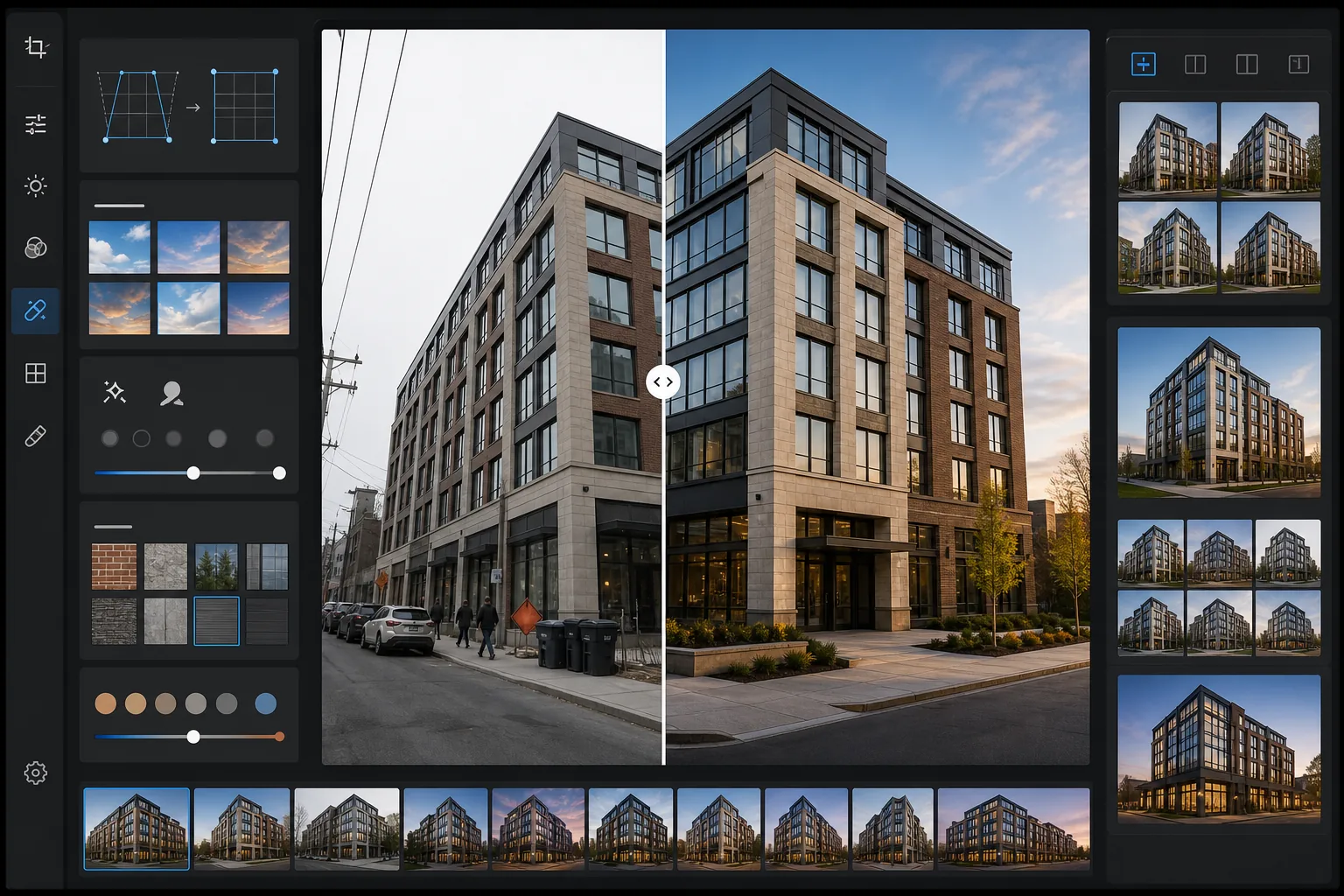
Verwandeln Sie Außenfotos von Gebäuden in Architekturbilder in Portfolio-Qualität. Diese Vorlage korrigiert konvergierende senkrechte Linien durch geneigte Kameras, ersetzt bedeckte oder ausgebrannte Himmel durch klares Blau oder Alternativen zur goldenen Stunde, entfernt geparkte Autos und Passanten aus der Szene und wendet eine Farbabstimmung an, die die Materialtexturen von Stein, Glas und Metall hervorhebt.
Diese Vorlage kostenlos testenReal Estate template preview
Was diese Vorlage leistet
Löst die häufigsten Probleme der Architektur-Außenfotografie. Konvergierende Senkrechten — bei denen die Gebäudekanten nach innen kippen, weil die Kamera nach oben geneigt war — werden korrigiert, sodass die Wände perfekt gerade sind. Ausgebrannte weiße Himmel von bedeckten Tagen werden durch natürlichen blauen Himmel oder Alternativen zur goldenen Stunde ersetzt, die zur vorhandenen Lichtrichtung am Gebäude passen. Magic Eraser entfernt geparkte Autos, Passanten, Mülltonnen, Baumaschinen und temporäre Beschilderung, die die Komposition stören. AI Enhance wendet eine dezente Farbabstimmung an, die die Wärme von Ziegeln, die Reflexion von gläsernen Vorhangfassaden und die Textur von Beton- und Steinfassaden zur Geltung bringt.
Vorlageneinstellungen
| Senkrechtenkorrektur | Automatische Trapezkorrektur (Neigungskorrektur ±15°) |
| Himmelaustausch | Natürlicher blauer Himmel mit passender Lichtrichtung (oder goldene Stunde) |
| Materialverstärkung | Texturschärfung für Ziegel, Stein, Glas und Metall |
| Farbabstimmung | Warme Architektur (Töne der goldenen Stunde auf Fassaden, kühle Schatten) |
| Entfernung von Störern | Fahrzeuge, Passanten und Tonnen automatisch erkennen und entfernen |
| Ausgabeauflösung | 6000px Längskante (Portfolio und Druck mit 300 DPI bis 20×13) |
So verwenden Sie diese Vorlage
Laden Sie Ihr Außenfoto hoch
Laden Sie ein Foto der Gebäudeaußenseite hoch, aufgenommen von der Straße, einer erhöhten Position oder einer Drohne. Die Vorlage verarbeitet Bilder von Smartphones, DSLRs und Weitwinkelobjektiven. Die tonnenförmige Verzeichnung des Weitwinkels wird zusammen mit der senkrechten Trapezverzeichnung automatisch korrigiert.
Perspektive und Himmel korrigieren
Senkrechte Linien werden begradigt, sodass die Gebäudekanten parallel und korrekt sind. Ist der ursprüngliche Himmel weiß ausgebrannt oder trüb bedeckt, wird er durch einen natürlichen Himmel ersetzt, der zur bereits an der Fassade sichtbaren Lichtrichtung passt. Sie können zwischen klarem blauem Himmel und warmen Tönen der goldenen Stunde wählen.
Störendes aus der Szene entfernen
Magic Eraser entfernt geparkte Autos, Passanten, Müllbehälter, temporäre Beschilderung, Baugerüste und oberirdische Stromleitungen. Die KI rekonstruiert Gehweg, Bepflanzung und Gebäudeflächen hinter den entfernten Objekten anhand des umgebenden Kontexts.
Für Portfolio oder Inserat exportieren
Laden Sie das korrigierte Bild mit 6000px Längskante herunter für Architektur-Portfoliodrucke, Immobilieninserate oder Marketingmaterial von Bauträgern. Das Farbprofil wird je nach gewünschter Ausgabe auf Adobe RGB für den Druck oder sRGB für das Web eingestellt.
Profi-Tipps für beste Ergebnisse
- ✓Für den natürlichsten Himmelaustausch fotografieren Sie so, dass das Gebäude nicht mehr als 60-70 % der Bildhöhe einnimmt. So bleibt genug ursprüngliche Himmelsfläche, damit die KI den Beleuchtungswinkel und die Verlaufsrichtung des Ersatzhimmels an die vorhandene Szene anpassen kann.
- ✓Beim Fotografieren stark verglaster Fassaden beeinflusst die Spiegelung in den Fenstern den Himmelaustausch. Ist der ursprüngliche bedeckte Himmel als Spiegelung im Glas sichtbar, verändert der Ersatzhimmel die Spiegelungen nicht — stark verglaste Gebäude wirken daher am natürlichsten, wenn sie an Tagen mit zumindest etwas blauem Himmel aufgenommen werden.
- ✓Entfernen Sie Autos und Personen jeweils nur von einer Seite des Bildes. Bei komplexen Szenen wie einem mit Autos gefüllten Parkplatz vor einem Gebäude liefert die KI sauberere Ergebnisse, wenn Sie abschnittsweise arbeiten, statt den gesamten Vordergrund auf einmal auszuwählen.
- ✓Fotografieren Sie nach Möglichkeit während der goldenen Stunde am Morgen oder späten Nachmittag. Die Vorlage kann eine Farbabstimmung der goldenen Stunde auf Mittagsfotos anwenden, doch echtes Licht der goldenen Stunde erzeugt gerichtete Schatten auf den Fassaden, die eine Tiefe schaffen, die keine Farbabstimmung nachbilden kann.
Häufige Fragen
Wie viel senkrechte Neigung lässt sich korrigieren?
+
Die Vorlage korrigiert bis zu 15 Grad senkrechte Trapezverzeichnung, was die meisten freihändigen Aufnahmen von der Straße aus abdeckt, bei denen man zu einem Gebäude hinaufblickt. Eine extreme Neigung über 15 Grad lässt sich korrigieren, kann aber erhebliche Teile der Bildränder beschneiden und so die nutzbare Bildfläche verringern.
Wird der ausgetauschte Himmel natürlich aussehen?
+
Der Ersatzhimmel wird an die Richtung des Lichts angepasst, das bereits auf das Gebäude fällt. Kommt das Sonnenlicht im Originalfoto von links, werden Verlauf und Wolkenanordnung des Ersatzhimmels konsistent ausgerichtet. Der Horizontübergang, an dem der Himmel auf die Dachlinie trifft, wird so eingeblendet, dass er zum atmosphärischen Dunst und zur Kantenweichheit des Originals passt.
Lässt sich damit ein Gerüst von einem Gebäude in Renovierung entfernen?
+
Ein Gerüst, das einen kleinen Teil der Fassade bedeckt (bis zu etwa 20 % der Gebäudefläche), kann entfernt werden, wobei die KI das Baumaterial und das Fenstermuster dahinter rekonstruiert. Ein das ganze Gebäude umhüllendes Gerüst ist für eine saubere Entfernung zu umfangreich, da nicht genug sichtbare Fassade bleibt, auf die sich die KI bei der Rekonstruktion beziehen kann.
Präsentieren Sie jedes Gebäude in seiner architektonisch besten Form
Laden Sie Außenfotos hoch und erhalten Sie perspektivisch korrigierte, im Himmel verbesserte und störungsfreie Bilder, bereit für Portfolios, Inserate und Bauträger-Marketing.
Kostenlos testenRelated templates
More real estate templates for your workflow.
Professionelle Immobilienfotovorlage für MLS-Angebote. HDR-ähnliche Verbesserung, Himmelsersetzung, Beseitigung von Unordnung und Farbkorrektur für Immobilienfotos, die sich schneller verkaufen.
Verwandeln Sie Airbnb- und Ferienmietfotos mit Raumaufhellung, Beseitigung von Unordnung, Color correction und Korrektur von Weitwinkelobjektivverzerrungen für höhere Buchungsraten.
Verbessern Sie die Fotos Ihres Innenarchitektur-Portfolios durch Raumaufhellung, Beseitigung von Unordnung, Schärfung der Materialtextur und farbgenaue Wiedergabe von Oberflächen und Stoffen.
Verbessern Sie Drohnen-Luftaufnahmen durch Himmelsersatz, Hervorhebung von Grundstücksgrenzen, Farbbrillanz Boost und Entfernung von Ablenkungen für Immobilien- und Landvermessungen.
Inszenieren Sie leere Räume virtuell mit realistischen Möbeln, Dekor und Beleuchtung. Helfen Sie Käufern, Wohnräume ohne physische Inszenierungskosten zu visualisieren.
Bereinigen, verbessern und standardisieren Sie Grundrissbilder für Immobilienangebote durch Fleckenentfernung, Linienschärfung und einheitliches Styling.