
Immobilien-Grundriss
Verwandeln Sie gescannte oder fotografierte Grundrisse in saubere, professionelle Diagramme, die sich für MLS-Angebote, Immobilienbroschüren und Integrationen virtueller Rundgänge eignen. Diese Vorlage entfernt Flecken, Schatten und Knicke von Papierplänen, schärft Wandlinien und Maßangaben und standardisiert den visuellen Stil, sodass jeder Grundriss in Ihrem Angebotsportfolio einheitlich aussieht.
Diese Vorlage kostenlos testenReal Estate template preview
Was diese Vorlage macht
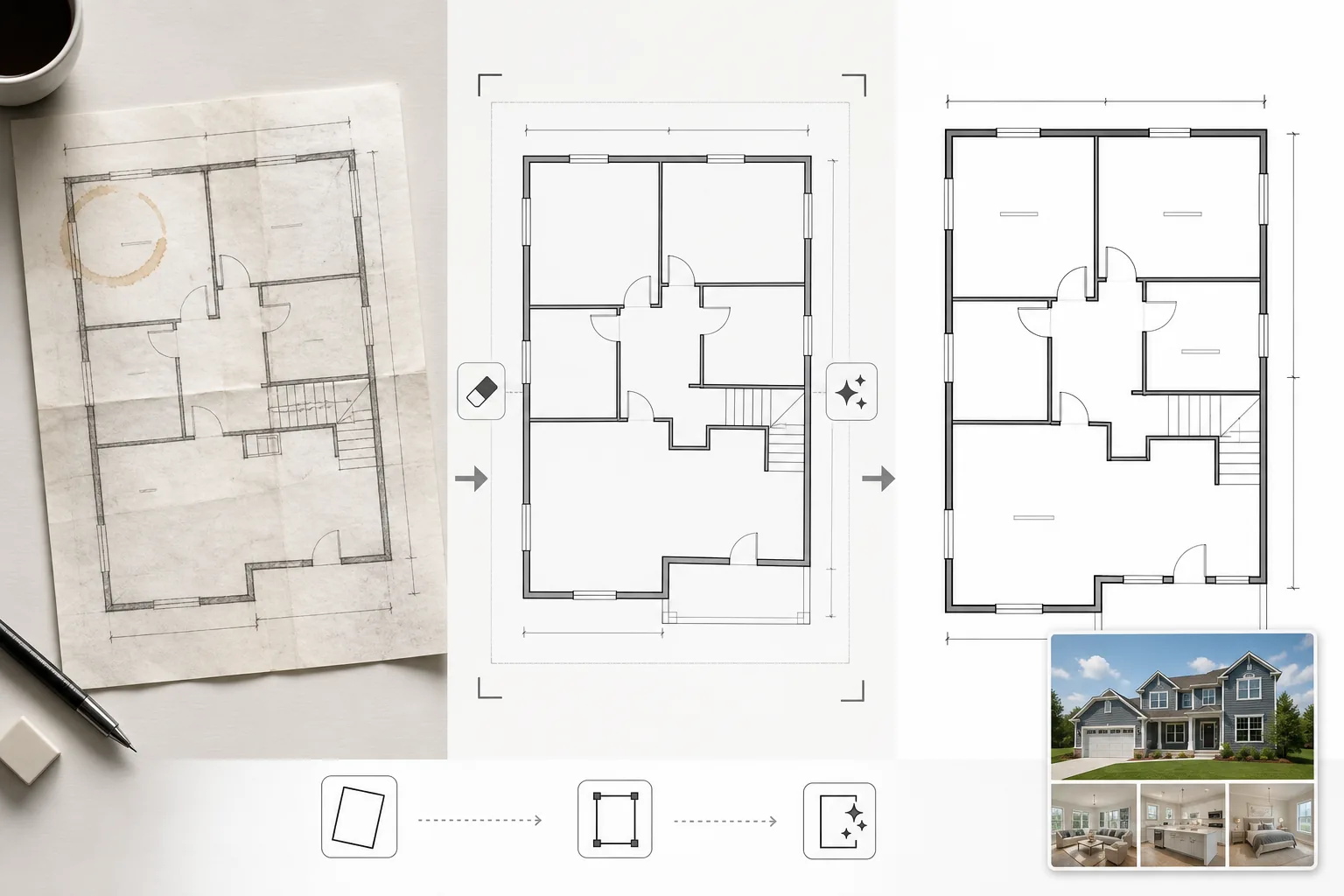
Bereinigt Grundrissbilder, die von Papierplänen abfotografiert, aus veralteter CAD-Software exportiert oder in geringer Qualität gescannt wurden. Magic Eraser entfernt Kaffeeflecken, Bleistiftnotizen, Knickfalten und Schattenartefakte aus Handyfotos von Papierplänen. AI Enhance schärft Wandlinien, Türöffnungen und Maßtext, sodass sie lesbar bleiben, wenn sie für die Webanzeige verkleinert oder in Broschüren gedruckt werden. Die Perspektive wird für Grundrisse korrigiert, die schräg fotografiert statt flach gescannt wurden. Die Hintergrundfarbe wird auf sauberes Weiß normalisiert, und Wandlinien werden auf eine einheitliche Stärke abgedunkelt, um ein gleichmäßiges Erscheinungsbild über alle Pläne eines Angebots hinweg zu erzielen.
Vorlageneinstellungen
| Hintergrundbereinigung | Flecken, Knicke und Schatten entfernen und auf sauberes Weiß normalisieren |
| Linienverbesserung | Wandlinien schärfen und auf eine einheitliche Stärke abdunkeln |
| Textklarheit | Maßangaben, Raumnamen und Messbeschriftungen verbessern |
| Perspektivkorrektur | Fotografierte Pläne auf eine echte Draufsicht ausrichten |
| Ausgabeauflösung | 3000×2000px (Querformat) oder benutzerdefiniert passend zum ursprünglichen Seitenverhältnis |
So verwenden Sie diese Vorlage
Laden Sie Ihr Grundrissbild hoch
Laden Sie einen gescannten, fotografierten oder digitalen Grundriss hoch. Die Vorlage verarbeitet Papierpläne, die mit einer Handykamera fotografiert wurden, Flachbettscans, PDF-Exporte und Screenshots aus Architektursoftware. Perspektivische Verzerrungen durch schräg aufgenommene Handyfotos werden automatisch korrigiert.
Artefakte und Flecken entfernen
Magic Eraser erkennt und entfernt Kaffeeflecken, Bleistiftspuren, Knickfalten, Scannerstreifen und Schattenverläufe durch ungleichmäßige Beleuchtung. Der Hintergrund wird auf sauberes Weiß normalisiert, während alle architektonischen Linien und Beschriftungen erhalten bleiben.
Linien und Text verbessern
AI Enhance schärft Wandkonturen, Türbögen, Fenstersymbole und Treppenmarkierungen. Maßtext und Raumbeschriftungen werden für die Lesbarkeit verbessert. Die Linienstärken werden normalisiert, sodass dicke Außenwände und dünnere Innentrennwände eine einheitliche visuelle Hierarchie aufweisen.
Für Angebot und Druck exportieren
Laden Sie den bereinigten Grundriss in hoher Auflösung für MLS-Uploads, Immobilienbroschüren und Overlays virtueller Rundgänge herunter. Der standardisierte visuelle Stil sorgt dafür, dass alle Grundrisse in Ihren Angeboten professionell und einheitlich aussehen.
Profi-Tipps für beste Ergebnisse
- ✓Wenn Sie einen Papiergrundriss fotografieren, legen Sie ihn auf eine ebene Fläche und fotografieren Sie direkt von oben bei gleichmäßiger Beleuchtung. Die Perspektivkorrektur bewältigt mäßige Winkel, aber ein nahezu senkrechter Ausgangspunkt liefert das schärfste Ergebnis.
- ✓Entfernen Sie Haftnotizen und Büroklammern vom Plan, bevor Sie ihn fotografieren. Die KI kann diese entfernen, aber Klebstoffrückstände und Klammerschatten hinterlassen manchmal schwache Spuren, die zusätzliche Bereinigung erfordern.
- ✓Verarbeiten Sie bei mehrstöckigen Immobilien jedes Stockwerk separat und verwenden Sie dieselben Verbesserungseinstellungen. Dies stellt sicher, dass Wandlinienstärken, Textgrößen und Hintergrundtöne über die Stockwerke hinweg übereinstimmen, für eine einheitliche Angebotspräsentation.
Häufige Fragen
Kann dies eine grobe Skizze in einen professionellen Grundriss umwandeln?
+
Die Vorlage bereinigt und verbessert bestehende Grundrisszeichnungen – sie erstellt keine Architekturpläne von Grund auf. Eine grobe Skizze mit klar gezeichneten Wänden und Raumformen kann bereinigt und geschärft werden, aber handgezeichnete Kurven und ungleichmäßige Linien behalten ihren handgezeichneten Charakter, nur sauberer.
Wird der Maßtext genau erhalten?
+
Ja. Die Verbesserung schärft bestehende Maßangaben, ohne die Zahlen zu verändern. Wenn der Originaltext zu unscharf zum Lesen ist, versucht die KI, die Lesbarkeit wiederherzustellen, kann aber bei stark beeinträchtigtem Text keine Genauigkeit garantieren – überprüfen Sie die Maße immer anhand des Quelldokuments.
Kann ich nach der Verarbeitung Raumbeschriftungen hinzufügen?
+
Ja. Der saubere weiße Hintergrund und die scharfen Linien erleichtern das Überlagern von Raumbeschriftungen, Möbelsymbolen oder Farbcodierungen mit jedem Bildeditor oder jeder Angebotssoftware.
Präsentieren Sie jedes Angebot mit einem sauberen, professionellen Grundriss
Laden Sie gescannte oder fotografierte Grundrisse hoch und erhalten Sie in Sekunden saubere, scharfe, angebotsfertige Diagramme.
Kostenlos testenRelated templates
More real estate templates for your workflow.
Professionelle Immobilienfotovorlage für MLS-Angebote. HDR-ähnliche Verbesserung, Himmelsersetzung, Beseitigung von Unordnung und Farbkorrektur für Immobilienfotos, die sich schneller verkaufen.
Verbessern Sie Architektur-Außenfotos mit Korrektur senkrechter Linien, Himmelaustausch, Entfernung von Autos und Passanten sowie Farbabstimmung zur goldenen Stunde für Inserate und Portfolios.
Verwandeln Sie Airbnb- und Ferienmietfotos mit Raumaufhellung, Beseitigung von Unordnung, Color correction und Korrektur von Weitwinkelobjektivverzerrungen für höhere Buchungsraten.
Verbessern Sie die Fotos Ihres Innenarchitektur-Portfolios durch Raumaufhellung, Beseitigung von Unordnung, Schärfung der Materialtextur und farbgenaue Wiedergabe von Oberflächen und Stoffen.
Verbessern Sie Drohnen-Luftaufnahmen durch Himmelsersatz, Hervorhebung von Grundstücksgrenzen, Farbbrillanz Boost und Entfernung von Ablenkungen für Immobilien- und Landvermessungen.
Inszenieren Sie leere Räume virtuell mit realistischen Möbeln, Dekor und Beleuchtung. Helfen Sie Käufern, Wohnräume ohne physische Inszenierungskosten zu visualisieren.