
Drohnen-Luftbild
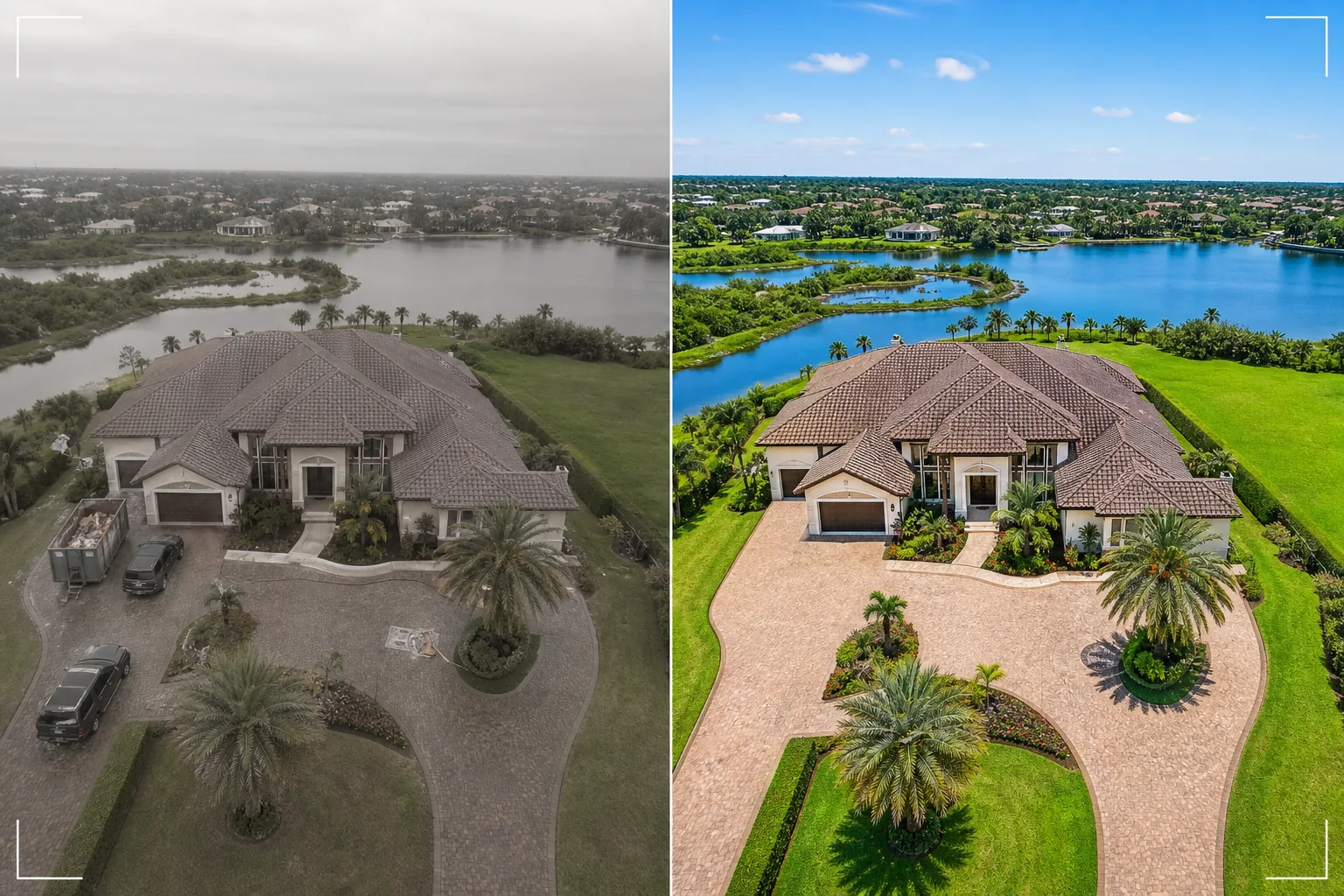
Verwandeln Sie Standbilder aus Drohnenaufnahmen in beeindruckende Luftbilder. Diese Vorlage ersetzt bedeckten Himmel, steigert die Farbbrillanz der Landschaft, entfernt unerwünschte Fahrzeuge und Baugeräte, schärft aus der Vogelperspektive sichtbare Grundstücksdetails und korrigiert das flache Farbprofil, das bei Drohnenkamera-Aufnahmen häufig vorkommt.
Diese Vorlage kostenlos testenReal Estate template preview
Was diese Vorlage macht
Verarbeitet Drohnen-Luftbilder für Immobilienanzeigen, Objektmarketing, Landvermessungen und architektonische Dokumentation. Drohnenkameras nehmen in der Regel mit einem flachen Farbprofil auf, das für das Video-Color-Grading konzipiert ist, wodurch Standbilder im Vergleich zu Aufnahmen dedizierter Kameras entsättigt und diesig wirken. Diese Vorlage wendet eine gezielte Farbkorrektur an, die aus der flachen Drohnenausgabe lebendige Landschaftsgrüns, gesättigte Dachziegel und klare blaue Wasserläufe wiederherstellt. Magic Eraser entfernt Fahrzeuge, Baugeräte, Müllcontainer und andere temporäre Objekte, die von oben sichtbar sind und ein Grundstück weniger ansprechend wirken lassen. AI Enhance schärft Gebäudekanten, Details der Außenanlagen und Grundstücksmerkmale, die durch die Flughöhe der Drohne und atmosphärischen Dunst tendenziell weicher erscheinen.
Vorlageneinstellungen
| Himmelsersatz | Klarer blauer Himmel oder goldene Stunde (passend zur Lichtrichtung am Boden) |
| Landschaftsfarbe | Lebendiges grünes Gras, gesättigtes Laub, klare Wassertöne |
| Dunstentfernung | Korrektur von atmosphärischem Dunst und Weichzeichnung durch Flughöhe der Drohne |
| Objektentfernung | Fahrzeuge, Müllcontainer und Baugeräte entfernen |
| Ausgabeauflösung | 5000px lange Kante (bereit für Druck und Großformatanzeige) |
So verwenden Sie diese Vorlage
Laden Sie Ihr Drohnenfoto hoch
Laden Sie ein Standbild von Ihrer Drohne hoch — DJI, Autel, Skydio oder jeder anderen Plattform. Die Vorlage verarbeitet sowohl unbearbeitete DNG-Dateien als auch komprimierte JPEG-Ausgaben. Für beste Ergebnisse fotografieren Sie auf der niedrigsten verfügbaren Höhe, die das gesamte Grundstück und seine Umgebung erfasst, da nähere Aufnahmen mehr Details bieten, die die KI verbessern kann.
Himmel- und Farbkorrektur
Bedeckter oder diesiger Himmel wird durch Alternativen mit klarem Blau oder goldener Stunde ersetzt, die der Lichtrichtung am Boden darunter entsprechen. Das flache Farbprofil der Drohne wird korrigiert, um satte Landschaftsgrüns, warme Gebäudetöne und klares blaues Wasser zu erzeugen, sofern vorhanden. Atmosphärischer Dunst wird entfernt, um die Schärfe wiederherzustellen.
Unerwünschte Objekte entfernen
Magic Eraser entfernt Fahrzeuge in Einfahrten und auf Straßen, Baucontainer, mobile Toiletten, Geräte und alle temporären Objekte, die von oben sichtbar sind. Die KI rekonstruiert die Einfahrt, den Rasen, die Straßenoberfläche oder das Dach hinter den entfernten Objekten anhand des umgebenden Kontexts.
Für Anzeige oder Präsentation exportieren
Laden Sie mit 5000px langer Kante für Großformatdrucke und Präsentationstafeln herunter oder in web-optimierten Abmessungen für MLS-Anzeigen und Immobilien-Websites. Die verbesserte Luftperspektive bietet die umfassende Grundstücksübersicht, die Aufnahmen aus Bodenhöhe nicht erreichen können.
Profi-Tipps für beste Ergebnisse
- ✓Fliegen Sie während der goldenen Stunde (die Stunde nach Sonnenaufgang oder vor Sonnenuntergang) für die dramatischste Beleuchtung. Flach einfallendes Sonnenlicht erzeugt lange Schatten, die die Geländekontur sichtbar machen und Gebäuden Tiefe verleihen. Die Vorlage kann jede Tageszeit verbessern, aber Luftbilder zur goldenen Stunde sind der visuell eindrucksvollste Ausgangspunkt.
- ✓Erfassen Sie sowohl eine Übersicht aus großer Höhe (die das gesamte Grundstück und den Kontext der Nachbarschaft zeigt) als auch eine Detailaufnahme aus geringer Höhe (die das Gebäude, die Außenanlagen und die Wohnbereiche im Freien zeigt). Verarbeiten Sie beide mit der Vorlage für eine vollständige Luftperspektive.
- ✓Planen Sie bei Grundstücken am Wasser Ihren Flug bei ruhigen Wasserbedingungen. Spiegelglattes Wasser erzeugt sauberere Reflexionen und ansprechendere blaue Töne, die die Vorlage hervorhebt. Aufgewühltes Wasser kann von oben unruhig wirken und lässt sich schwerer auf eine magazinwürdige Qualität verbessern.
Häufige Fragen
Kann dies Drohnenfotos korrigieren, die an bedeckten Tagen aufgenommen wurden?
+
Ja. Der Ersatz eines bedeckten Himmels ist eine der wirkungsvollsten Verbesserungen. Die Vorlage ersetzt den flachen weißen Himmel durch einen natürlichen blauen Himmel, dessen Lichtrichtung der weichen, gleichmäßigen Beleuchtung entspricht, die bereits am Boden vorhanden ist — was tatsächlich von Vorteil ist, da bedecktes Licht nur minimale harte Schatten auf Gebäuden erzeugt.
Was ist mit Aufnahmen aus großer Höhe mit atmosphärischem Dunst?
+
Die Vorlage enthält einen speziellen Schritt zur Dunstentfernung, der Kontrast und Farbsättigung wiederherstellt, die durch atmosphärischen Dunst in der Höhe verloren gehen. Dies ist am effektivsten für Aufnahmen zwischen 100 und 400 Fuß, bei denen Dunst vorhanden ist, das Motiv aber noch nah genug ist, um Details zu bewahren.
Kann ich Videoframes aus Drohnenaufnahmen verarbeiten?
+
Ja. Extrahieren Sie die besten Standbilder aus Ihrem 4K-Drohnenvideo und verarbeiten Sie sie mit der Vorlage. Videoframes haben eine geringere Auflösung als dedizierte Standfotos (8–12 MP gegenüber 20–48 MP), sodass die Ausgabe etwas weniger detailliert ist, aber die Farbkorrektur und der Himmelsersatz sind voll wirksam.
Luftaufnahmen, die Immobilien von oben verkaufen
Laden Sie Drohnenfotos hoch und erhalten Sie himmelsverbesserte, farbkorrigierte Luftbilder, die Immobilien von ihrer beeindruckendsten Seite zeigen.
Kostenlos testenRelated templates
More real estate templates for your workflow.
Professionelle Immobilienfotovorlage für MLS-Angebote. HDR-ähnliche Verbesserung, Himmelsersetzung, Beseitigung von Unordnung und Farbkorrektur für Immobilienfotos, die sich schneller verkaufen.
Verbessern Sie Architektur-Außenfotos mit Korrektur senkrechter Linien, Himmelaustausch, Entfernung von Autos und Passanten sowie Farbabstimmung zur goldenen Stunde für Inserate und Portfolios.
Verwandeln Sie Airbnb- und Ferienmietfotos mit Raumaufhellung, Beseitigung von Unordnung, Color correction und Korrektur von Weitwinkelobjektivverzerrungen für höhere Buchungsraten.
Verbessern Sie die Fotos Ihres Innenarchitektur-Portfolios durch Raumaufhellung, Beseitigung von Unordnung, Schärfung der Materialtextur und farbgenaue Wiedergabe von Oberflächen und Stoffen.
Inszenieren Sie leere Räume virtuell mit realistischen Möbeln, Dekor und Beleuchtung. Helfen Sie Käufern, Wohnräume ohne physische Inszenierungskosten zu visualisieren.
Bereinigen, verbessern und standardisieren Sie Grundrissbilder für Immobilienangebote durch Fleckenentfernung, Linienschärfung und einheitliches Styling.