
Immobilien-Dämmerungsfoto
Verwandeln Sie Außenaufnahmen von Immobilien, die mittags entstanden sind, in eindrucksvolle Dämmerungsbilder, ohne ein abendliches Fotoshooting planen zu müssen. Diese Vorlage wandelt den Tageshimmel in die blaue Stunde der Dämmerung um, fügt warmes Leuchten an den Innenfenstern hinzu, das das Haus bewohnt und einladend wirken lässt, und verstärkt die Landschaftsbeleuchtung – alles aus einem ganz normalen Tagesfoto. Das Ergebnis sind hochwertige Dämmerungsbilder, mit denen Luxusangebote scrollende Käufer zum Innehalten bringen.
Diese Vorlage kostenlos testenReal Estate template preview
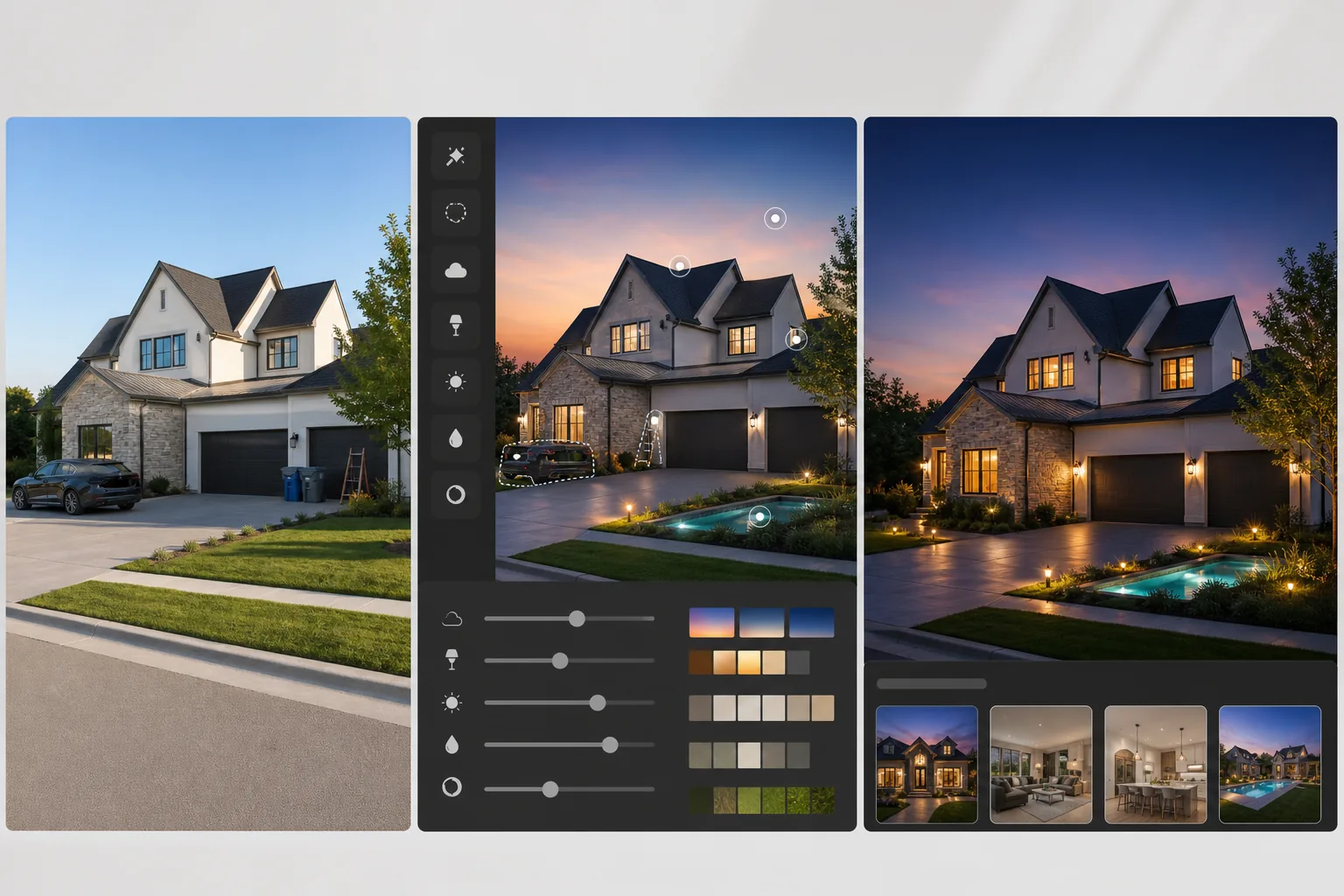
Was diese Vorlage leistet
Erzeugt den Dämmerungsfoto-Effekt, von dem Immobilienmakler wissen, dass er das höchste Engagement auf Angebotsplattformen erzielt – ohne die Kosten und den Planungsaufwand eines tatsächlichen Shootings in der Dämmerung. AI Enhance wandelt den Tageshimmel in einen satten Farbverlauf der blauen Stunde mit warmen Tönen am Horizont um und bildet den natürlichen Farbübergang nach, der 20 bis 30 Minuten nach Sonnenuntergang auftritt. Die Innenfenster werden mit warmem bernsteinfarbenem Licht beleuchtet, das den Eindruck erweckt, in jedem Raum brenne Licht, und so das einladende Gefühl eines Hauses erzeugt, das auf seine neuen Eigentümer wartet. Außenleuchten im Garten, Wegbeleuchtung sowie die Beleuchtung von Pool oder Wasserspiel werden anhand der im Originalfoto sichtbaren Leuchten hinzugefügt. Magic Eraser entfernt störende Tageselemente – geparkte Autos in der Einfahrt, Mülltonnen am Straßenrand und Gartengeräte – bevor die Dämmerungsumwandlung angewendet wird.
Vorlageneinstellungen
| Himmelumwandlung | Farbverlauf der blauen Stunde mit warmem Leuchten am Horizont (Look 20 Min. nach Sonnenuntergang) |
| Fensterbeleuchtung | Warmes bernsteinfarbenes Innenleuchten (Farbtemperatur 3000K) |
| Landschaftsbeleuchtung | Leuchten automatisch erkennen und Weg-, Anstrahl- und Akzentbeleuchtung hinzufügen |
| Außenverbesserung | Leichter blauer Umgebungston auf Gebäudeflächen passend zum Dämmerungslicht |
| Entfernung von Störelementen | Geparkte Autos, Tonnen und Gartengeräte vor der Umwandlung entfernen |
| Ausgabeauflösung | 5000×3333px (3:2 Querformat für MLS-Titelbild) |
So verwenden Sie diese Vorlage
Tagesaußenfoto hochladen
Laden Sie ein Tagesfoto der Außenansicht der Immobilie hoch. Bedeckte oder teilweise bewölkte Tage eignen sich am besten, da das gleichmäßige Licht einen ausgeglichenen Ausgangspunkt für die Dämmerungsumwandlung bietet. Tage mit klarem blauem Himmel funktionieren ebenfalls gut. Grelle Mittagssonne mit starken Schatten erfordert mehr Bearbeitung, liefert aber akzeptable Ergebnisse.
Störende Tageselemente entfernen
Magic Eraser entfernt Autos in der Einfahrt, Mülltonnen, Gartengeräte und anderes störendes Tagesgut. Die KI rekonstruiert die Einfahrtsfläche, den Rasen und die Bepflanzung hinter den entfernten Objekten. Diese Bereinigung erfolgt vor der Dämmerungsumwandlung, damit die rekonstruierten Bereiche dieselbe Dämmerungsbeleuchtung erhalten.
Dämmerungsumwandlung anwenden
Der Himmel wird durch einen Farbverlauf der blauen Stunde ersetzt. Die Fenster werden mit warmem Innenleuchten beleuchtet. Die Gebäudeflächen erhalten einen dezenten blauen Umgebungston passend zur natürlichen Dämmerung. Die im Originalfoto sichtbaren Landschaftsleuchten – Wegleuchten, Anstrahler und Wandleuchten – werden mit realistischem warmem Schein und Lichtstreuung auf die umgebenden Flächen aktiviert.
Für Luxusangebot exportieren
Laden Sie in 5000×3333px herunter, für die MLS-Titelplatzierung, Immobilienwebsites und gedruckte Broschüren. Das Dämmerungsbild wird in der Regel als Leitfoto eines Angebots verwendet, wo es bei direkten Vergleichstests auf Immobilienplattformen deutlich mehr Klicks erzielt als eine Tagesaußenansicht.
Profi-Tipps für beste Ergebnisse
- ✓Nehmen Sie das Tagesfoto von der gegenüberliegenden Straßenseite auf, etwa in Brusthöhe. Dieser Winkel erfasst die gesamte Fassade einschließlich der Dachlinie vor dem Himmel und bietet genügend Himmelsfläche für einen überzeugenden Farbverlaufsaustausch sowie genügend Boden für Landschaftsbeleuchtungseffekte.
- ✓Schalten Sie beim Fotografieren der Tagesaußenansicht alle Innenlichter ein. Auch wenn die KI das Fensterleuchten hinzufügt, verankern sichtbare Innenelemente wie Vorhänge, Möbelkanten und Leuchten hinter den Fenstern die Beleuchtung in der Realität und verhindern, dass der Schein aufgemalt wirkt.
- ✓Für das realistischste Ergebnis planen Sie das Originalfoto während der goldenen Stunde (1 Stunde vor Sonnenuntergang). Das bereits auf der Gebäudefassade vorhandene warme, gerichtete Licht macht den Übergang zur Dämmerung natürlicher als die Umwandlung eines grellen Mittagsfotos.
Häufige Fragen
Wie realistisch ist die Tag-zu-Dämmerung-Umwandlung?
+
Ausgehend von einem gut belichteten Tagesfoto ist das Ergebnis praktisch nicht von einem echten Dämmerungsshooting zu unterscheiden. Der Himmelverlauf entspricht der natürlichen Farbwissenschaft der blauen Stunde, das Fensterleuchten ist auf eine realistische Innenfarbtemperatur kalibriert, und die Gebäudeflächen erhalten die dezente blaue Umgebungsverschiebung, die in der Dämmerung auftritt.
Kann damit ein Pool-Leuchteffekt hinzugefügt werden?
+
Ja. Wenn ein Pool oder Wasserspiel im Originalfoto sichtbar ist, fügt die Vorlage ein realistisches türkisfarbenes Unterwasserleuchten und eine Lichtreflexion an der Oberfläche hinzu. Der Effekt basiert auf der tatsächlichen Poolform und der umgebenden Hartlandschaft, die im Quellbild sichtbar sind.
Gilt das als Bildmanipulation bei Immobilien?
+
Die Tag-zu-Dämmerung-Umwandlung ist eine weithin akzeptierte Praxis in der Immobilienfotografie und wird täglich von professionellen Immobilienfotografen eingesetzt. Sie zeigt, wie die Immobilie in der Dämmerung mit eingeschaltetem Licht tatsächlich aussieht. Ethische Nutzung bedeutet, dass die Umwandlung keine nicht vorhandenen Merkmale hinzufügt – sie visualisiert bestehende architektonische und landschaftliche Elemente unter Dämmerungsbedingungen.
Verleihen Sie jedem Angebot das luxuriöse Dämmerungsfinish
Laden Sie eine Tagesaußenansicht hoch und erhalten Sie ein atemberaubendes Dämmerungsfoto, das Käufer zum Innehalten bringt.
Kostenlos testenRelated templates
More real estate templates for your workflow.
Professionelle Immobilienfotovorlage für MLS-Angebote. HDR-ähnliche Verbesserung, Himmelsersetzung, Beseitigung von Unordnung und Farbkorrektur für Immobilienfotos, die sich schneller verkaufen.
Verbessern Sie Architektur-Außenfotos mit Korrektur senkrechter Linien, Himmelaustausch, Entfernung von Autos und Passanten sowie Farbabstimmung zur goldenen Stunde für Inserate und Portfolios.
Verwandeln Sie Airbnb- und Ferienmietfotos mit Raumaufhellung, Beseitigung von Unordnung, Color correction und Korrektur von Weitwinkelobjektivverzerrungen für höhere Buchungsraten.
Verbessern Sie die Fotos Ihres Innenarchitektur-Portfolios durch Raumaufhellung, Beseitigung von Unordnung, Schärfung der Materialtextur und farbgenaue Wiedergabe von Oberflächen und Stoffen.
Verbessern Sie Drohnen-Luftaufnahmen durch Himmelsersatz, Hervorhebung von Grundstücksgrenzen, Farbbrillanz Boost und Entfernung von Ablenkungen für Immobilien- und Landvermessungen.
Inszenieren Sie leere Räume virtuell mit realistischen Möbeln, Dekor und Beleuchtung. Helfen Sie Käufern, Wohnräume ohne physische Inszenierungskosten zu visualisieren.