
Magic Eraser vs PicWish: Welcher KI-Editor ist besser für Bereinigungsarbeit?
PicWish ist bekannt für Hintergrundentfernung und schnelle Workflows bei Produktbildern. Magic Eraser geht breiter vor — mit stärkerer Objektentfernung, Füllung, Verbesserung und kreativen KI-Tools in einem Editor.
Last updated
Magic Eraser kostenlos testenComparison rows are editorial summaries from the latest page review, not a guarantee of current pricing, limits, watermark policy, batch support, speed, or platform availability.
Überblick
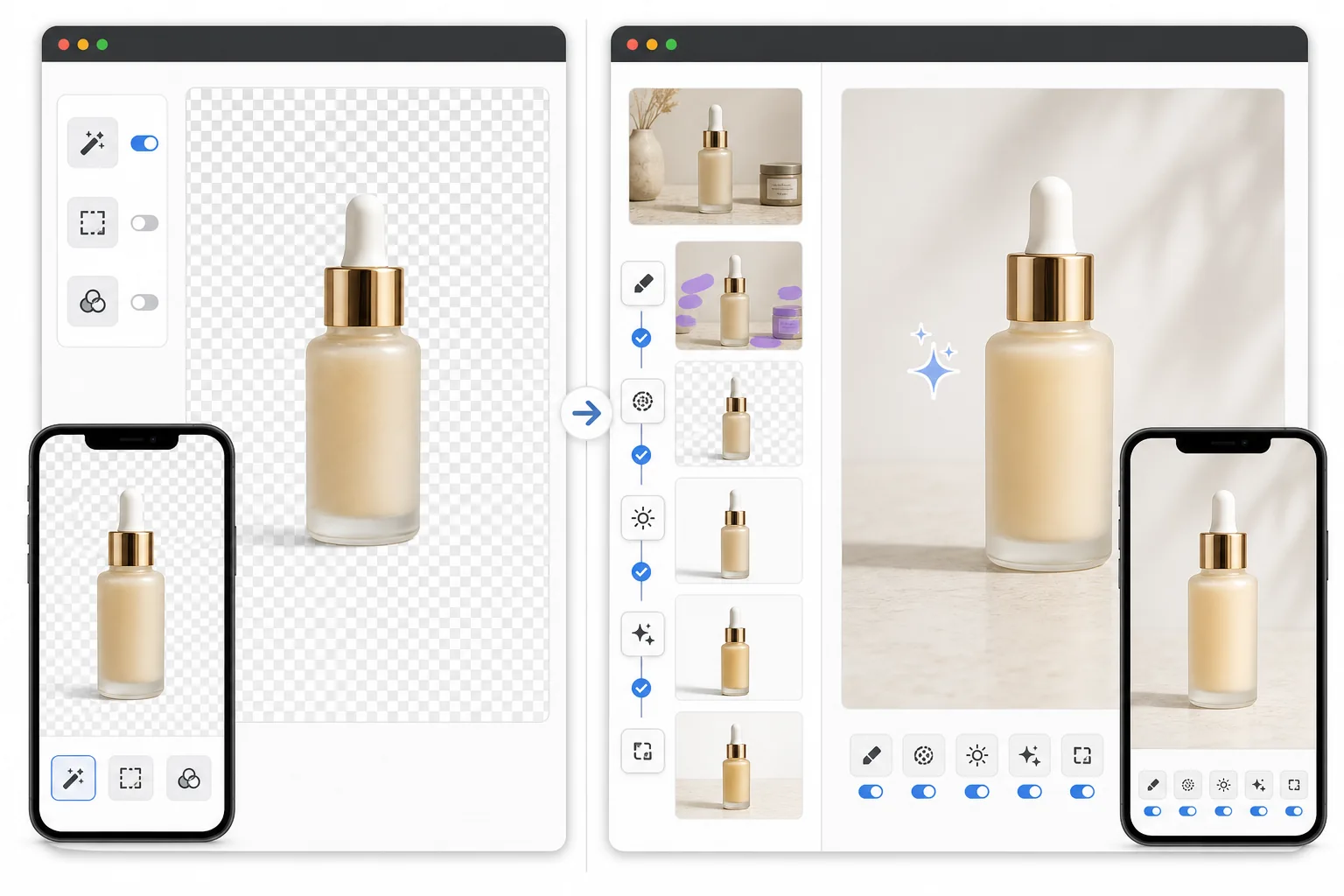
Magic Eraser vereint Objektentfernung, Hintergrundbearbeitung, Bildverbesserung, KI-Füllung und kreative Generierung in einem Workflow, der für praktische, schnelle Bildbereinigung gebaut ist.
PicWish konzentriert sich stark auf Hintergrundentfernung und einfache Produktbildbearbeitung. Es ist nützlich für simple Freisteller, aber enger als eine vollständige KI-Bereinigungs- und Verbesserungssuite.
Funktionsvergleich
Magic Eraser vereint Objektentfernung, Hintergrundbearbeitung, Bildverbesserung, KI-Füllung und kreative Generierung in einem Workflow, der für praktische, schnelle Bildbereinigung gebaut ist.
PicWish konzentriert sich stark auf Hintergrundentfernung und einfache Produktbildbearbeitung. Es ist nützlich für simple Freisteller, aber enger als eine vollständige KI-Bereinigungs- und Verbesserungssuite.
| Feature | Magic Eraser | PicWish |
|---|---|---|
| Hintergrundentfernung | Ja | Ja |
| Objektentfernung | Ja — starkes Kernwerkzeug | Begrenzt |
| KI-Füllung | Ja | Nein |
| KI-Verbesserung | Ja | Einfach |
| Kreative Generierung | Ja | Begrenzt |
| Am besten für | Breitere KI-Bereinigung | Einfache Freisteller |
| Plattform | Web + Mobil | Web + Mobil |
| Workflow-Tiefe | Breiter | Enger |
Feature rows summarize visible product positioning and should be rechecked against official product pages before purchase, migration, or compliance decisions.
- Last content review June 21, 2026
- PicWish source: official product site (https://picwish.com/)
- Magic Eraser source: https://magiceraser.live/de/product/magic-eraser
- Pricing, feature availability, platform support, and limits can change; recheck official sources before relying on a buying decision.
Preisvergleich
| Plan | Magic Eraser | PicWish |
|---|---|---|
| Kostenlose Stufe | Kostenlos — begrenzte Bearbeitungen | Kostenlos — mit Wasserzeichen |
| Monatlich | 9,99 $/Monat | 5,99 $/Monat (Pro) |
| Jährlich | 4,99 $/Monat (jährlich abgerechnet) | 3,33 $/Monat (Pro, jährlich abgerechnet) |
Preise Stand Mai 2026. Aktuelle Preise beim jeweiligen Anbieter prüfen.
Pricing rows are snapshots from review time. Free tiers, subscriptions, trials, export limits, and regional availability can change without notice.
- Last content review June 21, 2026
- PicWish source: official product site (https://picwish.com/)
- Magic Eraser source: https://magiceraser.live/de/product/magic-eraser
- Pricing, feature availability, platform support, and limits can change; recheck official sources before relying on a buying decision.
Warum Magic Eraser wählen
Mehr als nur Freisteller
Magic Eraser bewältigt die gesamte Kette von Bereinigung über Verbesserung bis zur Generierung, was besonders nützlich ist, wenn Ihr Bild mehr braucht als nur einen sauberen Hintergrund.
Stärkerer Objektentfernungs-Workflow
Beim Entfernen von Kabeln, Etiketten, Personen, Makeln und Unordnung wird Magic Eraser nützlicher als engere, hintergrundzentrierte Tools.
Besser für vielfältige Bearbeitungsaufgaben
Teams haben selten nur ein Bildproblem. Magic Eraser hilft, wenn die nächste Aufgabe Hintergrundbereinigung ist, die nächste Verbesserung und die nächste inhaltsbasiertes Füllen.
Bessere Passform für Verkäufer und Marketer
Produktteams und Marketer profitieren davon, mehrere KI-Bearbeitungsaufgaben an einem Ort zu lösen, statt mit zunehmender Komplexität das Tool zu wechseln.
Häufig gestellte Fragen
Ist Magic Eraser besser als PicWish bei der Hintergrundentfernung?
+
Beide bewältigen die Hintergrundentfernung gut. Magic Eraser wird zur stärkeren Wahl, wenn Sie nach dem Freistellen auch Objektbereinigung, KI-Füllung, Verbesserung oder flexiblere Bearbeitung brauchen.
Welches Tool ist besser für die Bereinigung von Produktfotos?
+
Magic Eraser ist oft besser, weil Produktbilder meist mehr als nur einen transparenten Hintergrund brauchen. Häufig sind auch Staubbereinigung, Etikettenentfernung, Schattenkorrekturen und Detailverbesserung nötig.
Kann PicWish Objekte aus Fotos entfernen?
+
PicWish bietet etwas Bearbeitungsunterstützung, aber Magic Eraser ist leistungsfähiger bei dedizierter Objektentfernung und natürlicher Hintergrundrekonstruktion.
Funktioniert Magic Eraser auch für Social-Media-Bilder?
+
Ja. Magic Eraser ist nützlich für Produktbilder, Listings, Social-Posts, kreative Assets und allgemeine alltägliche Fotobereinigung.
Welches Tool bietet mehr Wachstumsspielraum?
+
Magic Eraser bietet mehr Workflow-Tiefe, weil es eine breitere Palette von KI-Fotobearbeitungsaufgaben abdeckt, die über die reine Hintergrundentfernung hinausgehen.
Mehr als nur ein Hintergrundentferner gesucht?
Testen Sie Magic Eraser kostenlos und erledigen Sie Objektbereinigung, Verbesserung, Füllung und ausgefeilte finale Bearbeitungen an einem Ort.
Magic Eraser kostenlos testenVerwandte Anwendungsfälle
Erfahren Sie, wie Profis diese Tools in realen Workflows einsetzen.
Exposé-Fotos voller persönlicher Gegenstände, geparkter Autos oder Baustellenmaterial schrecken Käufer ab. Magic Eraser räumt Ihre Immobilienfotos per KI blitzschnell auf — ganz ohne Photoshop-Kenntnisse.
Unscharfe Hintergründe und unaufgeräumte Produktbilder kosten Sie jeden Tag Umsatz. Magic Eraser erstellt professionelle Produktbilder in Sekunden — ganz ohne Photoshop-Kenntnisse. Hochladen, Störendes entfernen, mit Vertrauen einstellen.
Fremde Personen ruinieren deine Reisefotos? Unordentliche Hintergründe verderben deine Selfies? Schluss mit stundenlangem Photoshop. Magic Eraser entfernt Störungen, räumt Hintergründe auf und passt Fotos an jedes Format an — mit einem Klick.
Verwandte Anleitungen
Entdecke weitere Anleitungen und Inhalte zu diesem Workflow.
Lerne, wie du mit Magic Eraser Objekte, Personen, Text und störende Details aus Fotos entfernst und sauberere KI-Ergebnisse erzielst.
Person aus Foto entfernen mit KI in Sekunden. Anleitung für Reisefotos, Immobilienbilder und Produktfotos.
Anleitung zum Entfernen von Wasserzeichen aus eigenen Fotos mit KI. Wann es angemessen ist, Techniken und Tipps.
Weitere Vergleiche
Sehen Sie, wie Magic Eraser im Vergleich zu anderen Bildbearbeitungstools abschneidet.
TouchRetouch ist eine beliebte kostenpflichtige mobile App zur Entfernung von Objekten und Makeln. Magic Eraser bietet kostenlose KI-Bearbeitung auf jedem Gerät ohne Installation. Vergleichen Sie Funktionen, Preise und Benutzerfreundlichkeit.
Zwei leistungsstarke KI-Fotoeditoren mit unterschiedlichen Stärken. Magic Eraser bietet ein breiteres Set generativer KI-Tools, während Photoroom bei E-Commerce-Produktfotografie und Stapelverarbeitung glänzt. Finden Sie heraus, was zu Ihrem Workflow passt.
Wir haben die besten KI-Fotobearbeitungstools getestet und verglichen. Von der Objektentfernung bis zum Hintergrundwechsel — finden Sie den Editor, der die besten Ergebnisse für Ihren Workflow liefert.
Photoshop ist der Industriestandard für tiefgehende Bildbearbeitung, doch viele brauchen nur schnelle Objektentfernung, saubere Hintergründe und KI-gestützte Korrekturen. Magic Eraser konzentriert sich auf diese Aufgaben mit einem leichteren Workflow, der in Sekunden im Web und mobil funktioniert.
Canva ist hervorragend fuer Layouts und Social-Media-Grafiken, aber viele Nutzer benoetigen schnelleres Entfernen von Objekten, sauberere Hintergrundbearbeitung und leistungsstaerkere KI-Fototools. Dieser Vergleich zeigt, wo Magic Eraser fuer bildorientierte Workflows besser passt.
Pixlr bietet Nutzern eine klassische browserbasierte Bearbeitungsumgebung mit Ebenen und Effekten. Magic Eraser konzentriert sich auf KI-gestützte Bereinigung, Verbesserung und Hintergrundarbeit für Nutzer, die polierte Ergebnisse ohne eine vollständige Bearbeitungsoberfläche wünschen.