
Magic Eraser vs Pixlr: Welcher Web-Editor liefert schneller Ergebnisse?
Pixlr bietet Nutzern eine klassische browserbasierte Bearbeitungsumgebung mit Ebenen und Effekten. Magic Eraser konzentriert sich auf KI-gestützte Bereinigung, Verbesserung und Hintergrundarbeit für Nutzer, die polierte Ergebnisse ohne eine vollständige Bearbeitungsoberfläche wünschen.
Last updated
Magic Eraser kostenlos testenComparison rows are editorial summaries from the latest page review, not a guarantee of current pricing, limits, watermark policy, batch support, speed, or platform availability.
Überblick
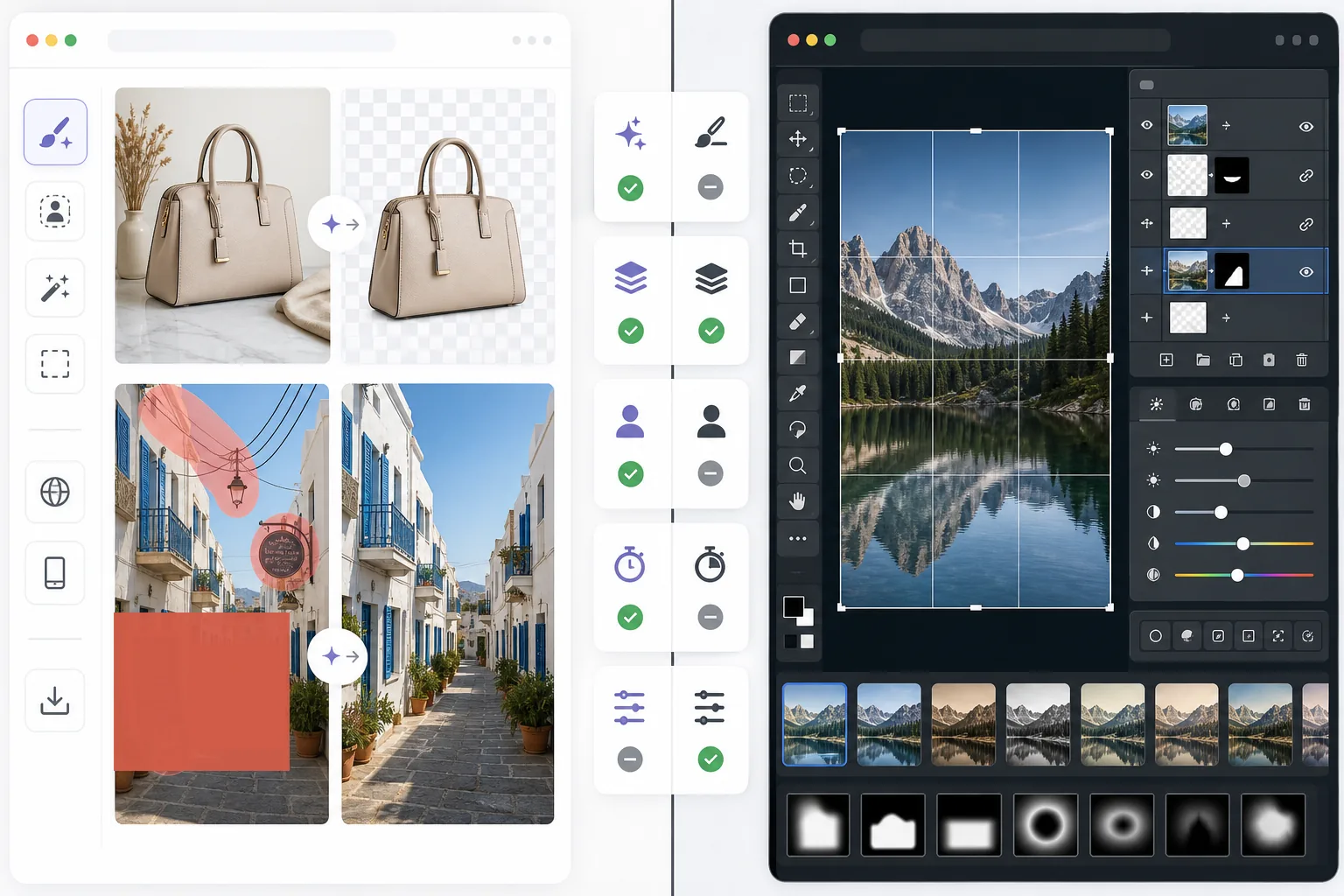
Magic Eraser hilft Nutzern, praktische Bildprobleme schnell mit KI zu lösen: unerwünschte Objekte entfernen, Text löschen, Hintergründe bereinigen, Details schärfen und fehlende Bereiche füllen.
Pixlr bietet eine traditionellere browserbasierte Bearbeitungserfahrung mit Ebenen, Filtern und manuellen Werkzeugen. Es ist flexibel, aber bei wiederkehrenden Bereinigungsaufgaben oft langsamer.
Funktionsvergleich
Magic Eraser hilft Nutzern, praktische Bildprobleme schnell mit KI zu lösen: unerwünschte Objekte entfernen, Text löschen, Hintergründe bereinigen, Details schärfen und fehlende Bereiche füllen.
Pixlr bietet eine traditionellere browserbasierte Bearbeitungserfahrung mit Ebenen, Filtern und manuellen Werkzeugen. Es ist flexibel, aber bei wiederkehrenden Bereinigungsaufgaben oft langsamer.
| Feature | Magic Eraser | Pixlr |
|---|---|---|
| Objektentfernung | Ja — KI-Pinsel | Eingeschränkt |
| Hintergrundentfernung | Ja | Ja |
| Bildverbesserung | Ja | Einfach |
| Ebenenbasierte Bearbeitung | Nein | Ja |
| Generatives Füllen | Ja | Eingeschränkt |
| Einsteigerfreundlich | Ja | Mittel |
| Am besten für | Schnelle Bereinigung und KI-Bearbeitung | Allgemeine Browser-Bearbeitung |
| Plattform | Web + Mobil | Web + Mobil |
Feature rows summarize visible product positioning and should be rechecked against official product pages before purchase, migration, or compliance decisions.
- Last content review June 21, 2026
- Pixlr source: official product site (https://pixlr.com/)
- Magic Eraser source: https://magiceraser.live/de/product/magic-eraser
- Pricing, feature availability, platform support, and limits can change; recheck official sources before relying on a buying decision.
Preisvergleich
| Plan | Magic Eraser | Pixlr |
|---|---|---|
| Kostenlose Stufe | Kostenlos — begrenzte Bearbeitungen | Kostenlos — einfach + Werbung |
| Monatlich | $9.99/mo | $7.99/mo (Plus) |
| Jährlich | $4.99/mo (jährliche Abrechnung) | $4.90/mo (Plus, jährliche Abrechnung) |
Preise Stand May 2026. Aktuelle Tarife beim jeweiligen Anbieter prüfen.
Pricing rows are snapshots from review time. Free tiers, subscriptions, trials, export limits, and regional availability can change without notice.
- Last content review June 21, 2026
- Pixlr source: official product site (https://pixlr.com/)
- Magic Eraser source: https://magiceraser.live/de/product/magic-eraser
- Pricing, feature availability, platform support, and limits can change; recheck official sources before relying on a buying decision.
Warum Magic Eraser wählen
Weniger Zeit in Bearbeitungssteuerungen
Magic Eraser reduziert die Notwendigkeit, Symbolleisten, Ebenen und manuelle Effekte zu verwalten, wenn das Hauptziel einfach darin besteht, ein Foto schnell zu bereinigen und zu verbessern.
Nützlicher für wiederholbare Workflows
Wenn Sie täglich Produktfotos, Social-Media-Bilder, Anzeigen oder Creator-Inhalte bearbeiten, spart der schmalere, aber stärkere KI-Workflow von Magic Eraser oft mehr Zeit als ein Allzweck-Editor.
Besser für Hintergrund- und Ablenkungsbereinigung
Magic Eraser ist besonders stark, wenn das Problem Unordnung, Text, Kabel oder eine ablenkende Umgebung ist, die auf natürliche Weise verschwinden soll.
Geringerer Schulungsaufwand
Teams können mit Magic Eraser schneller eingearbeitet werden, da es weniger Bearbeitungswissen erfordert als ein klassischer Browser-Editor mit einer größeren Auswahl an manuellen Werkzeugen.
Häufig gestellte Fragen
Ist Magic Eraser einfacher zu bedienen als Pixlr?
+
Ja, für bereinigungsorientierte Aufgaben. Pixlr bietet mehr traditionelle Bearbeitungsflexibilität, aber Magic Eraser ist einfacher für Nutzer, die hauptsächlich KI-Objektentfernung und Hintergrundbearbeitung benötigen.
Hat Pixlr Ebenen?
+
Ja. Pixlr bietet eine klassischere ebenenbasierte Bearbeitungsumgebung. Magic Eraser ist stärker auf schnelle KI-gestützte Ergebnisse ausgerichtet als auf manuelle Ebenenbearbeitung.
Welches Tool ist besser für Marketer und Verkäufer?
+
Magic Eraser passt oft besser, da es Bereinigung, Verbesserung und präsentationsfertige Bildvorbereitung schneller erledigt.
Kann ich mit Magic Eraser Text aus Bildern entfernen?
+
Ja. Magic Eraser kann Text, Beschriftungen, Schilder und andere Ablenkungen entfernen und den Hintergrund auf natürliche Weise wiederherstellen.
Welcher Editor funktioniert besser auf Mobil und Desktop zusammen?
+
Magic Eraser bietet einen konsistenteren KI-Workflow über Web und Mobil hinweg, was den Gerätewechsel bei praktischen Bearbeitungsaufgaben erleichtert.
Benötigen Sie einen schnelleren Web-Editor für die Bildbereinigung im Alltag?
Testen Sie Magic Eraser kostenlos und nutzen Sie KI, um Ablenkungen zu entfernen, die Klarheit zu verbessern und polierte Bearbeitungen mit weniger Schritten abzuschließen.
Magic Eraser kostenlos testenVerwandte Anwendungsfälle
Erfahren Sie, wie Profis diese Tools in realen Workflows einsetzen.
Exposé-Fotos voller persönlicher Gegenstände, geparkter Autos oder Baustellenmaterial schrecken Käufer ab. Magic Eraser räumt Ihre Immobilienfotos per KI blitzschnell auf — ganz ohne Photoshop-Kenntnisse.
Unscharfe Hintergründe und unaufgeräumte Produktbilder kosten Sie jeden Tag Umsatz. Magic Eraser erstellt professionelle Produktbilder in Sekunden — ganz ohne Photoshop-Kenntnisse. Hochladen, Störendes entfernen, mit Vertrauen einstellen.
Fremde Personen ruinieren deine Reisefotos? Unordentliche Hintergründe verderben deine Selfies? Schluss mit stundenlangem Photoshop. Magic Eraser entfernt Störungen, räumt Hintergründe auf und passt Fotos an jedes Format an — mit einem Klick.
Verwandte Anleitungen
Entdecke weitere Anleitungen und Inhalte zu diesem Workflow.
Lerne, wie du mit Magic Eraser Objekte, Personen, Text und störende Details aus Fotos entfernst und sauberere KI-Ergebnisse erzielst.
Person aus Foto entfernen mit KI in Sekunden. Anleitung für Reisefotos, Immobilienbilder und Produktfotos.
Anleitung zum Entfernen von Wasserzeichen aus eigenen Fotos mit KI. Wann es angemessen ist, Techniken und Tipps.
Weitere Vergleiche
Sehen Sie, wie Magic Eraser im Vergleich zu anderen Bildbearbeitungstools abschneidet.
Zwei leistungsstarke KI-Fotoeditoren mit unterschiedlichen Stärken. Magic Eraser bietet ein breiteres Set generativer KI-Tools, während Photoroom bei E-Commerce-Produktfotografie und Stapelverarbeitung glänzt. Finden Sie heraus, was zu Ihrem Workflow passt.
Wir haben die besten KI-Fotobearbeitungstools getestet und verglichen. Von der Objektentfernung bis zum Hintergrundwechsel — finden Sie den Editor, der die besten Ergebnisse für Ihren Workflow liefert.
Adobe Photoshop ist leistungsstark, aber die meisten Menschen nutzen nur einen Bruchteil seiner Funktionen. Magic Eraser liefert genau die Werkzeuge zur Fotobereinigung, die Sie wirklich brauchen — Objekte entfernen, Hintergründe freistellen, KI-Verbesserung und generatives Füllen — in einer einfacheren Oberfläche, die im Web und auf dem Handy funktioniert und für den Einstieg kein Abo erfordert.
remove.bg ist in einer Sache großartig: Hintergründe entfernen. Magic Eraser macht das genauso gut, entfernt dazu unerwünschte Objekte, verbessert die Bildqualität, füllt fehlende Bereiche mit KI und übernimmt deinen gesamten Fotobearbeitungs-Workflow — alles an einem Ort.
Tried to remove an object or background and hit a Pro paywall in Canva, Adobe Express/Photoshop, or Fotor? Magic Eraser does the same job — object removal, background removal, watermark cleanup, and enhancement — for free. No subscription, and no watermark stamped on your download.
Vergleichen Sie Magic Eraser mit magic-eraser.io. Sehen Sie Funktionen, Preise und Benutzerfreundlichkeit im direkten Vergleich. Erfahren Sie, warum Magic Eraser die bessere Wahl für KI-Fotobearbeitung ist.