
Magic Eraser vs Photoshop: Welcher Editor passt zu schnelleren Workflows?
Photoshop ist der Industriestandard für tiefgehende Bildbearbeitung, doch viele brauchen nur schnelle Objektentfernung, saubere Hintergründe und KI-gestützte Korrekturen. Magic Eraser konzentriert sich auf diese Aufgaben mit einem leichteren Workflow, der in Sekunden im Web und mobil funktioniert.
Last updated
Magic Eraser kostenlos testenComparison rows are editorial summaries from the latest page review, not a guarantee of current pricing, limits, watermark policy, batch support, speed, or platform availability.
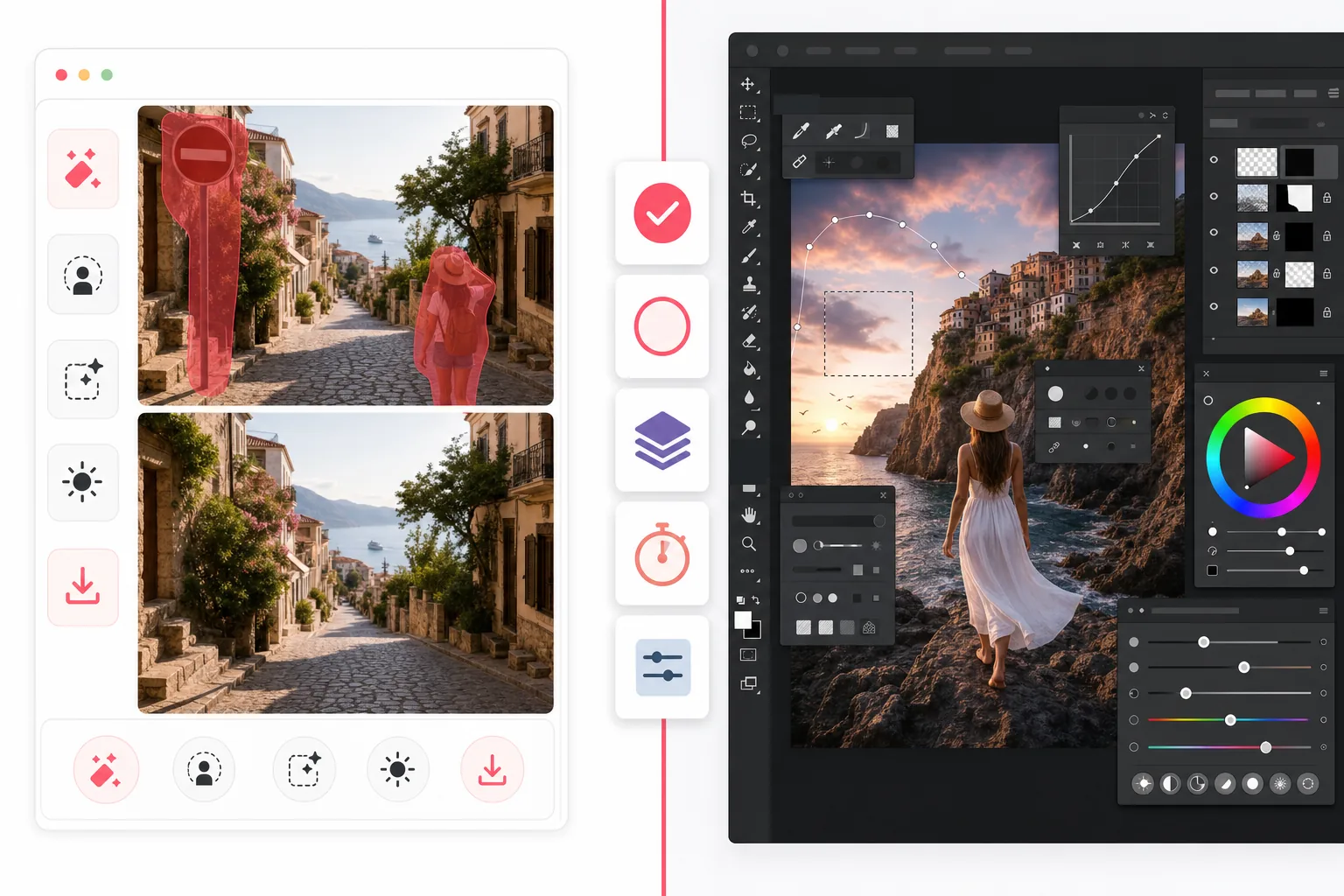
Überblick
Magic Eraser ist ein KI-Fotoeditor für schnelle Bereinigungsaufgaben wie das Entfernen von Personen, das Löschen von Unordnung, das Ersetzen von Hintergründen, das Verbessern unscharfer Bilder und das Füllen fehlender Bereiche — ohne steile Lernkurve.
Adobe Photoshop ist eine vollwertige professionelle Bildbearbeitungssuite mit erweiterten Ebenen, Maskierung, Retusche, generativem Füllen und Kompositionswerkzeugen, ausgelegt auf detaillierte kreative Kontrolle auf Desktop und iPad.
Funktionsvergleich
Magic Eraser ist ein KI-Fotoeditor für schnelle Bereinigungsaufgaben wie das Entfernen von Personen, das Löschen von Unordnung, das Ersetzen von Hintergründen, das Verbessern unscharfer Bilder und das Füllen fehlender Bereiche — ohne steile Lernkurve.
Adobe Photoshop ist eine vollwertige professionelle Bildbearbeitungssuite mit erweiterten Ebenen, Maskierung, Retusche, generativem Füllen und Kompositionswerkzeugen, ausgelegt auf detaillierte kreative Kontrolle auf Desktop und iPad.
| Feature | Magic Eraser | Adobe Photoshop |
|---|---|---|
| Objektentfernung | Ja — KI-Pinsel | Ja — inhaltsbasierte Werkzeuge |
| Hintergrundentfernung | Ja — ein Klick | Ja — manuell + KI |
| Generatives Füllen | Ja — vereinfachter Workflow | Ja — erweiterte Prompt-Tools |
| Lernkurve | Anfängerfreundlich | Hoch |
| Plattform | Web + iOS + Android | Desktop + iPad + Web-Beta |
| Stapelbearbeitung | Ja | Ja — mehr Einrichtung |
| Abo erforderlich | Zum Start nicht | Ja |
| Am besten für | Schnelle Alltagsbearbeitung | Professionelle Produktionsarbeit |
Feature rows summarize visible product positioning and should be rechecked against official product pages before purchase, migration, or compliance decisions.
- Last content review May 1, 2026
- Adobe Photoshop source: official product site (https://www.adobe.com/products/photoshop.html)
- Magic Eraser source: https://magiceraser.live/de/product/magic-eraser
- Pricing, feature availability, platform support, and limits can change; recheck official sources before relying on a buying decision.
Preisvergleich
| Plan | Magic Eraser | Adobe Photoshop |
|---|---|---|
| Kostenlose Stufe | Kostenlos — begrenzte Bearbeitungen | 7-tägige Testphase |
| Monatlich | 9,99 $/Monat | 22,99 $/Monat |
| Jährlich | 4,99 $/Monat (jährlich abgerechnet) | 20,99 $/Monat (jährlich abgerechnet) |
Preise Stand Mai 2026. Aktuelle Preise beim jeweiligen Anbieter prüfen.
Pricing rows are snapshots from review time. Free tiers, subscriptions, trials, export limits, and regional availability can change without notice.
- Last content review May 1, 2026
- Adobe Photoshop source: official product site (https://www.adobe.com/products/photoshop.html)
- Magic Eraser source: https://magiceraser.live/de/product/magic-eraser
- Pricing, feature availability, platform support, and limits can change; recheck official sources before relying on a buying decision.
Warum Magic Eraser wählen
Schneller vom ersten Klick bis zum Export
Magic Eraser spart den Einrichtungsaufwand. Editor öffnen, das störende Element markieren und die KI den Bereich neu aufbauen lassen — ohne Ebenen, Masken oder komplexe Menüs.
Für praktische Fotobereinigung gemacht
Wenn Ihr Ziel das Entfernen von Touristen, Schildern, Makeln, Kabeln, Text oder unaufgeräumten Hintergründen ist, erreicht Magic Eraser dieses Ergebnis direkt, statt Ihnen eine komplette Kreativsuite beizubringen.
Funktioniert überall
Photoshop glänzt weiterhin bei tiefen Desktop-Workflows, aber Magic Eraser läuft im Browser und auf Mobilgeräten — so können Marketer, Verkäufer, Creator und Teams von überall bearbeiten.
Weniger Reibung für Teams
Magic Eraser lässt sich leichter im Team standardisieren, das konsistente, schnelle Bearbeitungen für Produktfotos, Social-Assets, Listings und Anzeigen braucht — ohne für alle eine vollständige Kreativsoftware zu kaufen.
Häufig gestellte Fragen
Ist Magic Eraser ein Ersatz für Photoshop?
+
Für schnelle Bereinigung, Hintergrundentfernung und KI-gestützte Fotokorrekturen ja. Für fortgeschrittene Komposition, ebenenintensive Designarbeit und detaillierte professionelle Retusche bietet Photoshop noch mehr Tiefe.
Welches Tool ist für Anfänger einfacher?
+
Magic Eraser ist für Anfänger deutlich einfacher, weil es um geführte KI-Bearbeitungsaufgaben herum aufgebaut ist statt um einen vollständigen professionellen Arbeitsbereich.
Bietet Photoshop bessere Kontrolle?
+
Ja. Photoshop bietet mehr manuelle Kontrolle, besonders bei professioneller Retusche und Komposition. Magic Eraser gibt einen Teil dieser Tiefe für eine viel schnellere Alltagsbearbeitung auf.
Kann ich Magic Eraser auf dem Handy nutzen?
+
Ja. Magic Eraser ist für iOS und Android verfügbar und funktioniert auch im Web, sodass Sie ohne Toolwechsel zwischen Geräten wechseln können.
Was ist besser für E-Commerce-Produktfotos?
+
Magic Eraser ist oft die schnellere Wahl, um Hintergründe zu entfernen, Ablenkungen zu bereinigen und große Sätze von Produktbildern vorzubereiten. Photoshop ist besser, wenn jedes Bild eine individuelle Retusche auf Designniveau braucht.
Schnelle Bearbeitung ohne Photoshop-Komplexität gesucht?
Testen Sie Magic Eraser kostenlos und bereinigen Sie Fotos in Sekunden mit KI-gestützter Objektentfernung, Hintergrundbereinigung und generativem Füllen.
Magic Eraser kostenlos testenVerwandte Anwendungsfälle
Erfahren Sie, wie Profis diese Tools in realen Workflows einsetzen.
Exposé-Fotos voller persönlicher Gegenstände, geparkter Autos oder Baustellenmaterial schrecken Käufer ab. Magic Eraser räumt Ihre Immobilienfotos per KI blitzschnell auf — ganz ohne Photoshop-Kenntnisse.
Unscharfe Hintergründe und unaufgeräumte Produktbilder kosten Sie jeden Tag Umsatz. Magic Eraser erstellt professionelle Produktbilder in Sekunden — ganz ohne Photoshop-Kenntnisse. Hochladen, Störendes entfernen, mit Vertrauen einstellen.
Fremde Personen ruinieren deine Reisefotos? Unordentliche Hintergründe verderben deine Selfies? Schluss mit stundenlangem Photoshop. Magic Eraser entfernt Störungen, räumt Hintergründe auf und passt Fotos an jedes Format an — mit einem Klick.
Verwandte Anleitungen
Entdecke weitere Anleitungen und Inhalte zu diesem Workflow.
Lerne, wie du mit Magic Eraser Objekte, Personen, Text und störende Details aus Fotos entfernst und sauberere KI-Ergebnisse erzielst.
Person aus Foto entfernen mit KI in Sekunden. Anleitung für Reisefotos, Immobilienbilder und Produktfotos.
Anleitung zum Entfernen von Wasserzeichen aus eigenen Fotos mit KI. Wann es angemessen ist, Techniken und Tipps.
Weitere Vergleiche
Sehen Sie, wie Magic Eraser im Vergleich zu anderen Bildbearbeitungstools abschneidet.
Wir haben die besten KI-Fotobearbeitungstools getestet und verglichen. Von der Objektentfernung bis zum Hintergrundwechsel — finden Sie den Editor, der die besten Ergebnisse für Ihren Workflow liefert.
Adobe Photoshop ist leistungsstark, aber die meisten Menschen nutzen nur einen Bruchteil seiner Funktionen. Magic Eraser liefert genau die Werkzeuge zur Fotobereinigung, die Sie wirklich brauchen — Objekte entfernen, Hintergründe freistellen, KI-Verbesserung und generatives Füllen — in einer einfacheren Oberfläche, die im Web und auf dem Handy funktioniert und für den Einstieg kein Abo erfordert.
Tried to remove an object or background and hit a Pro paywall in Canva, Adobe Express/Photoshop, or Fotor? Magic Eraser does the same job — object removal, background removal, watermark cleanup, and enhancement — for free. No subscription, and no watermark stamped on your download.
Vergleichen Sie Magic Eraser mit magic-eraser.io. Sehen Sie Funktionen, Preise und Benutzerfreundlichkeit im direkten Vergleich. Erfahren Sie, warum Magic Eraser die bessere Wahl für KI-Fotobearbeitung ist.
Vergleichen Sie Magic Eraser mit Pixelcut. Sehen Sie Funktionen, Preise und Benutzerfreundlichkeit im direkten Vergleich. Erfahren Sie, warum Magic Eraser die bessere Wahl für KI-Fotobearbeitung ist.
Entdecken Sie die besten Emoji-Entferner für Fotobearbeitung. Wir haben Funktionen, Preise und KI-Fähigkeiten verglichen, um Ihnen bei der Auswahl zu helfen.