
بديل PhotoRoom بمجموعة أدوات تحرير AI أوسع
يركز PhotoRoom على إزالة الخلفية وقوالب تصوير المنتجات. يضاهي Magic Eraser هذه الإمكانات ويضيف أدوات AI قوية لإزالة الكائنات، وتحسين الصور، والتعبئة التوليدية، والتصميم الإبداعي — مما يمنحك قدرة تحرير أكبر على الويب والجوال.
Last updated
جرّب Magic Eraser مجانًاComparison rows are editorial summaries from the latest page review, not a guarantee of current pricing, limits, watermark policy, batch support, speed, or platform availability.
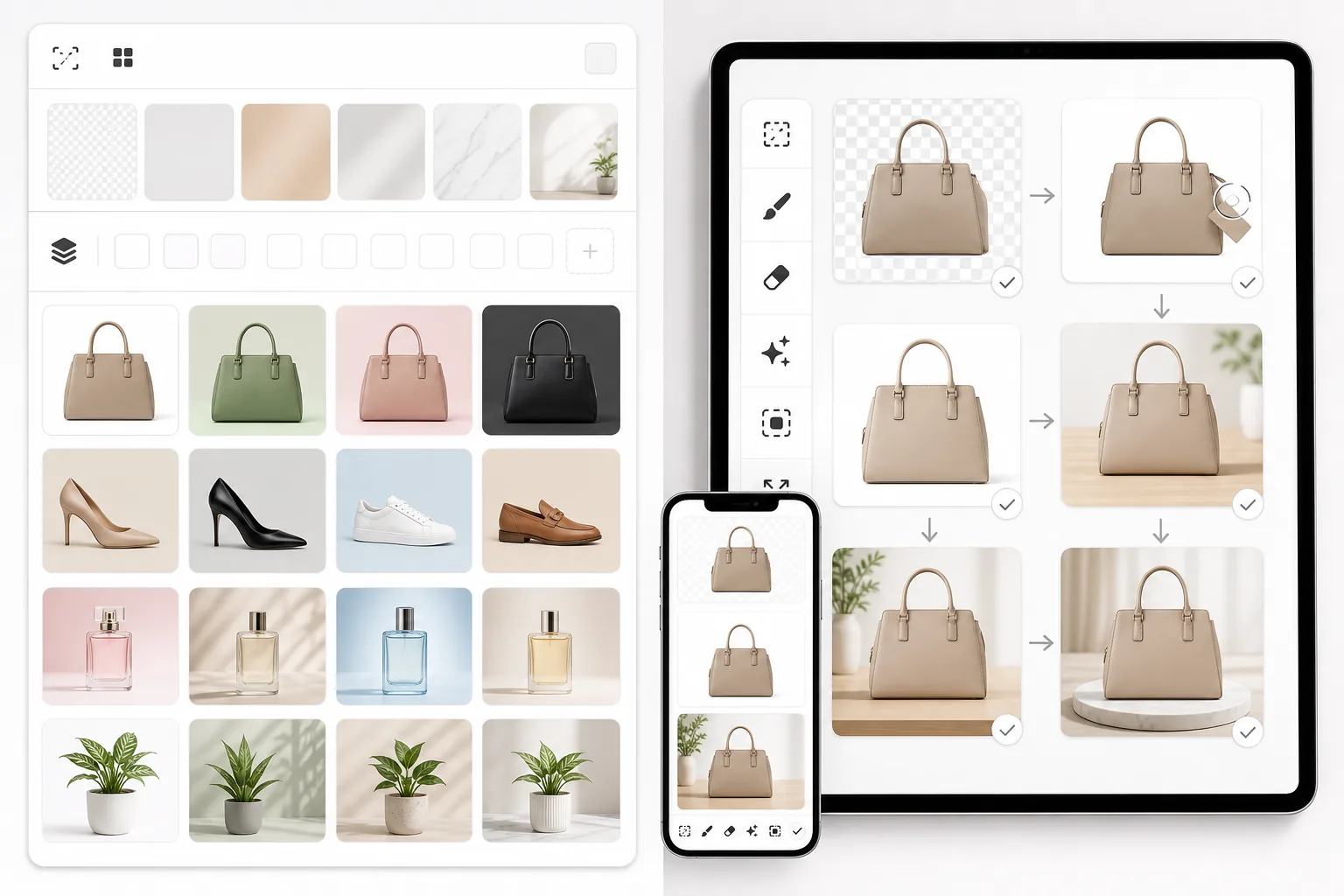
نظرة عامة
Magic Eraser هو محرر صور يعمل بالذكاء الاصطناعي مع ثماني أدوات متخصصة: إزالة الكائنات، وإزالة الخلفية، وتحسين الصور، والتعبئة التوليدية، وإنشاء الصور بالذكاء الاصطناعي، واستعادة الصور، وتوسيع الصور، وأدوات التصميم. يعمل على Web وiOS وAndroid.
PhotoRoom هو محرر صور يركز على الجوال أولًا ويُعنى بإزالة الخلفية، وتصوير المنتجات، والتصميم القائم على القوالب. وهو شائع بين بائعي التجارة الإلكترونية ومنشئي وسائل التواصل الاجتماعي لإنشاء صور منتجات احترافية.
مقارنة الميزات
Magic Eraser هو محرر صور يعمل بالذكاء الاصطناعي مع ثماني أدوات متخصصة: إزالة الكائنات، وإزالة الخلفية، وتحسين الصور، والتعبئة التوليدية، وإنشاء الصور بالذكاء الاصطناعي، واستعادة الصور، وتوسيع الصور، وأدوات التصميم. يعمل على Web وiOS وAndroid.
PhotoRoom هو محرر صور يركز على الجوال أولًا ويُعنى بإزالة الخلفية، وتصوير المنتجات، والتصميم القائم على القوالب. وهو شائع بين بائعي التجارة الإلكترونية ومنشئي وسائل التواصل الاجتماعي لإنشاء صور منتجات احترافية.
| Feature | Magic Eraser | PhotoRoom |
|---|---|---|
| إزالة الخلفية | نعم — AI فوري | نعم — ميزة أساسية |
| إزالة الكائنات | نعم — فرشاة محو AI | محدود — تنقيح أساسي |
| تحسين الصور بالذكاء الاصطناعي | نعم — تكبير، وتوضيح، واستعادة | محدود |
| التعبئة التوليدية | نعم — تعبئة AI قائمة على الأوامر | لا |
| عدد أدوات AI | 8 أدوات متخصصة | يركز على الخلفيات + القوالب |
| محرر الويب | نعم — متكامل الميزات | نعم — محدود مقارنة بالجوال |
| مكتبة القوالب | نعم — مع أدوات تصميم | نعم — واسعة |
| الأفضل لـ | تحرير صور AI متكامل | صور المنتجات + وسائل التواصل الاجتماعي |
Feature rows summarize visible product positioning and should be rechecked against official product pages before purchase, migration, or compliance decisions.
- Last content review May 8, 2026
- PhotoRoom source: official product site (https://www.photoroom.com/)
- Magic Eraser source: https://magiceraser.live/ar/product/magic-eraser
- Pricing, feature availability, platform support, and limits can change; recheck official sources before relying on a buying decision.
لماذا تختار Magic Eraser بدلاً من PhotoRoom
أدوات AI أكثر لكل مهمة تحرير
يتفوق PhotoRoom في الخلفيات والقوالب، لكن Magic Eraser يمنحك ثماني أدوات AI مصممة لغرض محدد. أزل الكائنات، وحسّن الصور الضبابية، وأنشئ المحتوى المفقود، واستعد الصور القديمة، ووسّع الصور — وكلها مهام تتجاوز ما يقدمه PhotoRoom.
إمكانات أقوى لإزالة الكائنات
هل تحتاج إلى إزالة شخص أو لافتة أو سلك أو أي عنصر غير مرغوب فيه من صورة؟ تُعد إزالة الكائنات بالذكاء الاصطناعي في Magic Eraser نقطة قوة أساسية، في حين أن أدوات التنقيح في PhotoRoom أكثر بساطة ومحدودة النطاق.
تجربة ويب وجوال متكاملة الميزات
تعمل كلتا الأداتين على الجوال، لكن Magic Eraser يقدم تجربة قوية بالقدر نفسه في المتصفح. تحصل على المجموعة الكاملة نفسها من أدوات AI سواء كنت تحرر على هاتفك أو على مكتبك.
أسعار تنافسية مع المزيد من المزايا المضمنة
يوفر Magic Eraser أدوات تحرير أكثر بأسعار تنافسية. بدلاً من الدفع مقابل PhotoRoom ثم الحاجة إلى أدوات منفصلة لإزالة الكائنات أو تحسين الصور، تحصل على كل شيء في اشتراك واحد.
الأسئلة الشائعة
كيف يُقارن Magic Eraser بـ PhotoRoom في إزالة الخلفية؟
+
تنتج كلتا الأداتين عمليات إزالة خلفية عالية الجودة باستخدام AI. الفرق الرئيسي هو أن Magic Eraser يتضمن إزالة الخلفية كواحدة من ثماني أدوات AI، في حين يركز PhotoRoom تجربته حول إزالة الخلفية وقوالب المنتجات.
هل Magic Eraser أفضل من PhotoRoom لتصوير المنتجات؟
+
بالنسبة لقوالب صور المنتجات الخالصة وإزالة الخلفية بالجملة، يتمتع PhotoRoom بسير عمل قوي. أما Magic Eraser فهو الخيار الأفضل عندما تحتاج أيضًا إلى إزالة الكائنات، وتحسين الصور، والتعبئة التوليدية كجزء من سير عمل صور منتجاتك.
هل يعمل Magic Eraser على الجوال مثل PhotoRoom؟
+
نعم. يمتلك Magic Eraser تطبيقات أصلية لكل من iOS وAndroid، تمامًا مثل PhotoRoom. كما تحصل على محرر ويب متكامل الميزات، بحيث يمكنك التبديل بين الأجهزة دون فقدان أي وظيفة.
هل يمكنني إنشاء تصاميم باستخدام Magic Eraser؟
+
نعم. يتضمن Magic Eraser أدوات تصميم وميزات إنشاء صور بالذكاء الاصطناعي تتيح لك بناء رسومات وسائل التواصل الاجتماعي، والمواد التسويقية، ومرئيات المنتجات إلى جانب عملك في تحرير الصور.
أي أداة تقدم قيمة أفضل مقابل المال؟
+
يقدم Magic Eraser عمومًا قيمة أكبر لأنك تحصل على مجموعة أوسع من أدوات تحرير AI — إزالة الكائنات، والتحسين، والتعبئة التوليدية، والاستعادة، والتوسيع — بالإضافة إلى إزالة الخلفية وميزات التصميم، وكل ذلك ضمن خطة واحدة.
كيف تُقارَن أداة Magic Eraser في PhotoRoom بتطبيق Magic Eraser؟
+
يتضمّن PhotoRoom أداة لإزالة العناصر بأسلوب الممحاة السحرية ضمن مجموعته للتصميم وإدارة الكتالوج، وهي تؤدي عملها جيدًا في عمليات التنظيف السريعة أثناء إعداد صور المنتجات. أما تطبيق Magic Eraser المستقل فمُصمَّم خصيصًا للإزالة، لذا فهو في المشاهد المعقّدة — العناصر ذات الظلال، والخلفيات المزدحمة، والأشخاص بالكامل — يميل إلى إعادة بناء المنطقة بصورة أنظف، كما تصدّر باقته المجانية بدقة كاملة. اختر PhotoRoom إن أردت الإزالة إلى جانب القوالب وأدوات الكتالوج؛ واختر Magic Eraser إن كانت الإزالة النظيفة هي المهمة الأساسية.
ما أفضل بديل لـ PhotoRoom لصور المنتجات بالجملة؟
+
يُعدّ PhotoRoom نفسه قويًا لكتالوجات التجارة الإلكترونية بفضل القوالب والخلفيات الجماعية. وإن أردت بديلًا، فإن Magic Eraser يتعامل مع إزالة الخلفيات وتنظيف العناصر بالجملة بدقة كاملة مع باقة مجانية، بينما يُعدّ Remove.bg (عبر الـ API) الأسرع في تبديل الخلفيات البسيطة على نطاق واسع. أما لسير عمل كتالوج معتمد على القوالب تحديدًا، فيبقى التفوق على PhotoRoom صعبًا؛ وللإزالة والتحرير المرنين عبر مجموعة من الصور، فإن Magic Eraser هو البديل الأقرب.
هل تبحث عن أكثر مما يقدمه PhotoRoom؟
جرّب Magic Eraser مجانًا واحصل على ثماني أدوات تحرير صور مدعومة بالذكاء الاصطناعي — إزالة الخلفية، وإزالة الكائنات، والتحسين، والتعبئة التوليدية، والمزيد — على الويب والجوال.
جرّب Magic Eraser مجانًاحالات استخدام ذات صلة
شاهد كيف يستخدم المحترفون هذه الأدوات في مهام العمل الفعلية.
صور الإعلانات المزدحمة بالأغراض الشخصية أو السيارات المركونة أو معدات البناء قد تنفّر المشترين. يستخدم Magic Eraser الذكاء الاصطناعي لتنظيف صور عقارك فورًا — دون الحاجة إلى مهارات Photoshop.
الخلفيات المشوشة ولقطات المنتجات الفوضوية تكلفك مبيعات كل يوم. يساعدك Magic Eraser على إنشاء صور منتجات احترافية ونظيفة في ثوانٍ — دون الحاجة إلى مهارات Photoshop. ما عليك سوى الرفع، ومسح العناصر المشتتة، والإدراج بثقة.
متطفلون يفسدون صور سفرك؟ خلفيات فوضوية تدمّر صور السيلفي؟ توقف عن إضاعة الساعات في Photoshop. يزيل Magic Eraser المشتتات، وينظّف اللقطات المزدحمة، ويوسّع صورك لتناسب أي تنسيق منصة — كل ذلك بنقرة واحدة.
أدلة ذات صلة
استكشف المزيد من الأدلة والمحتوى المتعلق بسير العمل هذا.
استكشف كيف يغيّر الذكاء الاصطناعي عمليات الأعمال، من الأتمتة وتحليل البيانات إلى تجارب عملاء أكثر تخصيصًا.
تعرّف على كيفية استخدام Magic Eraser لإزالة العناصر والأشخاص والنصوص والمشتتات من الصور بنتائج ذكاء اصطناعي أنظف.
تعلّم كيفية استخدام إضافة الترجمة في Figma لتوطين ملفات التصميم بسرعة أكبر مع التحكم في تغييرات التخطيط.
مقارنات أخرى
شاهد كيف يقارن Magic Eraser بأدوات تحرير الصور الأخرى.
Canva منصة تصميم متعددة الاستخدامات، لكن أدوات تحرير الصور فيها ثانوية مقارنة بتركيزها على التصميم. صُمم Magic Eraser خصيصًا لتحرير الصور المدعوم بالذكاء الاصطناعي — حيث يوفر إزالة أفضل للكائنات وإزالة الخلفية وتحسين الصور والتعبئة التوليدية للمستخدمين الذين يحتاجون أدوات متخصصة لتنظيف الصور.
محرران قويان للصور بالذكاء الاصطناعي بنقاط قوة مختلفة. يقدم Magic Eraser مجموعة أوسع من أدوات الذكاء الاصطناعي التوليدية، بينما يتفوق Photoroom في تصوير منتجات التجارة الإلكترونية والمعالجة الدفعية. اعرف أيهما يناسب سير عملك.
اختبرنا وقارنا أبرز أدوات تحرير الصور بالذكاء الاصطناعي حتى لا تضطر لذلك. من إزالة الكائنات إلى استبدال الخلفية، تعرّف على المحرر الذي يقدّم أفضل النتائج لسير عملك.
Canva ممتاز للتخطيطات والرسوميات الاجتماعية، لكن كثيرًا من المستخدمين يحتاجون إلى إزالة كائنات أسرع وتعديلات خلفية أنظف وأدوات صور أقوى بالذكاء الاصطناعي. توضح هذه المقارنة أين يكون Magic Eraser أنسب لسير العمل الذي يركز على الصور.
اختبرنا أبرز مولّدات الخلفيات بالذكاء الاصطناعي من حيث جودة الإزالة وخيارات الاستبدال والمرونة الإبداعية وسهولة الاستخدام. اطّلع على الأداة التي تجعل إزالة الخلفيات واستبدالها وتوليد خلفيات جديدة لصورك أسهل ما يكون.
اختبرنا أبرز مولدات صور البورتريه بالذكاء الاصطناعي من حيث الجودة والواقعية والتخصيص والقيمة. سواء كنت بحاجة إلى صور بورتريه لـ LinkedIn أو صور الفريق أو صور بورتريه احترافية، شاهد أي أداة تقدم أفضل النتائج.