
حرّر صور Instagram وTikTok ووسائل التواصل بالذكاء الاصطناعي
متطفلون يفسدون صور سفرك؟ خلفيات فوضوية تدمّر صور السيلفي؟ توقف عن إضاعة الساعات في Photoshop. يزيل Magic Eraser المشتتات، وينظّف اللقطات المزدحمة، ويوسّع صورك لتناسب أي تنسيق منصة — كل ذلك بنقرة واحدة.
الغرباء والمتطفلون في لقطاتك
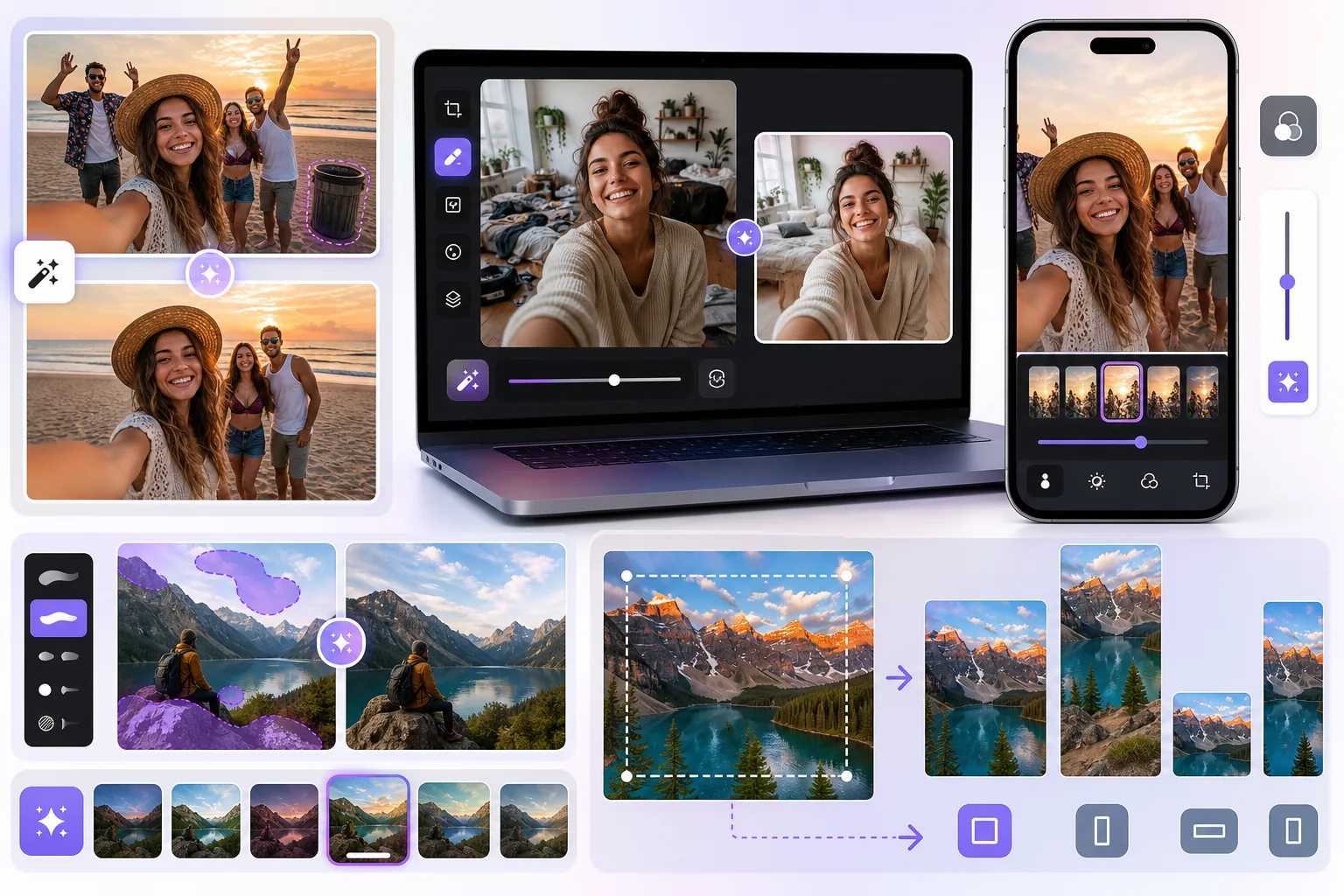
تلك الصورة المثالية لغروب الشمس من رحلتك — لولا سائح عشوائي يمشي عبر الإطار. صور جماعية حيث أغمض أحدهم عينيه أو ظهر غريب غير مدعو في الخلفية. تزيل أداة إزالة الكائنات بالذكاء الاصطناعي الأشخاص غير المرغوب فيهم في ثوانٍ، دون الحاجة إلى تحديد يدوي.
خلفيات فوضوية في السيلفي والقصص
إطلالتك رائعة لكن كومة الغسيل خلفك ليست كذلك. الغرف المزدحمة والمرايا المتسخة والخلفيات المشتتة تخفض تفاعلك. نظّف الخلفيات أو استبدلها بالكامل ليبدو محتواك بجودة الاستوديو في كل مرة.
إعادة تحجيم الصور عبر تنسيقات المنصات
صورة واحدة، خمسة تنسيقات: مربعة لخلاصتك، 9:16 للقصص وReels، أفقية لرؤوس Twitter، وعمودية لـ Pinterest. يوسّع AI Expand مساحة صورتك بذكاء حتى لا تضطر أبدًا للاقتصاص بشكل محرج أو فقدان تفاصيل مهمة.
من الصورة الخام إلى الجاهزة للنشر في 4 خطوات
ارفع صورتك
اسحب وأفلت أو التقط صورة مباشرة من ألبوم الكاميرا. يعمل مع JPG وPNG وHEIC وWebP.
أزل الكائنات غير المرغوب فيها
مرّر الفرشاة فوق المتطفلين أو صناديق القمامة أو خطوط الكهرباء أو أي تشتيت. يملأ الذكاء الاصطناعي الفجوة بتفاصيل واقعية.
نظّف الخلفية
نعّم الخلفيات المزدحمة، أو أزل البقع، أو استبدل الخلفية بالكامل بأخرى أنظف.
أعد التحجيم والتصدير لأي منصة
اختر من نسب العرض إلى الارتفاع المُعدّة مسبقًا لـ Instagram أو TikTok أو YouTube أو Pinterest. يملأ AI Expand المساحة الإضافية بشكل طبيعي.
Removal tools for this workflow
الأسئلة الشائعة
هل سيبدو التحرير واضحًا لمتابعيّ؟
+
لا. يستخدم Magic Eraser الذكاء الاصطناعي التوليدي لإعادة بناء المناطق المُزالة بنسيج وإضاءة ومنظور واقعي. النتيجة سلسة — لن يتمكن متابعوك من ملاحظة أي تعديل.
هل يمكنني تحرير عدة صور دفعة واحدة؟
+
نعم. يمكنك رفع ومعالجة عدة صور في جلسة واحدة، وهو مثالي لصنّاع المحتوى الذين يصوّرون بكميات كبيرة ويحتاجون لتجهيز منشورات أسبوع كامل.
هل يعمل مع الصور الملتقطة بكاميرا هاتفي؟
+
بالتأكيد. يعمل Magic Eraser مع أي تنسيق صورة من أي جهاز — iPhone أو Android أو DSLR أو لقطات الشاشة. لا حاجة لأي معدات خاصة.
هل يمكنني استخدام AI Expand لتحويل صورة أفقية إلى عمودية للقصص؟
+
نعم. يمكن لـ AI Expand توسيع أي حافة من صورتك — أعلى أو أسفل أو يسار أو يمين — حتى تحوّل لقطة أفقية إلى تنسيق عمودي للقصص أو Reels دون اقتصاص الأجزاء الجيدة.
اجعل كل منشور أفضل منشوراتك
ارفع صورة لإزالة عنصر مشتت أو تنظيف الخلفية أو توسيع مساحة الصورة. راجع النتيجة ثم صدّرها عندما تبدو مناسبة.
ابدأ التحرير مجانًاحالات استخدام ذات صلة
شاهد كيف يستخدم المحترفون هذه الأدوات في مهام العمل الفعلية.
صور الإعلانات المزدحمة بالأغراض الشخصية أو السيارات المركونة أو معدات البناء قد تنفّر المشترين. يستخدم Magic Eraser الذكاء الاصطناعي لتنظيف صور عقارك فورًا — دون الحاجة إلى مهارات Photoshop.
الخلفيات المشوشة ولقطات المنتجات الفوضوية تكلفك مبيعات كل يوم. يساعدك Magic Eraser على إنشاء صور منتجات احترافية ونظيفة في ثوانٍ — دون الحاجة إلى مهارات Photoshop. ما عليك سوى الرفع، ومسح العناصر المشتتة، والإدراج بثقة.
هل تتعامل مع لقطات شاشة مزدحمة بالتعليقات، أو صور قديمة مطبوع عليها التاريخ، أو صور مغطاة بالنصوص؟ تمحو أداة إزالة النص بالذكاء الاصطناعي من Magic Eraser أي نص غير مرغوب فيه وتعيد بناء الخلفية بشكل طبيعي، لتبدو صورك نظيفة واحترافية.
مقارنات ذات صلة
شاهد كيف يقارن Magic Eraser بالأدوات المشابهة.
TouchRetouch هو تطبيق جوال مدفوع شائع لإزالة الكائنات والعيوب. يوفّر Magic Eraser تحريرًا مجانيًا مدعومًا بالذكاء الاصطناعي على أي جهاز دون الحاجة إلى التثبيت. اطّلع على كيفية مقارنتهما من حيث الميزات والأسعار وسهولة الاستخدام.
Cleanup.pictures هي أداة ويب مجانية لإزالة الكائنات بسرعة. يذهب Magic Eraser إلى أبعد من ذلك مع 8 أدوات تحرير مدعومة بالذكاء الاصطناعي AI وتطبيقات للهاتف المحمول ومعالجة متقدمة. اطلع على المقارنة بين الاثنين.
محرران قويان للصور بالذكاء الاصطناعي بنقاط قوة مختلفة. يقدم Magic Eraser مجموعة أوسع من أدوات الذكاء الاصطناعي التوليدية، بينما يتفوق Photoroom في تصوير منتجات التجارة الإلكترونية والمعالجة الدفعية. اعرف أيهما يناسب سير عملك.
اختبرنا وقارنا أبرز أدوات تحرير الصور بالذكاء الاصطناعي حتى لا تضطر لذلك. من إزالة الكائنات إلى استبدال الخلفية، تعرّف على المحرر الذي يقدّم أفضل النتائج لسير عملك.
أدلة ذات صلة
استكشف المزيد من الأدلة والمحتوى المتعلق بسير العمل هذا.
تعرّف على كيفية استخدام Magic Eraser لإزالة العناصر والأشخاص والنصوص والمشتتات من الصور بنتائج ذكاء اصطناعي أنظف.
تعلّم كيفية إزالة الأشخاص من الصور بالذكاء الاصطناعي في ثوانٍ. دليل لصور السفر والعقارات والمنتجات.
دليل خطوة بخطوة لإزالة العلامات المائية من صورك باستخدام الذكاء الاصطناعي. متى يكون ذلك مناسبًا، وأفضل التقنيات، وكيف يتعامل Magic Eraser معها.