
Magic Eraser مقابل Cleanup.pictures
Cleanup.pictures هي أداة ويب مجانية لإزالة الكائنات بسرعة. يذهب Magic Eraser إلى أبعد من ذلك مع 8 أدوات تحرير مدعومة بالذكاء الاصطناعي AI وتطبيقات للهاتف المحمول ومعالجة متقدمة. اطلع على المقارنة بين الاثنين.
Last updated
جرب Magic Eraser مجانًاComparison rows are editorial summaries from the latest page review, not a guarantee of current pricing, limits, watermark policy, batch support, speed, or platform availability.
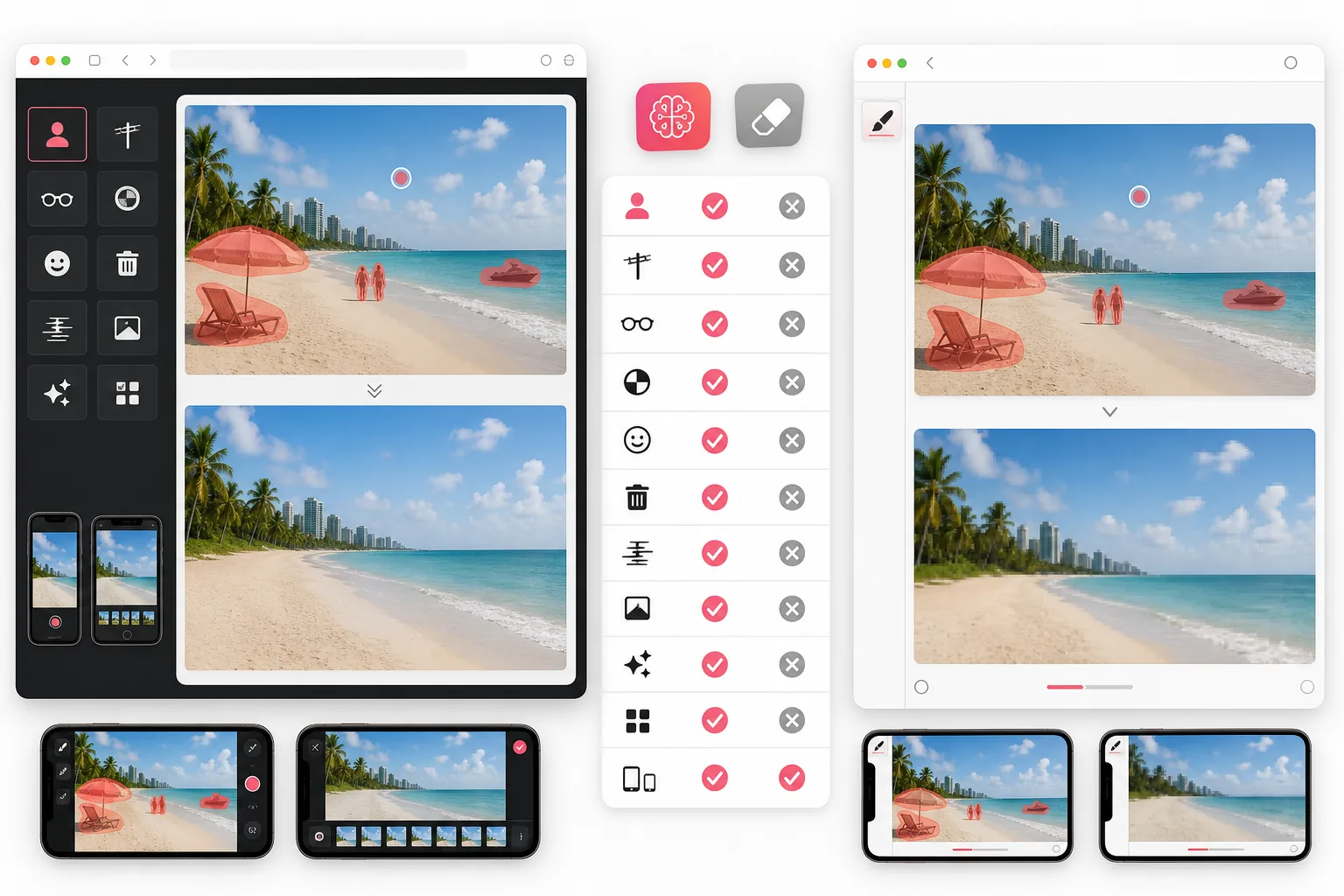
كيف تتم المقارنة بينهما؟
Magic Eraser منصة كاملة لتحرير الصور بالذكاء الاصطناعي AI متاحة على الويب والهاتف المحمول. تتضمن إزالة الكائنات وإزالة الخلفية والتحسين بالذكاء الاصطناعي والتوسيع بالذكاء الاصطناعي والملء بالذكاء الاصطناعي والفلتر بالذكاء الاصطناعي والإنشاء بالذكاء الاصطناعي وأدوات التصميم — كل ذلك في مساحة عمل واحدة.
Cleanup.pictures من ClipDrop هي أداة مجانية تعمل في المتصفح وتركز على إزالة الكائنات غير المرغوب فيها من الصور. توفر سير عمل بسيطًا بالفرشاة والمسح دون الحاجة إلى حساب للاستخدام الأساسي.
مقارنة الميزات
Magic Eraser منصة كاملة لتحرير الصور بالذكاء الاصطناعي AI متاحة على الويب والهاتف المحمول. تتضمن إزالة الكائنات وإزالة الخلفية والتحسين بالذكاء الاصطناعي والتوسيع بالذكاء الاصطناعي والملء بالذكاء الاصطناعي والفلتر بالذكاء الاصطناعي والإنشاء بالذكاء الاصطناعي وأدوات التصميم — كل ذلك في مساحة عمل واحدة.
Cleanup.pictures من ClipDrop هي أداة مجانية تعمل في المتصفح وتركز على إزالة الكائنات غير المرغوب فيها من الصور. توفر سير عمل بسيطًا بالفرشاة والمسح دون الحاجة إلى حساب للاستخدام الأساسي.
| Feature | Magic Eraser | Cleanup.pictures |
|---|---|---|
| إزالة الكائنات | نعم — مدعومة بالذكاء الاصطناعي AI | نعم — مدعومة بالذكاء الاصطناعي AI |
| إزالة الخلفية | نعم — بنقرة واحدة | لا |
| تحسين الصور بالذكاء الاصطناعي AI | نعم — رفع الدقة والتوضيح | لا |
| الملء التوليدي | نعم — أداة الملء بالذكاء الاصطناعي AI | لا |
| التوسيع بالذكاء الاصطناعي AI / الرسم الخارجي | نعم | لا |
| تطبيقات الهاتف المحمول | iOS و Android | الويب فقط |
| المعالجة الدفعية | نعم | محدودة |
| الباقة المجانية | نعم — مع حدود | نعم — أساسية غير محدودة |
Feature rows summarize visible product positioning and should be rechecked against official product pages before purchase, migration, or compliance decisions.
- Last content review May 1, 2026
- Cleanup.pictures source: official product site (https://cleanup.pictures/)
- Magic Eraser source: https://magiceraser.live/ar/product/magic-eraser
- Pricing, feature availability, platform support, and limits can change; recheck official sources before relying on a buying decision.
مقارنة الأسعار
| Plan | Magic Eraser | Cleanup.pictures |
|---|---|---|
| الباقة المجانية | مجانًا — تعديلات محدودة | مجانًا — دقة منخفضة |
| شهري | $9.99/mo | $5.00/mo (Pro) |
| سنوي | $4.99/mo (يُحتسب سنويًا) | $3.00/mo (Pro، يُحتسب سنويًا) |
الأسعار اعتبارًا من May 2026. تحقق من كل مزود للاطلاع على الأسعار الحالية.
Pricing rows are snapshots from review time. Free tiers, subscriptions, trials, export limits, and regional availability can change without notice.
- Last content review May 1, 2026
- Cleanup.pictures source: official product site (https://cleanup.pictures/)
- Magic Eraser source: https://magiceraser.live/ar/product/magic-eraser
- Pricing, feature availability, platform support, and limits can change; recheck official sources before relying on a buying decision.
لماذا تختار Magic Eraser
8 أدوات في منصة واحدة
بدلًا من التنقل بين تطبيقات منفصلة، يجمع Magic Eraser بين إزالة الكائنات وإزالة الخلفية والتحسين بالذكاء الاصطناعي والملء التوليدي والتوسيع بالذكاء الاصطناعي والفلاتر والإنشاء وأدوات التصميم في مساحة عمل واحدة.
معالجة بالذكاء الاصطناعي بجودة أعلى
يستخدم Magic Eraser نماذج ذكاء اصطناعي AI متقدمة تقدم نتائج أنظف في عمليات الإزالة المعقدة، مع الحفاظ على القوام والإضاءة بشكل أكثر طبيعية من أساليب الرسم الداخلي الأساسية.
التحرير على الهاتف المحمول أثناء التنقل
مع تطبيقات iOS و Android الأصلية، يمكنك تحرير الصور مباشرة من هاتفك. أما Cleanup.pictures فيقتصر على متصفحات سطح المكتب.
ما هو أبعد من الإزالة — الإنشاء والتحسين
يقوم التحسين بالذكاء الاصطناعي برفع دقة الصور منخفضة الدقة، ويولد الملء بالذكاء الاصطناعي محتوى جديدًا داخل التحديدات، ويوسّع التوسيع بالذكاء الاصطناعي مساحة العمل لديك. تتجاوز هذه القدرات بكثير مجرد مسح الكائنات.
الأدوات
الأسئلة الشائعة
هل Cleanup.pictures مجاني حقًا؟
+
نعم، يوفر Cleanup.pictures إزالة مجانية للكائنات بدقة قياسية. أما عمليات التصدير بدقة أعلى وبعض الميزات المتقدمة فتتطلب اشتراكًا مدفوعًا في ClipDrop.
هل يمكن لـ Magic Eraser إزالة الكائنات من الصور مجانًا؟
+
نعم. يحتوي Magic Eraser على باقة مجانية تتيح لك تجربة إزالة الكائنات وأدوات أخرى. تنطبق حدود على المعالجة، لكن يمكنك الترقية للحصول على سعة أكبر.
أي أداة تنتج نتائج إزالة أفضل؟
+
تتعامل كلتا الأداتين مع عمليات الإزالة البسيطة بشكل جيد. أما للمشاهد المعقدة ذات القوام المعقد أو الكائنات المتداخلة المتعددة، فإن نماذج الذكاء الاصطناعي AI الأكثر تقدمًا في Magic Eraser تنتج عادةً نتائج أنظف وأكثر طبيعية.
هل يحتوي Cleanup.pictures على تطبيق للهاتف المحمول؟
+
لا. Cleanup.pictures يعمل على الويب فقط. يوفر Magic Eraser تطبيقات أصلية لكل من iOS و Android، بالإضافة إلى محرر الويب.
هل يمكنني إزالة الخلفيات باستخدام Cleanup.pictures؟
+
تم تصميم Cleanup.pictures لإزالة الكائنات وليس لإزالة الخلفية. يتضمن Magic Eraser أداة مخصصة لإزالة الخلفية بنقرة واحدة إلى جانب أداة إزالة الكائنات.
هل أحتاج إلى حساب لاستخدام أي من الأداتين؟
+
يتيح لك Cleanup.pictures البدء دون حساب. يتطلب Magic Eraser حسابًا مجانيًا لحفظ عملك والوصول إلى جميع الميزات.
هل أنت مستعد لتجربة Magic Eraser؟
ابدأ التحرير مجانًا مع 8 أدوات مدعومة بالذكاء الاصطناعي AI — من إزالة الكائنات إلى الملء التوليدي.
افتح Magic Eraserحالات استخدام ذات صلة
شاهد كيف يستخدم المحترفون هذه الأدوات في مهام العمل الفعلية.
صور الإعلانات المزدحمة بالأغراض الشخصية أو السيارات المركونة أو معدات البناء قد تنفّر المشترين. يستخدم Magic Eraser الذكاء الاصطناعي لتنظيف صور عقارك فورًا — دون الحاجة إلى مهارات Photoshop.
الخلفيات المشوشة ولقطات المنتجات الفوضوية تكلفك مبيعات كل يوم. يساعدك Magic Eraser على إنشاء صور منتجات احترافية ونظيفة في ثوانٍ — دون الحاجة إلى مهارات Photoshop. ما عليك سوى الرفع، ومسح العناصر المشتتة، والإدراج بثقة.
متطفلون يفسدون صور سفرك؟ خلفيات فوضوية تدمّر صور السيلفي؟ توقف عن إضاعة الساعات في Photoshop. يزيل Magic Eraser المشتتات، وينظّف اللقطات المزدحمة، ويوسّع صورك لتناسب أي تنسيق منصة — كل ذلك بنقرة واحدة.
أدلة ذات صلة
استكشف المزيد من الأدلة والمحتوى المتعلق بسير العمل هذا.
تعرّف على كيفية استخدام Magic Eraser لإزالة العناصر والأشخاص والنصوص والمشتتات من الصور بنتائج ذكاء اصطناعي أنظف.
تعلّم كيفية إزالة الأشخاص من الصور بالذكاء الاصطناعي في ثوانٍ. دليل لصور السفر والعقارات والمنتجات.
دليل خطوة بخطوة لإزالة العلامات المائية من صورك باستخدام الذكاء الاصطناعي. متى يكون ذلك مناسبًا، وأفضل التقنيات، وكيف يتعامل Magic Eraser معها.
مقارنات أخرى
شاهد كيف يقارن Magic Eraser بأدوات تحرير الصور الأخرى.
محرران قويان للصور بالذكاء الاصطناعي بنقاط قوة مختلفة. يقدم Magic Eraser مجموعة أوسع من أدوات الذكاء الاصطناعي التوليدية، بينما يتفوق Photoroom في تصوير منتجات التجارة الإلكترونية والمعالجة الدفعية. اعرف أيهما يناسب سير عملك.
اختبرنا وقارنا أبرز أدوات تحرير الصور بالذكاء الاصطناعي حتى لا تضطر لذلك. من إزالة الكائنات إلى استبدال الخلفية، تعرّف على المحرر الذي يقدّم أفضل النتائج لسير عملك.
يقدم Fotor محرر صور عبر الإنترنت واسع النطاق مع قوالب وأدوات تجميل. ويركز Magic Eraser على التنظيف العملي بالذكاء الاصطناعي وإزالة الخلفية والتحسين والتحرير التوليدي لسير عمل يومي أسرع.
لا يزال Snapseed محرر صور مجاني شائع على الهاتف، لكنه يعتمد أكثر على التعديلات اليدوية وأدوات الصور التقليدية. يضيف Magic Eraser سير عمل حديث بالذكاء الاصطناعي للمستخدمين الذين يريدون تنظيفًا وتحسينًا أسرع بجهد أقل.
يمنح Pixlr المستخدمين بيئة تحرير كلاسيكية تعمل عبر المتصفح مع الطبقات والتأثيرات. يركّز Magic Eraser على التنظيف والتحسين والعمل على الخلفية بالاعتماد على الذكاء الاصطناعي أولاً، للمستخدمين الذين يريدون نتائج متقنة دون واجهة تحرير كاملة.
Luminar Neo قوي للمصورين على سطح المكتب الذين يريدون تحسينًا عميقًا وعناصر تحكم إبداعية. صُمم Magic Eraser لتنظيف أسرع وسير عمل أخف وتحرير مرن عبر الويب والمحمول.