
Magic Eraser مقابل Pixlr: أي محرر ويب أفضل للحصول على نتائج أسرع؟
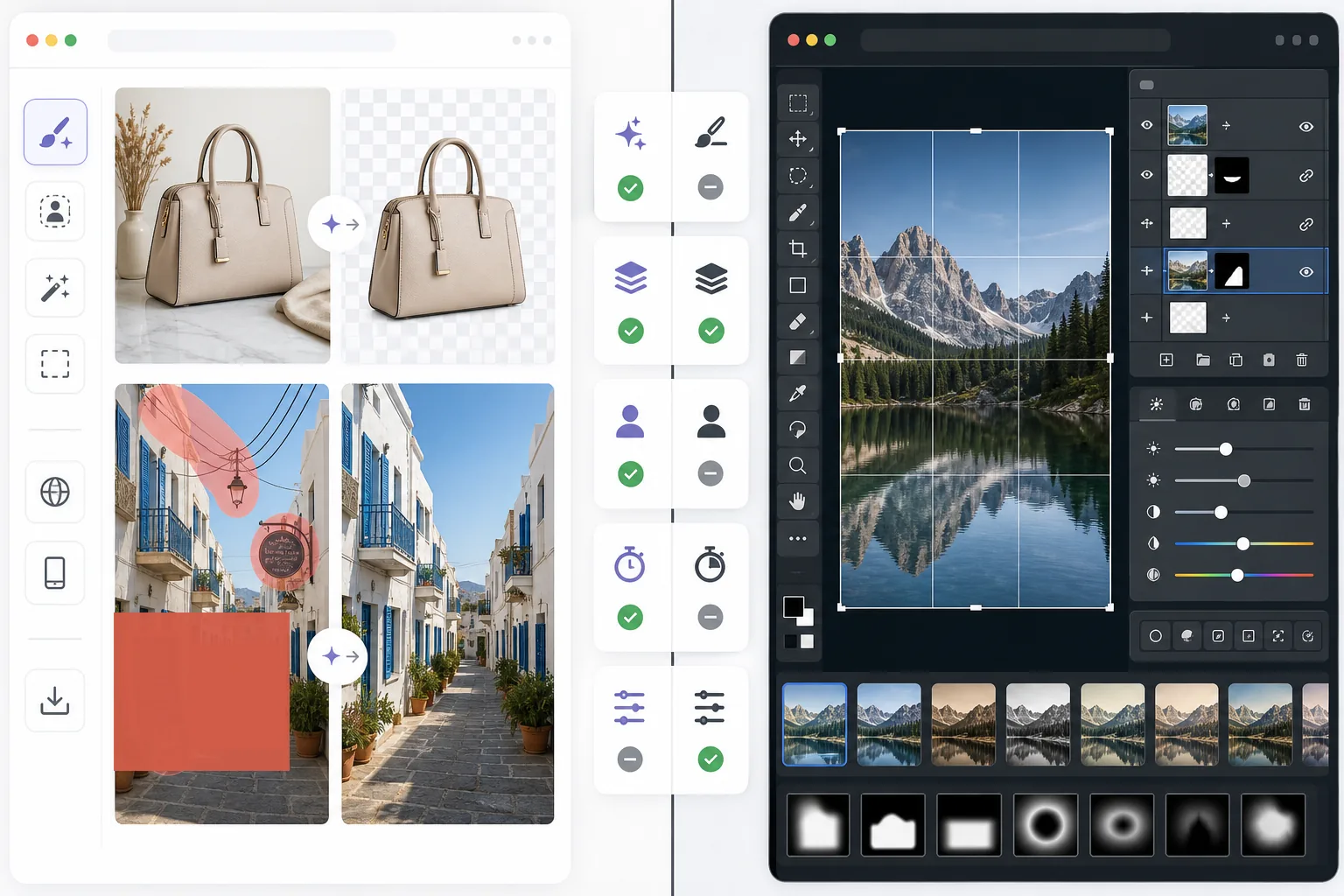
يمنح Pixlr المستخدمين بيئة تحرير كلاسيكية تعمل عبر المتصفح مع الطبقات والتأثيرات. يركّز Magic Eraser على التنظيف والتحسين والعمل على الخلفية بالاعتماد على الذكاء الاصطناعي أولاً، للمستخدمين الذين يريدون نتائج متقنة دون واجهة تحرير كاملة.
Last updated
جرّب Magic Eraser مجانًاComparison rows are editorial summaries from the latest page review, not a guarantee of current pricing, limits, watermark policy, batch support, speed, or platform availability.
نظرة عامة
يساعد Magic Eraser المستخدمين على إصلاح مشكلات الصور العملية بسرعة باستخدام الذكاء الاصطناعي: إزالة الكائنات غير المرغوب فيها، ومحو النصوص، وتنظيف الخلفيات، وزيادة حدة التفاصيل، وملء المناطق المفقودة.
يوفّر Pixlr تجربة تحرير أكثر تقليدية عبر المتصفح مع الطبقات والمرشحات والأدوات اليدوية. إنه مرن، لكنه غالبًا ما يكون أبطأ في مهام التنظيف المتكررة.
مقارنة الميزات
يساعد Magic Eraser المستخدمين على إصلاح مشكلات الصور العملية بسرعة باستخدام الذكاء الاصطناعي: إزالة الكائنات غير المرغوب فيها، ومحو النصوص، وتنظيف الخلفيات، وزيادة حدة التفاصيل، وملء المناطق المفقودة.
يوفّر Pixlr تجربة تحرير أكثر تقليدية عبر المتصفح مع الطبقات والمرشحات والأدوات اليدوية. إنه مرن، لكنه غالبًا ما يكون أبطأ في مهام التنظيف المتكررة.
| Feature | Magic Eraser | Pixlr |
|---|---|---|
| إزالة الكائنات | نعم — فرشاة الذكاء الاصطناعي | محدودة |
| إزالة الخلفية | نعم | نعم |
| تحسين الصور | نعم | أساسي |
| التحرير القائم على الطبقات | لا | نعم |
| الملء التوليدي | نعم | محدود |
| سهل للمبتدئين | نعم | متوسط |
| الأفضل لـ | التنظيف السريع وتعديلات الذكاء الاصطناعي | التحرير العام عبر المتصفح |
| المنصة | ويب + جوال | ويب + جوال |
Feature rows summarize visible product positioning and should be rechecked against official product pages before purchase, migration, or compliance decisions.
- Last content review June 21, 2026
- Pixlr source: official product site (https://pixlr.com/)
- Magic Eraser source: https://magiceraser.live/ar/product/magic-eraser
- Pricing, feature availability, platform support, and limits can change; recheck official sources before relying on a buying decision.
مقارنة الأسعار
| Plan | Magic Eraser | Pixlr |
|---|---|---|
| الباقة المجانية | مجاني — تعديلات محدودة | مجاني — أساسي + إعلانات |
| شهري | $9.99/mo | $7.99/mo (Plus) |
| سنوي | $4.99/mo (تُدفع سنويًا) | $4.90/mo (Plus، تُدفع سنويًا) |
الأسعار اعتبارًا من May 2026. تحقّق من كل مزوّد لمعرفة الأسعار الحالية.
Pricing rows are snapshots from review time. Free tiers, subscriptions, trials, export limits, and regional availability can change without notice.
- Last content review June 21, 2026
- Pixlr source: official product site (https://pixlr.com/)
- Magic Eraser source: https://magiceraser.live/ar/product/magic-eraser
- Pricing, feature availability, platform support, and limits can change; recheck official sources before relying on a buying decision.
لماذا تختار Magic Eraser
وقت أقل في عناصر التحكم بالتحرير
يقلّل Magic Eraser الحاجة إلى إدارة أشرطة الأدوات والطبقات والتأثيرات اليدوية عندما يكون الهدف الأساسي ببساطة هو تنظيف الصورة وتحسينها بسرعة.
أكثر فائدة لسير العمل المتكرر
عندما تحرّر صور المنتجات أو الصور الاجتماعية أو القوائم أو أصول صنّاع المحتوى يوميًا، فإن سير عمل الذكاء الاصطناعي الأضيق لكن الأقوى في Magic Eraser غالبًا ما يوفّر وقتًا أكثر من محرر متعدد الأغراض.
أفضل لتنظيف الخلفية والعناصر المشتّتة
يتميّز Magic Eraser بقوة خاصة عندما تكون المشكلة عبارة عن فوضى أو نصوص أو أسلاك أو بيئة مشتّتة تحتاج إلى الاختفاء بشكل طبيعي.
عبء تدريب أقل
يمكن للفرق البدء باستخدام Magic Eraser بشكل أسرع لأنه يتطلّب معرفة أقل بالتحرير مقارنة بمحرر متصفح كلاسيكي يحتوي على مجموعة أوسع من الأدوات اليدوية.
الأسئلة الشائعة
هل Magic Eraser أسهل في الاستخدام من Pixlr؟
+
نعم للمهام التي تركّز على التنظيف. يوفّر Pixlr مرونة تحرير أكثر تقليدية، لكن Magic Eraser أسهل للمستخدمين الذين يحتاجون أساسًا إلى إزالة الكائنات وتعديلات الخلفية بالذكاء الاصطناعي.
هل يحتوي Pixlr على طبقات؟
+
نعم. يتضمّن Pixlr بيئة تحرير أكثر كلاسيكية قائمة على الطبقات. أما Magic Eraser فيركّز أكثر على النتائج السريعة بمساعدة الذكاء الاصطناعي بدلاً من التحرير اليدوي للطبقات.
أي أداة أفضل للمسوّقين والبائعين؟
+
غالبًا ما يكون Magic Eraser هو الخيار الأنسب لأنه يتعامل مع التنظيف والتحسين وإعداد الصور الجاهزة للعرض بشكل أسرع.
هل يمكنني إزالة النص من الصور باستخدام Magic Eraser؟
+
نعم. يستطيع Magic Eraser إزالة النصوص والملصقات واللافتات وغيرها من العناصر المشتّتة مع إعادة بناء الخلفية بشكل طبيعي.
أي محرر يعمل بشكل أفضل على الجوال وسطح المكتب معًا؟
+
يوفّر Magic Eraser سير عمل ذكاء اصطناعي أكثر اتساقًا عبر الويب والجوال، مما يجعل التنقّل بين الأجهزة أسهل لمهام التحرير العملية.
هل تحتاج إلى محرر ويب أسرع لتنظيف الصور في الواقع العملي؟
جرّب Magic Eraser مجانًا واستخدم الذكاء الاصطناعي لإزالة العناصر المشتّتة وتحسين الوضوح وإنهاء تعديلات متقنة بخطوات أقل.
جرّب Magic Eraser مجانًاحالات استخدام ذات صلة
شاهد كيف يستخدم المحترفون هذه الأدوات في مهام العمل الفعلية.
صور الإعلانات المزدحمة بالأغراض الشخصية أو السيارات المركونة أو معدات البناء قد تنفّر المشترين. يستخدم Magic Eraser الذكاء الاصطناعي لتنظيف صور عقارك فورًا — دون الحاجة إلى مهارات Photoshop.
الخلفيات المشوشة ولقطات المنتجات الفوضوية تكلفك مبيعات كل يوم. يساعدك Magic Eraser على إنشاء صور منتجات احترافية ونظيفة في ثوانٍ — دون الحاجة إلى مهارات Photoshop. ما عليك سوى الرفع، ومسح العناصر المشتتة، والإدراج بثقة.
متطفلون يفسدون صور سفرك؟ خلفيات فوضوية تدمّر صور السيلفي؟ توقف عن إضاعة الساعات في Photoshop. يزيل Magic Eraser المشتتات، وينظّف اللقطات المزدحمة، ويوسّع صورك لتناسب أي تنسيق منصة — كل ذلك بنقرة واحدة.
أدلة ذات صلة
استكشف المزيد من الأدلة والمحتوى المتعلق بسير العمل هذا.
تعرّف على كيفية استخدام Magic Eraser لإزالة العناصر والأشخاص والنصوص والمشتتات من الصور بنتائج ذكاء اصطناعي أنظف.
تعلّم كيفية إزالة الأشخاص من الصور بالذكاء الاصطناعي في ثوانٍ. دليل لصور السفر والعقارات والمنتجات.
دليل خطوة بخطوة لإزالة العلامات المائية من صورك باستخدام الذكاء الاصطناعي. متى يكون ذلك مناسبًا، وأفضل التقنيات، وكيف يتعامل Magic Eraser معها.
مقارنات أخرى
شاهد كيف يقارن Magic Eraser بأدوات تحرير الصور الأخرى.
محرران قويان للصور بالذكاء الاصطناعي بنقاط قوة مختلفة. يقدم Magic Eraser مجموعة أوسع من أدوات الذكاء الاصطناعي التوليدية، بينما يتفوق Photoroom في تصوير منتجات التجارة الإلكترونية والمعالجة الدفعية. اعرف أيهما يناسب سير عملك.
اختبرنا وقارنا أبرز أدوات تحرير الصور بالذكاء الاصطناعي حتى لا تضطر لذلك. من إزالة الكائنات إلى استبدال الخلفية، تعرّف على المحرر الذي يقدّم أفضل النتائج لسير عملك.
يُعد Adobe Photoshop قوياً، لكن معظم الناس لا يستخدمون سوى جزء بسيط من ميزاته. يوفر لك Magic Eraser أدوات تنظيف الصور التي تحتاجها فعلاً — إزالة الكائنات، وإزالة الخلفية، والتحسين بالذكاء الاصطناعي، والملء التوليدي — ضمن واجهة أبسط تعمل على الويب والهاتف المحمول دون الحاجة إلى اشتراك للبدء.
remove.bg بارع في شيء واحد: إزالة الخلفيات. Magic Eraser يؤدي هذه المهمة بكفاءة مماثلة، بالإضافة إلى إزالة الكائنات غير المرغوب فيها، وتحسين جودة الصورة، وملء المناطق المفقودة بالذكاء الاصطناعي، وإدارة سير عمل تحرير الصور بالكامل — كل ذلك في مكان واحد.
Tried to remove an object or background and hit a Pro paywall in Canva, Adobe Express/Photoshop, or Fotor? Magic Eraser does the same job — object removal, background removal, watermark cleanup, and enhancement — for free. No subscription, and no watermark stamped on your download.
قارن Magic Eraser مع magic-eraser.io. شاهد الميزات والأسعار وسهولة الاستخدام جنبًا إلى جنب. اكتشف لماذا Magic Eraser هو الخيار الأفضل لتعديل الصور بالذكاء الاصطناعي.