
Magic Eraser + Photoshop:快速清理、深度编辑
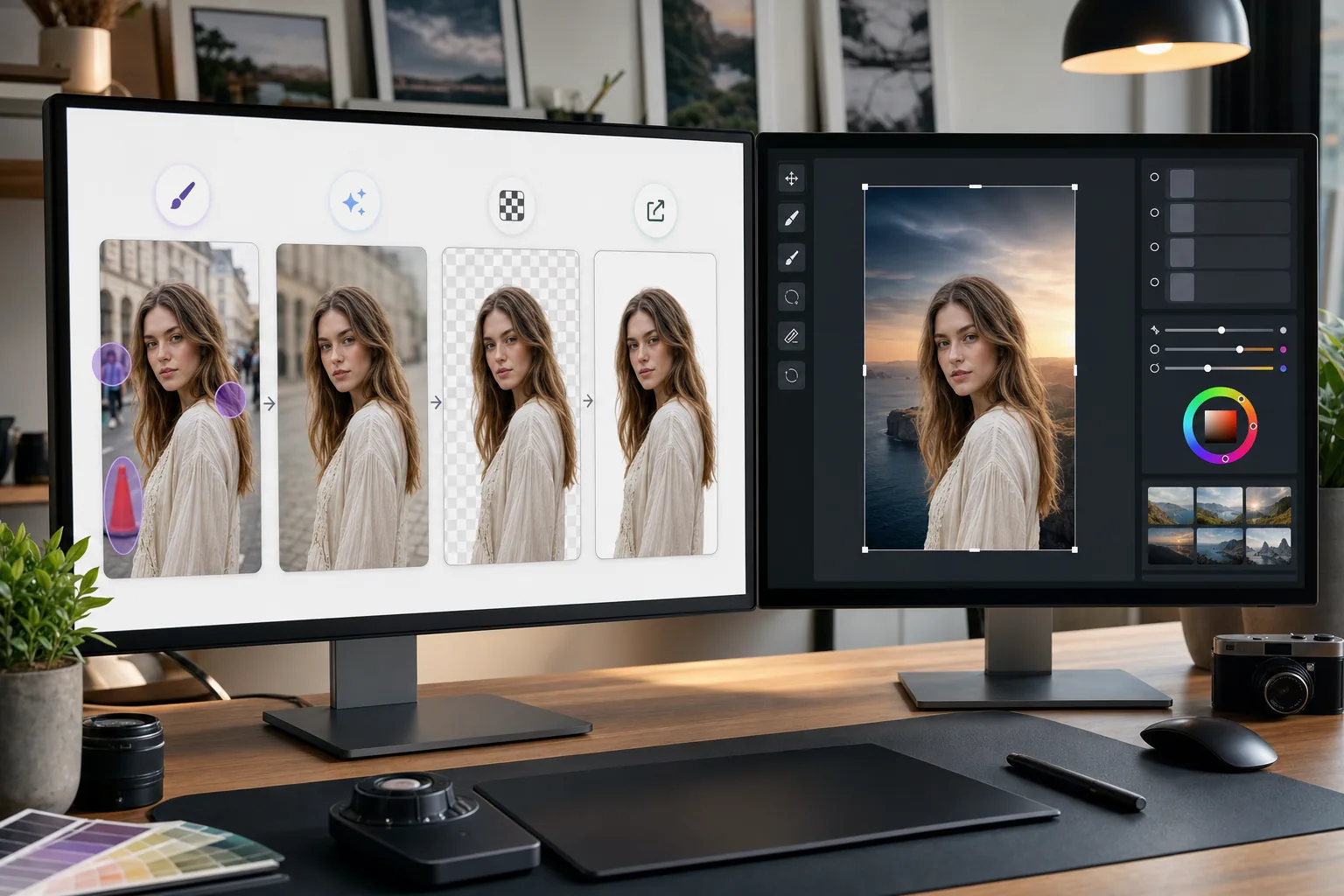
Photoshop 是详细图像编辑的行业标准。 Magic Eraser 处理快速清理任务 - 删除背景、擦除对象以及使用 AI 填充间隙 - 这样您就可以直接进入 Photoshop 中的精细工作。
关于 Adobe Photoshop
Adobe Photoshop 是全球摄影师、设计师和数字艺术家使用的专业图像编辑软件。它提供了用于合成、修饰、Color correction 和像素级编辑的高级工具。
优势
在详细编辑之前更快地清理
使用 Magic Eraser 在几秒钟内删除不需要的对象和干扰,而不是花时间使用 Photoshop 的克隆图章或修复画笔来完成简单的任务。
一键去除背景
通过 Magic Eraser 的人工智能背景去除功能立即隔离主体。将透明 PNG 导入 Photoshop 进行合成和高级遮罩。
AI 驱动的填充缺失区域
使用 Magic Eraser 的 AI 填充在移除对象后智能重建区域。结果为 Photoshop 优化提供了一个干净的起点。
简单任务的可用替代方案
并非所有图像都需要 Photoshop 的全部功能。在浏览器中使用 Magic Eraser 进行快速修复,并保留 Photoshop 来处理需要其高级工具集的工作。
如何在 Photoshop 中使用 Magic Eraser
上传至Magic Eraser
在浏览器中打开 Magic Eraser 并上传需要在 Photoshop 编辑之前进行初步清理的图像。
执行快速清理
删除背景、擦除不需要的对象或使用 AI 填充来处理在 Photoshop 中需要更长时间的简单编辑。
完全品质出口
将清理后的图像下载为 PNG 格式以保持透明度,或下载为高质量 JPEG 格式以保存不透明图像。
在 Photoshop 中打开进行详细工作
将处理后的图像导入 Photoshop 并继续进行高级编辑、修饰、合成或颜色分级。
常见问题解答
Magic Eraser 是否与 Photoshop 直接集成?
+
否。本页介绍的是手动导出和导入流程,并非 Photoshop 插件或直接集成。请先在 Magic Eraser 中编辑图像,下载为 PNG 或 JPEG,然后在 Photoshop 中打开该文件。
如果我已经有 Photoshop,为什么还要使用 Magic Eraser?
+
Magic Eraser 无需启动 Photoshop,即可在几秒钟内处理简单的清理任务。它的背景去除、对象擦除和基本清理速度更快,让您可以使用 Photoshop 来完成实际需要的工作。
Magic Eraser 会取代 Photoshop 吗?
+
不会。Magic Eraser 通过处理快速、人工智能驱动的任务来补充 Photoshop。 Photoshop 对于详细修饰、合成、色彩工作和像素级编辑仍然至关重要。
这两种工具之间可以使用哪些文件格式?
+
从 Magic Eraser 导出为 PNG(具有透明度)或高质量 JPEG。两种格式均可直接导入 Photoshop,并保留完整质量。
Magic Eraser 的背景去除和 Photoshop 一样准确吗?
+
对于大多数拍摄对象,Magic Eraser 的 AI 背景去除功能一键即可产生干净的结果。对于具有极其精细细节的图像(例如纤细的头发),您可能需要在 Photoshop 中进一步细化边缘。
我可以在 PSD 文件上使用 Magic Eraser 吗?
+
Magic Eraser 适用于标准图像格式,如 JPEG、PNG 和 WebP。从 Photoshop 导出拼合图像,在 Magic Eraser 中对其进行处理,然后将其带回到 PSD 项目中。
加快您的 Photoshop 工作流程
在深入进行详细的 Photoshop 编辑之前,请免费尝试 Magic Eraser 进行快速背景去除、对象擦除和 AI 填充。
免费尝试 Magic Eraser相关使用场景
了解专业人士如何在实际工作流程中使用这些工具。
相关对比
了解 Magic Eraser 与类似工具的对比。
TouchRetouch是一款热门的付费移动应用,专注于移除物体和瑕疵。Magic Eraser提供免费的AI编辑功能,无需安装即可在任何设备上使用。比较功能、价格和易用性。
Cleanup.pictures是一款免费的网页端快速物体移除工具。Magic Eraser提供8种AI编辑工具、移动应用和高级处理能力。查看详细对比。
remove.bg是抠图市场的领导者,提供强大的API以及Photoshop和Figma插件。Magic Eraser更进一步,将物体移除、生成填充、AI增强、设计等八大AI工具集于一体。
两款各具优势的强大AI照片编辑器。Magic Eraser提供更广泛的生成式AI工具集,而Photoroom在电商产品摄影和批量处理方面表现出色。看看哪款更适合您的工作流程。
其他集成
探索更多可与 Magic Eraser 搭配使用的平台。