Skip to content

用 AI Fill 做出更强的视觉效果

可以把 AI Fill 作为 Magic Eraser 更大图像编辑 workflow 的一部分来使用。

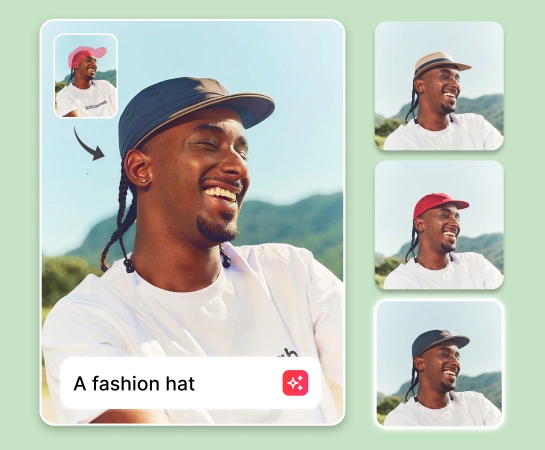
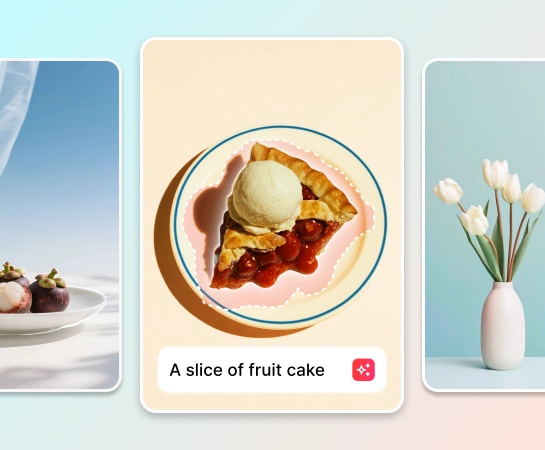
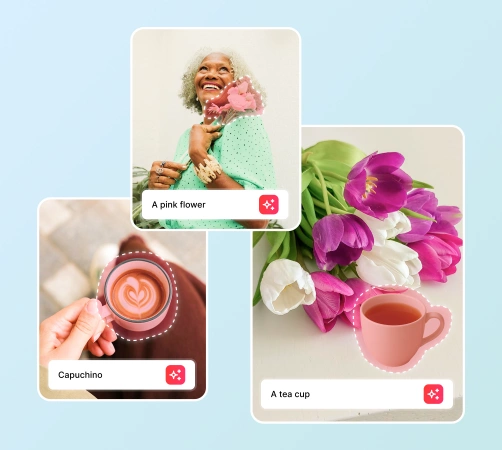
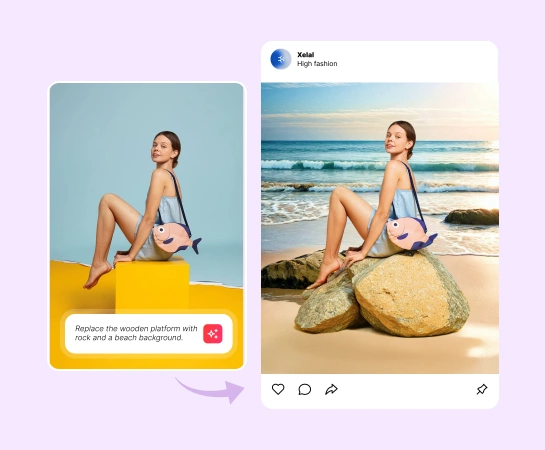
Magic Eraser AI Fill 是一款 AI 工具,帮助用户替换选中区域并重建缺失内容。常见用途包括商品编辑、社交创意、场景修复和活动清理。

用 AI Fill 做出更强的视觉效果

当你需要更干净的视觉结果和更顺滑的发布流程时,AI Fill 能帮助你更快完成制作。

试用AI Fill
AI Fill
AI Fill

加快实用型编辑 workflow

当你需要更干净的视觉结果和更顺滑的发布流程时,AI Fill 能帮助你更快完成制作。

试用AI Fill
AI Fill
AI Fill

把 AI Fill 用在电商、社交和营销场景中

当你需要更干净的视觉结果和更顺滑的发布流程时,AI Fill 能帮助你更快完成制作。

试用AI Fill
AI Fill
AI Fill

把 AI Fill 接入 Magic Eraser 的完整工具栈

当你需要更干净的视觉结果和更顺滑的发布流程时,AI Fill 能帮助你更快完成制作。

试用AI Fill
AI Fill
AI Fill

AI Fill 的使用方式

步骤 1

AI Fill

先准备一张符合当前 workflow 的原始图片。

步骤 2

AI Fill

执行 AI Fill 的核心操作,更快得到结果。

步骤 3

AI Fill

检查输出结果,并在需要时微调细节。

步骤 4

AI Fill

导出图片,或在其他 Magic Eraser 工具中继续编辑。

AI Fill 的核心能力

可以把 AI Fill 作为 Magic Eraser 更大图像编辑 workflow 的一部分来使用。

AI Fill

当你需要更干净的视觉结果和更顺滑的发布流程时,AI Fill 能帮助你更快完成制作。

去除物体

当你需要更干净的视觉结果和更顺滑的发布流程时,AI Fill 能帮助你更快完成制作。

去背景

当你需要更干净的视觉结果和更顺滑的发布流程时,AI Fill 能帮助你更快完成制作。

AI Enhance

当你需要更干净的视觉结果和更顺滑的发布流程时,AI Fill 能帮助你更快完成制作。

AI Expand

当你需要更干净的视觉结果和更顺滑的发布流程时,AI Fill 能帮助你更快完成制作。

设计编辑器

当你需要更干净的视觉结果和更顺滑的发布流程时,AI Fill 能帮助你更快完成制作。

AI Filter

当你需要更干净的视觉结果和更顺滑的发布流程时,AI Fill 能帮助你更快完成制作。

AI Create

当你需要更干净的视觉结果和更顺滑的发布流程时,AI Fill 能帮助你更快完成制作。

团队如何使用 AI Fill

下面这些例子展示了 AI Fill 如何帮助团队更快完成图像制作。

"AI Fill 帮助我们的团队减少了手工编辑时间,同时让输出更稳定。"

A. Nguyen
内容 workflow

"当我们需要提升产出速度而又不想增加工具复杂度时,就会用到 AI Fill。"

Linh Tran
营销 workflow

"AI Fill 很适合融入我们的内容、商品图和活动资产 workflow。"

Minh Pham
电商 workflow

"最大的价值是速度:从原始图片到可用资产的时间明显缩短了。"

Hoang Le
创意运营

常见问题

AI Fill 的目标是帮助用户 替换选中区域并重建缺失内容。

AI Fill 很适合用于 商品编辑、社交创意、场景修复和活动清理。

可以。很多团队会把 AI Fill 与清理、增强、生成和设计类 workflow 结合在同一个工具栈里使用。

适合。当内容和营销工作需要更快、更稳定的视觉产出时,AI Fill 很有价值。

常见流程很简单:从图片开始,标记区域、描述替换内容,并让 AI 进行重建,检查结果,然后导出或继续编辑。

其他对比

了解Magic Eraser与其他照片编辑工具的对比。

2025年最佳AI照片编辑器 — 全面对比

我们测试并对比了顶级AI照片编辑工具。从物体移除到背景替换,看看哪个编辑器能为你的工作流程提供最佳效果。

Magic Eraser vs Photoshop: Which Photo Editor Fits Faster Workflows?

Photoshop is the industry standard for deep image editing, but many people only need fast object removal, clean backgrounds, and AI-powered fixes. Magic Eraser focuses on those jobs with a lighter workflow that works in seconds on web and mobile.

Magic Eraser vs Inpaint: Which Tool Removes Distractions More Efficiently?

Inpaint is a recognizable name for removing unwanted objects from photos. Magic Eraser builds on that workflow with broader AI editing tools, faster cross-device access, and more useful cleanup features beyond a single task.

The Faster Photoshop Alternative for Everyday Photo Editing

Adobe Photoshop is powerful, but most people only use a fraction of its features. Magic Eraser delivers the photo cleanup tools you actually need — object removal, background removal, AI enhancement, and generative fill — in a simpler interface that works on web and mobile with no subscription required to start.

Magic Eraser vs Adobe Express: Which Is Better for Photo Cleanup?

Adobe Express bundles photo editing inside a design and content-creation suite tied to Adobe Firefly. Magic Eraser is purpose-built for AI photo cleanup: object removal, background replacement, generative fill, and enhancement. This comparison shows where each tool fits best.

Magic Eraser vs Pixelcut: Which AI Photo Editor Should You Pick?

Magic Eraser and Pixelcut both offer AI-powered photo editing across web, iOS, and Android with free tiers and paid Pro tiers. Pixelcut leans heavily into e-commerce product photos with templates. Magic Eraser is purpose-built for AI cleanup tasks across the full range of photo work. This comparison shows where each tool wins.

相关使用场景

了解专业人士如何在实际工作流程中使用这些工具。

几秒钟移除房产照片中的多余物体

充满个人物品、停放车辆或施工设备的房源照片会让买家望而却步。Magic Eraser利用AI瞬间清理你的房产照片——无需任何修图技能。

去除照片中的文字、字幕、日期水印和覆盖层

截图上满是字幕、旧照片印着日期水印、图片被文字覆盖?Magic Eraser的AI文字去除工具可以擦除任何不需要的文字,并自然重建背景,让你的照片干净又专业。

Yearbook Photo Editing with AI Tools

Yearbook photos need consistent backgrounds, even lighting, and clean portraits. Magic Eraser helps schools, studios, and parents get professional-looking results without expensive retouching workflows.

Food Photography Cleanup with AI Editing

Great food photos drive orders and engagement, but messy tables, utensils, and background clutter ruin the shot. Magic Eraser helps restaurants, food bloggers, and delivery platforms clean up food images fast.

Pet Photo Editing with AI Tools

Pet photos rarely come out the way you want. The dog moves, the cat is half in shadow, the background is full of clutter. Magic Eraser handles all of that in seconds — background swaps, leash removal, blur cleanup, sharper fur — without manual masking or expensive software.

Virtual Staging with AI

Empty listings sit on the market longer because buyers struggle to visualize the space. Virtual staging with AI fills the rooms with furniture in the style your buyer wants — modern, transitional, coastal, traditional — in minutes per room instead of days. Magic Eraser handles the pre-staging cleanup (paint touch-ups, painter's tape, debris) and the post-staging polish (lighting refinement, edge cleanup).

Restaurant Menu Photo Editing

Dish photos move delivery and dine-in revenue more than menu copy ever will. Magic Eraser turns phone-shot food photos into delivery-platform-ready images: clean the cluttered table, enhance the dish, swap to a brand-consistent background, and export to DoorDash, Uber Eats, Yelp, and Instagram specs without a food photographer.

YouTube Thumbnail Editing for Creators

YouTube thumbnails decide 50-70% of the click decision in the first 1-2 seconds of feed exposure. Magic Eraser handles the workflow that lets creators ship higher-CTR thumbnails in 25-40 minutes per video: subject isolation via Background Eraser, dark-mode-feed color contrast via AI Filter, clean text-overlay surfaces via AI Fill, and 2-3 distinct variants ready for YouTube's native Test & Compare in under 30 minutes.

Travel Photo Editing for Trip Recaps and Memory Books

Travel photos are the most-edited and most-shared images on most cameras — and the hardest to fix manually. Crowds at every landmark, harsh midday sun, lens glare from phone cameras pressed against bus windows, dim interiors, and decades-old film scans that finally need restoration. Magic Eraser handles every common travel-photo failure mode in seconds, on the same phone you took the photo with.

Pinterest Pin Design for Bloggers, Creators, and Small Brands

Pinterest is a visual search engine, not a social feed — pins keep earning impressions for 6-18 months on evergreens and 2-5 years on seasonal evergreens like holiday recipes and gift guides. That long-tail traffic only compounds if every pin is built for the 2:3 vertical canvas at 1000×1500 displayed at ~320px on mobile (85%+ of Pinterest traffic). Magic Eraser's AI tools turn a landscape source photo library into pin-ready vertical compositions in 2-3 minutes per pin instead of 20-40 minutes in Photoshop.

Online Course Creator Photo Workflow: Sales Page to Last Lesson

Online course businesses live or die by their visual production quality. The sales-page hero photo, the instructor headshot in the bio section, the in-lesson screenshots, the social-promo carousels driving traffic to the sales page, and the email-newsletter inline imagery in the launch sequence — every one of those surfaces directly affects conversion, completion, and refund rates. Magic Eraser handles the full course-creator image workflow without a designer on staff, on the same laptop or phone you record courses with.

Podcaster Photo Workflow: Cover Art, Guest Graphics, Per-Season Refresh

Podcasting is a uniquely visual-poor medium that lives or dies by its visual surfaces. The cover art is the most-viewed surface of every podcast brand, displayed at 56-100px in feed where new listeners decide whether to tap in under a second. The supporting graphic set per episode (Instagram squares, Stories, TikTok, YouTube audiogram covers, email-newsletter inline imagery) is where the show's growth happens between episodes. Magic Eraser handles the full podcaster visual stack — 3000×3000 cover art, host-portrait libraries, per-episode guest graphics, per-season AI refreshes, supporting graphic sets — without a designer on staff, on the laptop or phone you record episodes with.

Self-Published Author Photo Workflow: Covers, Headshots, BookTok, Series

Indie authors compete with traditional publishing on Amazon's discovery surface where the same algorithms, the same readers, and the same 100-150px mobile-thumbnail decision window apply equally to both. The difference is the production budget — traditional publishers have in-house art departments and marketing teams; indie authors have to handle covers, author headshots, BookTok and Instagram promo, A+ Content modules, and series-consistent visual identity themselves. Magic Eraser preps the full self-published author visual stack — book covers that survive the thumbnail render, author headshots for back covers and bios, social-promo across BookTok / Instagram / Pinterest, Amazon A+ Content modules, and series-consistent presets across 3-12 books — in minutes per asset instead of $400-1500 of designer time per book.

Newsletter Writer Photo Workflow: Hero Images, Inline Imagery, Notes, Author Photos

Newsletter writing in 2026 is platform-fragmented across Substack (35M+ subscribers), beehiiv, ConvertKit, Ghost, and Beehiiv-adjacent indie tools — and the visual surfaces have multiplied with each platform's discovery features (Substack Notes, beehiiv Boost, Ghost's recommendation network). Newsletter writers need post hero images that survive every platform's render pipeline, author photos that work across bylines and email signatures, microblog imagery for the discovery-driving feed surfaces, and email-newsletter inline graphics that render across Gmail / Apple Mail / Outlook. Magic Eraser preps the full newsletter visual stack — phone-to-publish in minutes per asset — without a designer on staff.

Interior Design Portfolio: Clean Rooms, Correct Lighting & Extend Compositions

An interior designer's portfolio is the primary sales tool for landing new clients — prospective homeowners and commercial clients evaluate design sensibility, style range, and attention to detail entirely through project photography. The challenge is that completed projects are photographed in occupied spaces where client belongings, everyday clutter, power cords, and personal items compete with the design work for visual attention. Magic Eraser removes the distractions that undermine design photography, AI Enhance corrects the mixed-lighting conditions endemic to interior spaces, and AI Fill extends tight compositions to show the full spatial context of the design.

Common removals with this tool

Quick guides for specific things people remove most often.

相关文章

查看与此工作流程相关的更多指南和编辑内容。

AI Fill - Magic Eraser