
Удалить знаки с фотографий
Удалите уличные знаки, вывески о продаже, деловые вывески, размещенные объявления и баннеры с фотографий недвижимости, фотографий из путешествий и фотографий на открытом воздухе. Magic Eraser удаляет знак и реконструирует стену, небо, пейзаж или фасад здания за ним.
Последнее обновление
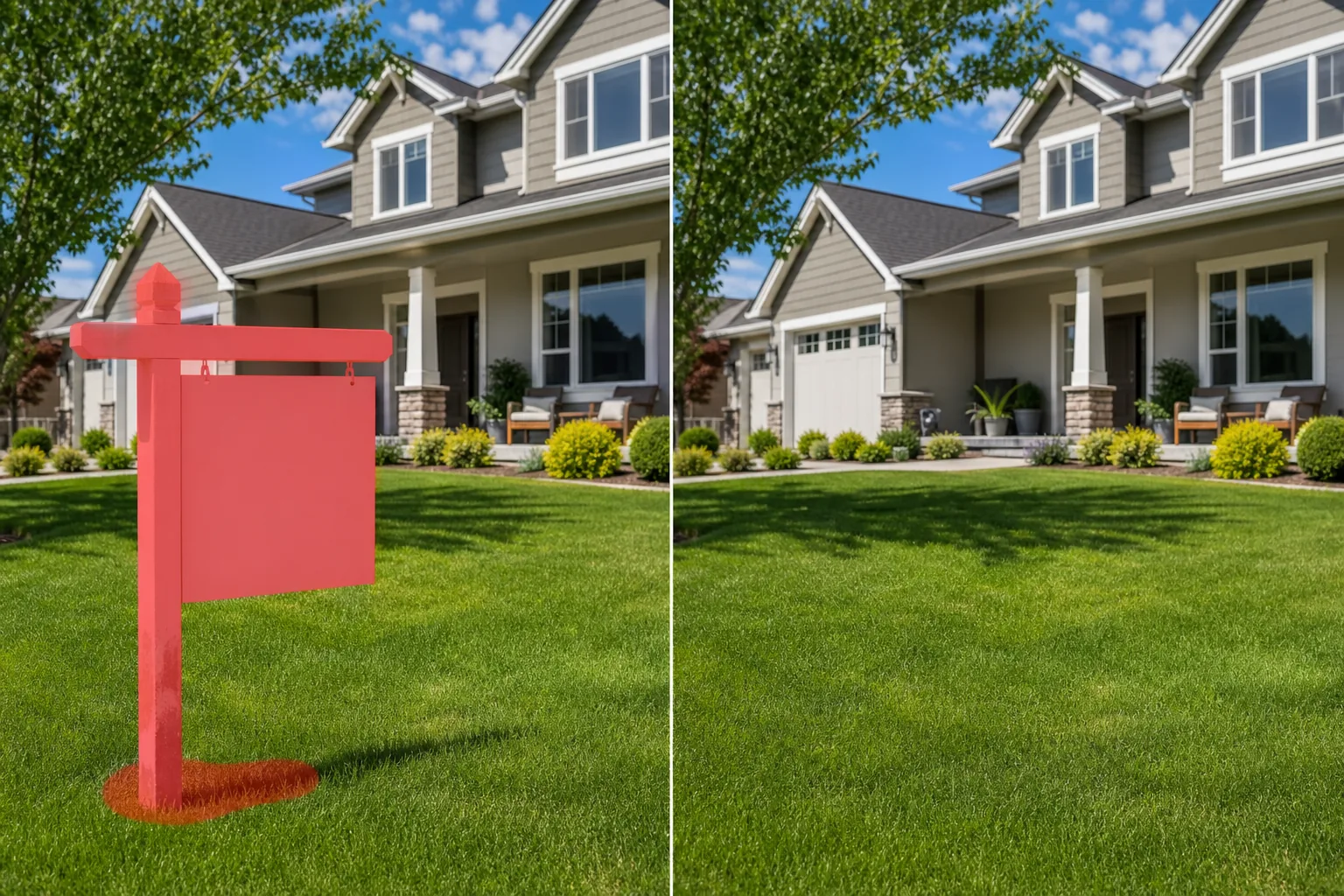
Когда знаки загромождают композицию
Чтобы убрать вывеску или знак с фотографии, откройте Magic Eraser в браузере, на iOS или Android, загрузите снимок, закрасьте кистью знак — вместе со столбом, рамкой и тенью, которую он отбрасывает, — и нажмите «Стереть». ИИ восстановит то, что находится за ним: кирпичную стену, забор, открытое небо, траву или фасад здания. Это бесплатно и без регистрации. Если на кадре много знаков, закрасьте каждый по очереди; на однотонном фоне вроде неба или ровной стены заливка получается почти незаметной, а на детализированном фоне может понадобиться быстрый повторный проход. Знаки при съемке на открытом воздухе повсюду — и редко там, где вы хотите. Вывеска «Продается» на лужайке красиво оформленного объекта недвижимости. Табличка «Посторонним вход воспрещен» на заборе в живописном месте. Дорожные знаки и знаки парковки загромождают архитектурный кадр. Деловая вывеска соседнего магазина мешает фотографии витрины. Развешивание объявлений на стенах во время фотосъемки места проведения мероприятия. Каждый знак добавляет визуальный шум, который отвлекает от объекта и может датировать или находить фотографию нежелательным образом. Фотографы недвижимости удаляют конкурирующие вывески с фотографий. Фотографы-путешественники убирают вывески, которые разрушают ощущение вневременности снимка, снятого в пункте назначения. Фотографы на местах проведения мероприятий стирают вывешенные правила и знаки пожарного выхода, которые портят элегантность места приема. Magic Eraser обрабатывает различные поверхности, на которых расположены знаки — стены, заборы, небо, трава, фасады зданий — реконструируя чистый фон позади каждого знака.
Удалить вывеску за три шага
- 1
Загрузите свою фотографию
Откройте Magic Eraser в Интернете, на iOS или Android и загрузите фотографию на улице, недвижимости или мероприятия с вывеской, которую хотите удалить.
- 2
Кисть над знаком
Закрасьте весь знак, включая стойки, кронштейны и крепежные детали. Учитывайте тень, которую знак отбрасывает на стену или землю. Если вы хотите, чтобы знаки на столбах были удалены полностью, протрите и сам столб.
- 3
Стереть и проверить
Нажмите «Стереть», и ИИ удалит знак и реконструирует стену, забор, небо или пейзаж, который находился за ним. Убедитесь, что текстура и цвет реконструированной поверхности соответствуют окружающей местности. Экспортируйте чистую фотографию.
Лучшее для
- Фотографии объявлений о недвижимости с конкурирующими или отвлекающими вывесками.
- Фотографии путешествий и мест назначения с нежелательными вывесками
- Архитектурная фотография, где вывески нарушают дизайн фасада
- Фотографии места проведения мероприятия с указанием пожарного выхода и предписаниями
- Фотография витрины магазина с видимыми соседними бизнес-вывесками
- Места для портретов на открытом воздухе с опубликованными правилами или предупреждениями.
- Стоковая фотография, на которой знаки добавляют нежелательный текст или локализацию.
- Документация по историческому строительству, в которой современные знаки являются анахронизмом.
Советы по чистому удалению вывески
Удаление знаков работает лучше всего, когда фоновая поверхность имеет однородную текстуру — кирпичные стены, окрашенные поверхности, чистое небо и однородные заборы — все восстанавливается аккуратно. Для знаков на сложном фоне (знак, частично перекрывающий окно и стену) ИИ обрабатывает обе поверхности, но в точке перехода может потребоваться второй проход. Включите в выделение тень знака — затянувшаяся тень без знака выглядит неестественно. Если вывеска «Продается» на газоне, зачистите вывеску, столб и любую тень на траве. Искусственный интеллект реконструирует поверхность газона. Для уличных знаков на столбах решите, следует ли удалить только лицевую сторону знака или весь столб — удаление столба также дает более чистый результат, но требует реконструкции большего количества неба или фона. Для текста на стенах (в стиле граффити или наклеенных плоско размещенных объявлений) ИИ удаляет текст и реконструирует текстуру и цвет стены под ним.
Часто задаваемые вопросы
- Может ли он удалить надпись «Продается» с фотографии объявления?
- Да. Закрасьте вывеску, столб и тень на лужайке. ИИ удаляет всю структуру знака и реконструирует чистый газон и фон позади знака.
- Работает ли это на знаках, прикрепленных к зданиям?
- Да. Почистите знак и монтажные кронштейны. ИИ реконструирует поверхность стены, подбирая кирпич, краску, штукатурку или любой другой материал, к которому была прикреплена вывеска.
- Может ли он удалить текст, нарисованный прямо на стене?
- Да. Нарисованный текст, размещенные объявления и вставленные знаки — все это обрабатывается одним и тем же рабочим процессом «кисть и стирание». Искусственный интеллект реконструирует чистую поверхность стены под текстом.
- Демонтаж вывески бесплатный?
- Да. Уровень бесплатного пользования Magic Eraser включает удаление знаков. Загрузите свою фотографию, зачистите ненужные вывески и экспортируйте чистую версию.
- Как убрать знак с фотографии прямо на телефоне?
- Откройте Magic Eraser в любом мобильном браузере или в приложении для iOS либо Android, загрузите фото из галереи и приблизьте знак щипком. Пальцем закрасьте весь знак — вместе со столбом и рамкой — и нажмите «Стереть». Приближение помогает аккуратно обвести края на фоне стены, забора или неба. Результат не уступает версии для компьютера и сразу сохраняется обратно в галерею.
- Можно ли убрать сразу несколько знаков с одного фото?
- Да. Закрасьте все знаки, которые хотите убрать, за один проход — скопление дорожных знаков, ряд объявлений или табличку «Продаётся» вместе с вывеской соседей — и нажмите «Стереть» один раз. ИИ восстанавливает каждый участок фона по отдельности. Если два знака стоят на очень разных поверхностях, бывает удобнее закрашивать и проверять их по одному, чтобы каждая заливка совпадала со своим фоном.
- Не будет ли заметно, что стену или небо за знаком «подлатали»?
- На простом фоне — открытом небе, ровной окрашенной стене, однородном заборе — заливка обычно бесшовная. Сложные фоны вроде кирпичной кладки, листвы или фактурного фасада даются труднее: закрасьте чуть дальше края знака и тени, которую он отбрасывает, затем увеличьте до 100% и проверьте стык. Короткий повторный проход по разрыву в повторяющемся узоре выровняет картинку.