
Удалить темные круги с фотографий
Устраните темные круги под глазами, отечность и усталый вид глаз на портретах, снимках головы и профессиональных фотографиях. Magic Eraser уменьшает обесцвечивание и восстанавливает естественный, обновленный вид — без чрезмерной ретуши, которую создают тяжелые косметические фильтры.
Последнее обновление
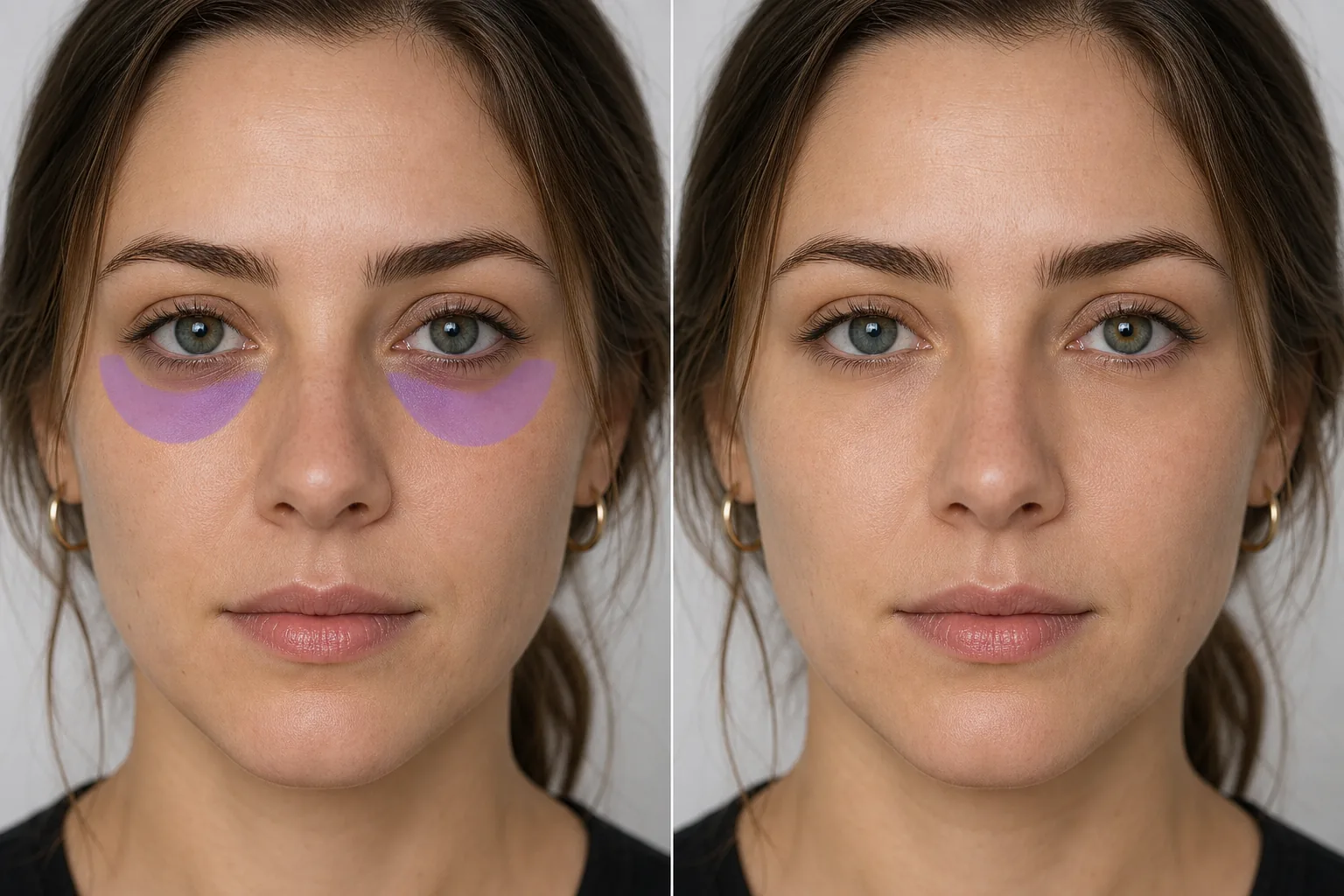
Как убрать тёмные круги под глазами на фото
Чтобы убрать тёмные круги под глазами на фото, откройте Magic Eraser в браузере, на iOS или Android, загрузите свой портрет, проведите кистью по области под глазами — и ИИ уберёт потемнение, сохранив естественный контур глазницы и текстуру кожи. Это бесплатно и без регистрации. Редактируется только фото — меняется лишь то, как кожа выглядит на снимке, а на реальную область под глазами и на ваше здоровье это никак не влияет. Для максимально естественного результата не стирайте круги полностью, а смягчайте их: лёгкая тень под глазами — это нормально, а если убрать её полностью, лицо может выглядеть как маска. Сохраняйте узнаваемость, особенно для портретов и фото на документы. Темные круги под глазами — одна из самых частых запросов на ретушь в портретной фотографии. Поздние ночи, аллергия, генетика, старение и обезвоживание — все это способствует появлению синевато-фиолетового или коричневого цвета в впадинках под глазами. Студийное освещение может их преувеличить — верхний свет отбрасывает тени на орбитальную область, из-за чего круги кажутся глубже и темнее, чем они кажутся вживую. Вспышка на камере делает обратное, но создает свои проблемы. Результат: клиенты, которые вживую выглядят отдохнувшими, на фотографиях выглядят измученными. Традиционная ретушь требует тщательной работы с Color correction, сохраняя естественный контур под глазами и одновременно уменьшая темный тон. Искусственный интеллект Magic Eraser обрабатывает это автоматически: проведите кистью по темной области, и искусственный интеллект устранит обесцвечивание, сохраняя при этом естественный контур глазницы и текстуру кожи.
Исправьте темные круги под глазами за три шага
- 1
Загрузите свой портрет
Откройте Magic Eraser в Интернете, на iOS или Android и загрузите снимок или портрет с видимыми кругами под глазами.
- 2
Кисть под глаза
Закрасьте затемненную область под каждым глазом. Следуйте естественному изгибу области под глазами. Включите всю обесцвеченную зону, но не затрагивайте складку нижнего века — сохранение естественной линии века даст наиболее правдоподобный результат.
- 3
Стереть и просмотреть
Нажмите «Стереть», и искусственный интеллект уменьшит темное пятно, осветлив область под глазами, чтобы она соответствовала тону кожи вокруг щек. Естественный контур глазницы сохраняется. Убедитесь, что оба глаза выглядят симметрично, затем экспортируйте.
Лучшее для
- Профессиональные снимки, на которых клиенты выглядят более уставшими, чем они есть на самом деле.
- Свадебные портреты после долгого приема
- Корпоративные фотографии команды в безупречном внешнем виде
- Актерские снимки, требующие свежего, энергичного взгляда
- Фотографии профилей в LinkedIn и социальных сетях
- Скриншоты видеозвонков и портреты виртуальных событий
- Фотографии на паспорт и удостоверение личности, на которых круги подчеркнуты вспышкой.
- Фотографии мероприятий ранним утром или поздним вечером
Советы по естественной коррекции темных кругов
Цель – сокращение, а не устранение. Полное удаление всех теней под глазами может выглядеть неестественно, поскольку глазница естественным образом создает небольшую глубину тона. ИИ стремится к естественному сокращению, благодаря которому человек выглядит отдохнувшим, а не отдохнувшим. Наносите кистью точно по темным участкам — слишком широкое нанесение на щеки или слишком высокое на нижнее веко меняет геометрию лица. При сильных темных кругах (очень темно-фиолетовых или коричневых) один проход дает значительное улучшение; второй проход может еще больше уменьшить оставшееся обесцвечивание. Если круги сочетаются с отечностью (мешки под глазами), ИИ устраняет изменение цвета; физический контур отечности остается частью структуры лица. На фотографиях с резким верхним освещением, создающим искусственные тени под глазами, применение инструмента AI Enhancement ко всему изображению сначала может уменьшить тень перед целевой коррекцией круга.
Часто задаваемые вопросы
- Будет ли это выглядеть так, будто я использую консилер?
- Нет. AI уменьшает темный тон, сохраняя при этом естественную текстуру кожи и тонкий контур под глазами. Результат выглядит как отдохнувшая версия лица, а не эффект макияжа.
- Можно ли убрать мешки под глазами?
- ИИ эффективно борется с обесцвечиванием. Физическая отечность (приподнятый контур мешков под глазами) – структурная особенность, которую средство уменьшает, но не может полностью устранить, так как полное ее удаление может выглядеть неестественно.
- Одинаково ли он действует на оба глаза?
- Для максимально естественного результата расчешите область под глазами каждого глаза отдельно. Искусственный интеллект обрабатывает каждую область независимо, согласовывая коррекцию с конкретным тоном и освещением каждой стороны.
- Удаление темных кругов бесплатно?
- Да. Уровень бесплатного пользования Magic Eraser включает коррекцию зоны под глазами. Загрузите свой портрет, нарисуйте под глазами и бесплатно экспортируйте обновленный результат.