
時計の製品写真
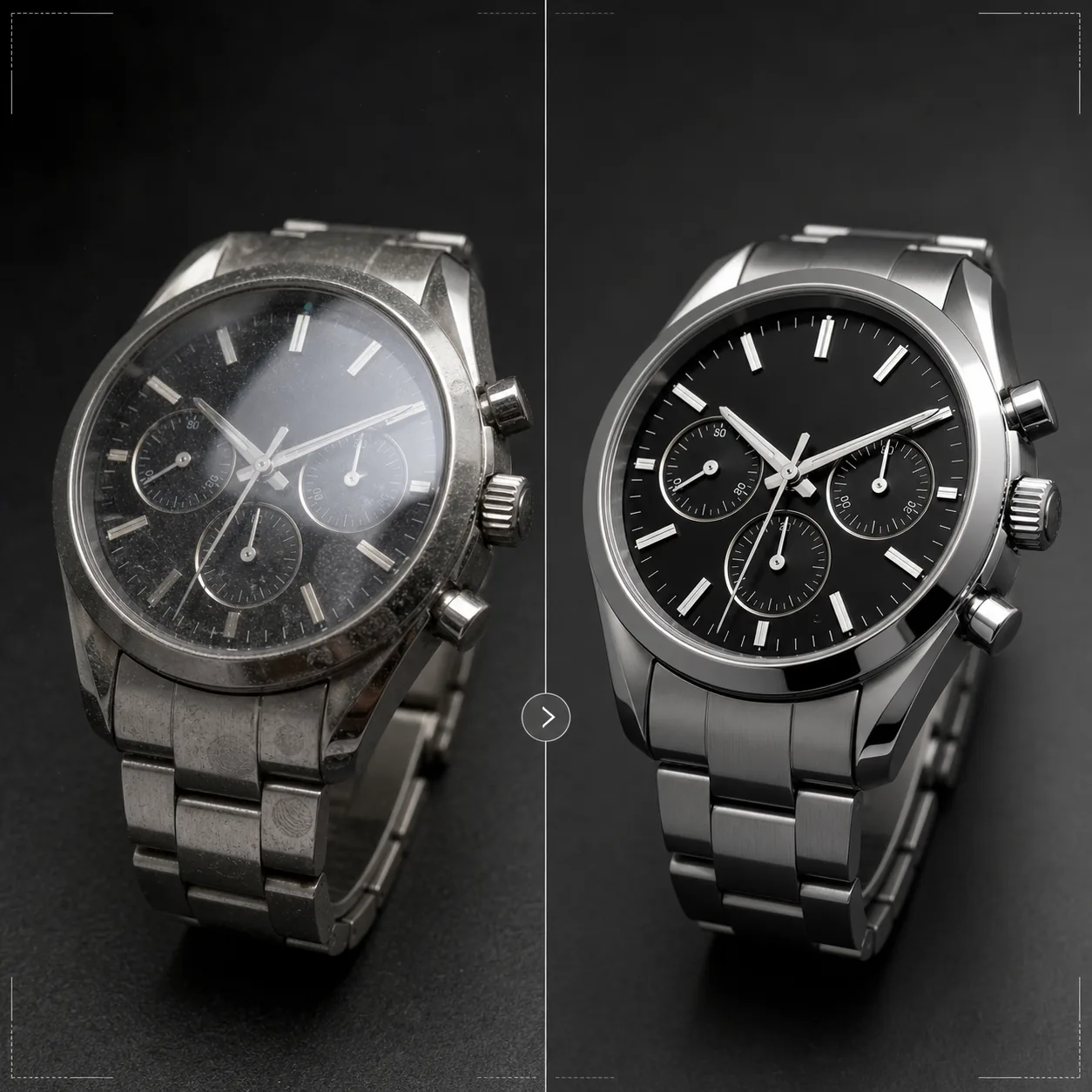
時計にふさわしい精緻さで魅せましょう。このテンプレートは文字盤の細部やインデックスを鮮明にし、風防の反射を制御し、ブレスレットとケースの金属質感を引き立て、研磨面のほこりや指紋を除去し、高級ECサイトの商品掲載やカタログ用に画像を仕上げます。
このテンプレートを無料で試すE-commerce template preview
このテンプレートでできること
わずかな細部が購入者にとって極めて重要となる時計撮影ならではの課題に対応します。時計の文字盤にはインデックス、サブダイヤル、日付窓、印字といった精緻なディテールが詰まっており、品質を伝えるには画像が極めてシャープである必要があります。このテンプレートはAI Enhanceを使い、画像全体の自然さを保ちながら文字盤の要素を選択的に鮮明化します。Magic Eraserは文字盤上のほこり、研磨されたケースの指紋、高倍率で目立つ風防の小さな傷を除去します。風防の反射を抑えて下の文字盤がはっきり見えるようにし、ケースやブレスレットの金属質感を引き立てて、時計の購入者が入念に評価するヘアライン仕上げと鏡面仕上げの違いを際立たせます。
テンプレート設定
| 文字盤の鮮明化 | 選択的なマイクロディテール強調(インデックス、針、文字) |
| 風防の反射 | サファイア/ミネラルガラスのギラつきと反射を低減 |
| 金属質感 | ヘアライン仕上げと鏡面仕上げの違いを強調 |
| 表面のクリーンアップ | ほこり、指紋、小さな傷を除去 |
| 出力解像度 | 4000 × 4000 px(ズーム表示向けのマクロディテール) |
| 背景 | 純白、濃色の単色、またはグラデーション(高級商品の標準) |
このテンプレートの使い方
時計の写真をアップロード
時計の商品写真をアップロードします — 着用ショット、フラットレイ、クッションやスタンドに置いたスタジオ撮影に対応。文字盤面のマクロ接写やケースの側面ビューもサポートします。最良の結果を得るには、ロゴをきれいに収めバランスの取れた左右対称の構図を作る業界標準の10時10分の針位置で撮影してください。
文字盤とディテールの強調
AI Enhanceが文字盤を選択的に鮮明化します — 時刻マーカー、針、サブダイヤル、日付窓、印字がくっきりと読みやすくなります。インデックスの夜光ドットはわずかに明るくしてその存在を示します。強調処理は元の撮影の被写界深度を尊重し、意図的にぼかした部分は柔らかいまま保ちます。
表面のクリーンアップと反射制御
Magic Eraserが文字盤上のほこり、ケースやブレスレットの指紋、風防の小さな傷を除去します。風防の反射を抑えて下の文字盤全体を見せつつ、ガラスの存在感を伝えるのに十分な反射は残します — 反射を完全に消すと時計が非現実的に平らに見えてしまいます。
掲載用またはカタログ用に書き出し
ズーム対応のECサイト掲載用には4000 × 4000 pxで、カタログや広告用には印刷解像度でダウンロードできます。背景オプションには、マーケットプレイス掲載向けの純白、高級ブランドの美学向けの濃色単色、編集用途向けのグラデーションがあります。
最良の結果を得るためのプロのヒント
- ✓針を10時10分または10時08分に合わせて時計を撮影しましょう — この位置はブランドロゴを両針の間に収め、日付窓とサブダイヤルの両方をはっきり見せ、時計業界全体で使われる視覚的にバランスの取れた構図を作ります。
- ✓マクロレンズや接写モードを使って文字盤のディテールを最大限に捉えましょう。このテンプレートは既存のディテールを鮮明にできますが、撮影されていないディテールを作り出すことはできません — 文字盤のディテールがより多い高解像度の元画像なら、はるかに良い結果が得られます。
- ✓金属ブレスレットの時計では、ヘアライン仕上げと鏡面仕上げの違いが見えるよう光の角度を調整しましょう。このテンプレートはそのコントラストを強調しますが、表面の違いが見える状態から始めると最も印象的な仕上がりになります。
- ✓撮影直前にマイクロファイバークロスで時計を拭きましょう。Magic Eraserはほこりや指紋を除去しますが、きれいな状態から始めればAIによる再構築が少なく済み、クリーンアップした部分の金属質感をより正確に保てます。
E-commerce workflow
Product photo hub
Use this template with the full ecommerce product photo workflow for marketplace backgrounds, cleanup, compression, resizing, and listing-ready exports.
View ecommerce product photo workflowよくある質問
反射で文字盤が隠れている写真も修正できますか?
+
中程度の反射であれば抑えて下の文字盤のディテールを見せることができます。ただし、反射が強すぎて元の写真に文字盤のディテールがまったく写っていない場合、AIは元々写っていないディテールを作り出すことはできません。最良の結果を得るには、風防への直接の反射を最小限に抑える位置に光源を置いて撮影してください。
スマートウォッチでも使えますか?
+
はい。スマートウォッチの画面は、インターフェース要素を鮮明にしガラスの指紋を低減して強調します。このテンプレートは従来のアナログ文字盤とデジタル表示の両方を認識し、鮮明化のアプローチをそれに応じて調整します。
時計のバンドやストラップはどうですか?
+
レザーストラップは、シボやステッチのディテールを見せる質感強調を受けます。NATOストラップや布製ストラップは控えめな質感の鮮明化が施されます。金属ブレスレットはヘアライン/鏡面仕上げの強調を受けます。時計全体 — ケース、風防、文字盤、ストラップ — が一つの完成された製品として処理されます。
Related templates
More e-commerce templates for your workflow.
製品写真用の純白の背景テンプレート。 Amazon、Shopify、マーケットプレイスに対応したクリーンでプロフェッショナルな製品画像を変換するための設定。
Etsy に最適化されたリスティング写真テンプレート。ライフスタイルのショットを 2000 ピクセルのきれいな白い背景に変換し、手作りの製品の詳細を強調し、Etsy の画像ガイドラインを満たします。
eBay に最適化された出品写真テンプレート。ギャラリー画像の白い背景、状態文書の強化、eBay の画像基準を満たすマルチアングル レイアウト。
リング、ネックレス、時計用のプロ仕様のジュエリー写真テンプレート。反射を制御し、宝石の輝きを高め、きれいな背景で市場にすぐに使える画像を提供します。
マーケットプレイス出品用のプロフェッショナルな家具の写真テンプレート。部屋の雑然としたものを取り除き、実際の寸法を表示し、きれいな背景またはスタイルされた部屋のコンテキストで作品を表示します。
しわの除去、糸くずの除去、純白の背景、正確な生地の色を使用して、衣類の平置き写真をクリーンアップします。 Shopify、Amazon、ブティック ストアに対応。