
Etsy 出品画像
キッチンテーブルで撮った商品写真を Etsy のベストセラー画像に変えましょう。このテンプレートは雑然とした背景を取り除き、手作り品を特別なものにする細部を強調し、Etsy 推奨の最低 2000px で出力します。検索サムネイルと出品ズーム機能の両方に最適化されています。
このテンプレートを無料で試すE-commerce template preview
このテンプレートの機能
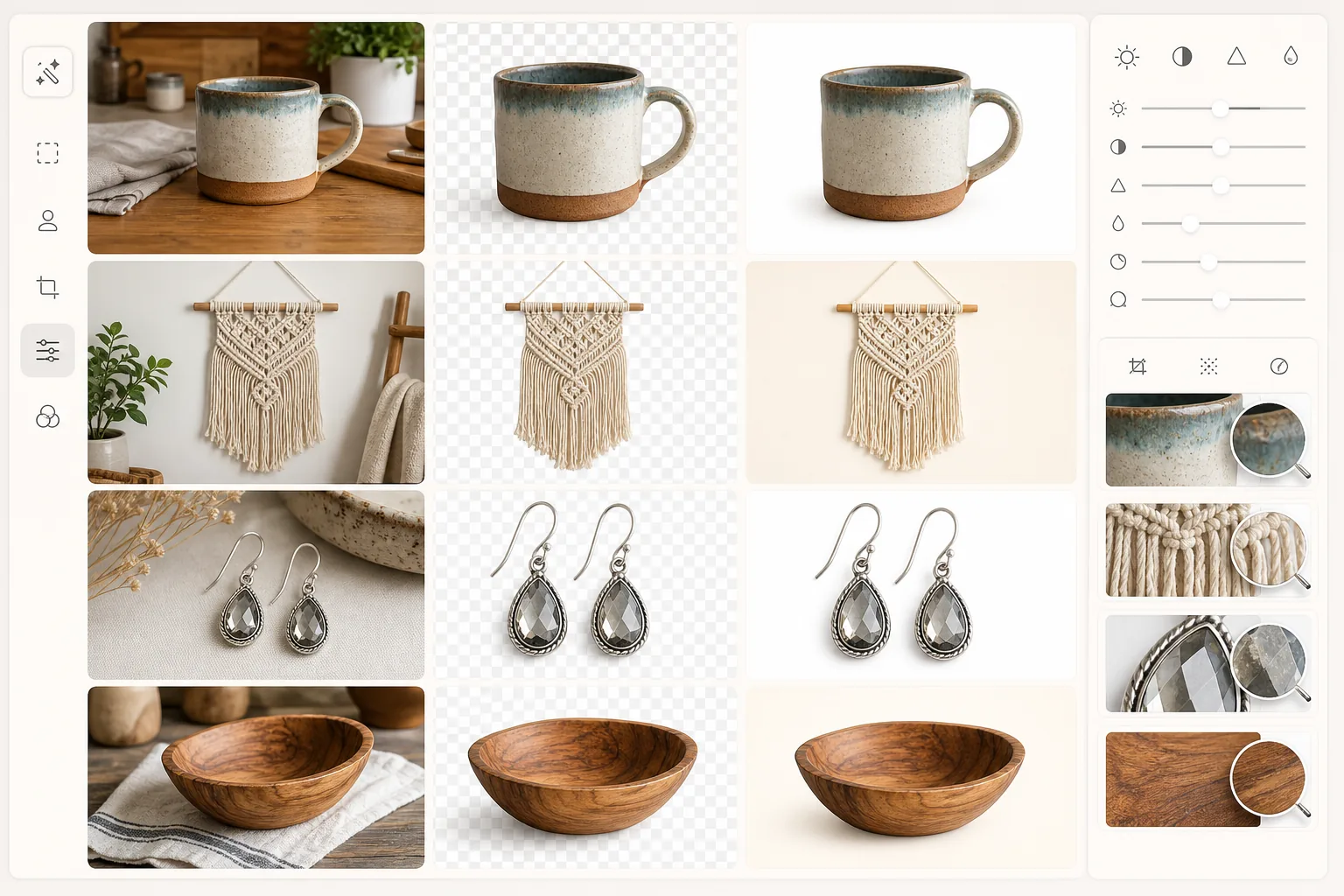
ライフスタイルやカジュアルな商品写真を、清潔でプロフェッショナルな Etsy 出品画像に変換します。テンプレートは背景を取り除き、純白または柔らかなニュートラルなトーンに置き換え、縫い目や木目、ジュエリーのカット面といった細かなテクスチャをシャープにし、色補正を行って手作り品が実物と全く同じに見えるようにします。出力は完全なズーム機能のために Etsy 推奨の 2000px サイズを満たします。
テンプレート設定
| 出力サイズ | 2000×1600px(Etsy 推奨の 5:4 比率) |
| 背景 | 純白(#FFFFFF)または柔らかなクリーム色(#FAF8F5) |
| ディテールのシャープ化 | テクスチャ対応(縫い目、木目、カット面を強調) |
| カラープロファイル | sRGB、画面表示用に彩度を +10% 強化 |
| ファイル形式 | JPEG 品質 92%(Etsy の高速読み込みのため 1MB 未満) |
| 商品の余白 | 均等な 10% の余白(サムネイルのトリミングに最適化) |
このテンプレートの使い方
商品写真をアップロード
手作り品をどんな面でも撮影しましょう — テーブル、布の背景、または屋外。窓際の自然光は、毛糸、木材、陶器などの手作り素材に最も忠実な色を生み出します。
背景を取り除く
Background Eraser は商品をあらゆる面からきれいに切り離し、マクラメのフリンジ、編み物のテクスチャ、自動ツールが苦手とする不規則な手作りの形状といった繊細な縁を保持します。
商品のディテールを強調
AI Enhance は、手作り品で買い手が求める細部 — 糸のテクスチャ、木目模様、釉薬のばらつき、職人技を示す手押しの不完全さ — をシャープにします。
Etsy ショップ用にエクスポート
Etsy で最適に表示するために 2000×1600px でダウンロードします。最初の出品画像は検索サムネイルになるため、テンプレートは商品が中央に配置されフレームを満たすようにし、検索結果での視認性を最大化します。
最良の結果を得るためのプロのヒント
- ✓ジュエリーやオーナメントなどの小さなアイテムは、白い発泡ボードの上から真上で撮影しましょう — これにより最もきれいな出発点と、Etsy サムネイルに最も正確な真上からの視点が得られます。
- ✓二次出品画像用に、元の写真にサイズの基準(硬貨、定規、手)を入れましょう — Etsy で最も多い買い手の不満は、予想外の商品サイズです。
- ✓メイン出品画像では、フレームの少なくとも 75% を商品で満たしましょう。Etsy の検索サムネイルは小さく、グリッドで大きく見える商品ほどクリックされます。
- ✓デフォルトの広角ではなく、スマホの 2x または 3x レンズで撮影しましょう — 望遠の圧縮効果により手作り品がより魅力的に見え、陶器などの丸いアイテムの縁の歪みが軽減されます。
E-commerce workflow
Product photo hub
Use this template with the full ecommerce product photo workflow for marketplace backgrounds, cleanup, compression, resizing, and listing-ready exports.
View ecommerce product photo workflowよくある質問
これは Etsy のサムネイル要件に対応していますか?
+
はい。Etsy は出品サムネイルを画像の中央から正方形に切り抜きます。テンプレートは商品を均等な余白で中央に配置するため、画像の最も重要な部分が正方形のサムネイルと出品全体の表示の両方で常に見えるようになっています。
白の代わりにライフスタイルの背景を保てますか?
+
テンプレートはメイン出品画像にはデフォルトで白を使用します(Etsy 検索で最も効果的です)が、スタイリングされた背景やライフスタイルの背景が商品に文脈を加える二次画像では、背景除去のステップをスキップできます。
これで手作り品が大量生産品のように見えてしまいますか?
+
いいえ。この強調は手作り作品の特徴を保ちます — わずかな非対称性、手描きのばらつき、自然な素材のテクスチャは、滑らかにされるのではなくシャープにされます。目標は職人技を明確に示すことであり、無機質な商品カタログのような見た目を作ることではありません。
あなたの Etsy ショップにプロフェッショナルな見た目を
手作り商品の写真をアップロードすれば、数秒で清潔でディテール豊かな出品画像が手に入ります。Etsy の買い手が実際に閲覧しズームする方法に合わせて設計されています。
無料で試すRelated templates
More e-commerce templates for your workflow.
製品写真用の純白の背景テンプレート。 Amazon、Shopify、マーケットプレイスに対応したクリーンでプロフェッショナルな製品画像を変換するための設定。
eBay に最適化された出品写真テンプレート。ギャラリー画像の白い背景、状態文書の強化、eBay の画像基準を満たすマルチアングル レイアウト。
リング、ネックレス、時計用のプロ仕様のジュエリー写真テンプレート。反射を制御し、宝石の輝きを高め、きれいな背景で市場にすぐに使える画像を提供します。
マーケットプレイス出品用のプロフェッショナルな家具の写真テンプレート。部屋の雑然としたものを取り除き、実際の寸法を表示し、きれいな背景またはスタイルされた部屋のコンテキストで作品を表示します。
しわの除去、糸くずの除去、純白の背景、正確な生地の色を使用して、衣類の平置き写真をクリーンアップします。 Shopify、Amazon、ブティック ストアに対応。
純白の背景、適切な照明補正、メインおよびセカンダリの出品画像のサイズを最適化した Amazon 準拠の商品写真を作成します。