
製品写真の白背景
E コマース製品撮影の業界標準。このテンプレートは、Amazon、Shopify、eBay、マーケットプレイスの要件を満たす純白(#FFFFFF)の背景を作成します — 写真家は不要です。
このテンプレートを無料で試すE-commerce template preview
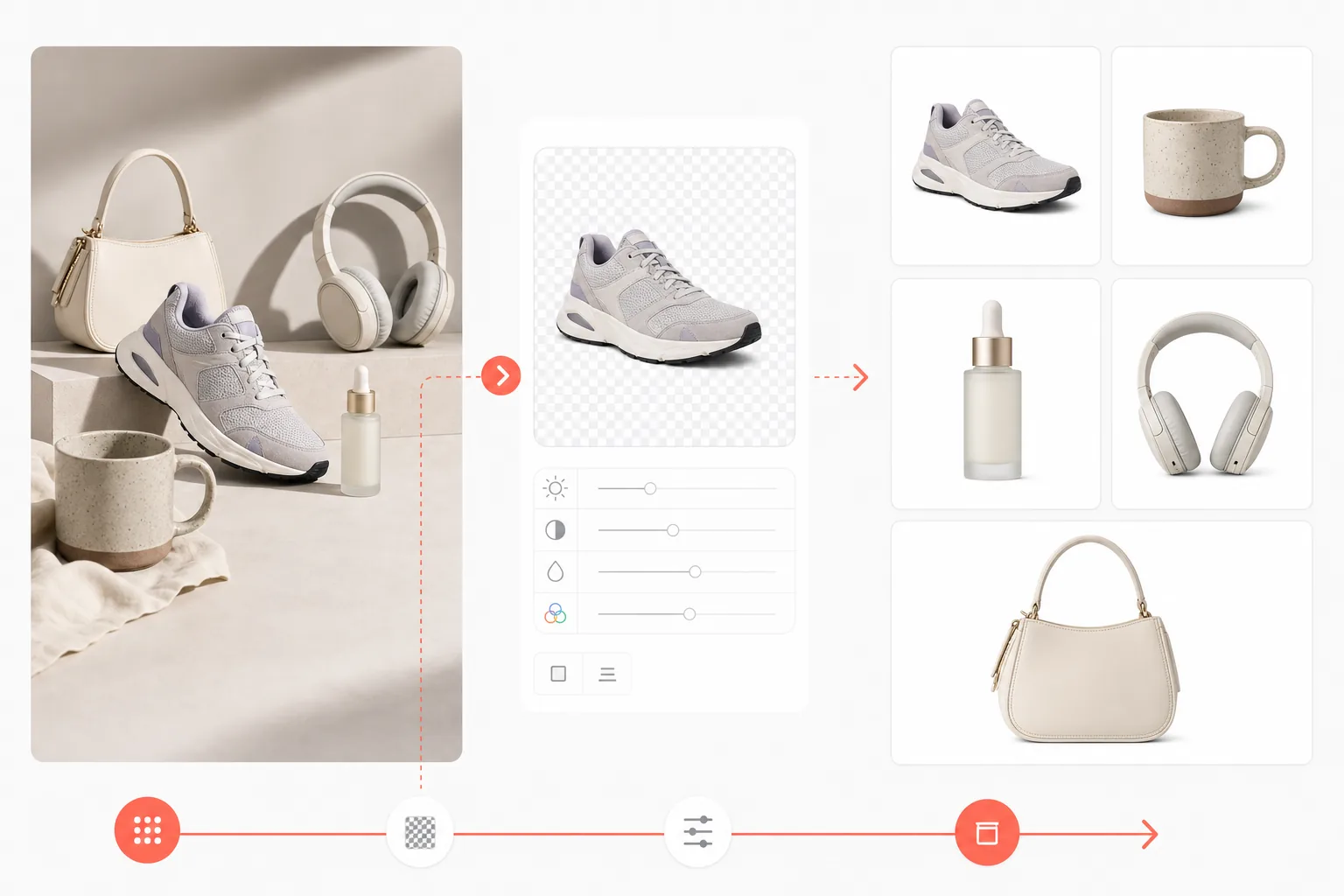
このテンプレートの機能
あらゆる背景を削除して純白に置き換え、E コマース出品基準に合わせて製品の色と鮮明さを強化します。仕上がりは、白背景のメイン製品画像に関する Amazon の要件を満たし、主要なすべてのマーケットプレイスで使用できます。
テンプレート設定
| 背景 | 純白(#FFFFFF) |
| 出力サイズ | 2000×2000px(正方形、マーケットプレイス標準) |
| ファイル形式 | PNG(可逆)または JPEG(品質 95%) |
| カラープロファイル | sRGB |
| 製品の占有率 | フレームの 85%(均等な余白付き) |
| 影 | なし(端から端まで純白) |
このテンプレートの使い方
製品写真をアップロード
どんな表面でも製品の写真を撮影してください。自然な窓の光が最も正確な色を生み出します。背景は完全に置き換えられます。
Background Eraser を適用
AI が背景全体を削除し、複雑な形状、透明部分、細かいディテールを含む製品の正確な輪郭を保持します。
製品の見栄えを強化
AI Enhance が室内照明による色の正確さを補正し、製品のディテールをシャープにして、2000px の書き出しサイズで印刷品質の解像度を満たすことを保証します。
マーケットプレイス向けに書き出し
Amazon 向けは 2000×2000px、Shopify 向けは 2048×2048、またはお使いのプラットフォーム向けのカスタムサイズでダウンロードできます。すべての書き出しで純白の背景が維持されます。
最良の結果を得るためのプロのヒント
- ✓最も自然な視点を得るために、製品を目の高さで撮影してください — 見下ろすと歪みが生じます。
- ✓背景の削除を難しくする反射を避けるため、製品の下には光沢のない(つや消しの)面を使用してください。
- ✓透明または半透明の製品(ガラス、透明なプラスチック)は、AI が最もきれいに切り抜けるよう中間グレーの背景で撮影してください。
- ✓横向きで撮影して後で正方形に切り抜いてください — これによりフレーム内で製品の位置を調整する余裕が生まれます。
E-commerce workflow
Product photo hub
Use this template with the full ecommerce product photo workflow for marketplace backgrounds, cleanup, compression, resizing, and listing-ready exports.
View ecommerce product photo workflowよくある質問
これは Amazon のメイン画像要件を満たしますか?
+
はい。Amazon はメイン製品画像に純白の背景(RGB 255,255,255)を要求しています。このテンプレートはまさにその仕様を生成し、ズーム機能のために推奨される最小寸法 2000px も満たします。
製品の輪郭は自然に見えますか?
+
AI は複雑な輪郭を正確に処理します — 髪の毛のような質感、半透明の素材、入り組んだ製品形状を含みます。仕上がりは、製品が白いシームレスな背景でプロによって撮影されたように見えます。
複数の製品を一括処理できますか?
+
はい。すべての製品写真をアップロードし、それぞれに同じ白背景テンプレートを適用してください。数分でカタログ全体にわたって一貫した結果が得られます。
Related templates
More e-commerce templates for your workflow.
Etsy に最適化されたリスティング写真テンプレート。ライフスタイルのショットを 2000 ピクセルのきれいな白い背景に変換し、手作りの製品の詳細を強調し、Etsy の画像ガイドラインを満たします。
eBay に最適化された出品写真テンプレート。ギャラリー画像の白い背景、状態文書の強化、eBay の画像基準を満たすマルチアングル レイアウト。
リング、ネックレス、時計用のプロ仕様のジュエリー写真テンプレート。反射を制御し、宝石の輝きを高め、きれいな背景で市場にすぐに使える画像を提供します。
マーケットプレイス出品用のプロフェッショナルな家具の写真テンプレート。部屋の雑然としたものを取り除き、実際の寸法を表示し、きれいな背景またはスタイルされた部屋のコンテキストで作品を表示します。
しわの除去、糸くずの除去、純白の背景、正確な生地の色を使用して、衣類の平置き写真をクリーンアップします。 Shopify、Amazon、ブティック ストアに対応。
純白の背景、適切な照明補正、メインおよびセカンダリの出品画像のサイズを最適化した Amazon 準拠の商品写真を作成します。