
eBay 出品写真
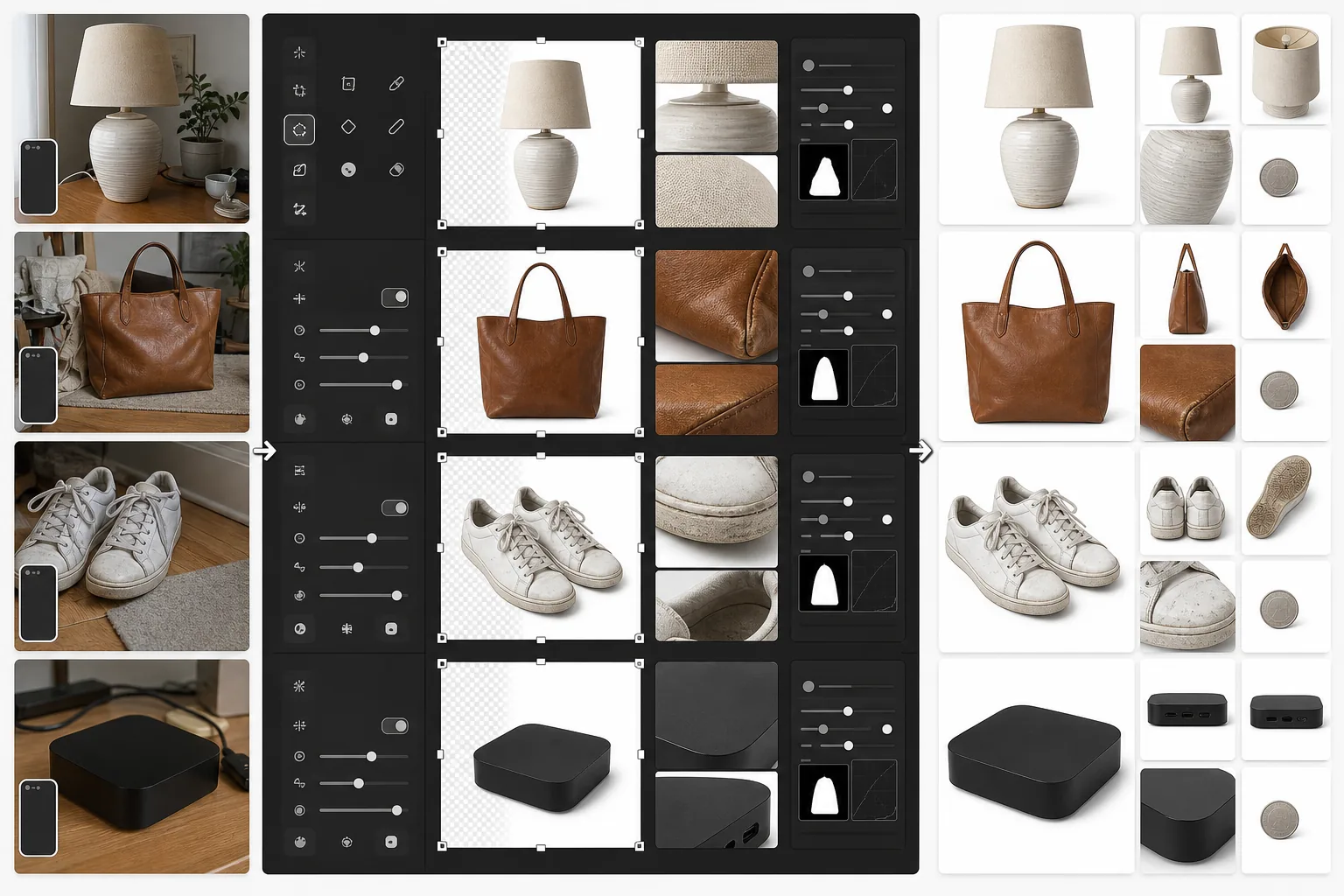
検索結果で目立ち、購入者の信頼を獲得する eBay 出品を作成しましょう。このテンプレートは、清潔な白背景のギャラリー画像を生成し、中古品の状態を示す詳細写真を強化し、すべての写真が eBay の最小 500px をズーム機能に余裕を持って満たすことを保証します。
このテンプレートを無料で試すE-commerce template preview
このテンプレートの機能
eBay 出品専用に商品写真を準備します。メイン画像には清潔な白背景を施し、eBay の検索結果やカテゴリ閲覧で好成績を収めます。サブ画像は商品の状態をはっきり示すように強化され、傷、摩耗跡、ラベル、シリアル番号が鮮明に見えるようになります。Magic Eraser は商品自体に影響を与えることなく、状態写真から背景の乱雑さを取り除きます。
テンプレート設定
| メイン画像サイズ | 1600×1600px(正方形、eBay の最小 500px を超える) |
| 背景(メイン) | 純白(#FFFFFF)のギャラリーサムネイル用 |
| 状態詳細モード | 傷、ラベル、摩耗のためのマイクロコントラスト強化 |
| ファイル形式 | JPEG 90% 品質(eBay の 12MB 制限以下) |
| カラープロファイル | sRGB(ウェブ標準) |
| 透かし | なし(eBay は出品画像への透かしを禁止) |
このテンプレートの使い方
商品写真をアップロード
商品を正面、背面、側面、そして傷、タグ、シリアル番号などの状態詳細のクローズアップから撮影します。自然光を使用し、反射面に詳細をぼかしたり眩しさを生じさせたりするフラッシュは避けてください。
ギャラリー画像を作成
Background Eraser が商品を切り出し、メイン出品写真用に純白の背景に配置します。eBay の検索アルゴリズムは白背景の画像を優先し、それらは「Buy It Now」やオークションの検索結果で大幅に好成績を収めます。
状態文書を強化
中古、再生品、ヴィンテージ品には、AI Enhance がマイクロコントラストシャープニングを適用し、擦り傷、味のある経年変化、生地の毛玉、認証マークなどの状態詳細をはっきり見えるようにします。Magic Eraser は商品に触れることなく、詳細写真から背景の乱れを取り除きます。
出品写真セットをエクスポート
すべての画像を 1600×1600px でダウンロードします。eBay は出品ごとに最大 24 枚の写真を許可しています。最高の購入者の信頼と最低の返品率のために、フルセットを活用しましょう。
最良の結果を得るためのプロのヒント
- ✓メインのギャラリー画像では、対照的な背景の前で商品を撮影してください。残りは Background Eraser が処理します。明るい面に暗い商品(またはその逆)が、最も清潔なエッジ検出をもたらします。
- ✓中古品のあらゆる欠陥をクローズアップ写真で記録してください。強化された状態画像は「商品が説明と異なる」という返品を減らし、販売者評価を保護し、出品の表示を維持します。
- ✓縮尺のために身近な物体を入れた写真を含めましょう。小型電子機器の横にコイン、衣類の横にペンなどです。eBay の購入者は商品のみの写真からサイズを誤判断しがちです。
- ✓電子機器やコレクション品は、シリアル番号と認証マークがはっきり見えるように撮影してください。AI Enhance の詳細シャープニングは、わずかに斜めから撮影したスマートフォン写真からでもこれらを読みやすくします。
E-commerce workflow
Product photo hub
Use this template with the full ecommerce product photo workflow for marketplace backgrounds, cleanup, compression, resizing, and listing-ready exports.
View ecommerce product photo workflowよくある質問
eBay は白背景を必須としていますか?
+
eBay は白背景を厳密には必須としていませんが、検索アルゴリズムと Best Match ランキングは清潔な白背景のメイン画像を優先します。白背景のギャラリー写真がある出品は、eBay の検索結果で一貫してより多くのインプレッションとより高いクリック率を得ています。
写真から透かしやロゴを削除できますか?
+
eBay は出品画像への透かし、枠線、テキストオーバーレイを禁止しています。このテンプレートは追加要素のない清潔な画像を生成します。カメラが日付スタンプを追加した場合、Magic Eraser がそれを削除できます。
出品ごとに何枚の写真を含めるべきですか?
+
状態が必要とする分だけ使用してください。eBay は最大 24 枚の無料写真を許可しています。新品の場合、通常 4~6 アングルで十分です。中古品の場合は、すべてのアングルに加え、あらゆる摩耗、ラベル、付属品のクローズアップを含めてください。写真が多いほど、売却率の向上と購入者との紛争の減少に相関します。
Related templates
More e-commerce templates for your workflow.
製品写真用の純白の背景テンプレート。 Amazon、Shopify、マーケットプレイスに対応したクリーンでプロフェッショナルな製品画像を変換するための設定。
Etsy に最適化されたリスティング写真テンプレート。ライフスタイルのショットを 2000 ピクセルのきれいな白い背景に変換し、手作りの製品の詳細を強調し、Etsy の画像ガイドラインを満たします。
リング、ネックレス、時計用のプロ仕様のジュエリー写真テンプレート。反射を制御し、宝石の輝きを高め、きれいな背景で市場にすぐに使える画像を提供します。
マーケットプレイス出品用のプロフェッショナルな家具の写真テンプレート。部屋の雑然としたものを取り除き、実際の寸法を表示し、きれいな背景またはスタイルされた部屋のコンテキストで作品を表示します。
しわの除去、糸くずの除去、純白の背景、正確な生地の色を使用して、衣類の平置き写真をクリーンアップします。 Shopify、Amazon、ブティック ストアに対応。
純白の背景、適切な照明補正、メインおよびセカンダリの出品画像のサイズを最適化した Amazon 準拠の商品写真を作成します。