
家具リストの写真
クリーンでプロフェッショナルな出品写真で家具をより早く販売しましょう。このテンプレートは背景から部屋の雑然としたものや私物を取り除き、室内照明による色のゆがみを補正し、すべての作品を最高の状態で見せます。マーケットプレイスの要件に合わせた白背景でも、ライフスタイルの魅力を引き出すスタイリングされた部屋の文脈でも対応できます。
このテンプレートを無料で試すE-commerce template preview
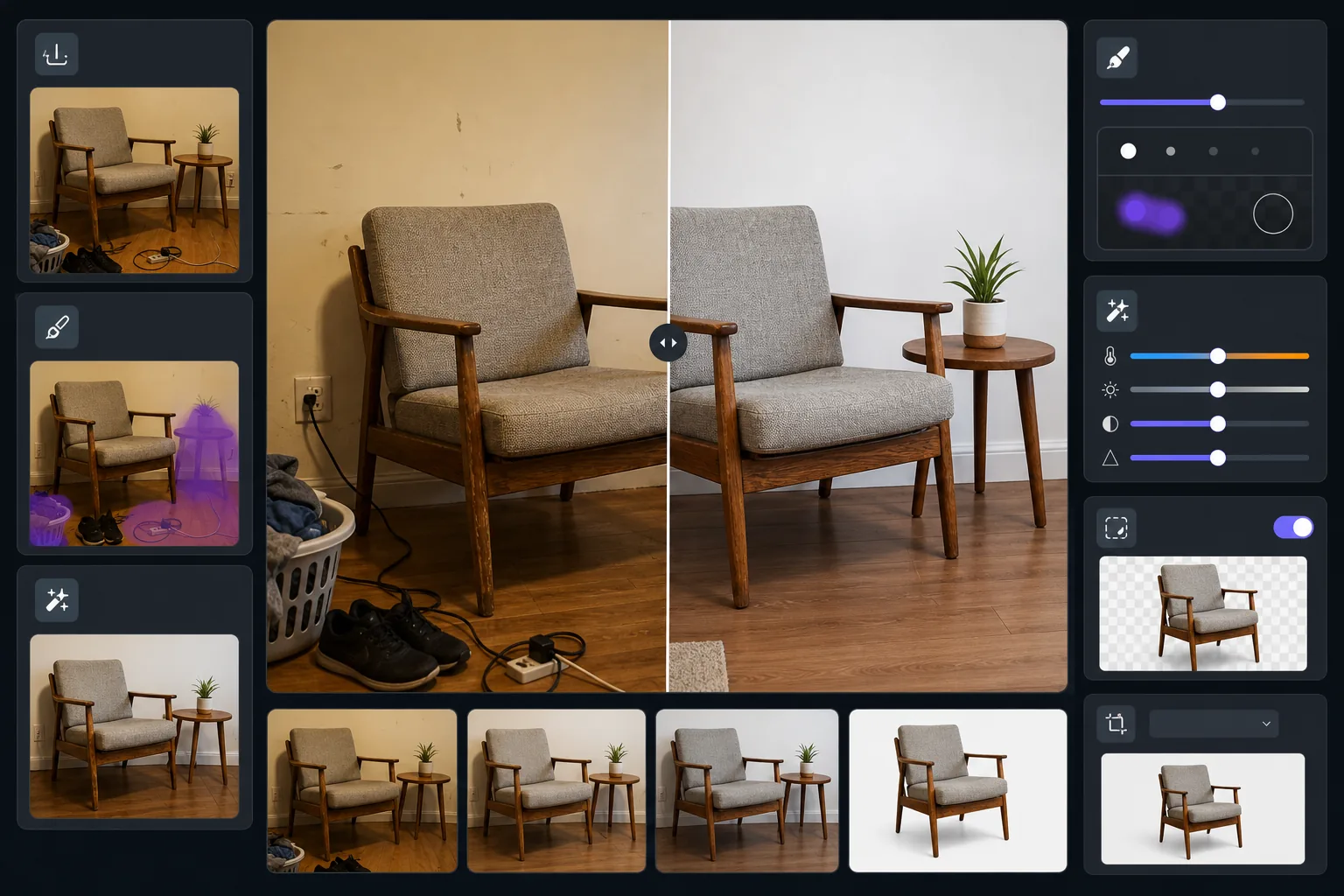
このテンプレートの機能
生活感のある部屋で撮影した家具写真を、洗練された出品画像に変換します。Magic Eraser は周囲の雑然としたもの、私物、写真に写り込んだ壁の損傷を取り除きます。AI Enhance は室内照明による黄ばみを補正し、本来の木目の色合いや生地の色を再現します。Background Eraser は作品を完全に切り抜き、Facebook Marketplace、Craigslist、Chairish の出品基準を満たすクリーンな白背景にできます。
テンプレート設定
| 背景モード | クリーンな白、または整理された部屋の文脈(選択可能) |
| 出力サイズ | 2000×1500px(4:3 横長、出品標準) |
| 色補正 | 室内から昼光へのホワイトバランス調整 |
| 雑然除去 | 自動 — 家具の縁から12 inches以内の物体を除去 |
| ディテール強調 | テクスチャ対応 — 木目、生地の織り、金具をシャープに |
| 状態の記録 | 誠実な表現のため使用痕や経年変化を保持 |
このテンプレートの使い方
家具を撮影する
周囲に少し余裕を持たせて作品全体を収められるよう十分に下がります。椅子やテーブルは立った目線で、コーヒーテーブルなどの低い家具は座った高さで撮影します。部屋の照明をすべて点け、カーテンを開けて均一に明るくします。
周囲の雑然を取り除く
Magic Eraser は近くの物体を自動で検出して除去します — 床の靴、隣接する面の物、壁の装飾、電源コードなど。結果として、クリーンな環境にある家具だけが残ります。
色を補正しディテールを強調する
AI Enhance は室内写真の暖かい黄色や冷たい蛍光灯の色かぶりを取り除き、木材の塗装、張り地の生地、金属金具の本来の色を再現します。テクスチャのシャープ化により、買い手が確認したい木目模様や縫製のディテールが際立ちます。
背景を選んで書き出す
ライフスタイルの魅力のために整理された部屋の文脈を残すか、マーケットプレイス準拠のために純白の背景に切り替えます。素早く読み込め、拡大して見る価値のあるディテールを保った出品最適化サイズで書き出します。
最良の結果を得るためのプロのヒント
- ✓取り除く前に、本やマグカップなど身近な物を家具の表面に置いておきましょう — ビフォー画像から買い手が大きさを把握でき、アフターはクリーンなままに保てます。
- ✓張り地の作品は四分の三の角度から撮影し、正面と側面の両方を1枚に収めましょう。
- ✓木製家具は窓際で日中に撮影して正確な木の色合いを捉えましょう — 人工光はオークをオレンジに、ウォルナットを濁った茶色に変えてしまいます。
- ✓広角の写真1枚と、注目すべきディテール(接合部、金具、生地のテクスチャ)のクローズアップ1枚を撮り、両方をこのテンプレートで処理すると完全な出品になります。
E-commerce workflow
Product photo hub
Use this template with the full ecommerce product photo workflow for marketplace backgrounds, cleanup, compression, resizing, and listing-ready exports.
View ecommerce product photo workflowよくある質問
これで家具の損傷や使用感を隠せますか?
+
いいえ、意図的にそうしていません。テンプレートは家具自体の既存の使用痕、傷、経年変化を保持します — 取り除くのは周囲の雑然としたものだけで、照明の色を補正するだけです。誠実な状態の表現は買い手の信頼を築き、返品トラブルを減らします。
散らかりを写さずに部屋の中で作品を見せることはできますか?
+
はい。整理された部屋の文脈モードは、壁、床、部屋全体の環境を残しつつ、私物、雑然としたもの、気を散らす要素を取り除きます。買い手は生活感のある空間の視覚的なノイズなしで、現実的な設定の家具を見ることができます。
Facebook Marketplace と Craigslist にはどの寸法が適していますか?
+
デフォルトの2000×1500px出力は主要なすべてのプラットフォームで機能します。Facebook Marketplace は幅1200pxで画像を表示し、Craigslist は最大600×450pxまで受け付けます — テンプレートの出力はこれらのどの表示サイズでも鮮明に見えます。
Related templates
More e-commerce templates for your workflow.
製品写真用の純白の背景テンプレート。 Amazon、Shopify、マーケットプレイスに対応したクリーンでプロフェッショナルな製品画像を変換するための設定。
Etsy に最適化されたリスティング写真テンプレート。ライフスタイルのショットを 2000 ピクセルのきれいな白い背景に変換し、手作りの製品の詳細を強調し、Etsy の画像ガイドラインを満たします。
eBay に最適化された出品写真テンプレート。ギャラリー画像の白い背景、状態文書の強化、eBay の画像基準を満たすマルチアングル レイアウト。
リング、ネックレス、時計用のプロ仕様のジュエリー写真テンプレート。反射を制御し、宝石の輝きを高め、きれいな背景で市場にすぐに使える画像を提供します。
しわの除去、糸くずの除去、純白の背景、正確な生地の色を使用して、衣類の平置き写真をクリーンアップします。 Shopify、Amazon、ブティック ストアに対応。
純白の背景、適切な照明補正、メインおよびセカンダリの出品画像のサイズを最適化した Amazon 準拠の商品写真を作成します。