
衣類のフラットレイ クリーンアップ
未加工のフラットレイ衣類写真を、マーケットプレイス対応の商品画像に変えます。このテンプレートはしわ、糸くず、ペットの毛、ほつれ糸を除去し、雑然とした背景を純白に置き換え、生地の色を補正することで、お客様が画面で見るものと届く商品が一致するようにします。
このテンプレートを無料で試すE-commerce template preview
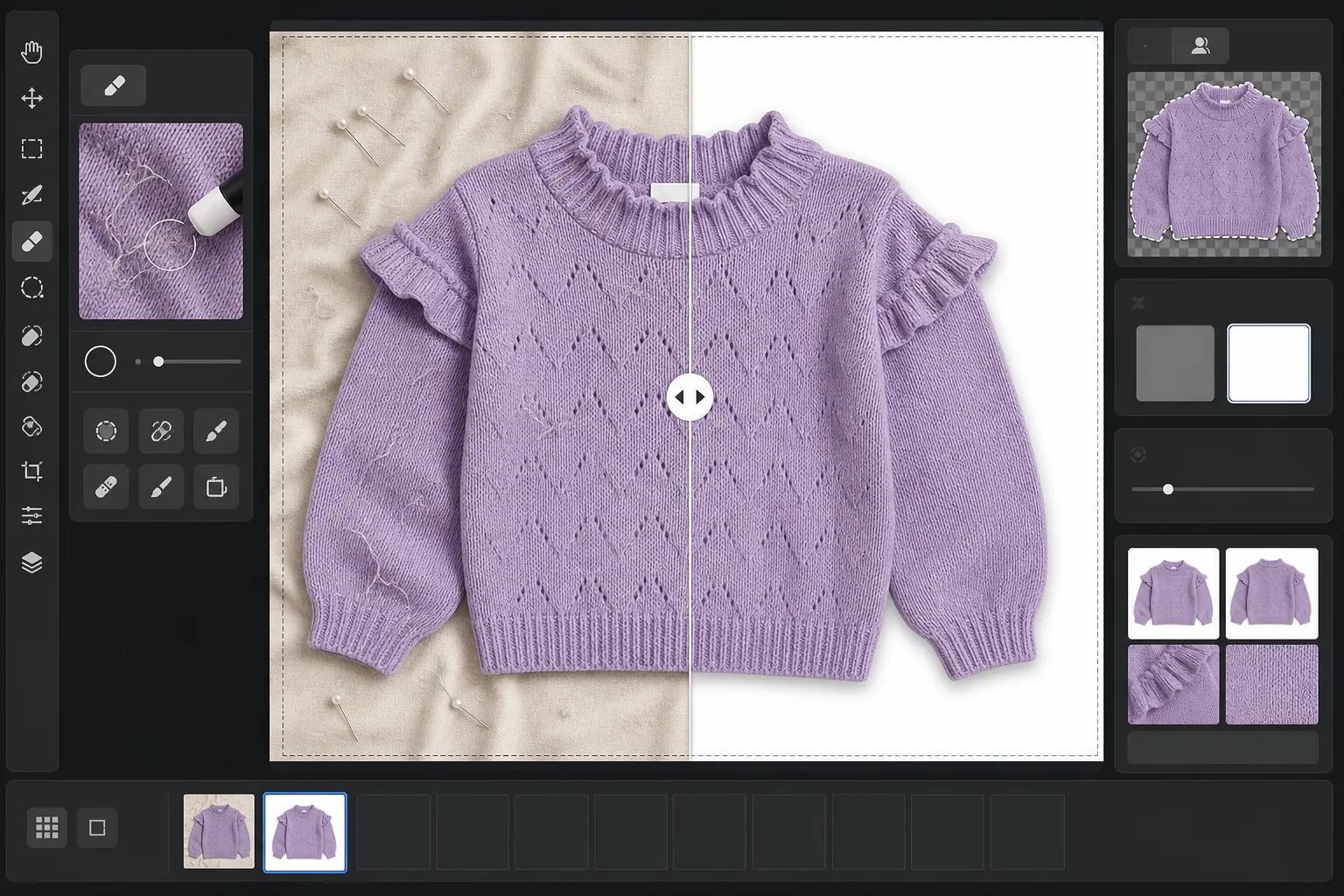
このテンプレートの機能
衣類のフラットレイ撮影で最もよくある問題に対処します。折り畳みや配送によるしわ、肉眼では見逃すがカメラが捉える糸くずやペットの毛、シーツやポスターボードの継ぎ目による不均一な背景、混合光による不正確な生地の色などです。Magic Eraser は表面のごみ、ほつれ糸、襟元から飛び出した洗濯表示タグを除去します。Background Eraser は衣類を切り抜き、清潔な白い背景に配置します。AI Enhance は色温度を補正し、モニターでも印刷カタログでも生地の染色が正確に表示されるようにします。
テンプレート設定
| 背景 | 純白 (#FFFFFF)、2px のソフトエッジ ぼかし付き |
| しわ軽減 | 中(配送のしわをならし、意図的なプリーツは保持) |
| 色精度 | sRGB、ニュートラルグレーカードへの自動ホワイトポイント較正付き |
| 糸くず除去 | 3px を超える繊維、毛、ほこりを自動検出 |
| 影 | 控えめなドロップシャドウ(4px オフセット、不透明度 15%)で奥行きを演出 |
| 出力サイズ | 10% の余白付き 2000×2000px の正方形トリミング |
このテンプレートの使い方
フラットレイ写真をアップロード
衣類を清潔な面に平らに置いて撮影します — ベッド、テーブル、ポスターボードなど。背景は置き換えられるため、完全に白い必要も、しわがない必要もありません。窓際の自然光が最も正確な生地の色を生み出します。
糸くず、糸、タグを除去
Magic Eraser は襟元やウエストバンドの上に見える糸くず、ペットの毛、ほつれ糸、洗濯表示タグを自動的に検出して除去します。撮影時に残ったハンガー、クリップ、スタイリングピンを手動で選択して削除することもできます。
背景を置き換える
Background Eraser は撮影した面が何であれ衣類を切り抜き、純白の背景に配置します。エッジ検出は、フリル、フリンジ、レースのディテールを含む衣類の実際の輪郭をたどり、細かい特徴を切り取ることはありません。
色を補正してエクスポート
AI Enhance はホワイトバランスを調整し、画面上の生地の色を実物の衣類にできるだけ近づけます。最終画像を 2000x2000px の正方形 JPEG としてダウンロードでき、Shopify、Amazon、Etsy、または自社のストアフロントにそのまま使えます — ほとんどのマーケットプレイスの画像要件を満たすサイズです。
最良の結果を得るためのプロのヒント
- ✓可能であれば撮影前に衣類をスチームまたはアイロンがけしてください。しわ軽減は配送による軽いしわはうまく処理しますが、長期保管による深い折りじわは、生地の自然なドレープや質感に影響を与えずになめらかにするのが難しくなります。
- ✓フレームの端(最終トリミング領域の外)に小さなグレーカードまたはホワイトバランス参照カードを入れてください。色精度アルゴリズムがそれを使ってホワイトポイントを較正し、自動ホワイトバランスだけの場合よりも明らかに正確な生地の色を生み出します。
- ✓白い背景に濃い色の生地を使う場合は、元の写真で衣類の縁と面の間に十分なコントラストがあることを確認してください。濃い色の木材の上の黒い衣類は、明るいグレーや白いシーツの上の黒い衣類よりもきれいに切り抜くのが難しくなります。
- ✓色の一貫性をカタログ全体で保つため、すべての衣類を同じ照明の下で同じバッチで撮影してください。このテンプレートを通じてまとめて処理することで、製品ライン全体で均一なホワイトバランスが確保されます。
E-commerce workflow
Product photo hub
Use this template with the full ecommerce product photo workflow for marketplace backgrounds, cleanup, compression, resizing, and listing-ready exports.
View ecommerce product photo workflowよくある質問
しわ除去によって生地が不自然に滑らかに見えませんか?
+
しわ軽減は、生地の自然な質感を保ちながら折り畳みや配送によるしわを除去するよう較正されています — リネンの織り、デニムの綾織り、コットンのリブ編み、ニットの柄はすべて維持されます。仕上がりはスチームしたての衣類のように見え、デジタルで塗りつぶした表面には見えません。
写真と実際の衣類で色は一致しますか?
+
色の精度は元の写真の照明に左右されます。自然光や較正されたスタジオ照明の下では、色補正アルゴリズムは較正済みモニターで実物の衣類と delta-E 3 以内の結果を生み出します。強い蛍光灯やタングステン光の下では改善は大きいものの、正確な一致にはグレーカードの参照が必要です。
どのマーケットプレイスがこのサイズに対応していますか?
+
2000x2000px の正方形出力は、Amazon、Shopify、Etsy、eBay、Poshmark、その他ほとんどの eコマース プラットフォームの画像要件を満たします。Amazon はズーム機能のために最長辺で少なくとも 1000px を推奨しており、2000px はこれを十分に上回ります。
実物と同じくらいオンラインでも見栄えのする衣類を出品しましょう
フラットレイ写真をアップロードすれば、糸くずがなく、しわをならし、白背景の商品画像が手に入り、あらゆる eコマース プラットフォームにすぐ使えます。
無料で試すRelated templates
More e-commerce templates for your workflow.
製品写真用の純白の背景テンプレート。 Amazon、Shopify、マーケットプレイスに対応したクリーンでプロフェッショナルな製品画像を変換するための設定。
Etsy に最適化されたリスティング写真テンプレート。ライフスタイルのショットを 2000 ピクセルのきれいな白い背景に変換し、手作りの製品の詳細を強調し、Etsy の画像ガイドラインを満たします。
eBay に最適化された出品写真テンプレート。ギャラリー画像の白い背景、状態文書の強化、eBay の画像基準を満たすマルチアングル レイアウト。
リング、ネックレス、時計用のプロ仕様のジュエリー写真テンプレート。反射を制御し、宝石の輝きを高め、きれいな背景で市場にすぐに使える画像を提供します。
マーケットプレイス出品用のプロフェッショナルな家具の写真テンプレート。部屋の雑然としたものを取り除き、実際の寸法を表示し、きれいな背景またはスタイルされた部屋のコンテキストで作品を表示します。
純白の背景、適切な照明補正、メインおよびセカンダリの出品画像のサイズを最適化した Amazon 準拠の商品写真を作成します。