
車両在庫写真
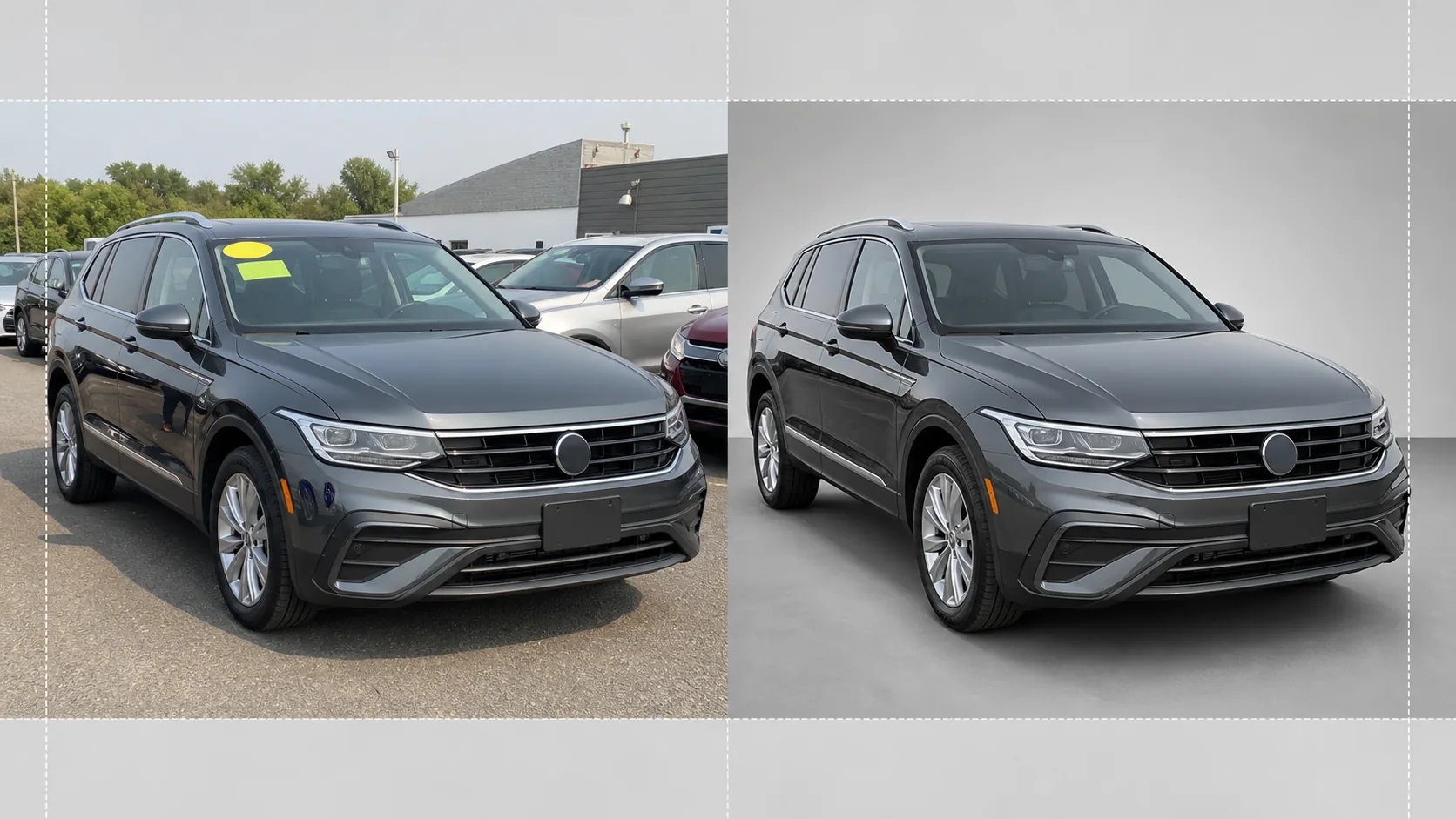
駐車場で撮った写真を、オンライン在庫リスト向けのショールーム品質の車両画像に変えます。このテンプレートは、雑然とした販売店の背景(他の車、看板、建物)を取り除き、清潔な白・グレー・スタジオ風の背景に置き換えます。Magic Eraser がフロントガラスの反射、ナンバープレートの詳細、駐車場のステッカーをきれいに消去し、カラー補正によってどんな照明下でも塗装が実物どおりに見えるようにします。
このテンプレートを無料で試すE-commerce template preview
このテンプレートでできること
販売店の在庫撮影の全ワークフローを処理します。Background Eraser が車両を駐車場の環境から切り離し、車・トラック・SUV に焦点を集中させる清潔なスタジオ風の背景に置き換えます。Magic Eraser はフロントガラスの価格ステッカー、駐車場タグ、ナンバープレート(プライバシー保護のため)、そして光沢のある塗装やガラスに映り込んだ撮影者や周囲の車両の反射を取り除きます。カラー補正は塗装色を正規化し、曇り空・駐車場のナトリウム灯・真昼の強い日差しの下で撮影した写真がすべて同じ正確な塗装トーンになるようにします。最終画像はトリミングと水平調整が施され、在庫全体を通じて車両が中央かつ水平に収まります。
テンプレート設定
| 背景 | スタジオホワイト、ニュートラルグレー、またはグラデーションのショールーム床 |
| 反射のクリーンアップ | 塗装やガラスの反射から撮影者、駐車場の雑物、隣接する車を除去 |
| 塗装色のカラー補正 | ニュートラルな昼光下でメーカーの塗装コードの見え方に正規化 |
| プライバシー処理 | ナンバープレートを自動でぼかすか除去 |
| トリミングと水平調整 | 車両の自動センタリング、水平調整、16:9 のアスペクト比 |
| 出力解像度 | 3000×1688px(AutoTrader、Cars.com、販売店ウェブサイト向けに最適化) |
このテンプレートの使い方
駐車場の写真をアップロード
販売店の駐車場で撮影した車両の写真をアップロードします。斜め前方からの 4 分の 3 アングルが理想的ですが、横向きや後方アングルも使えます。このテンプレートはスマートフォン、コンパクトカメラ、プロ用の機材いずれにも対応します。
背景と邪魔な要素を除去
Background Eraser が駐車場の環境を切り抜き、清潔な背景に置き換えます。Magic Eraser はフロントガラスのステッカー、駐車場番号タグ、価格デカール、ナンバープレートの文字を消去します。塗装や窓に映り込んだ隣の車や撮影者の反射も自動でクリーンアップされます。
色と露出を補正
塗装色はニュートラルな昼光下でメーカーが意図したトーンに合わせて正規化されます。クロムやガラスの白飛びしたハイライトが復元され、ホイールアーチやバンパー下の影のディテールが持ち上げられて、均一でショールーム品質の仕上がりになります。
在庫リスト用に書き出し
完成した画像を 16:9 のアスペクト比、3000×1688px で書き出します。フォーマットは AutoTrader、Cars.com、CarGurus、Facebook Marketplace、そして販売店管理システム向けに最適化されています。駐車場全体の在庫撮影にはバッチ処理も利用できます。
最良の結果を得るためのプロのヒント
- ✓車両はバンパーの高さから斜め前方の 4 分の 3 アングルで撮影してください。フロントフェイスと横のプロフィールを 1 枚に収められ、オンライン在庫リストで最もクリックされるアングルです。
- ✓真上からの直射日光の下での撮影は避けてください。車の下に強い影が、ルーフやボンネットに白飛びが生じます。曇りの日や駐車場の日陰のほうが、AI が扱いやすい最も均一な光が得られます。
- ✓可能であれば撮影前にフロントガラスの価格ステッカーを剥がしてください。AI はデジタルで消去できますが、ダッシュボードのディテールを覆う大きなステッカーは、手作業の修正が必要な薄い輪郭を残すことがあります。
- ✓撮影前に車両をきれいにしておきましょう。このテンプレートは照明と背景を補正しますが、塗装の汚れ、水滴の跡、鳥のフンは AI レタッチよりさっと洗車したほうがうまく処理できます。
E-commerce workflow
Product photo hub
Use this template with the full ecommerce product photo workflow for marketplace backgrounds, cleanup, compression, resizing, and listing-ready exports.
View ecommerce product photo workflowよくある質問
在庫全体を一度に処理できますか?
+
はい。複数の車両写真をアップロードすると、テンプレートが同じ背景、カラー補正、クリーンアップ設定を各写真に適用します。これにより、オンライン在庫全体で視覚的な一貫性が保たれます。
塗装色は正確になりますか?
+
カラー補正は、ニュートラルな昼光(5500K)下での見え方に合わせて塗装を正規化します。メーカーの塗装コードがわかっている場合、AI はそれを参照として使い、画面上の色が実車に近づくようにします。
オートバイやボートにも使えますか?
+
はい。背景除去と反射のクリーンアップは、オートバイ、ボート、RV、大型トラックを含むあらゆる車種に対応します。自動センタリングとトリミング比率は、標準外の車両プロポーションでは手動調整が必要な場合があります。
Related templates
More e-commerce templates for your workflow.
製品写真用の純白の背景テンプレート。 Amazon、Shopify、マーケットプレイスに対応したクリーンでプロフェッショナルな製品画像を変換するための設定。
Etsy に最適化されたリスティング写真テンプレート。ライフスタイルのショットを 2000 ピクセルのきれいな白い背景に変換し、手作りの製品の詳細を強調し、Etsy の画像ガイドラインを満たします。
eBay に最適化された出品写真テンプレート。ギャラリー画像の白い背景、状態文書の強化、eBay の画像基準を満たすマルチアングル レイアウト。
リング、ネックレス、時計用のプロ仕様のジュエリー写真テンプレート。反射を制御し、宝石の輝きを高め、きれいな背景で市場にすぐに使える画像を提供します。
マーケットプレイス出品用のプロフェッショナルな家具の写真テンプレート。部屋の雑然としたものを取り除き、実際の寸法を表示し、きれいな背景またはスタイルされた部屋のコンテキストで作品を表示します。
しわの除去、糸くずの除去、純白の背景、正確な生地の色を使用して、衣類の平置き写真をクリーンアップします。 Shopify、Amazon、ブティック ストアに対応。