
Twitch バナー写真
初回訪問の瞬間から、あなたの配信が確立されているように見せるプロフェッショナルな Twitch チャンネルバナーをデザインしましょう。このテンプレートはあらゆる背景からあなたのポートレートを切り抜き、ゲームをテーマにした、またはブランドカラーの背景に配置し、プロフィール画像のオーバーレイやチャンネルナビゲーション要素のためのセーフゾーンを確保しつつ、Twitch の正確なバナーサイズで出力します。
このテンプレートを無料で試すSocial Media template preview
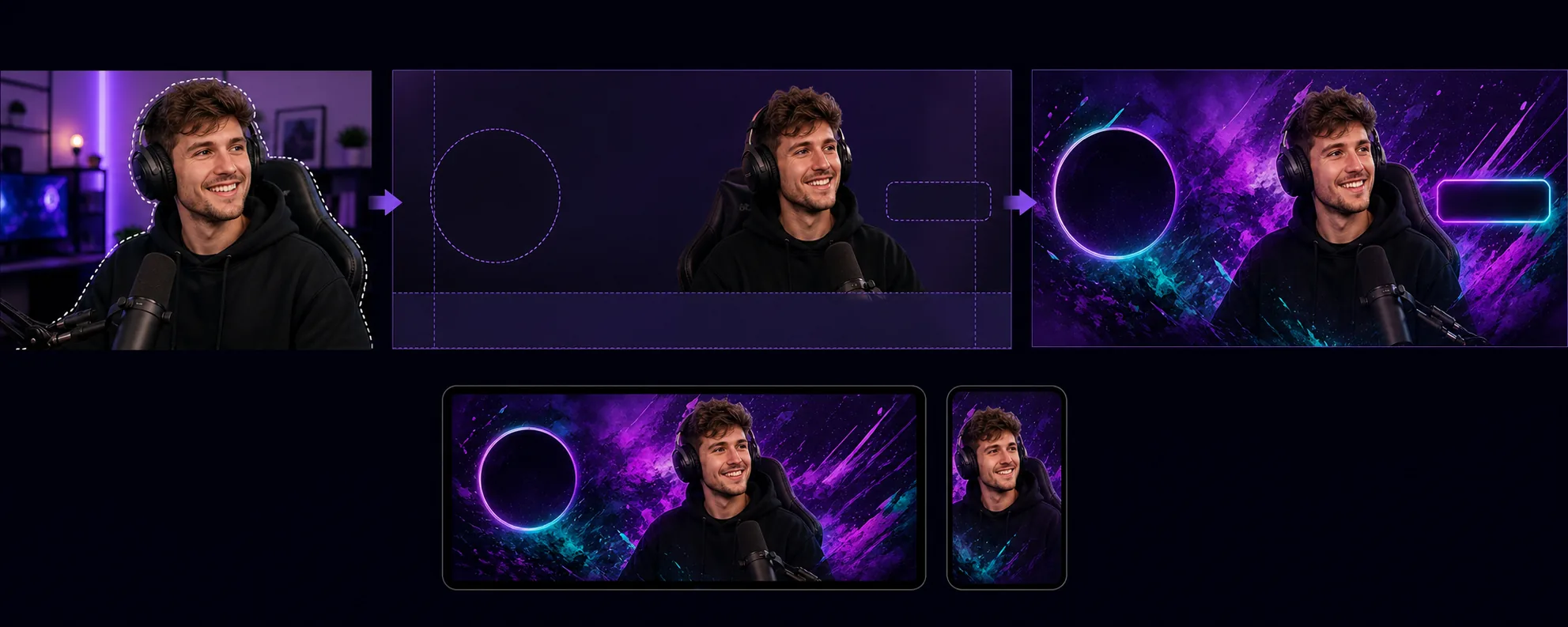
このテンプレートの機能
プロフィール画像、フォローボタン、チャンネルナビゲーションがバナーの特定の領域に重なるという、Twitch 特有のレイアウト要件に最適化されたチャンネルバナーを作成します。Background Eraser はあらゆる環境からあなたのストリーマーのポートレートやチームの写真を切り抜き、チャンネルのビジュアルアイデンティティに合った背景 — 単色のブランドカラー、グラデーション、抽象的なゲームテーマ、控えめなパターンなど — に配置します。このテンプレートは Twitch のセーフゾーンを尊重するため、重要なビジュアルコンテンツがプロフィール画像の円形(左側)やチャンネルポイント/登録ボタン(右側)の後ろに隠れることはありません。出力は 1200×480px(推奨バナーサイズ)で、バナーの切り取られ方が異なるデスクトップのブラウザ表示とモバイルアプリのヘッダーの両方で見やすいように調整されています。
テンプレート設定
| バナーサイズ | 1200×480px(Twitch 推奨のプロフィールバナー) |
| セーフゾーン | 左 250px(プロフィールオーバーレイ)、右 200px(ボタン)、下 80px(ナビゲーションバー) |
| 背景 | 単色、グラデーション、抽象的なゲームパターン、またはカスタム画像 |
| ポートレートの配置 | 右中央または中央、プロフィール画像の重なる領域を避ける |
| 色の鮮やかさ | Twitch の濃い紫色のインターフェースに対して見やすいよう強調 |
このテンプレートの使い方
ストリーマーの写真をアップロード
自分自身、配信環境、またはチームの写真をアップロードします。表情豊かなポーズの上半身ショットがバナーに最適です。このテンプレートはウェブカメラのキャプチャ、スマホの自撮り、プロの写真にも対応しています。
切り抜きと配置
Background Eraser は元の背景を削除し、ポートレートをバナーのセーフゾーン内に配置します。左の 250 ピクセルはプロフィール画像の円形オーバーレイのために空けられ、下の 80 ピクセルはナビゲーションバーを避けます。あなたの画像はデスクトップとモバイルの両方で最大のビジュアルインパクトを発揮する位置に配置されます。
背景とブランディングを適用
チャンネルのアイデンティティに合った背景を選びましょう。大胆なグラデーションやゲームをテーマにしたパターンは Twitch の濃い紫色のクロームに対してよく映えます。チャンネルに確立されたブランドカラーがある場合は、それを使って視聴者がチャンネルページに来たときの認知を強化しましょう。
書き出しとアップロード
Twitch 向けに最適化された 1200×480px でダウンロードします。ファイルは 10MB 未満(Twitch の上限)で、回線の遅い視聴者でも素早く読み込めるよう圧縮されています。チャンネルにアップロードする前に、プロフィール画像とナビゲーションが重なった状態でバナーがどう見えるかをプレビューしましょう。
最良の結果を得るためのプロのヒント
- ✓表情豊かで活気のあるポーズ — カメラを指さす、喜びを表現する、前のめりになるなど — の写真を使いましょう。静的なポーズは横長の狭いバナー形式では埋もれてしまいますが、動きのあるポーズはビジュアルにエネルギーを生み、視聴者を引き留めます。
- ✓バナーはデスクトップとモバイルの両方でテストしましょう。Twitch はモバイルでバナーを異なる形で切り取り、主に中央部分だけを表示します。デバイス間の互換性のために、最も重要なビジュアルコンテンツは中央の 700 ピクセルに配置しましょう。
- ✓バナーの色を Twitch のアクセントカラー設定に合わせましょう。バナーのグラデーションが、チャンネルの登録ボタンや強調表示されたテキストに使われているアクセントカラーと同じ色に移行すると、ページ全体に統一感が生まれ、プロフェッショナルにブランディングされた印象になります。
よくある質問
Twitch はバナーにどのサイズを要求しますか?
+
Twitch はプロフィールバナーに 1200×480 ピクセルを推奨しています。最大ファイルサイズは 10MB です。このテンプレートは適切な圧縮で正確にこのサイズで出力します。
バナーにテキストを入れられますか?
+
このテンプレートはテキストのオーバーレイなしでビジュアルレイアウトを作成します。チャンネル名、配信スケジュール、SNS のハンドルは、その後で任意の画像編集ソフトを使って追加できます。セーフゾーンのガイドは、テキストが見えたまま Twitch の UI 要素に隠れない位置を正確に示します。
これは Twitch のオフライン画面にも使えますか?
+
このテンプレートはプロフィールバナー用のサイズです。Twitch のオフライン画面の画像は 16:9 のアスペクト比(1920×1080)を使用します。同様のワークフロー — ポートレートを切り抜き、背景を適用 — を使えますが、オフライン画面のサイズは別途選択する必要があります。
初日からあなたの Twitch チャンネルを確立されたものに見せましょう
写真をアップロードして、Twitch のレイアウトを尊重し、あなたの配信を際立たせるプロフェッショナルなチャンネルバナーを手に入れましょう。
無料で試すRelated templates
More social media templates for your workflow.
Instagram に最適化された 1080×1080 ピクセルの正方形のトリミング テンプレート。きれいな背景、鮮やかな色、フィード内で際立つシャープなディテール。
セーフ ゾーン ガイド付きの 2560 × 1440 ピクセルの YouTube バナー テンプレート。クリエイターの写真の背景をきれいに削除し、デバイスに応じたレイアウト、ブランドと一貫したチャネル アートを実現します。
Facebook のカバー写真テンプレート (デスクトップ用は 820×312px、モバイルは 640×360px)。プロフィール写真のオーバーラップと CTA ボタンの配置に適切な安全ゾーンを設けたクリーンなブランド イメージ。
正確な 1500×500 ピクセルのサイズで本格的な Twitter/X ヘッダー画像を作成します。プロフィール写真の重なりを考慮し、ダーク モードとライト モードの両方で機能します。
自然な肌のスムージング、背景のクリーンアップ、照明補正、フィルター処理されていない本物に見える微妙なカラー グレーディングを使用して、デート プロフィール写真を強化します。
きれいな背景、最適な 2:3 の垂直サイズ、鮮やかな色の強調、ピンに対応した構成を備えた、スクロールを止める Pinterest ピン画像を作成します。