
Twitter/X ヘッダー写真
あらゆるデバイスとあらゆるモードで洗練されて見えるヘッダー画像をデザインしましょう。このテンプレートは Twitter が要求する正確な 1500×500px の寸法に対応し、重要なコンテンツが隠れないようプロフィール写真の重なり領域を考慮し、ダーク モードとライト モードの両方でバナーが美しく見えるようにします。
このテンプレートを無料で試すSocial Media template preview
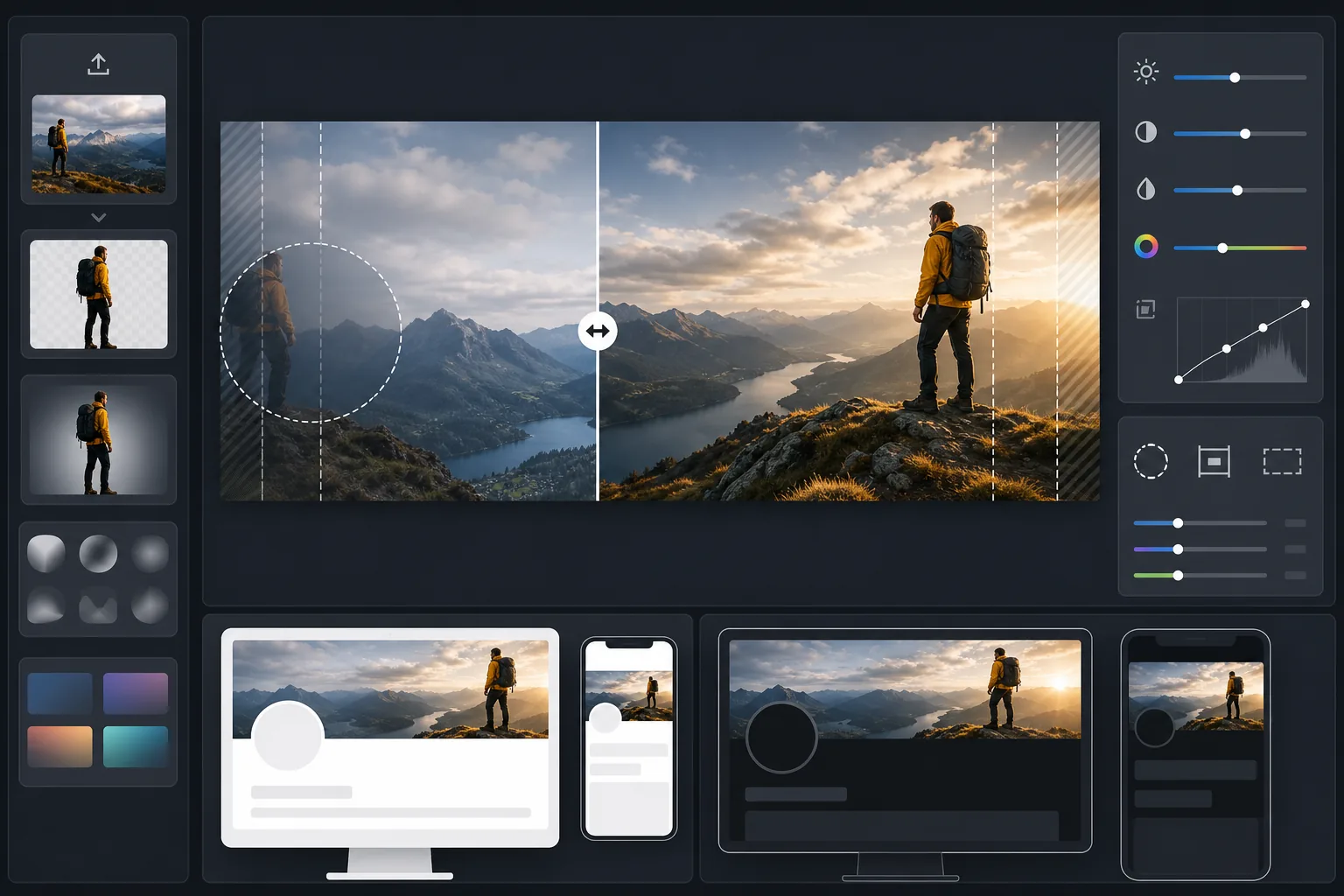
このテンプレートの機能
Twitter/X が要求する正確な 1500×500px のバナーサイズに写真を処理し、顔や重要なコンテンツを見える安全領域内に保つインテリジェントなトリミングを行います。Background Eraser は被写体を切り出してすっきりした構図を作り、AI Enhance はフォロワーが目にするダーク モードとライト モードの両方の背景に合わせてコントラストと色を最適化します。
テンプレート設定
| 出力サイズ | 1500×500px(3:1 Twitter/X ヘッダー比率) |
| 安全領域 | 左 25% を確保 — デスクトップとモバイルでのプロフィール写真の重なりを回避 |
| エッジのブレンド | ダークまたはライトへのソフトフェード(モードに適応) |
| 色の最適化 | ダーク モード(#15202B)とライト モード(#FFFFFF)のコントラストを二重テスト |
| ファイル形式 | 品質 92% の JPEG(Twitter の 5MB アップロード上限内) |
| テキスト安全領域 | 中央 50% の横帯 — モバイルでの上下のトリミングを回避 |
このテンプレートの使い方
元画像をアップロード
横向きの写真またはグラフィックを使用します。横長のパノラマ写真、街並み、水平方向の構図が最適です。テンプレートは極端な 3:1 のアスペクト比にトリミングするため、縦長の被写体や垂直方向に中央寄せされたコンテンツは避けてください。
重要なコンテンツを安全領域に配置
テンプレートは左 25% をプロフィール写真の重なり領域、外側の端をモバイルのトリミング領域としてマークします。最も重要な視覚的コンテンツはバナーの右中央あたりに配置すべきです。
ダーク モードとライト モードに最適化
AI Enhance はコントラストを調整し、ダーク モードのほぼ黒い背景とライト モードの白い背景の両方に対してバナーが鋭いエッジにならないようにします。エッジのブレンドは硬い切れ目ではなく滑らかな移行を作り出します。
書き出してアップロード
最適化された 1500×500px の JPEG をダウンロードし、Twitter/X に直接アップロードします。ファイルは Retina ディスプレイで鮮明なディテールを保ちながら、5MB の上限を十分に下回るサイズに調整されています。
最良の結果を得るためのプロのヒント
- ✓確定する前に、スマートフォンとデスクトップの両方でヘッダーをプレビューしましょう — Twitter はモバイルで上下の端をより大きくトリミングし、各端から約 10% を切り取ります。
- ✓デスクトップでプロフィール写真、名前、自己紹介が重なる左下の四分円にテキストや顔を配置しないようにしましょう。
- ✓バナーの端には #15202B(ダーク モード)と #FFFFFF(ライト モード)の両方とコントラストのある色を使いましょう — 中間トーンの青、緑、暖かいグレーがどちらの状況でもよく映えます。
- ✓人物が写った写真を使う場合は、左側のプロフィール写真と並んでも見えるよう、フレームの右側 3 分の 1 に配置しましょう。
よくある質問
プロフィール写真は正確にどこで重なりますか?
+
デスクトップでは、円形のプロフィール写真がヘッダーの左下隅に重なり、バナーの最も左側 20% のうち下部約 60% を覆います。モバイルでは重なりは似ていますがわずかにずれます。テンプレートの安全領域は両方のレイアウトを考慮しています。
ヘッダーはダーク モードでもきれいに見えますか?
+
はい。テンプレートはダーク モード背景(#15202B)とライト モード背景(#FFFFFF)の両方に対してバナーをテストします。エッジのブレンドが両方のモードで滑らかな移行を保証するため、最適化されていないヘッダーに見られる耳障りな硬いエッジ効果を避けられます。
Twitter がヘッダーの寸法を変更したらどうなりますか?
+
1500×500px の仕様は 2017 年以降、X へのブランド変更を通じて安定しています。寸法が変更された場合はテンプレートを更新します。現在の出力は、より小さいバナーサイズにもきれいに縮小されます。
Twitter プロフィールが見られるたびに際立つ
画像をアップロードするだけで、完璧なサイズでダーク モードにも対応した Twitter ヘッダーが数秒で手に入ります。Photoshop も寸法の推測も不要です。
無料で試すRelated templates
More social media templates for your workflow.
Instagram に最適化された 1080×1080 ピクセルの正方形のトリミング テンプレート。きれいな背景、鮮やかな色、フィード内で際立つシャープなディテール。
セーフ ゾーン ガイド付きの 2560 × 1440 ピクセルの YouTube バナー テンプレート。クリエイターの写真の背景をきれいに削除し、デバイスに応じたレイアウト、ブランドと一貫したチャネル アートを実現します。
Facebook のカバー写真テンプレート (デスクトップ用は 820×312px、モバイルは 640×360px)。プロフィール写真のオーバーラップと CTA ボタンの配置に適切な安全ゾーンを設けたクリーンなブランド イメージ。
自然な肌のスムージング、背景のクリーンアップ、照明補正、フィルター処理されていない本物に見える微妙なカラー グレーディングを使用して、デート プロフィール写真を強化します。
きれいな背景、最適な 2:3 の垂直サイズ、鮮やかな色の強調、ピンに対応した構成を備えた、スクロールを止める Pinterest ピン画像を作成します。
きれいな背景、大胆な被写体のフレーミング、プロファイル グリッドの一貫性を保つために最適化された 9:16 の垂直寸法を備えた、人目を引く TikTok ビデオ カバー写真を作成します。