
Facebook のカバー写真
デスクトップとモバイルの両方で洗練されて見える Facebook のカバー写真を作成しましょう。このテンプレートは、820×312px のデスクトップ表示と 640×360px のモバイル切り抜きという扱いにくい違いに対応し、ブランド メッセージ、画像、行動喚起がプロフィール写真やアクション ボタンの後ろに隠れることなく、すべてのデバイスで確実に表示されるようにします。
このテンプレートを無料で試すSocial Media template preview
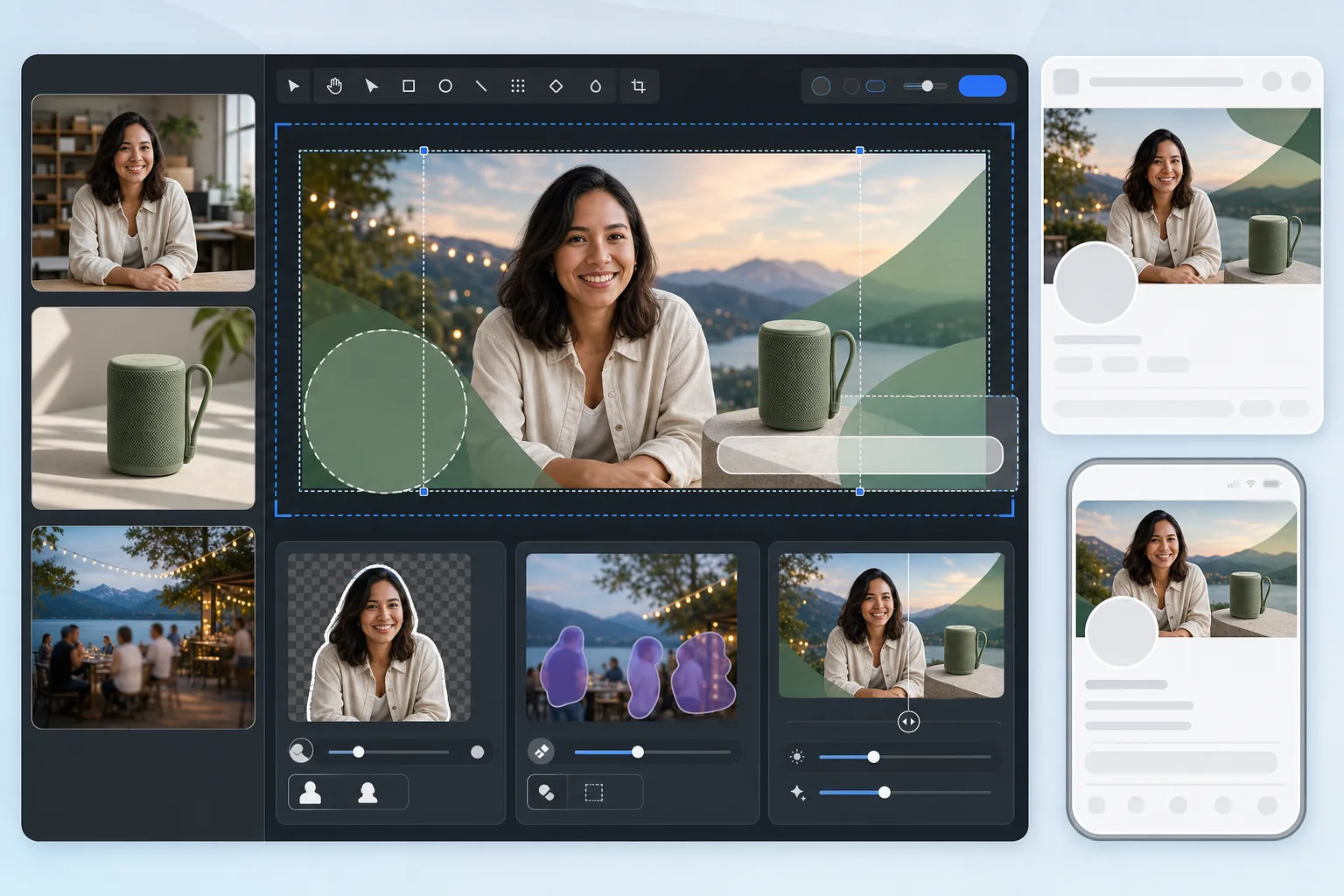
このテンプレートでできること
デスクトップ (820×312px) とモバイル (640×360px) の両方の表示に最適化された Facebook のカバー写真を作成します。このテンプレートは、左側のプロフィール写真の重なり、右側のアクション ボタン、デバイス間で異なるアスペクト比を考慮します。Background Eraser は人物や商品をきれいに切り抜いて合成でき、Magic Eraser は風景の背景から気を散らす要素を取り除き、AI Enhance は Facebook の圧縮後も画像をくっきりと保ちます。
テンプレート設定
| アップロード用キャンバス | 820×360px (デスクトップとモバイルの両方の切り抜きをカバー) |
| デスクトップの表示領域 | 820×312px (横長で低め) |
| モバイルの表示領域 | 640×360px (縦長で高め — 中央切り抜き) |
| プロフィール写真の重なり | 左下に 170×170px の円 (デスクトップ) |
| ファイル形式 | グラフィックは PNG、写真は JPEG 85% (事前圧縮) |
| カラープロファイル | sRGB (Facebook はアップロード時に他のプロファイルを削除します) |
このテンプレートの使い方
カバー画像をアップロード
合成したい写真、ブランド グラフィック、またはポートレートから始めましょう。少なくとも 820px の幅がある横長の写真が最適です。テンプレートがコンテンツを安全に配置できる場所を案内します。
構図を整える
Background Eraser を使って人物や商品を切り抜き、ブランドの背景の上に配置します。Magic Eraser は、写り込んだ人、看板、雑然としたものなどの不要な要素を風景写真やイベント写真から取り除きます。
コンテンツを安全ゾーンに配置
重要なコンテンツ — テキスト、顔、ロゴ — を、デスクトップとモバイルの両方で表示される中央エリアに配置しましょう。左下の角 (デスクトップでのプロフィール写真の重なり) と右端 (アクション ボタン) は避けてください。
事前圧縮して書き出す
テンプレートは最適化された圧縮設定で 820×360px に書き出します。Facebook はすべてのアップロードを再圧縮するため、書き出し時に軽いプリシャープニングと慎重な JPEG 品質を適用し、二重圧縮にもバンディングやぼやけなしで耐えられるようにします。
最良の結果を得るためのプロのヒント
- ✓820×360px のキャンバスでデザインしつつ、重要なコンテンツはすべて 580×280px の中央ゾーン内に配置しましょう。これは、プロフィール写真やボタンに邪魔されることなくデスクトップとモバイルの両方で表示される重なり領域です。
- ✓カバー写真に 24px より小さいテキストを配置するのは避けましょう。Facebook はカバー画像を強く圧縮するため、小さなテキストはアップロード後にぼやけて読めなくなります — 特にモバイル画面では顕著です。
- ✓ビジネス ページでは、右側に表示される CTA ボタン (「予約する」「購入する」など) とカバー写真を調整しましょう。ボタンがデザインに重ならないように視覚的なスペースを空けておきます。
- ✓キャンペーン、季節、イベントに合わせてカバー写真を更新しましょう。Facebook はカバーのアップロードをページのタイムラインに投稿として表示するため、ページ ヘッダー以上のオーガニック リーチが得られます。
よくある質問
なぜモバイルではカバー写真の見え方が違うのですか?
+
Facebook はデバイスごとにカバー写真の切り抜き方が異なります。デスクトップでは 820×312px (横長で低め) を表示し、モバイルでは 640×360px の中央切り抜き (狭いが高め) を表示します。左右の端のコンテンツはデスクトップでは表示されますが、モバイルでは切り取られます。テンプレートの安全ゾーン ガイドにより、重要なコンテンツが両方の切り抜きで残るようにします。
Facebook はカバー写真をぼかしますか?
+
Facebook はアップロードされたすべての画像を再圧縮します。テンプレートは、軽いプリシャープニングを適用し、二重圧縮に耐える最適な JPEG 品質レベルを使用することでこれに対抗します。JPEG の代わりに PNG でアップロードするのも効果的です。Facebook のサーバー側での PNG からの変換は、すでに圧縮された JPEG を再圧縮するよりも良い結果になることが多いためです。
Facebook のカバー写真にテキストを使えますか?
+
はい、Facebook はカバー写真の「テキスト 20% ルール」を廃止しました。ただし、Facebook の圧縮があるため、テキストは大きく (最小 24px)、コントラストを高く保ちましょう。テンプレートの安全ゾーン オーバーレイを使って、テキストがデスクトップでプロフィール写真の後ろに隠れたり、モバイルで切り取られたりしないようにしてください。
Related templates
More social media templates for your workflow.
Instagram に最適化された 1080×1080 ピクセルの正方形のトリミング テンプレート。きれいな背景、鮮やかな色、フィード内で際立つシャープなディテール。
セーフ ゾーン ガイド付きの 2560 × 1440 ピクセルの YouTube バナー テンプレート。クリエイターの写真の背景をきれいに削除し、デバイスに応じたレイアウト、ブランドと一貫したチャネル アートを実現します。
正確な 1500×500 ピクセルのサイズで本格的な Twitter/X ヘッダー画像を作成します。プロフィール写真の重なりを考慮し、ダーク モードとライト モードの両方で機能します。
自然な肌のスムージング、背景のクリーンアップ、照明補正、フィルター処理されていない本物に見える微妙なカラー グレーディングを使用して、デート プロフィール写真を強化します。
きれいな背景、最適な 2:3 の垂直サイズ、鮮やかな色の強調、ピンに対応した構成を備えた、スクロールを止める Pinterest ピン画像を作成します。
きれいな背景、大胆な被写体のフレーミング、プロファイル グリッドの一貫性を保つために最適化された 9:16 の垂直寸法を備えた、人目を引く TikTok ビデオ カバー写真を作成します。