
Pinterest ピン画像
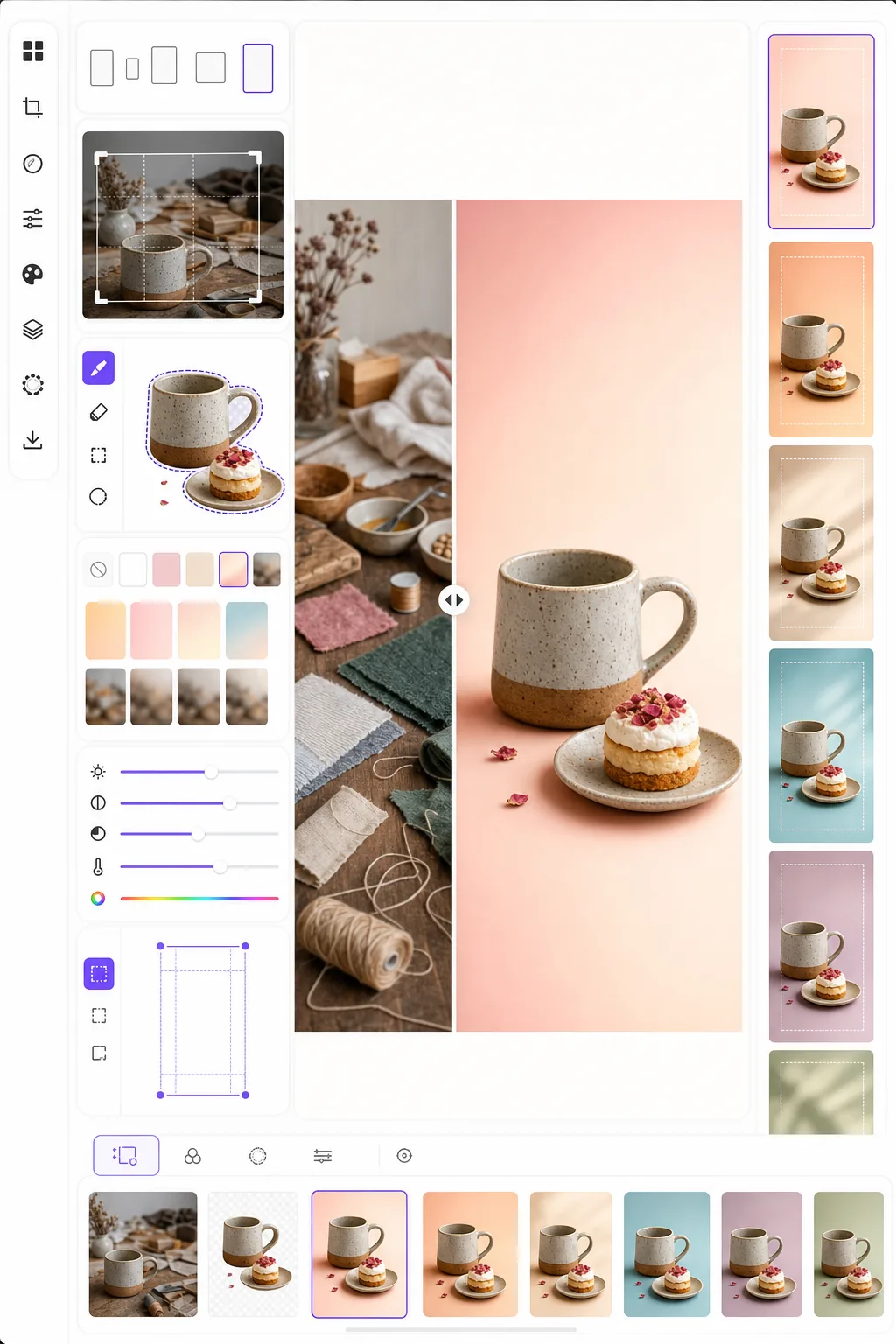
スクロールを止め、保存を促すピン画像を作成します。このテンプレートは写真を Pinterest 最適の 2:3 縦長比率に整え、ごちゃごちゃした背景を取り除いて商品に焦点を当てたすっきりとした構図を作り、Pinterest フィード向けに色の鮮やかさを高め、モバイルでもデスクトップでも鮮明に見えるピン対応の画像を出力します。
このテンプレートを無料で試すSocial Media template preview
このテンプレートの機能
縦長で目を引くピンが標準的な横長写真より保存率で3〜5倍も優れている Pinterest において、最大限のエンゲージメントを得られるよう画像を最適化します。Background Eraser は被写体 — 商品、料理、コーディネート、ハンドメイド作品 — を切り抜き、混み合ったフィードの中で被写体が際立つきれいな背景、単色背景、またはグラデーション背景に配置します。明るく彩度の高いコンテンツを優遇する Pinterest アルゴリズムの傾向に合わせて、色の鮮やかさが強調されます。テンプレートは標準ピンに Pinterest が推奨する正確なサイズである 1000 × 1500 px で出力します。
テンプレート設定
| アスペクト比 | 2:3 縦長 (1000 × 1500 px — Pinterest 標準) |
| 背景オプション | きれいな白、単色、ソフトなグラデーション、または元画像のぼかし |
| 色のブースト | フィードでの視認性のために彩度 +20%(調整可能) |
| 被写体のフレーミング | テキストオーバーレイ用に10%の余白を取って自動センタリング |
| 出力形式 | PNG(テキストオーバーレイ用)または JPEG(直接アップロード用) |
このテンプレートの使い方
ソース画像をアップロード
商品写真、料理写真、コーディネート写真、または Pinterest ピンにしたい任意の画像をアップロードします。テンプレートは横長、正方形、縦長の画像に対応し、被写体を中央に保つスマートなトリミングで最適な 2:3 縦長比率に再構成します。
背景と構図
Background Eraser が被写体を切り抜き、きれいな背景に配置します。純白、単色のブランドカラー、ソフトなグラデーション、または元の背景のぼかしバージョンから選べます。被写体はテキストオーバーレイ用に上下の余白を残すよう自動的に配置されます。
色と鮮明さの最適化
くすんだ画像はスクロールで飛ばされがちな Pinterest フィードで目立つよう、色は彩度 20% で強調されます。背景はソフトに保ちつつ被写体の鮮明さが高められ、メインの被写体に視線を引き寄せる視覚的な奥行きが生まれます。
ピンをエクスポート
1000 × 1500 px で PNG(Canva や他のエディターでテキストオーバーレイを追加する予定がある場合)または JPEG(Pinterest へ直接アップロードする場合)としてダウンロードします。すべてのデバイスとブラウザで正確に表示されるよう、カラープロファイルは sRGB に設定されています。
最良の結果を得るためのプロのヒント
- ✓テキストオーバーレイ用に、ピンの上部20%と下部15%を比較的すっきりさせておきましょう。テンプレートはこの余白を残すよう被写体を配置しますが、これらの領域に単色やグラデーションの背景を選ぶと、ごちゃごちゃした写真背景よりもテキストが読みやすくなります。
- ✓ライフスタイルや料理のピンには暖色系の背景(ブラッシュ、テラコッタ、クリーム)を、商品やテクノロジーのピンには寒色系のニュートラル(白、ライトグレー、淡い青)を使いましょう。Pinterest のエンゲージメントデータは、意図的な配色のピンがランダムな背景のものを一貫して上回ることを示しています。
- ✓同じコンテンツに対して複数のピンバージョンを作成しましょう — 同じ被写体で背景色やトリミングを変えるのです。Pinterest はコンテンツの多様性を評価し、コンテンツごとに2〜3種類のピンデザインをテストすると、どの視覚スタイルがオーディエンスの心に響くかを見極めるのに役立ちます。
よくある質問
ピンにテキストを追加できますか?
+
テンプレートはテキストオーバーレイ用に最適化されたきれいな画像を出力しますが、テキストを直接追加することはありません。PNG としてエクスポートし、Canva、Photoshop、または任意のデザインツールでテキストを追加してください。被写体は上部に見出し、下部に行動喚起を入れる余白を残すよう配置されています。
Idea Pins(動画)はどうですか?
+
このテンプレートは標準的な静止ピン用です。Idea Pins(旧 Story Pins)は動画と複数ページの形式を使用し、別のツールが必要です。静止のサムネイルが必要な場合、テンプレートの出力は Idea Pins のカバーフレームとしてうまく機能します。
インフォグラフィック風のピンにも使えますか?
+
インフォグラフィックピンの場合、テンプレートは個々の画像や商品写真を準備するのに最適で、それらをより縦長のインフォグラフィックレイアウト(1000 × 2100 px 以上)に配置します。各要素を個別に処理してからデザインツールで組み合わせることができます。
Related templates
More social media templates for your workflow.
Instagram に最適化された 1080×1080 ピクセルの正方形のトリミング テンプレート。きれいな背景、鮮やかな色、フィード内で際立つシャープなディテール。
セーフ ゾーン ガイド付きの 2560 × 1440 ピクセルの YouTube バナー テンプレート。クリエイターの写真の背景をきれいに削除し、デバイスに応じたレイアウト、ブランドと一貫したチャネル アートを実現します。
Facebook のカバー写真テンプレート (デスクトップ用は 820×312px、モバイルは 640×360px)。プロフィール写真のオーバーラップと CTA ボタンの配置に適切な安全ゾーンを設けたクリーンなブランド イメージ。
正確な 1500×500 ピクセルのサイズで本格的な Twitter/X ヘッダー画像を作成します。プロフィール写真の重なりを考慮し、ダーク モードとライト モードの両方で機能します。
自然な肌のスムージング、背景のクリーンアップ、照明補正、フィルター処理されていない本物に見える微妙なカラー グレーディングを使用して、デート プロフィール写真を強化します。
きれいな背景、大胆な被写体のフレーミング、プロファイル グリッドの一貫性を保つために最適化された 9:16 の垂直寸法を備えた、人目を引く TikTok ビデオ カバー写真を作成します。