
YouTube チャンネル アート
2560px のデスクトップ モニターからモバイル端末のトリミングまで、あらゆる画面で鮮明に見える YouTube チャンネル バナーをデザインしましょう。このテンプレートは複雑なセーフ ゾーンの計算を処理するため、ブランディング、テキスト、クリエイターの写真が TV、デスクトップ、タブレット、モバイルで切れることなく正しく表示されます。
このテンプレートを無料で試すSocial Media template preview
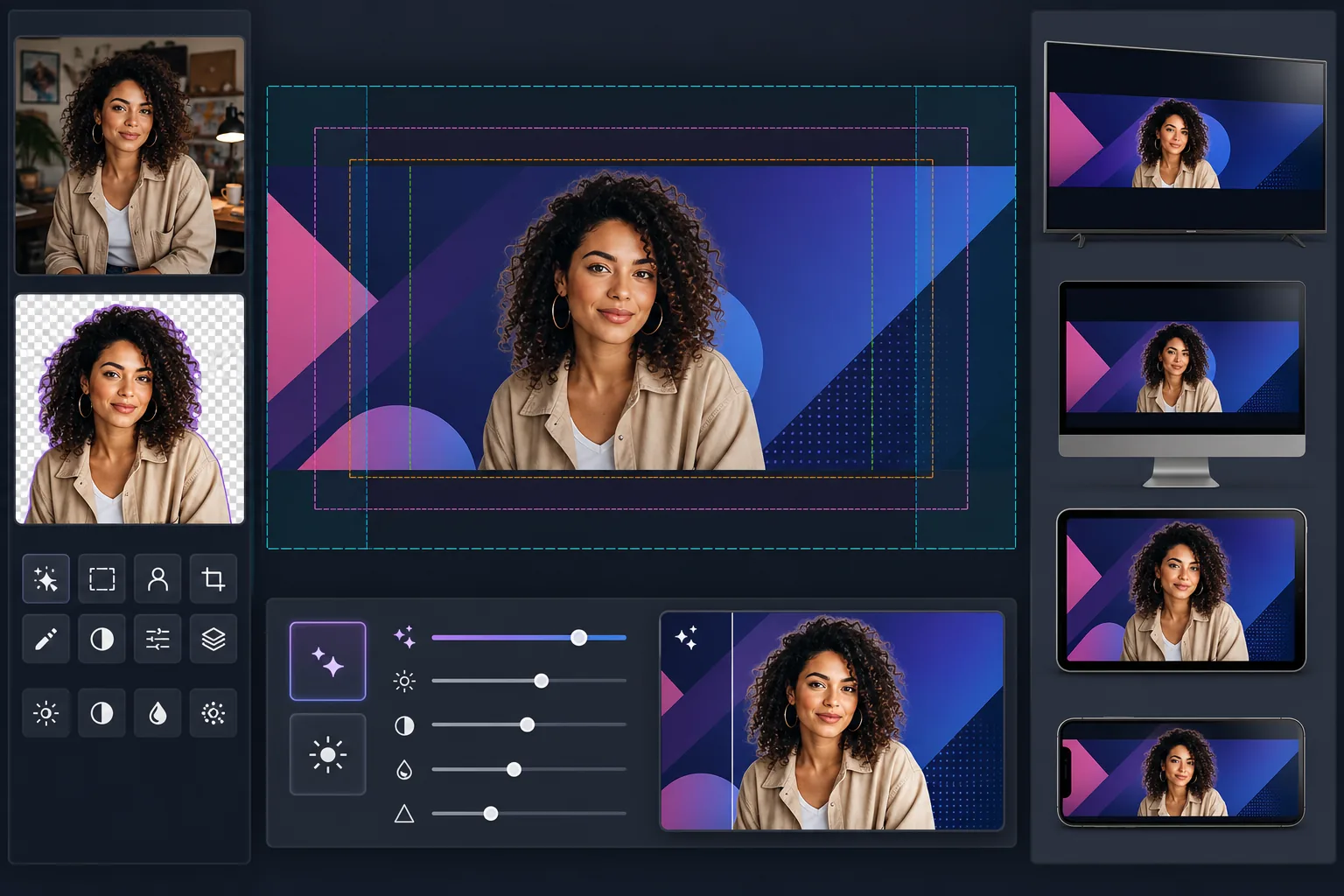
このテンプレートでできること
コンテンツを YouTube のセーフ ゾーン内に配置し、フル 2560×1440px のキャンバス サイズで YouTube チャンネル アートを作成します。Background Eraser はクリエイターのポートレートをきれいに切り抜いてブランド付きの背景に合成し、AI Enhance は最終的なバナーが YouTube の高解像度表示サイズで鮮明に保たれるようにします。このテンプレートは、YouTube が TV、デスクトップ、タブレット、モバイル端末にわたって適用する 4 つの異なるトリミング ゾーンを考慮しています。
テンプレート設定
| キャンバス サイズ | 2560×1440px(YouTube が必要とするアップロード サイズ) |
| セーフ ゾーン(すべてのデバイス) | 1546×423px の中央エリア(常に表示) |
| デスクトップ表示エリア | 2560×423px(全幅、中央ストリップ) |
| 色空間 | sRGB(一貫した YouTube 表示のための Web 標準) |
| ファイル形式 | グラフィック/テキストには PNG、写真バナーには JPEG 95% |
| 最大ファイル サイズ | 6MB(YouTube のアップロード上限) |
このテンプレートの使い方
クリエイターの写真またはブランド アセットをアップロード
ポートレート写真、ロゴ、またはブランド画像をアップロードします。クリエイター中心のチャンネルには、すっきりとしたヘッドショットや上半身の写真が最適です。Background Eraser があらゆる背景からあなたを切り離し、柔軟に配置できるようにします。
被写体を抽出して配置
Background Eraser が元の背景を削除し、きれいな切り抜きを提供します。クリエイターの写真やロゴを 1546×423px のセーフ ゾーン内に配置してください。これは、スマートフォンからスマート TV まで、あらゆるデバイスで確実に表示される中央エリアです。
解像度と鮮明さを向上
AI Enhance は最終的な構図をアップスケールしてシャープにし、2560px 幅で鮮明に見えるようにします。テキストの輪郭はシャープに保たれ、グラデーションは滑らかに保たれ、写真要素は YouTube のフル表示解像度で自然なディテールを維持します。
プレビューしてエクスポート
バナーがモバイル(1546×423px トリミング)、デスクトップ(2560×423px トリミング)、TV(フル 2560×1440px 表示)でどのように表示されるかをプレビューします。テキストの多いデザインには PNG、写真バナーには JPEG としてエクスポートし、YouTube の 6MB ファイル サイズ制限内に収めます。
最良の結果を得るためのプロのヒント
- ✓顔、チャンネル名、キャッチフレーズなど、すべての重要な要素を中央の 1546×423px セーフ ゾーン内に収めてください。これはあらゆるデバイスで確実に表示される唯一のエリアです。その外側にあるものはモバイルでトリミングされます。
- ✓バナーの右下隅にテキストやロゴを配置するのは避けてください。YouTube はデスクトップでそのエリアにプロフィール写真と登録ボタンを重ねるため、コンテンツが隠れる可能性があります。
- ✓バナー内のテキストには、コントラストの高い色と大きな太字フォントを使用してください。YouTube はチャンネル アートを強く圧縮するため、細い文字やコントラストの低い文字は、特にモバイル端末で読めなくなります。
- ✓外側のエリア(セーフ ゾーンの外)は背景の延長としてデザインしてください。単色、グラデーション、またはメイン画像をぼかしたバージョンがうまく機能します。これらのエリアは TV や横長のデスクトップ モニターに表示されますが、必須情報を含めるべきではありません。
よくある質問
なぜ YouTube は細いバナーにこれほど大きな画像を必要とするのですか?
+
YouTube は大きく異なるデバイス全体で 1 枚の画像を使用します。TV はフル 2560×1440px のキャンバスを表示します。デスクトップは 2560×423px の横ストリップを表示します。タブレットは少し少なく表示し、モバイルは中央の 1546×423px だけにトリミングします。大きなキャンバスにより、個別のアップロードを必要とせず、あらゆる画面でアートが鮮明に見えます。
モバイルでチャンネル名が切れてしまいますか?
+
セーフ ゾーン内に収めていれば切れません。テンプレートはあらゆるデバイスで表示される 1546×423px の中央エリアを示します。チャンネル名、キャッチフレーズ、重要なブランディングをこのゾーン内に配置すれば、どこでも正しく表示されます。
季節のキャンペーン用にチャンネル アートを更新できますか?
+
はい。ブランド カラーとロゴの配置を含むベース テンプレートを保持し、季節の更新、動画の公開、マイルストーンに合わせて背景画像やアクセント カラーを差し替えます。セーフ ゾーンの配置はバージョン間で一貫して保たれます。
あらゆる画面で機能する YouTube バナーを作成
写真やブランド アセットをアップロードして、デバイスに最適化されたチャンネル アートを数分で作成できます。デザイン ソフトウェアは不要です。
無料で試すRelated templates
More social media templates for your workflow.
Instagram に最適化された 1080×1080 ピクセルの正方形のトリミング テンプレート。きれいな背景、鮮やかな色、フィード内で際立つシャープなディテール。
Facebook のカバー写真テンプレート (デスクトップ用は 820×312px、モバイルは 640×360px)。プロフィール写真のオーバーラップと CTA ボタンの配置に適切な安全ゾーンを設けたクリーンなブランド イメージ。
正確な 1500×500 ピクセルのサイズで本格的な Twitter/X ヘッダー画像を作成します。プロフィール写真の重なりを考慮し、ダーク モードとライト モードの両方で機能します。
自然な肌のスムージング、背景のクリーンアップ、照明補正、フィルター処理されていない本物に見える微妙なカラー グレーディングを使用して、デート プロフィール写真を強化します。
きれいな背景、最適な 2:3 の垂直サイズ、鮮やかな色の強調、ピンに対応した構成を備えた、スクロールを止める Pinterest ピン画像を作成します。
きれいな背景、大胆な被写体のフレーミング、プロファイル グリッドの一貫性を保つために最適化された 9:16 の垂直寸法を備えた、人目を引く TikTok ビデオ カバー写真を作成します。