
旅行ブログの写真
混雑した旅行スナップを、出版品質の旅先写真へと生まれ変わらせます。このテンプレートはMagic Eraserでランドマークや風景の写真から観光客、写り込んだ人、視覚的なノイズを取り除き、続いてAI Enhanceで旅行写真にありがちな難しい露出条件——真昼の強い日差し、奥まった寺院の内部、逆光の夕景——を補正し、自然な色を引き立てて、読者が思わず旅を予約したくなる一枚に仕上げます。
このテンプレートを無料で試すPersonal template preview
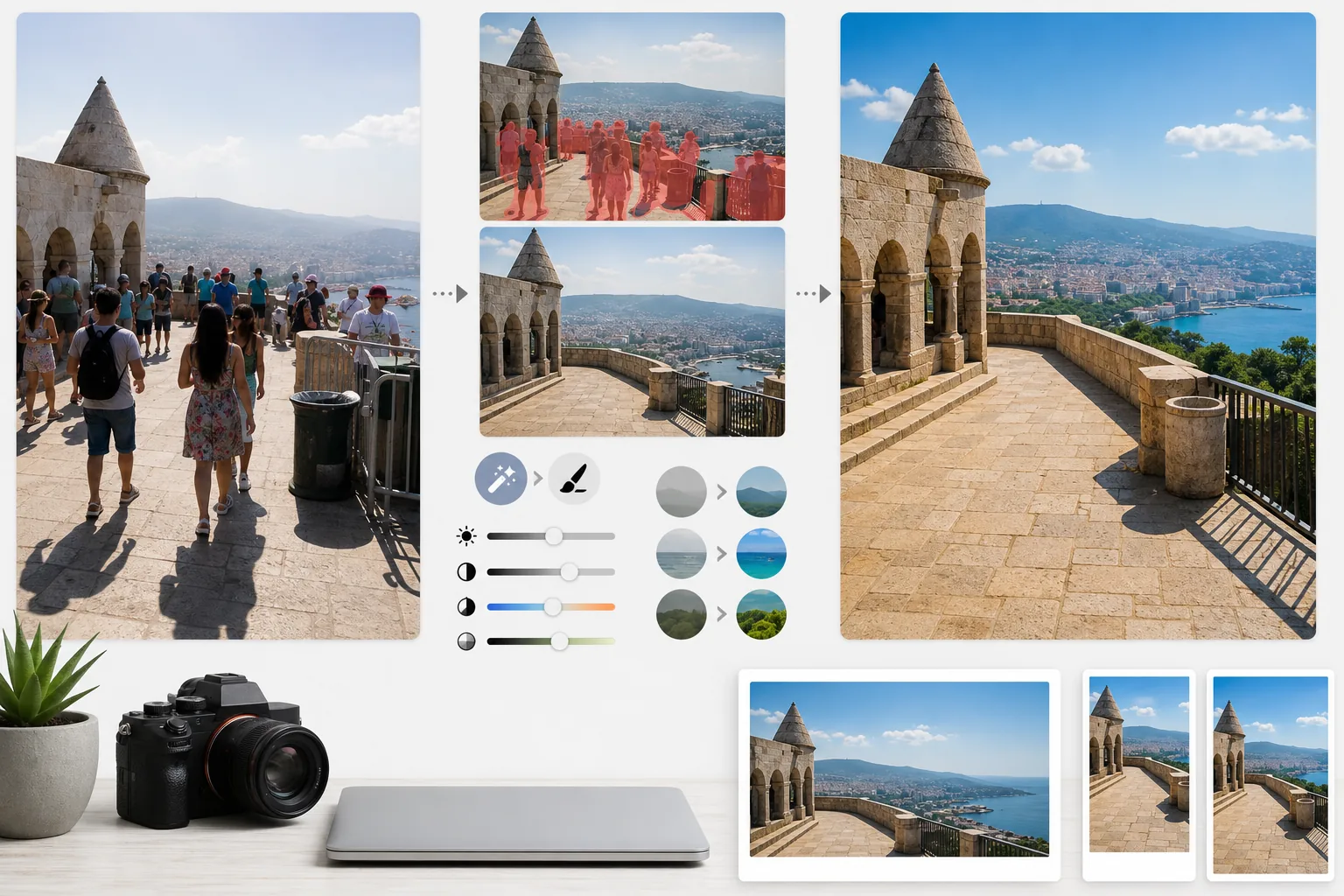
このテンプレートの機能
旅行写真における二大問題、すなわち人混みと悪い光を解決します。Magic Eraserは記念建造物の前に立つ観光客、フレームを横切る写り込み、ゴミ箱や工事用バリケード、仮設の標識といった場所の雰囲気を台無しにする視覚的なノイズを取り除きます。AIは周囲の状況をもとに、取り除いた人や物の背後にある建築、舗道、風景を再構築します。さらにAI Enhanceが、旅行特有の露出の難題に対処します——窓が白飛びして影が真っ黒な大聖堂や寺院の内部、熱帯の旅先で色をのっぺりさせる真昼の強い日差し、前景がシルエットになる逆光の夕景などです。色は、カメラがダイナミックレンジで常に表現しきれない、その場所が実際に人の目に映る姿を反映するように引き立てられます。
テンプレート設定
| 観光客の除去 | ランドマークや風景の写真から人物を自動検出して除去 |
| 露出補正 | 難しい光に対応するHDR風のハイライトとシャドウの復元 |
| 色の強調 | 不自然にならずに自然な彩度(空・水・草木)を引き立てる |
| もやの除去 | 大気のもやを抜いて遠景の風景をよりくっきりと |
| 出力解像度 | 長辺4000px(Retina品質のブログヒーロー画像向け) |
このテンプレートの使い方
旅行写真をアップロード
混雑したランドマーク、風景のパノラマ、街並み、屋内建築など、どんな旅行写真でもアップロードできます。このテンプレートはスマートフォン、ミラーレスカメラ、アクションカメラのJPEGに対応しています。最大限の編集の自由度を求める場合は、RAWファイルも受け付けます。
人混みとノイズを除去
Magic Eraserがフレーム内の人物を検出して除去します。すべての人を消す、特定の人物(自分自身や同行者)を残す、あるいは重要な建築や風景の要素を遮っている人だけを選んで消す、といった選択ができます。AIが欠けた部分を、再構築した地面、壁、景色で埋めます。
光と色を強調
AI EnhanceはHDR風の処理を適用し、白飛びした空を復元し、深いシャドウを持ち上げます——これは寺院の内部やヨーロッパの狭い路地でよく起こります。色は、その場所であなたの目が見たものに合わせて引き立てられ、特に空の青、海のティール、草木の緑が鮮やかになります。大気のもやも軽減され、山や街並みの遠景がよりくっきりします。
ブログとSNS向けに書き出し
Retina品質のブログヒーロー画像向けに長辺4000pxで、またはInstagram、Pinterest、Facebook向けの各プラットフォーム専用サイズで書き出せます。ファイルには、作品にジオタグを付ける写真家のために最適化されたEXIFデータの保持機能が含まれます。
最良の結果を得るためのプロのコツ
- ✓同じ場面を数秒間隔で複数枚撮影しましょう。観光客がフレーム間で移動すると、AIは彼らの背後にある地面や壁の参照情報を得られ、一枚だけの場合よりもきれいに再構築できます。
- ✓教会、寺院、美術館の屋内写真は、撮影時に少し露出オーバー気味にしましょう。AIは明るいハイライトを復元する方が、極端に暗いシャドウを持ち上げるよりも簡単で、屋内写真はもともと露出不足になりがちです。
- ✓風景はできるだけゴールデンアワーやブルーアワーに撮影しましょう。AI Enhanceは真昼ののっぺりした光でも色を引き立てられますが、ゴールデンアワーの方向性のある暖かい光が風景に生む影と立体感は、どんな色調補正でも再現できません。
よくある質問
自分は写真に残したまま、他の観光客だけを消せますか?
+
はい。自分自身や同行者を保護対象としてマークできます。AIは保護された人物を元の位置、光、影をそのまま保ったまま残し、それ以外の人をシーンから除去します。
非常に混雑した場面ではどのくらいうまく機能しますか?
+
人混みがフレームの約40%未満を占める場合に最も効果を発揮します。人と人の間に地面が見えないほど混み合った広場のような極端に混雑した場面では、きれいに再構築するための背景の参照情報が少なすぎます。そうした場合は、手前の列だけを部分的に除去すると、説得力のある結果になることがよくあります。
もやの除去で写真が不自然に見えませんか?
+
もやの軽減は自然な仕上がりになるよう調整されています。遠くの山や建物をかすませる青灰色の大気散乱を取り除く一方で、風景写真に奥行きを与える繊細な空気遠近感は保ちます。フィルターをかけたり過度に加工したりした画像ではなく、澄み切った晴れた日に撮影したような仕上がりになります。
Related templates
More personal templates for your workflow.
適切な背景色、頭のサイズ、表情の要件を備えた、ビザ、運転免許証、国民 ID に準拠した ID 写真を作成します。
背景のクリーンアップ、キャップとガウン Color correction、傷の除去、およびフレームとアナウンスの印刷準備の整ったシャープ化を使用して、卒業写真を強化します。
低照度のノイズ低減、ステージ照明 色補正、群衆の気を散らす除去、暗い会場のショットからのディテールの回復により、コンサートやイベントの写真を強化します。
柔らかな背景、穏やかなカラー グレーディング、病院の雑然としたものを取り除き、郵送用に印刷可能な寸法を備えた美しい新生児発表カードの写真を作成します。
お祝いの背景、温かみのあるカラー グレーディング、雪の効果、印刷用の標準カード寸法を備えたホリデー グリーティング カード用の家族写真やポートレート写真を準備します。
優しいレタッチ、背景の簡略化、温かみのあるカラーグレーディング、サービス用に印刷可能なサイズを使用して、記念のトリビュート写真を復元および強化します。