
卒業写真の強化
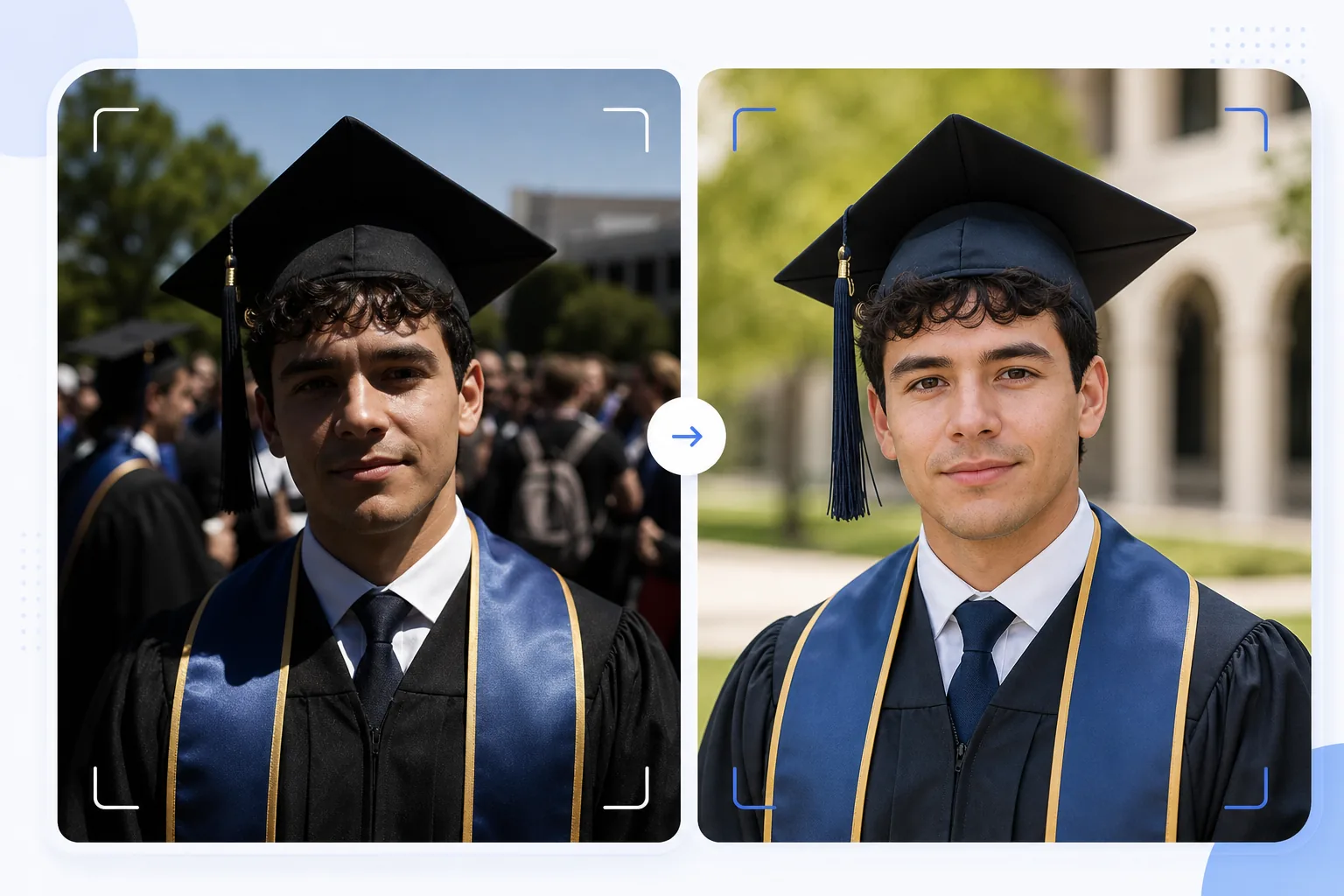
何気なく撮った卒業写真を、額に飾れる本格的なポートレートに変えます。このテンプレートは、卒業式によくある厳しい屋外の光を補正し、卒業生の背後にいる写り込みや雑然とした人混みを取り除き、キャップとガウンの色を引き立て、壁や暖炉の上に飾る大判印刷向けに画像をシャープにします。
このテンプレートを無料で試すPersonal template preview
このテンプレートでできること
卒業式にさっと撮ったスナップ写真を、額装、案内状、SNSでの共有にふさわしい洗練されたポートレートに変えます。卒業式は難しい条件で撮影されます。真昼の強い日差しがキャップのつばの下にクマのような影を作り、背景の人混みは雑然とし、ガウンの色は直射日光で色あせて見えます。AI Enhance は露出を補正してキャップ下の影を埋め、ガウンやストールに豊かな色を取り戻し、慌ただしい人混みでの撮影でぼやけがちな顔のディテールをシャープにします。Magic Eraser は写り込んだ人、卒業生の背後に見える人混み、気が散る看板、その他の式典の雑然とした要素を取り除き、よりすっきりとした背景の中で卒業生を際立たせます。
テンプレート設定
| シャドウ復元 | キャップ下の影埋め(ハイライトを飛ばさずに顔を明るく) |
| ガウンの色強化 | 黒、ネイビー、カーディナル、ゴールドのガウンの生地色を復元 |
| 肌のスムージング | 自然な肌の質感を保ちながら軽く肌荒れを軽減 |
| 背景のクリーンアップ | 卒業生の背後の写り込みや人混みを除去 |
| 出力解像度 | 長辺5000px(300 DPIで16×12インチまで印刷可能) |
| シャープ化 | ポートレート最適化シャープ化(顔のディテール+ガウン生地の質感) |
このテンプレートの使い方
卒業写真をアップロード
ポーズをとったポートレート、ステージを歩く瞬間、キャップを投げる場面、自然なお祝いの瞬間など、どんな卒業式の写真でもアップロードできます。このテンプレートは、明るい屋外の日差しから薄暗い屋内の講堂まで、あらゆる照明条件で撮影されたスマートフォンや一眼レフの写真に対応します。
光と色を補正
AI Enhance は、角帽が作り出す強い影を補正します。この影は通常、卒業生の目元や顔の上部を暗くします。ガウンやストールの色は本来の豊かな色合いに復元され、黒いガウンは暗い灰色に見える代わりに深みを取り戻し、名誉ストールは色の鮮やかさを存分に発揮します。
余分なものを除去
Magic Eraser は、被写体の背後に見える人混み、他の卒業生、折りたたみ椅子、看板を取り除きます。AI は会場のすっきりとしたバージョン(芝生、建物の外壁、カーテンなど)で背景を再構成し、人混みの場面からポートレートのような構図を作り出します。
印刷と共有用に書き出し
額装プリント用には長辺5000pxで300 DPIの16×12インチまで、SNSやデジタル案内状用には2000pxでダウンロードできます。カラープロファイルは、画面表示用にsRGB、プロ向け印刷用にAdobe RGBに設定されています。
最高の結果を得るためのプロのコツ
- ✓計画できる場合は、式典の直後に直射日光ではなく日陰で正式なポートレートを撮りましょう。日陰なら、最も補正が難しいキャップの強い影をなくせます。このテンプレートは日差しの影を補正できますが、日陰が最も自然な結果になります。
- ✓伝統的なポーズのポートレートと、自然なお祝いの瞬間(家族と抱き合う、キャップを投げる)の両方を撮りましょう。このテンプレートは両方のスタイルを強化し、それぞれの洗練されたバージョンがあれば、額装プリントとSNS投稿の選択肢が広がります。
- ✓家族との集合写真では、卒業生をグループより少し前に配置しましょう。これにより自然な奥行きの分離が生まれ、Magic Eraser が家族のメンバーに影響を与えずに背景の余分なものを切り分けて除去しやすくなります。
よくある質問
ぼやけた卒業写真を補正できますか?
+
AI Enhance は、わずかな手ぶれやオートフォーカスのわずかなずれによる軽いぼやけのある写真をシャープにできます。ただし、激しい被写体ぶれによる大きくぼやけた写真(遠くからステージを歩く瞬間を撮ったものなど)は完全には復元できません。このテンプレートはディテールを強化しますが、もともと記録されていなかったシャープさを作り出すことはできません。
屋内の式典写真はどうですか?
+
講堂の照明(暖かい黄色や混合した蛍光灯)で撮影された屋内の卒業写真は、色温度が補正されます。このテンプレートはホワイトバランスを調整し、肌の色が自然に見え、ガウンの色が本来どおりに現れるようにします。高ISO設定による暗所ノイズは、顔のディテールを保ちながら軽減されます。
背景を完全に削除できますか?
+
はい。背景のクリーンアップを使って、すべての背景要素を削除し、スタジオポートレートのような単色やグラデーションに置き換えられます。これは、元の式典の背景が雑然としすぎて選択的に除去できない場合に効果的です。
Related templates
More personal templates for your workflow.
適切な背景色、頭のサイズ、表情の要件を備えた、ビザ、運転免許証、国民 ID に準拠した ID 写真を作成します。
低照度のノイズ低減、ステージ照明 色補正、群衆の気を散らす除去、暗い会場のショットからのディテールの回復により、コンサートやイベントの写真を強化します。
柔らかな背景、穏やかなカラー グレーディング、病院の雑然としたものを取り除き、郵送用に印刷可能な寸法を備えた美しい新生児発表カードの写真を作成します。
お祝いの背景、温かみのあるカラー グレーディング、雪の効果、印刷用の標準カード寸法を備えたホリデー グリーティング カード用の家族写真やポートレート写真を準備します。
優しいレタッチ、背景の簡略化、温かみのあるカラーグレーディング、サービス用に印刷可能なサイズを使用して、記念のトリビュート写真を復元および強化します。
背景の置き換え、照明の補正、毛皮のディテールの強化を行って保護施設や救助ペットの写真を変換し、動物がより早く家を見つけられるようにします。