
証明写真テンプレート
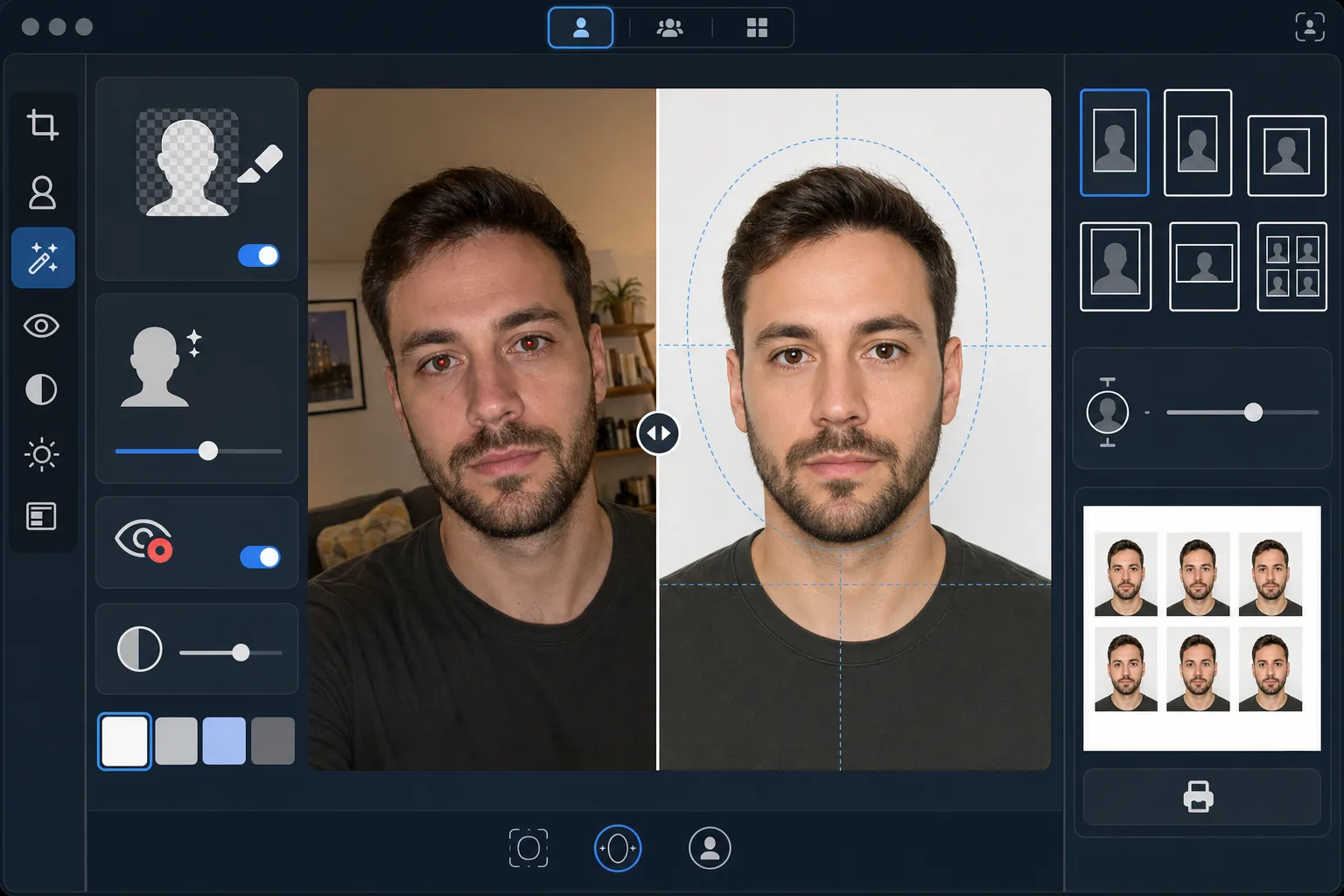
自撮りやポートレートから、ビザ、運転免許証、国民 ID カード、社員証に対応した証明写真を作成します。このテンプレートは背景を必要な単色に置き換え、頭のサイズと位置を公式仕様に合わせて調整し、顔が均一に照らされるよう照明を補正して、必要な印刷寸法ぴったりで出力します。
このテンプレートを無料で試すPersonal template preview
このテンプレートでできること
あらゆるポートレート写真を、政府要件に準拠した証明写真に変換します。書類ごとに仕様は異なり、米国のパスポートは白背景で頭の高さが 25~35mm、2×2 インチの印刷が必要なのに対し、シェンゲンビザは 35×45mm で薄いグレーまたは白の背景が求められます。このテンプレートは最も一般的な証明写真規格を自動で処理します。Background Eraser が元の背景を削除し、必要な単色に置き換えます。AI Enhance は不均一な照明を補正し、フラッシュによる赤目を除去し、片側に強い影が出ないよう顔を均一に照らします。片側の影は政府窓口でよくある却下理由です。
テンプレート設定
| 背景色 | 白 (#FFFFFF) または薄いグレー (#E5E5E5) — ID の種類で選択可能 |
| 頭のサイズ | 頭の高さをフレームの 70~80% に自動調整(規格ごとに調整可能) |
| 印刷寸法 | 2×2 in(米国)、35×45 mm(EU/シェンゲン)、33×48 mm(英国)— 選択可能 |
| 照明補正 | 顔を均一に照射 — 左右どちらにも影なし |
| 出力解像度 | 写真印刷用 600 DPI(キオスクと家庭用プリンターに対応) |
このテンプレートの使い方
正面向きの写真をアップロード
目線の高さで撮影した、鮮明な正面向きのポートレートをアップロードしてください。写真には顔全体と肩の上部が写り、表情は中立で両目を開けている必要があります。撮影前にメガネ、帽子、かぶり物(宗教上の理由で着用する場合を除く)を外してください。
ID の種類を選択
書類の種類を選びます — 米国パスポート、EU/シェンゲンビザ、英国パスポート、運転免許証、または国民 ID カード。テンプレートが選択した書類の公式要件に合わせて、背景色、頭のサイズ、印刷寸法、縦横比を自動で調整します。
背景と照明の補正
Background Eraser が元の背景を削除し、必要な単色に置き換えます。AI Enhance は不均一な照明を補正して顔の両側が均一に照らされるようにし、人工照明による色かぶりを除去します。フラッシュによる赤目は自動で補正されます。
印刷用に書き出す
書類の種類に必要な印刷寸法ぴったりで 600 DPI でダウンロードします。出力は標準的な 4×6 インチの写真用紙向けに整えられ、複数の証明写真が 1 枚に並べられているため、自宅、薬局の写真キオスク、またはプロの印刷店で印刷できます。
最良の結果を得るためのプロのヒント
- ✓窓に向かった、十分に明るい部屋で無地の壁を背景に撮影してください。テンプレートが背景を置き換えるとはいえ、最初から顔に均一な自然光が当たっている方が、人工照明の強い影を補正するよりも良い結果になります。
- ✓口を閉じて両目を開け、中立的な表情を保ってください。政府の証明写真要件は、笑顔、目を細めた状態、口を開けた写真を一貫して却下します。これらの規則は多くの政府窓口で自動写真検証システムによって適用されています。
- ✓髪が顔にかかったり眉を隠したりしないようにしてください。顔はあごの先から額の上まで完全に見える必要があります。撮影前に顔を横切る髪はピンで留めてください。
- ✓背景色と対照的なトップスを着てください。背景が白の場合は白い服を避けてください — 暗い色や有色のトップスは輪郭をきれいに分離し、肩が背景に溶け込むのを防ぎます。
よくある質問
これは政府窓口で受理されますか?
+
テンプレートは各書類の種類の公式仕様(国際渡航書類は ICAO 9303、国内 ID は各国固有の要件)に従っています。ただし、最終的な受理は審査担当者の判断によります。テンプレートは寸法、背景色、頭のサイズ、照明が公表された要件を満たすことを保証します。
写真でメガネをかけてもいいですか?
+
ほとんどの国(米国では 2016 年以降)が、パスポートおよびビザ写真ではメガネを外すよう求めています。テンプレートはメガネをデジタルで除去しません — 元の写真を撮る前に外してください。宗教上のかぶり物はほとんどの法域で許可されています。
出力をどのように印刷しますか?
+
テンプレートは、複数の証明写真が正しいサイズで並べられた 4×6 インチのシートを出力します。薬局の写真キオスク(CVS、Walgreens、Boots)、自宅で 600 DPI の写真用紙、またはプロの印刷店で印刷してください。光沢またはマットの写真用紙を使用し、通常のプリンター用紙は使わないでください。
Related templates
More personal templates for your workflow.
背景のクリーンアップ、キャップとガウン Color correction、傷の除去、およびフレームとアナウンスの印刷準備の整ったシャープ化を使用して、卒業写真を強化します。
低照度のノイズ低減、ステージ照明 色補正、群衆の気を散らす除去、暗い会場のショットからのディテールの回復により、コンサートやイベントの写真を強化します。
柔らかな背景、穏やかなカラー グレーディング、病院の雑然としたものを取り除き、郵送用に印刷可能な寸法を備えた美しい新生児発表カードの写真を作成します。
お祝いの背景、温かみのあるカラー グレーディング、雪の効果、印刷用の標準カード寸法を備えたホリデー グリーティング カード用の家族写真やポートレート写真を準備します。
優しいレタッチ、背景の簡略化、温かみのあるカラーグレーディング、サービス用に印刷可能なサイズを使用して、記念のトリビュート写真を復元および強化します。
背景の置き換え、照明の補正、毛皮のディテールの強化を行って保護施設や救助ペットの写真を変換し、動物がより早く家を見つけられるようにします。