
新生児お知らせカード
病院での写真や生後初日の写真を美しいお知らせカードの画像に変えます。このテンプレートは病院の背景の雑然としたものを取り除き、柔らかく温かみのあるカラー グレーディングを適用し、赤ちゃんをきれいな背景やパステル調の背景から切り出し、郵送やデジタル共有のための標準的なカードサイズで印刷可能な画像を出力します。
このテンプレートを無料で試すPersonal template preview
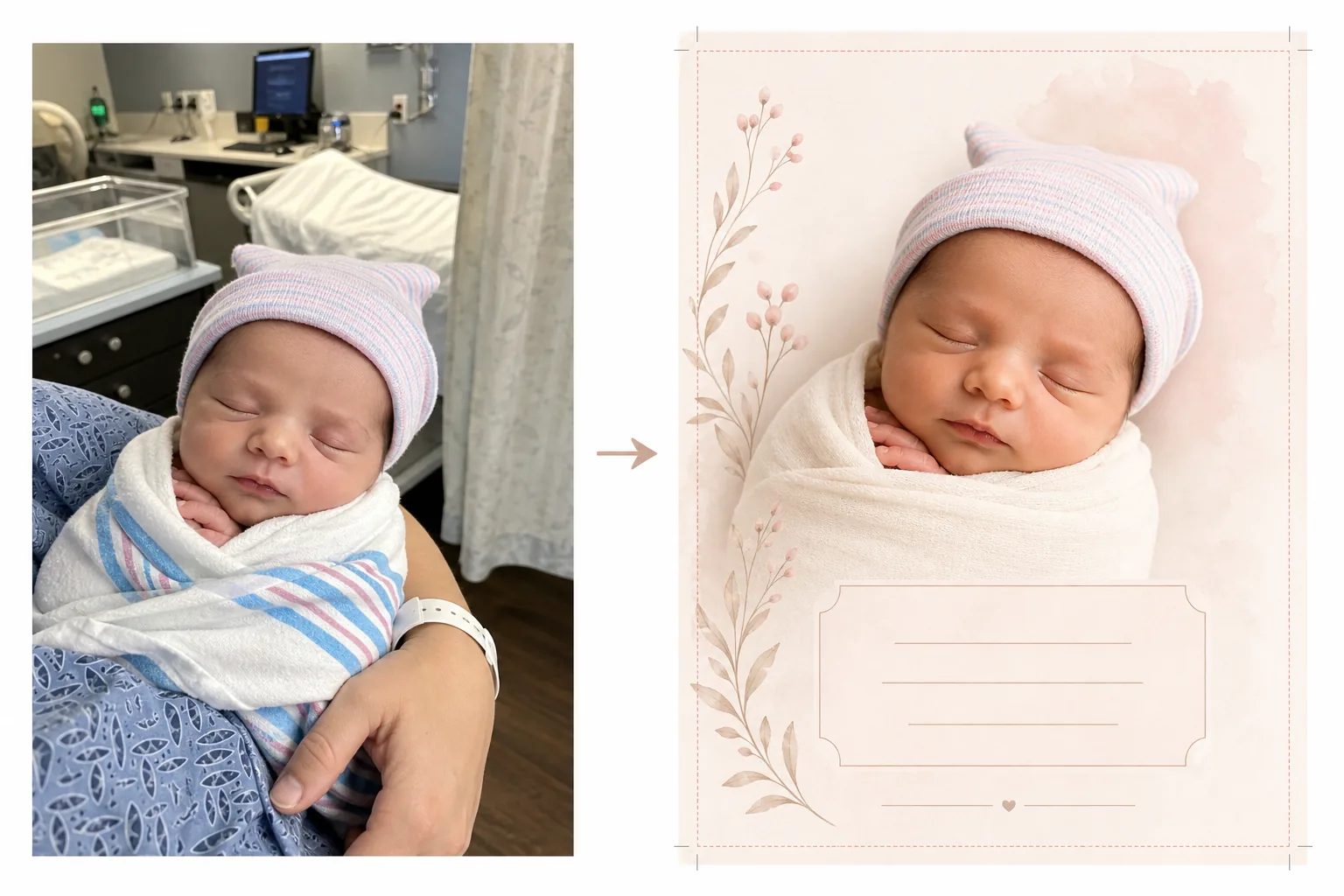
このテンプレートの機能
病室で撮ったスナップ写真を、印刷カードにもデジタルお知らせにも適したきれいで優しい画像に変換し、出生のお知らせカード用に新生児の写真を準備します。病室には医療機器や蛍光灯、施設的な背景があり、新生児写真の親密さを損ねます。Background Eraser は赤ちゃんを切り出し、病院の設定を白、クリーム、パステル調の柔らかくきれいな背景に置き換えます。AI Enhance は冷たい蛍光灯の病院照明を温かく優しいトーンに補正し、肌を健康的で自然に見せます。その結果、医療的な背景が一切見えず、新しい命だけに完全に焦点を当てた、お知らせにふさわしい写真が生まれます。
テンプレート設定
| 背景 | 柔らかな白、クリーム、ブラッシュ、セージ(お知らせカードに最適) |
| カラー グレーディング | 温かく優しいトーン(病院の蛍光灯を自然な温かみに補正) |
| 肌の色 | 自然な新生児の肌の補正(柔らかく、温かく、健康的) |
| カードの寸法 | 5×7 in、4×6 in、または A6(標準的なお知らせカードサイズ) |
| 出力解像度 | カードサイズで 300 DPI(印刷店および家庭用プリンター対応) |
このテンプレートの使い方
新生児の写真をアップロード
新生児の写真をアップロードします——病院のベビーベッドの中、親の腕の中、または毛布にくるまれた状態など。このテンプレートは、顔のクローズアップ、全身をくるんだポーズ、親子のポートレートなど、さまざまな構図に対応します。病院の患者衣、モニター、親に見えるリストバンドは自動的に取り除かれます。
背景と色の変換
Background Eraser が病室を取り除き、お好みの色の柔らかくきれいな背景に置き換えます。冷たい蛍光灯の照明は温かく自然なトーンに補正されます。肌は、新生児写真特有の柔らかく温かみのある輝きで、健康的かつ自然に見えるよう優しく補正されます。
カードのフォーマット
画像は、プロの印刷に適した適切な裁ち落としの余白とともに、お好みのカードの寸法にフォーマットされます。名前、日付、体重、身長などのテキストを重ねるためのスペースが確保され、赤ちゃんの写真を視覚的な中心として、標準的なお知らせカードのレイアウトに従って配置されます。
印刷と共有のためのエクスポート
プロの印刷店、オンラインカードサービス、または家庭用プリンターで印刷するために、お好みのカードサイズで 300 DPI でダウンロードします。メールでのお知らせやソーシャルメディアでの共有用に、ウェブ最適化版も提供されます。
最良の結果を得るためのプロのヒント
- ✓最も使いやすいお知らせカードの写真を撮るには、赤ちゃんが眠っている間に顔のクローズアップを撮影しましょう。眠っている赤ちゃんはリラックスした穏やかな表情で、写真映りが美しく、カードレイアウトの焦点として効果的です。
- ✓撮影前に赤ちゃんを白または明るい色のおくるみで包みましょう。これにより赤ちゃんと背景の間にきれいな視覚的境界ができ、特に小さな指や細い髪の毛の周りで、Background Eraser が可能な限りきれいなエッジを生成しやすくなります。
- ✓片方の親の手や腕が赤ちゃんを抱いて見えても問題ありません——このテンプレートは親の肌の色も補正します。親の手首にある病院のリストバンドは、よりすっきり見せるために自動的に取り除かれます。
- ✓複数の写真を撮り、最も良い表情と手の位置のものを選びましょう。新生児は予測できない動きをします——いくつかの選択肢を撮っておくことで、小さな指、口、目が最も写真映りする一枚を確保できます。
よくある質問
背景から病院の機器を取り除けますか?
+
はい。このテンプレートはまさにこの目的のために設計されています——病院のベビーベッド、モニター、点滴スタンド、カーテン、天井の蛍光灯を取り除き、お知らせに適したきれいな背景に置き換えます。赤ちゃんと抱いている親は医療環境から切り離されます。
利用できるカードサイズは何ですか?
+
標準的なお知らせカードサイズに対応しています:5×7 インチ(郵送するお知らせで最も人気)、4×6 インチ(ポストカード形式)、A6(国際標準)。出力にはプロの印刷に適した適切な裁ち落としの余白が含まれます。
カードにテキストを追加できますか?
+
このテンプレートは、テキストを重ねるためのスペースを確保して写真を準備しますが、テキストを直接追加することはありません。エクスポートした画像を Canva、Shutterfly、Minted、その他のカードデザインサービスで使い、赤ちゃんの名前、生年月日、体重、身長、個人的なメッセージを追加してください。
Related templates
More personal templates for your workflow.
適切な背景色、頭のサイズ、表情の要件を備えた、ビザ、運転免許証、国民 ID に準拠した ID 写真を作成します。
背景のクリーンアップ、キャップとガウン Color correction、傷の除去、およびフレームとアナウンスの印刷準備の整ったシャープ化を使用して、卒業写真を強化します。
低照度のノイズ低減、ステージ照明 色補正、群衆の気を散らす除去、暗い会場のショットからのディテールの回復により、コンサートやイベントの写真を強化します。
お祝いの背景、温かみのあるカラー グレーディング、雪の効果、印刷用の標準カード寸法を備えたホリデー グリーティング カード用の家族写真やポートレート写真を準備します。
優しいレタッチ、背景の簡略化、温かみのあるカラーグレーディング、サービス用に印刷可能なサイズを使用して、記念のトリビュート写真を復元および強化します。
背景の置き換え、照明の補正、毛皮のディテールの強化を行って保護施設や救助ペットの写真を変換し、動物がより早く家を見つけられるようにします。