
コンサート・イベント写真
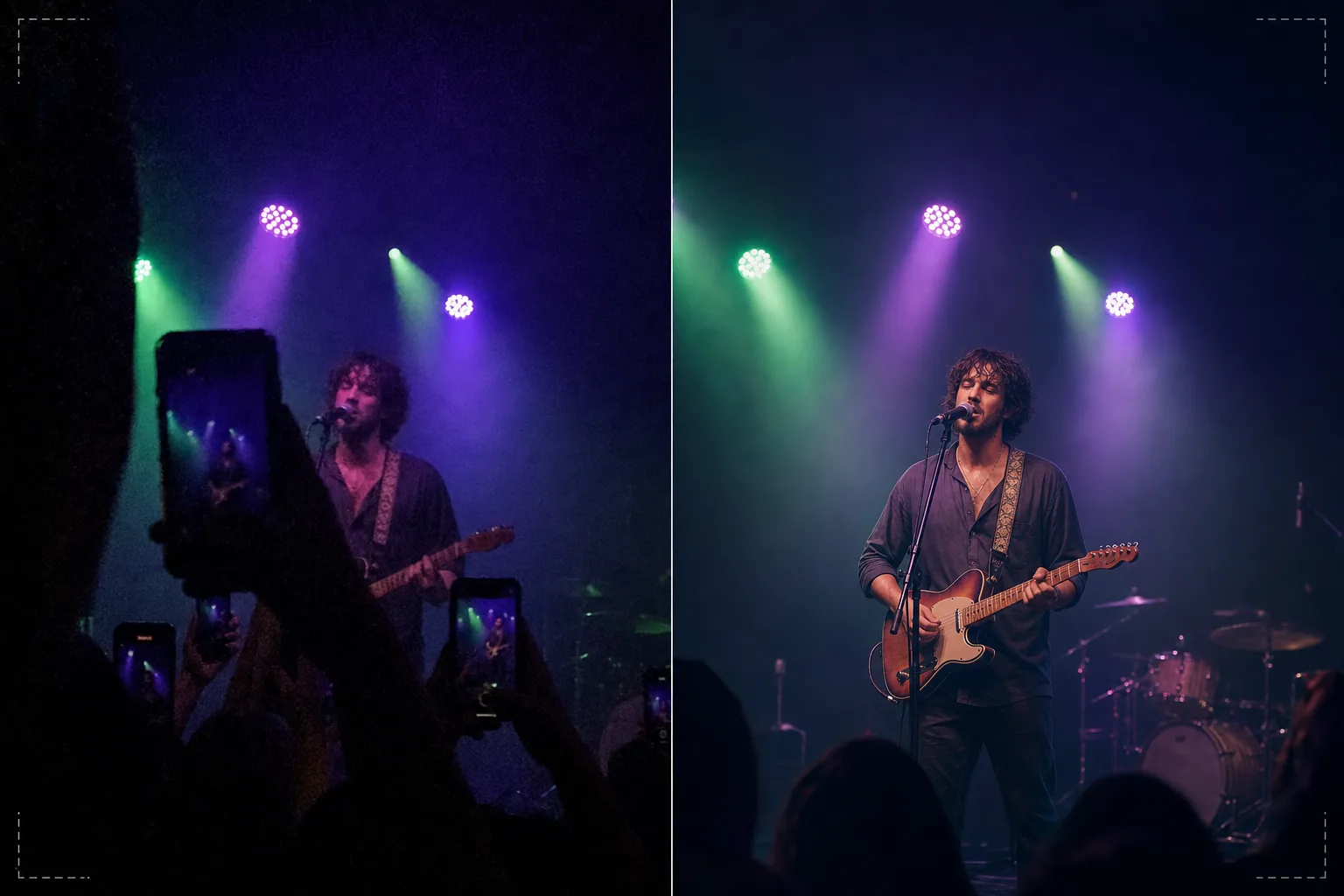
暗くノイズの多いコンサートやイベントの写真を、共有できる思い出に蘇らせます。このテンプレートは低照度ノイズを大幅に低減し、露出不足のショットからディテールを復元し、強い舞台照明の色かぶりを補正し、視界を遮る腕やスマホを除去し、出演者やイベントの被写体をシャープにします。
このテンプレートを無料で試すPersonal template preview
このテンプレートの機能
スマホのカメラでは対応しきれない照明条件のコンサート、フェス、スポーツイベント、屋内公演で撮影した難しい写真を救済します。コンサート写真は、人々が日常的に撮る中で最も技術的に難しいショットです。極端な低照度により高ISOノイズが発生し、混在した色付きの舞台照明が奇妙な色かぶりを生み、ステージまでの距離により顔やディテールが小さくぼやけます。AI Enhance はインテリジェントなノイズ低減を適用し、ノイズの粒状パターンを除去しながら下層のディテールを復元し、舞台照明による紫・緑・赤の色かぶりを補正して自然な肌や楽器のトーンを引き出し、出演者をシャープにして表情や楽器のディテールを際立たせます。Magic Eraser は視界を遮る他の観客の上げた腕、スマホ、頭を除去します。
テンプレート設定
| ノイズ低減 | AIノイズ除去(ISO 12800までの高ISO粒状からディテールを復元) |
| 色補正 | 舞台照明の色かぶり除去(紫・緑・赤・青を中和) |
| シャドウ復元 | 露出不足の領域を最大3段分まで持ち上げ |
| 群衆除去 | 上げた腕、スマホ、視界を遮る頭を除去 |
| 被写体シャープ化 | 被写体/ステージの選択的シャープ化(ボケの雰囲気を保持) |
このテンプレートの使い方
コンサート写真をアップロード
コンサート、フェス、演劇公演、お笑いショー、スポーツイベントで撮影したスマホやカメラの写真をアップロードします。このテンプレートは、こうした会場特有の極端な条件に対応します。ほぼ真っ暗な露出、濃い色の舞台照明、動く出演者によるモーションブラー、観客に遮られた視界などです。
ノイズ低減とディテール復元
AI Enhance は下層の画像ディテールを保持しながら高ISOノイズの粒状を除去します。露出不足の影が持ち上げられ、元のショットではほとんど見えなかった顔、楽器、ステージの要素が現れます。ノイズ低減は、画像を人工的に滑らかに見せるのではなく、会場の雰囲気を維持するよう調整されています。
色と照明の補正
強い舞台照明の色かぶりが補正され、肌のトーン、衣装、楽器が認識できる色で表示されます。自然な見た目のために舞台照明を完全に中和するか、最も極端な色かぶりを抑えつつ雰囲気のある色付き照明を一部残すよう部分的に補正するかを選べます。
強化した思い出を書き出す
強化した写真をSNS共有、個人アーカイブ、印刷用にダウンロードします。出力はライブイベントの雰囲気を保ちながら、顔、表情、瞬間が見えて思い出として意味のあるものになるよう、画像を十分に鮮明にします。
最良の結果を得るためのプロのヒント
- ✓暗く雰囲気のある場面ではなく、明るい舞台照明の瞬間 — スポットライト、花火演出、スクリーンの切り替え — に撮影しましょう。テンプレートは影のディテールをかなり復元できますが、最も明るい瞬間に撮った写真には扱える下層データが最も多くあります。
- ✓動く出演者を撮影するときは連写モードを使いましょう。歌手の手のジェスチャーやギタリストの弦を弾く腕によるモーションブラーは後から除去できませんが、10枚の連写の中の1枚が、テンプレートで強化できる鮮明な瞬間を捉えるかもしれません。
- ✓スマホを両手で持ち、肘を体に押し当てて手ブレを最小限に抑えましょう。手ブレは低照度コンサート撮影の難しさを増幅します。より安定した元写真はノイズ低減アルゴリズムにきれいなデータを提供し、よりシャープな最終画像を生み出します。
よくある質問
ほぼ真っ暗な写真も修正できますか?
+
テンプレートは2〜3段アンダー露出のショット — 被写体がかろうじて見える画像 — からディテールを復元できます。3段を超えるアンダーでは、センサーデータのほとんどがノイズで、復元画像には大きなアーティファクトが現れます。元の撮影が明るいほど結果は良くなります。
コンサートの動画素材についてはどうですか?
+
コンサート動画から最良の静止フレームを抽出し、個別に処理します。動画フレームは静止画より低解像度ですが、ノイズ低減と色補正の恩恵を大きく受け、動画としてはノイズが多すぎた素材から共有できる画像を生み出します。
観客の障害物を除去しても自然に見えますか?
+
目の前の観客の上げたスマホ、腕、頭の除去は、障害物がフレームのわずかな部分を覆う場合にうまく機能します。AIが除去した要素の背後のステージと背景を再構築します。被写体の大部分を覆う大きな障害物の除去は効果が低くなります。
Related templates
More personal templates for your workflow.
適切な背景色、頭のサイズ、表情の要件を備えた、ビザ、運転免許証、国民 ID に準拠した ID 写真を作成します。
背景のクリーンアップ、キャップとガウン Color correction、傷の除去、およびフレームとアナウンスの印刷準備の整ったシャープ化を使用して、卒業写真を強化します。
柔らかな背景、穏やかなカラー グレーディング、病院の雑然としたものを取り除き、郵送用に印刷可能な寸法を備えた美しい新生児発表カードの写真を作成します。
お祝いの背景、温かみのあるカラー グレーディング、雪の効果、印刷用の標準カード寸法を備えたホリデー グリーティング カード用の家族写真やポートレート写真を準備します。
優しいレタッチ、背景の簡略化、温かみのあるカラーグレーディング、サービス用に印刷可能なサイズを使用して、記念のトリビュート写真を復元および強化します。
背景の置き換え、照明の補正、毛皮のディテールの強化を行って保護施設や救助ペットの写真を変換し、動物がより早く家を見つけられるようにします。