
追悼トリビュート写真
美しく仕上げた追悼写真で大切な方を偲びましょう。このテンプレートは古い写真を優しく復元し、色あせた原版から鮮明さと色彩を取り戻し、気が散る背景を取り除いて、葬儀や告別式、訃報、そして末永く残る追悼の展示にふさわしい、品格ある印刷対応のポートレートを出力します。
このテンプレートを無料で試すPersonal template preview
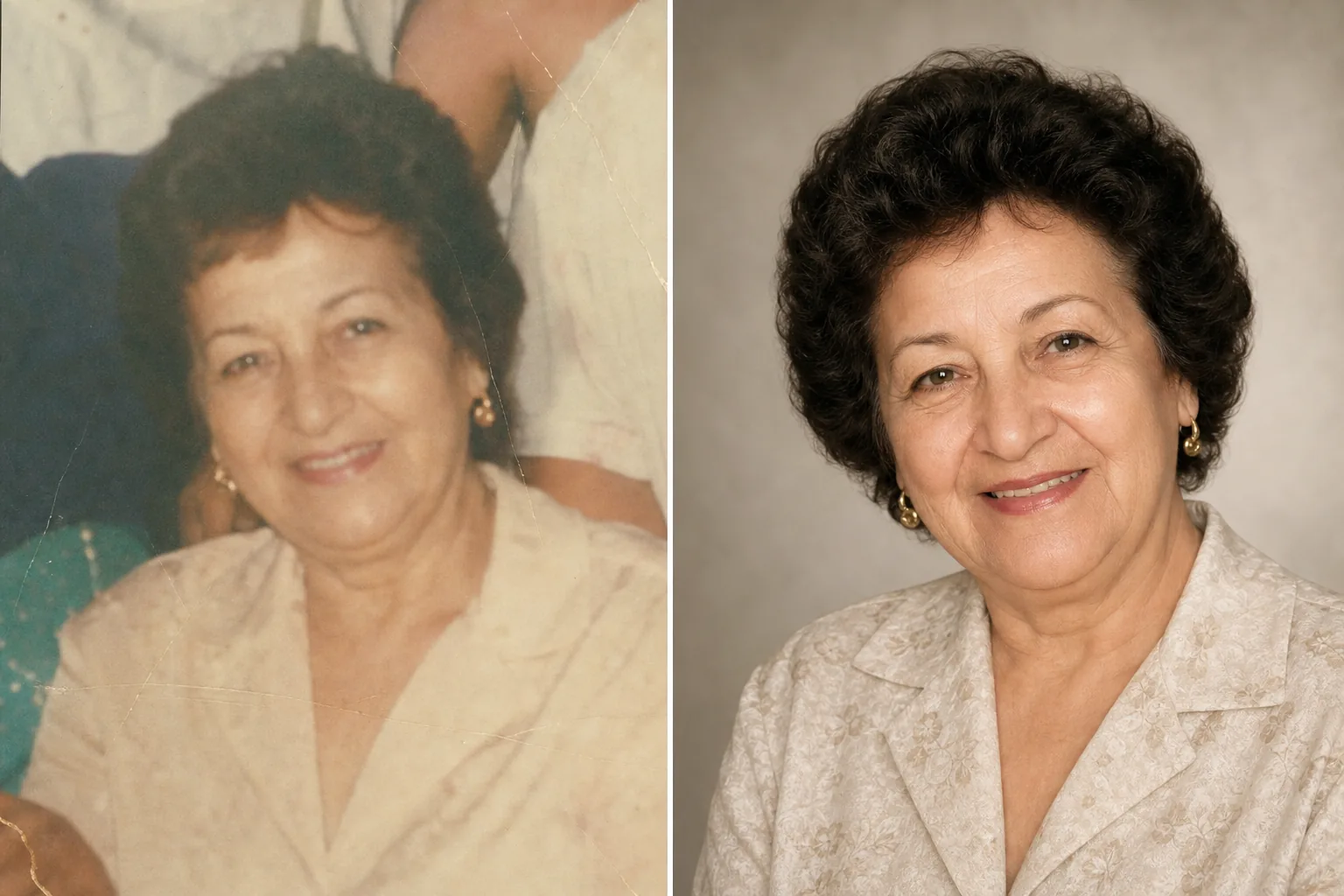
このテンプレートの機能
葬儀や告別式、訃報、葬儀のプログラム、追悼の展示、そして偲ぶ会のモンタージュのために、その場にふさわしい配慮と敬意をもってポートレート写真を準備します。大切な方の手元にある最良の写真は、何年も前に撮られたものであることがよくあります。それは何気ないスナップ写真だったり、本人を切り出す必要のある集合写真だったり、色あせてスキャンされたプリントだったりします。AI Enhance は古い写真や色あせた写真の色と鮮明さを復元し、露出不足の画像を明るくし、本人の本来の面影を保ちながら小さな欠点を優しく整えます。Magic Eraser は背景の気が散る要素を取り除き、集合写真から特定の人物を切り出すことができます。全体の雰囲気は温かく、品格があり、敬意に満ちており、決して過剰に加工されることはありません。
テンプレート設定
| 写真の復元 | 色あせた写真や古い写真から色とディテールを取り戻す |
| 背景 | 柔らかなニュートラルグラデーション、単色、または簡略化した原版 |
| カラーグレード | 温かく品格のある仕上がり(自然な肌色、穏やかな温かみ) |
| 強化レベル | 控えめで敬意あるもの(本来の面影を保持) |
| 出力サイズ | 300 DPI で 8×10 インチ(標準的な追悼ポートレート)またはカスタム |
このテンプレートの使い方
ポートレート写真をアップロード
その人の手元にある最良の写真をアップロードします。単独のポートレート、集合写真からの切り抜き、または印刷写真のスキャンでも構いません。このテンプレートは、色あせや折り目、軽微な損傷のある古いプリントを含め、あらゆる時代や状態の写真に対応します。
復元と強化
AI Enhance は色あせた色彩を取り戻し、ぼやけたディテールをシャープにし、古い写真に生じる黄色や青色のかぶりを補正します。プリントからスキャンした写真では、スキャンのノイズや紙の質感が軽減されます。強化はあえて控えめに行われます。目的は、その人を本来の姿のまま、鮮明さと温かみをもって表現することであり、外見を変えることではありません。
背景と構図
背景は柔らかでニュートラルな選択肢に置き換えられます。穏やかなグラデーション、落ち着いた単色、または元の場面を柔らかくしたものです。集合写真の場合は本人が切り出され、単独のポートレートとして構図が整えられます。構図は標準的な追悼ポートレートの比率に合わせて調整されます。
葬儀や展示用に書き出す
葬儀社や告別式での印刷用に 300 DPI の 8×10 インチで、または訃報の掲載、追悼カード、デジタル追悼展示用にカスタムサイズでダウンロードします。出力はカラー印刷にもモノクロ印刷にも適しています。
最良の結果を得るためのプロのヒント
- ✓技術的な品質が完璧でなくても、その人の表情や人柄が輝いて見える写真を選びましょう。テンプレートは画質を大きく改善できますが、解像度よりも写真への感情的なつながりのほうが大切です。
- ✓印刷写真をスキャンする際は、スキャナーが対応する最高の DPI(最低 600 DPI)を使い、きれいで平らな面でスキャンしてください。高解像度のスキャンは、ディテールの復元や色あせの補正の際に、テンプレートが扱えるデータをより多く提供します。
- ✓単独のポートレートがない場合、テンプレートは集合写真から特定の人物を切り出すことができます。最良の切り出し結果を得るには、本人の顔がはっきりと見え、遮られておらず、カメラの方を向いている集合写真を選んでください。
- ✓カラー版とモノクロ版の両方を仕上げることを検討してください。モノクロの追悼ポートレートは時代を超えた品格があり、元のカラー写真に著しい色あせや完全には復元できない色の損傷がある場合に適しています。
よくある質問
ひどく損傷した写真も復元できますか?
+
テンプレートは中程度の損傷に対応します。色あせ、色の変化、軽い折り目、経年によるぼやけなどです。大きな裂け目、深刻な水しみ、または大部分の欠落といった重度の損傷は、プロのレタッチャーによる手作業の修復が必要です。テンプレートは、顔や主要な特徴が原版でくっきりと無傷で見えている場合に最も効果を発揮します。
強化した写真は自然に見えますか?
+
はい。強化は控えめで敬意あるものになるよう調整されています。その人はその人自身のように見えます。若くも、老けても、別人にもなりません。目的は、その人がどのような人であったかというあらゆる側面を保ちながら、より良い照明、より良いカメラで、より良い日に撮られたかのように写真を表現することです。
追悼ビデオのスライドショーに使えますか?
+
はい。各写真を一貫した背景と色の設定でテンプレートにかけることで、まとまりのあるスライドショーになります。統一された処理が、さまざまな時代や出所の写真を一つの調和した映像の追悼へと結びつけます。
Related templates
More personal templates for your workflow.
適切な背景色、頭のサイズ、表情の要件を備えた、ビザ、運転免許証、国民 ID に準拠した ID 写真を作成します。
背景のクリーンアップ、キャップとガウン Color correction、傷の除去、およびフレームとアナウンスの印刷準備の整ったシャープ化を使用して、卒業写真を強化します。
低照度のノイズ低減、ステージ照明 色補正、群衆の気を散らす除去、暗い会場のショットからのディテールの回復により、コンサートやイベントの写真を強化します。
柔らかな背景、穏やかなカラー グレーディング、病院の雑然としたものを取り除き、郵送用に印刷可能な寸法を備えた美しい新生児発表カードの写真を作成します。
お祝いの背景、温かみのあるカラー グレーディング、雪の効果、印刷用の標準カード寸法を備えたホリデー グリーティング カード用の家族写真やポートレート写真を準備します。
背景の置き換え、照明の補正、毛皮のディテールの強化を行って保護施設や救助ペットの写真を変換し、動物がより早く家を見つけられるようにします。