
Product 360 スピナー
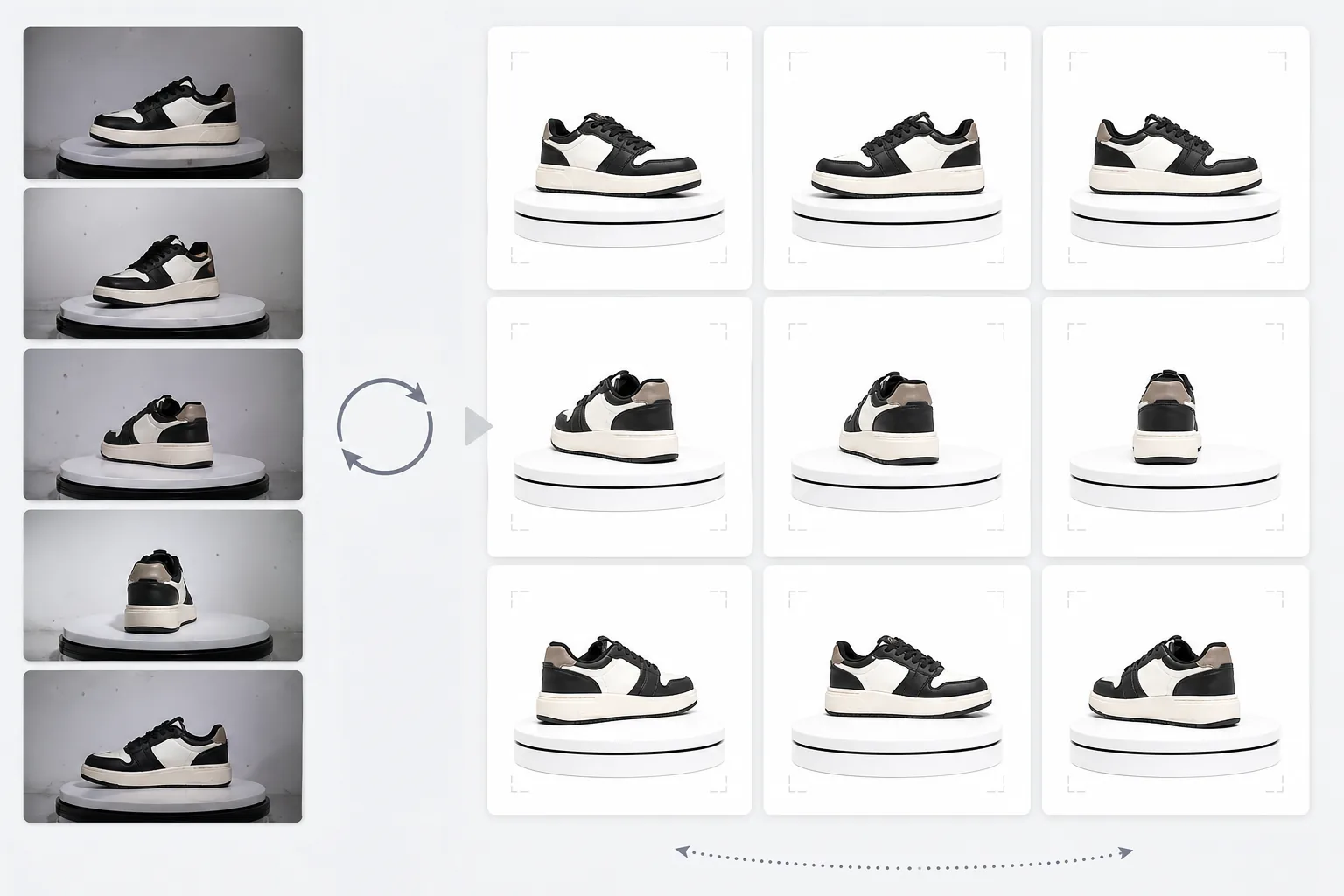
ターンテーブルで撮影した写真から、プロ仕様の360度商品回転ビューを作成します。このテンプレートはあらゆる回転角度から背景を削除し、すべてのフレームで一貫した照明と色を確保し、ほこりや表面の欠点を取り除き、商品ページのインタラクティブな360ビューアーにそのまま使える統一感のある画像セットを書き出します。
このテンプレートを無料で試すE-commerce template preview
このテンプレートの機能
複数の角度から撮影した商品写真を処理し、電子商取引サイトの360度インタラクティブ回転ビューアーに適した一貫性のあるセットに仕上げます。ターンテーブル上の商品を24または36の角度から撮影すると、背景・照明・影のわずかな不一致が積み重なり、ぎこちなく不格好な回転体験を生み出します。このテンプレートは Background Eraser を使ってあらゆる角度から一貫したエッジ処理で商品を切り抜き、すべてのフレームで照明と色温度を均一化することで、回転中に商品が暖色と寒色の間でちらつかないようにし、さらに Magic Eraser を使って、あるフレームには現れて次のフレームには現れないと目障りになるほこり・指紋・表面の欠点を取り除きます。
テンプレート設定
| 背景 | 純白 (#FFFFFF) — すべての回転フレームで一貫 |
| 照明の均一化 | フレーム間の一貫性(角度間のちらつきを解消) |
| 表面のクリーンアップ | フレームごとにほこり・指紋・反射を除去 |
| 商品のセンタリング | 各フレームで商品を自動的に中央配置し、滑らかな回転軸を実現 |
| 出力サイズ | フレームあたり 1500 × 1500 px(Web用360ビューアーに最適化) |
| フレーム数 | 12、24、36フレームのシーケンスに対応 |
このテンプレートの使い方
ターンテーブルの写真をアップロード
一定の間隔でターンテーブル上で撮影した回転写真一式(12、24、または36フレーム)をアップロードします。ファイルを連番(001.jpg から 036.jpg まで)で命名すると、テンプレートが正しい回転順序で処理します。テンプレートは白いスウィープ、グレー、カラーなど、どんな背景の写真でも処理できます。
背景の除去と一貫性の確保
Background Eraser は同じエッジ検出設定を使ってすべてのフレームから背景を除去し、商品の輪郭がすべての角度で一貫するようにします。各フレームで商品が自動的に中央に配置されるため、回転軸が安定し、回転がぶれることはありません。
フレーム間の均一化
照明・色温度・露出がすべてのフレームで均一化されます。これにより、ターンテーブルの照明がすべての角度で完全に均一でない場合に生じる、明るさと色の微妙な変動が解消されます。一部の角度で見える表面の欠点も、一貫性のためにクリーンアップされます。
フレームシーケンスを書き出す
フレームあたり 1500 × 1500 px の完全なフレームシーケンスを JPEG 形式でダウンロードします。ファイルは連番で番号付けされ、Magic 360、Sirv、Webrotate 360 などの360ビューアープラグインに直接インポートできる状態です。総ファイルサイズはWebでの高速読み込み用に最適化されています。
最良の結果を得るためのプロのヒント
- ✓手回しでの回転ではなく、角度目盛りの付いた手動ターンテーブルを使用してください。一定の10度間隔(36フレーム)が最も滑らかな回転を生み出します。テンプレートはわずかな回転のばらつきにも対応できますが、均等な間隔の方が明らかに滑らかな結果になります。
- ✓カメラを三脚に固定し、すべてのフレームで手動露出設定を使用してください。自動露出ではカメラが角度ごとに明るさを異なる形で調整し、テンプレートが後で補正しなければならないちらつき効果を生み出します。手動設定はテンプレートにとってよりクリーンな出発点となります。
- ✓撮影前に商品を十分に清掃してください。ほこりや指紋は、商品が回転するにつれて現れたり消えたりするため、1枚の静止写真よりも360度回転の方が目立ち、気が散りやすくなります。テンプレートはこれらを除去しますが、最初からきれいな状態であればより良い結果が得られます。
E-commerce workflow
Product photo hub
Use this template with the full ecommerce product photo workflow for marketplace backgrounds, cleanup, compression, resizing, and listing-ready exports.
View ecommerce product photo workflowよくある質問
フレームは何枚必要ですか?
+
36フレーム(10度間隔)がほとんどの商品で最も滑らかな回転を生み出します。24フレーム(15度間隔)は細かいディテールのない商品なら許容範囲です。12フレーム(30度間隔)は回転を認識できる最低限ですが、時計や電子機器など細部の多い商品ではぎこちなく感じられます。
動画からフレームを処理できますか?
+
はい、ターンテーブル動画から均等な間隔でフレームを抽出すれば可能です。利用可能な最高解像度でフレームを書き出し、360度全体にわたって角度が均等に分布するようにしてください。動画のフレームはモーションブラーや動画圧縮のため、専用の静止写真より品質が低い場合があります。
どの360ビューアープラグインに対応していますか?
+
連番のJPEG出力は、Magic 360、Sirv 360、Webrotate 360、jQuery Reel、カスタム実装など、主要なすべての360ビューアーソリューションに対応しています。一貫した寸法と命名規則により、インポートが簡単になります。
買い物客が期待する360度商品ビューを提供しましょう
ターンテーブルの写真をアップロードして、商品ページのインタラクティブな360度回転ビューアーにそのまま使える、一貫性のあるクリーンなフレームシーケンスを手に入れましょう。
無料で試すRelated templates
More e-commerce templates for your workflow.
製品写真用の純白の背景テンプレート。 Amazon、Shopify、マーケットプレイスに対応したクリーンでプロフェッショナルな製品画像を変換するための設定。
Etsy に最適化されたリスティング写真テンプレート。ライフスタイルのショットを 2000 ピクセルのきれいな白い背景に変換し、手作りの製品の詳細を強調し、Etsy の画像ガイドラインを満たします。
eBay に最適化された出品写真テンプレート。ギャラリー画像の白い背景、状態文書の強化、eBay の画像基準を満たすマルチアングル レイアウト。
リング、ネックレス、時計用のプロ仕様のジュエリー写真テンプレート。反射を制御し、宝石の輝きを高め、きれいな背景で市場にすぐに使える画像を提供します。
マーケットプレイス出品用のプロフェッショナルな家具の写真テンプレート。部屋の雑然としたものを取り除き、実際の寸法を表示し、きれいな背景またはスタイルされた部屋のコンテキストで作品を表示します。
しわの除去、糸くずの除去、純白の背景、正確な生地の色を使用して、衣類の平置き写真をクリーンアップします。 Shopify、Amazon、ブティック ストアに対応。