
エレクトロニクス製品写真
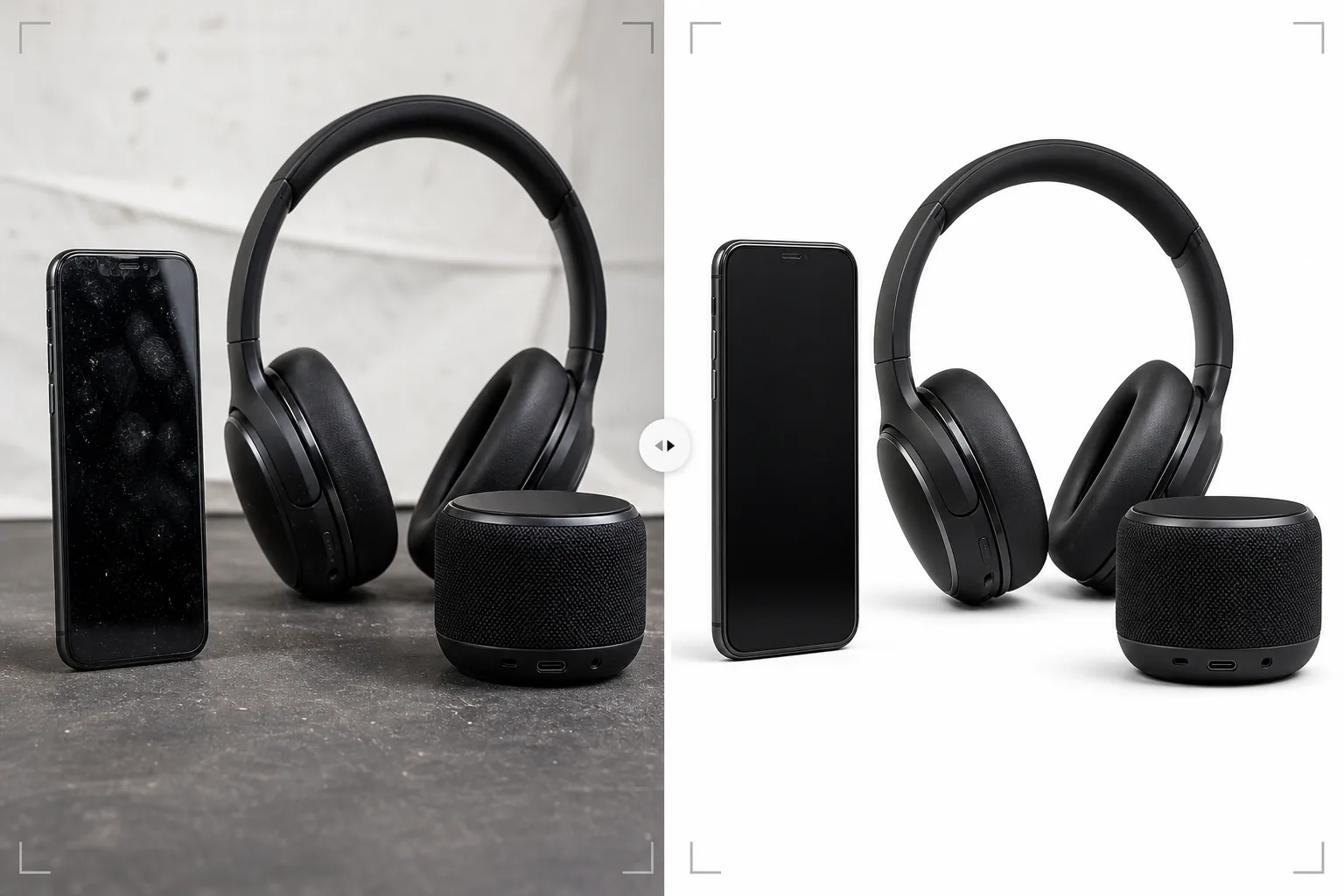
ショールーム品質の鮮明さで家電製品を見せましょう。このテンプレートは画面や光沢面から指紋や汚れを取り除き、ポートやボタンの細部をシャープにし、UI要素が見えるよう画面表示を強化し、マーケットプレイス出品やブランドページにすぐ使えるクリーンな製品画像を出力します。
このテンプレートを無料で試すE-commerce template preview
このテンプレートの機能
スマートフォン、ノートパソコン、タブレット、ヘッドホン、スピーカー、アクセサリーといった家電製品特有の撮影課題に対応します。反射面、複雑なポート、画面表示には専門的な処理が必要です。光沢のある画面や金属筐体は製品を扱う際にすぐ指紋が付きますが、Magic Eraserはこれらを除去し、高倍率で現れる粉塵粒子や表面の微細な傷も一緒に取り除きます。AI Enhanceは、買い手が仕上がり品質を評価する際によく見るUSBポート内部、ボタンの質感、スピーカーグリルの模様、ブランドテキストなどの細部をシャープにします。Background Eraserは、アンテナ、ポート、ケーブル開口部を含む複雑な形状の周囲をきれいな輪郭で切り抜きます。
テンプレート設定
| 表面のクリーンアップ | 画面や筐体から指紋、ほこり、微細な傷を除去 |
| 細部のシャープ化 | ポート、ボタン、スピーカーグリル、ブランドテキストの強化 |
| 画面表示 | 画面上のUIを明るくシャープに(またはクリーンなスクリーンショットに置き換え) |
| 背景 | 純白(#FFFFFF)またはプレミアムな位置づけのためのグラデーション |
| 出力サイズ | 2500 × 2500 px(買い手の確認用の高解像度ズーム) |
| 金属仕上げ | アルマイト加工アルミ、ヘアライン仕上げのスチール、マットなプラスチックの質感を強化 |
このテンプレートの使い方
エレクトロニクスの写真をアップロード
デバイスの製品写真をアップロードします — 前面、背面、側面、そしてポートやボタンの詳細ビュー。このテンプレートはスマートフォン、ノートパソコン、タブレット、ヘッドホン、スピーカー、スマートウォッチ、アクセサリーに対応します。デバイスにディスプレイがある場合は、画面が点灯している角度を少なくとも1枚含めてください。
表面の洗浄と指紋除去
Magic Eraserは画面、金属筐体、光沢のあるプラスチック面から指紋、汚れ、ほこりを除去します。サンプル機を扱った際の小さな傷やこすれも取り除かれます。AIはヘアライン仕上げの金属の風合いやマットな質感など、意図的な表面特徴を保持します。
細部と画面の強化
AI Enhanceはポート開口部、ボタンの縁、スピーカーグリルの模様、ブランドテキストをシャープにします。デバイスに画面がある場合、画面上のUI要素が見やすく魅力的になるようディスプレイを明るくシャープにします。スタジオ照明による画面の反射光は、ディスプレイの動作中の見た目を保ちながら軽減されます。
マーケットプレイスまたはブランドサイト向けに書き出し
フルズーム対応のマーケットプレイス出品用に2500 × 2500 pxで、またはブランドのウェブサイトやマーケティング資料用にカスタムサイズでダウンロードできます。背景オプションには、マーケットプレイス向けの純白、プレミアムなブランド位置づけ向けのグラデーションや暗色背景があります。
最良の結果を得るためのプロのヒント
- ✓撮影のために製品を扱うときは綿手袋を着用してください。家電製品の指紋は最も多いレタッチ課題で、テンプレートは効果的に除去しますが、指紋のない元写真の方が最終画像で元の表面質感をより多く保てます。
- ✓画面は空白やオフの状態ではなく、実際のUIを表示して撮影してください。点灯した画面は買い手にデバイスの使用時の見た目を伝えます。テンプレートは画面表面のスタジオ照明の反射を抑えつつ、表示内容をシャープに明るくします。
- ✓ポート配置を示す写真を必ず含めてください — USB、ヘッドホンジャック、カードスロット、充電ポート。これらの詳細写真は家電製品の出品で最も見られる画像の一つで、テンプレートはコネクタの細部を明確に見せるためポート内部をシャープにします。
- ✓ヘッドホンやスピーカーには、ドライバーやグリルの細部がよく見える角度を含めてください。テンプレートはメッシュやグリルの質感を強化し、仕上がり品質と音響設計の洗練さを伝えます。
E-commerce workflow
Product photo hub
Use this template with the full ecommerce product photo workflow for marketplace backgrounds, cleanup, compression, resizing, and listing-ready exports.
View ecommerce product photo workflowよくある質問
光沢のある黒い家電製品にも対応できますか?
+
光沢のある黒い表面(ピアノブラックのスマートフォンやノートパソコンのベゼルなど)はすべてを反射するため難しいものです。テンプレートは指紋を除去し環境の反射を軽減しますが、光沢のある表面の質感を伝えるために一部の反射は維持されます。最良の結果を得るには、周囲の反射源が少ない管理された環境で光沢のある黒い製品を撮影してください。
LEDインジケーター付きの製品はどうですか?
+
LEDステータスライト、周辺機器のRGB照明、画面表示は保持され強化されます。テンプレートは発光する要素を認識し、製品表面に対する発光効果を保ちながらシャープにします。
空白の画面にスクリーンショットを追加できますか?
+
テンプレートは既存の画面コンテンツがある写真を最適化しますが、空白の画面に新しいスクリーンショットを合成することはできません。画面の置き換え合成を行うには、画面を点灯させてデバイスを撮影してください。テンプレートが表示内容を強化します。
手に取ったときと同じくらいオンラインでも見栄えのする家電製品
製品写真をアップロードすれば、指紋のない、細部までシャープな画像が手に入り、マーケットプレイス出品やブランド製品ページにすぐ使えます。
無料で試すRelated templates
More e-commerce templates for your workflow.
製品写真用の純白の背景テンプレート。 Amazon、Shopify、マーケットプレイスに対応したクリーンでプロフェッショナルな製品画像を変換するための設定。
Etsy に最適化されたリスティング写真テンプレート。ライフスタイルのショットを 2000 ピクセルのきれいな白い背景に変換し、手作りの製品の詳細を強調し、Etsy の画像ガイドラインを満たします。
eBay に最適化された出品写真テンプレート。ギャラリー画像の白い背景、状態文書の強化、eBay の画像基準を満たすマルチアングル レイアウト。
リング、ネックレス、時計用のプロ仕様のジュエリー写真テンプレート。反射を制御し、宝石の輝きを高め、きれいな背景で市場にすぐに使える画像を提供します。
マーケットプレイス出品用のプロフェッショナルな家具の写真テンプレート。部屋の雑然としたものを取り除き、実際の寸法を表示し、きれいな背景またはスタイルされた部屋のコンテキストで作品を表示します。
しわの除去、糸くずの除去、純白の背景、正確な生地の色を使用して、衣類の平置き写真をクリーンアップします。 Shopify、Amazon、ブティック ストアに対応。