
Eコマース ライフスタイル写真
プレーンな商品写真を、キッチンカウンターの上、リビングルーム、デスク、屋外など、実際の生活の中でアイテムを見せるライフスタイル画像に変換します。このテンプレートは元の背景を削除し、商品を厳選されたライフスタイルシーンに、調和した照明と自然な影とともに配置することで、高価な撮影なしに購入判断を後押しする文脈ある画像を商品ページに提供します。
このテンプレートを無料で試すE-commerce template preview
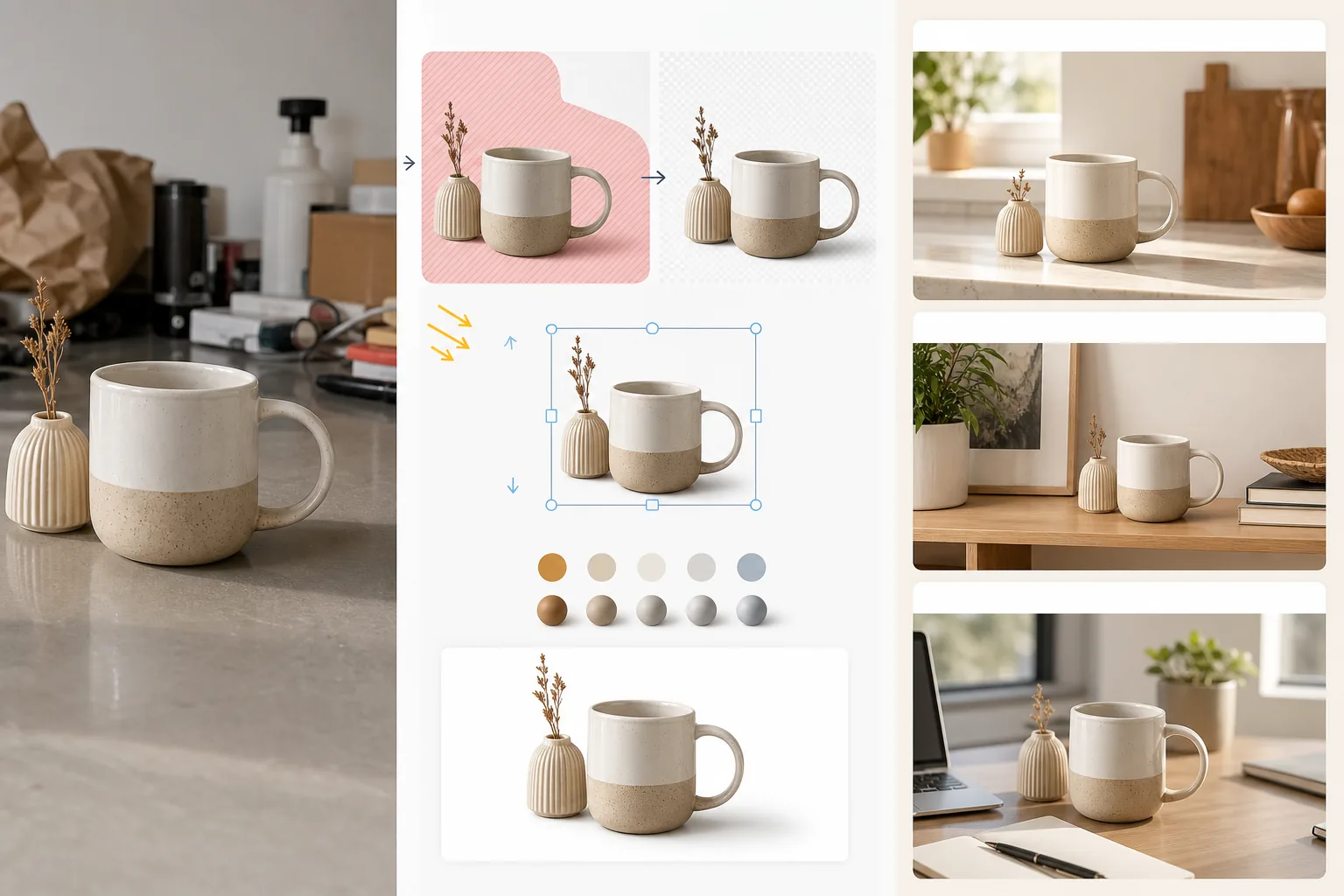
このテンプレートの機能
標準的な白背景の商品画像やカジュアルな商品写真を、顧客が所有して使用する様子をイメージしやすいライフスタイルシーンに変換します。Magic Eraser が元の背景と商品周辺の気を散らす要素を削除します。次に AI Enhance が、調理器具にはキッチンカウンター、ホームデコレーションにはリビングの棚、電子機器にはデスクセットアップ、ガーデン用品には屋外のパティオといった厳選されたライフスタイル環境に、シーンに合った照明方向と影の描画とともに商品を配置します。商品の色と露出は環境と調和され、合成画像がスタイリングされた設定で撮影された一枚の写真のように見えます。これにより、純粋な白背景のマーケットプレイス要件(機能を売る)と、Eコマースのコンバージョン調査が一貫してカート追加率の向上を示すライフスタイルの文脈(欲求を売る)との間のギャップを埋めます。
テンプレート設定
| シーンカテゴリ | キッチン、リビング、バスルーム、デスク/オフィス、屋外、またはフラットレイ面 |
| 照明の調和 | 商品の照明方向と色温度をシーンに合わせる |
| 影の描画 | シーンの幾何形状に合わせた自然な接地影とアンビエントオクルージョン |
| 商品のスケール | シーンの家具や物体に対して自動検出または手動でサイズ調整 |
| 色の調和 | 商品のホワイトバランスを調整してシーンの環境光に合わせる |
| 出力解像度 | 3000×3000px(1:1正方形)または 3000×2250px(ブランドサイト向け4:3) |
このテンプレートの使い方
商品写真をアップロード
白背景スタジオ、テーブルの上、あるいはご自宅のキッチンカウンターなど、どんな背景で撮影した商品写真でもアップロードできます。元の背景がきれいなほど商品の切り抜きが良くなりますが、このテンプレートは雑然とした環境にも対応します。端が切れないように商品全体を収めてください。
ライフスタイルシーンを選択
顧客が商品をどのように使うかに合ったシーンカテゴリを選びます。AI が商品の種類とサイズに基づいて、そのカテゴリ内の特定の環境を選択します。最初の提案がブランドの美意識に合わない場合は、他の候補を閲覧できます。
商品をシーンに調和させる
商品は、調和した照明方向、適切な影の描画、色温度の調整とともにシーンに合成されます。AI は商品が表面の上に浮いているのではなく、カウンターに置かれ、棚に載り、デスクに立っているように、物理的に存在して見えることを保証します。
商品ページやマーケティング用に書き出し
マーケットプレイスのライフスタイル画像枠には 3000×3000px で、ブランドサイトの商品ページには 4:3 でダウンロードします。白背景のメイン画像と並べて使ってください。ライフスタイル写真は文脈と欲求を示し、白背景画像は詳細と仕様を示します。
最良の結果を得るためのプロのヒント
- ✓商品は左上から光が当たるように撮影してください。ほとんどのライフスタイルシーン環境は左上から照らされているため、最初からこの方向に合わせることで、商品と環境の間で影の方向が一致する最も説得力のある合成画像が得られます。
- ✓元の商品写真に地面の表面を少し含めてください。商品の底面と表面の接点が、AI が商品の遠近感を理解し、新しいシーンの表面に説得力をもって配置するのに役立ちます。
- ✓マーケットプレイスの商品ページでは、ライフスタイル画像を補助的な枠に使ってください。メイン画像はマーケットプレイスのコンプライアンスのために清潔な白背景のものに保ち、枠2から5にライフスタイル画像を使って商品を文脈の中で示します。この組み合わせは、すべて白背景またはすべてライフスタイルのアプローチを一貫して上回ります。
E-commerce workflow
Product photo hub
Use this template with the full ecommerce product photo workflow for marketplace backgrounds, cleanup, compression, resizing, and listing-ready exports.
View ecommerce product photo workflowよくある質問
商品がシーンに貼り付けたように見えませんか?
+
いいえ。このテンプレートは、商品の照明方向、色温度、影の角度をシーン環境に合わせます。商品が表面に接する接地影は、シーンの環境光に合った柔らかい半影で描画されます。結果として、その設定で商品を撮影したかのように見えます。
自分のカスタムシーン写真を使えますか?
+
はい。背景環境として独自のライフスタイルシーン写真をアップロードできます。AI は組み込みのシーンライブラリと同様に、商品の照明と色をカスタムシーンに合わせて調和させます。
商品のスケールは自動で処理されますか?
+
はい。AI は元の写真から商品の実寸を推定し、シーン内の家具や物体に対して適切にスケールを調整します。コーヒーマグはキッチンカウンターの上でマグサイズに見え、ランプシェードの大きさにはなりません。自動検出に修正が必要な場合は、スケールを手動で調整できます。
Related templates
More e-commerce templates for your workflow.
製品写真用の純白の背景テンプレート。 Amazon、Shopify、マーケットプレイスに対応したクリーンでプロフェッショナルな製品画像を変換するための設定。
Etsy に最適化されたリスティング写真テンプレート。ライフスタイルのショットを 2000 ピクセルのきれいな白い背景に変換し、手作りの製品の詳細を強調し、Etsy の画像ガイドラインを満たします。
eBay に最適化された出品写真テンプレート。ギャラリー画像の白い背景、状態文書の強化、eBay の画像基準を満たすマルチアングル レイアウト。
リング、ネックレス、時計用のプロ仕様のジュエリー写真テンプレート。反射を制御し、宝石の輝きを高め、きれいな背景で市場にすぐに使える画像を提供します。
マーケットプレイス出品用のプロフェッショナルな家具の写真テンプレート。部屋の雑然としたものを取り除き、実際の寸法を表示し、きれいな背景またはスタイルされた部屋のコンテキストで作品を表示します。
しわの除去、糸くずの除去、純白の背景、正確な生地の色を使用して、衣類の平置き写真をクリーンアップします。 Shopify、Amazon、ブティック ストアに対応。