
写真から車両を削除する
駐車中の車、配送トラック、オートバイ、その他の車両を不動産物件、建築写真、旅行写真、都市景観から消去します。 Magic Eraser は、車両とその影を削除し、一致する表面テクスチャと遠近感を使用して、その背後の道路、私道、または駐車場を再構築します。
最終更新日
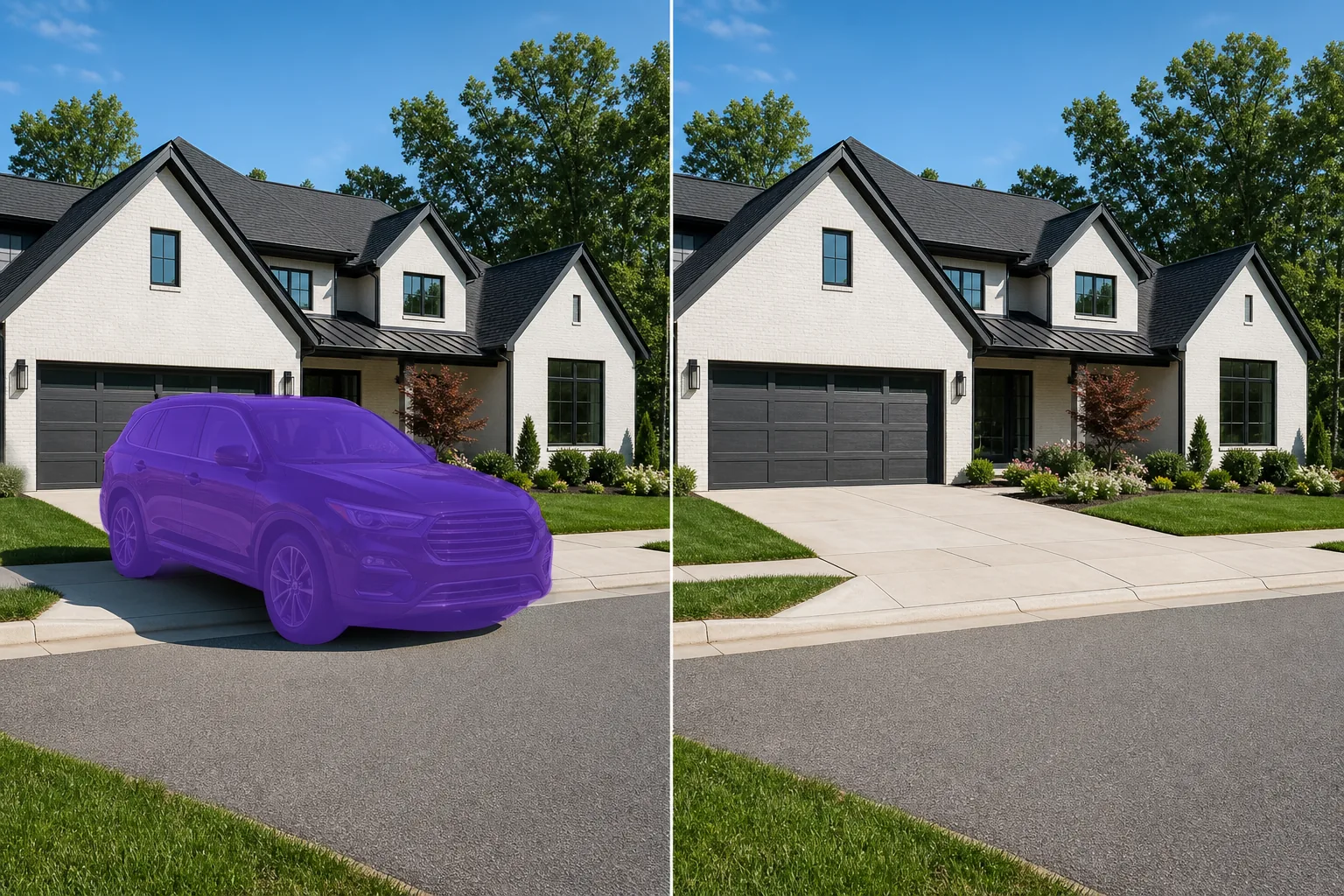
車両が不動産や建築物の写真を乱雑にする理由
写真から車や乗り物を消すには、ウェブ・iOS・AndroidのいずれかでMagic Eraserを開き、画像をアップロードして、消したい車・トラック・バンの上をブラシでなぞるだけ。あとはAIがその背後にある道路や駐車スペース、景色を自動で再構築します。登録不要・無料で使えます。車のまわりにアスファルト、芝生、歩道など、模様が一定で繰り返しのある面があると、AIが自然に補完しやすく、いちばんきれいに仕上がります。広い地面に小さく写った車や遠くの車はほぼ跡形もなく消えますが、画面手前を大きく占める車や、細かい建物を背にして駐まっている車は再構築する範囲が増えるため、部分ごとにブラシを当て、もう一度実行し、ズームインして補完結果を確認するのがおすすめです。 隣の私道にある隣人の車、通りの景色を遮る配送トラック、景観を覆う駐車中のセダンなど、不動産の外観写真で視覚的に最も一般的なのは車両です。これらは購入者の注意を不動産から逸らし、縁石の魅力を曖昧にし、写真に日付(モデル年、ナンバープレート)を付けます。建築写真では、フレーム内の車両が視覚的な注目を得るために建物と競合します。 Magic Eraser は、あらゆるサイズの車両を取り外し、その後ろにあるものを再構築します。 AI は、アスファルト道路、コンクリートの私道、レンガ舗装、砂利、草などの複雑な路面を処理します。撮影中に路上駐車を制御できない不動産写真家にとって、これにより、高価な再撮影の訪問や面倒な Photoshop の手動作業が不要になります。
3 つのステップで車両を撤去する
- 1
写真をアップロードする
Web、iOS、または Android で Magic Eraser を開き、撤去したい車両が含まれる不動産の外観写真、建築写真、または街路風景をアップロードします。すべての標準画像形式が受け入れられます。
- 2
車両をブラシで拭きます
ホイール、ミラー、地面の影、近くの窓や水たまりの反射など、車両全体をペイントします。トラックや SUV などの大型車両の場合は、シルエット全体をカバーする幅広のブラシを使用します。 AI にサーフェス再構築のコンテキストを与えるために、車両の輪郭の外側に小さなマージンを含めます。
- 3
消去して表面を確認する
「消去」をタップすると、AI が車両を削除しながら、路面、私道、縁石、車両の背後にあった景観を再構築します。道路標示、縁石、草の端が連続して見えることを確認してください。長い影を落としていた車両の場合は、影の領域が表面の残りの部分と自然にブレンドされていることを確認します。リスト、ポートフォリオ、またはマーケティング資料用にエクスポートします。
こんな方に最適
- 駐車した車が物件の縁石の魅力を隠している不動産の外観写真
- フレーム内の車両と建物が競う建築写真
- 清潔で魅力的な到着体験を示すAirbnbの写真リスト
- 駐車中の車両が風景の構図を崩す旅行写真
- 歩行者を中心とした美学を追求した都市風景写真
- 小売店、オフィス、工業用物件の写真
- 宿泊客の車両が敷地内に散らばっているホテルとリゾートのマーケティング写真
- 現在の交通量のない街路景観案を示す都市計画プレゼンテーション
車両をきれいに撤去するためのヒント
車両は大きなフレーム領域を占める大きなオブジェクトであるため、AI の再構築は小さなオブジェクトを削除するよりも要求が高くなります。最良の結果を得るには、利用可能な最高解像度のソース画像を使用してください。より多くのピクセル データが AI にサーフェス再構築のためのより適切なコンテキストを提供します。車両が建物、フェンス、景観の一部を遮ると、AI は両側に見えるコンテキストから車両の背後にあるものを推測します。通常、再構成は連続的なフィーチャ (フェンスの線、茂みの列、路面) については正確ですが、固有のフィーチャ (家屋番号、装飾的な郵便ポスト、特定の植物) については修正が必要な場合があります。複数の車両が映る広角ショットの場合は、大きい車両から順に 1 台ずつ削除します。これにより、後続の削除ごとに最適なコンテキストが AI に提供されます。一部の市場では、エクスポートされた画像にナンバー プレートが含まれるため、プライバシーに関する考慮事項が生じます。車両を削除すると、この懸念は完全に解消されます。
よくある質問
- 不動産の写真から車両を削除するのは自由ですか?
- はい。 Magic Eraser の無料枠は、1 日あたりの制限付きで車両の撤去を処理します。物件全体の撮影を処理する不動産写真家は、無制限の使用と高解像度のエクスポートが可能なプレミアム (年間 29.99 ドル) の恩恵を受けます。
- 大型トラックやSUVにも対応できますか?
- はい。 Magic Eraser は、セダン、SUV、ピックアップ トラック、配送用バン、商用車など、あらゆるサイズの車両を撤去します。大型の車両ではより多くの背景の再構成が必要になりますが、AI は道路、私道、景観などの複雑な表面を正確に処理します。
- 道路標識や縁石はどうなるの?
- AI は、車線境界線、縁石の端、側溝の線などの連続した道路の特徴を再構築します。車両が駐車されていたエリア全体に目に見えるパターンが広がります。異常なマーキング (横断歩道、矢印) については、結果を 100% で検査し、必要に応じて 2 回目のパスを実行します。
- 車両の影を選択範囲に含めるべきでしょうか?
- はい。常に完全な影を含めます。オブジェクトが投影されていない残りの影は、不完全な削除による最も明白なアーティファクトです。きれいな結果を得るために、車両とその影の両方をブラシで塗ります。