
写真から日焼けを除去する
休暇の写真、ビーチのポートレート、屋外イベントの写真の赤く日焼けした肌を修正します。 Magic Eraser は、日焼けによる赤みを取り除き、自然な肌の色合いを復元します。グループショット、旅行の思い出、屋外のポートレートをロブスターの外観から保存します。
最終更新日
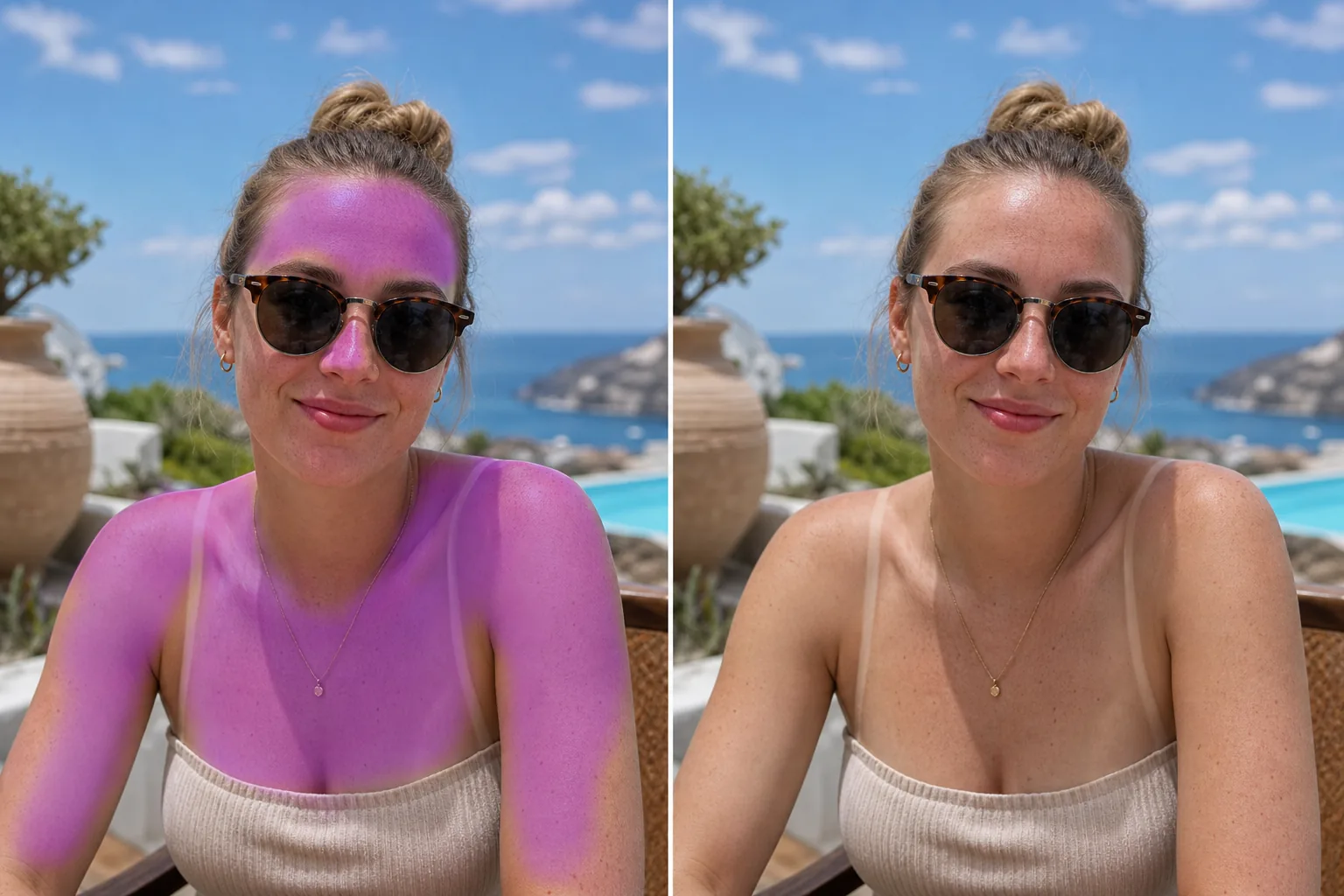
日焼けで最高の休暇の写真が台無しになるとき
写真の日焼けを補正するには、ウェブ・iOS・AndroidのいずれかでMagic Eraserを開き、写真をアップロードして、赤くなった肌やピンクがかった肌をブラシでなぞるだけ。日焼けした肩・鼻・おでこ・胸などをなぞります。「消去」をタップすると、AIがフレーム内の日焼けしていない肌から肌色を読み取り、その部分をその人本来の肌の色に補正します。無料で、登録も不要。変わるのはブラシでなぞった肌だけで、空や服、ほかの人はそのまま。グループ写真で日焼けしているのが1人だけなら、その人だけをなぞって、ほかの部分はそのまま残せます。 一日中ビーチで過ごしたり、景色の良い展望台にハイキングしたり、屋外の結婚式に出席したりしましたが、夕方の写真には、真っ赤な肩、火傷した鼻、またはサングラスによるアライグマの目の日焼け跡が写っています。日焼けすると、素晴らしい写真が印刷したり共有したりするのをためらう思い出になってしまいます。赤みは、グループ写真で特に顕著で、日焼けした 1 人が他の全員の通常の肌の色に対して目立つことがあります。従来の Color correction は赤のトーンを変更できますが、火傷とともに空の色、衣服、他の人の肌が変化するなど、画像全体に影響を与えることがよくあります。 Magic Eraser を使用すると、日焼けした領域を特にターゲットにすることができます。つまり、赤みをブラシで上書きすると、AI が写真の他の場所に表示される日焼けしていない肌に基づいて、その人の自然な肌色に一致するように肌の色調を補正します。
3ステップで日焼けを解消
- 1
写真をアップロードする
ウェブ、iOS、または Android で Magic Eraser を開き、日焼けが目に見えるビーチ、休暇、または屋外の写真をアップロードします。
- 2
焼けた部分をブラシで塗ります
赤またはピンク色の日焼けした肌、肩、鼻、額、胸、または火傷が見える場所にペイントします。最もきれいにブレンドするために、火傷した皮膚と正常な皮膚が接するエッジの周囲を正確に調整してください。
- 3
消して確認する
「消去」をタップすると、AI が赤みをその人の焼けていない肌に合わせた自然な肌の色調に置き換えます。修正された領域が周囲の皮膚と滑らかに融合していることを確認します。修正された領域と自然な領域の間に目に見える境界があってはなりません。救出された写真をエクスポートします。
こんな方に最適
- 日焼けが目に見えるビーチやプールでの休暇の写真
- 太陽が当たりすぎた屋外の結婚式のポートレート
- 晴れた旅先での旅行写真
- グループイベントの写真で、1 人が明らかな火傷を負っている場合
- 赤い肌の夏のスポーツやアクティビティの写真
- 直射日光が当たる屋外での家族再会の写真
- リゾートやハネムーンのフォトアルバム
- 晴れた旅のソーシャルメディアへの投稿
自然な日焼け補正のヒント
日焼け補正は、同じ人物に焼けていない肌が見える場合に最も効果を発揮します。AI はこれを自然な色合いの基準として使用します。目に見える体全体が火傷している場合、AI は顔の特徴と全体的な肌色から自然な色合いを推定します。 AI が焼けた参照と焼けていない参照の両方を並べて表示しているため、不均一な焼け (ストラップの線、時計の跡、サングラスのアライグマの目) が適切に補正されます。日焼けがはがれかけたピーリング肌に対して、AIが赤みを補正しキメを整え、きれいな肌を演出します。明るい赤いロブスターの火傷は、マイルドなピンク色よりも劇的に修正されます。どちらも機能しますが、重度の火傷の場合、前後の差がより顕著になります。日焼けが日焼けの線 (日焼けした領域の隣の焼けた領域) と組み合わされている場合は、赤/焼けた領域のみをブラッシングし、日焼けした皮膚を残します。AI は自然な日焼けした色調に一致するように焼けた領域を正規化します。
よくある質問
- 重度の日焼けや軽度の赤みを治すことはできますか?
- 両方。 AI は、穏やかなピンク色の赤みから真っ赤なロブスターの火傷まで、あらゆるものを処理します。より重度の火傷ではより劇的な修正が行われますが、どちらも自然な肌の色合いになります。
- 日焼けの線も消えますか?
- 修正したい領域をブラシで塗ります。日焼けの線 (ストラップの跡、ウォッチの線、ゴーグルの跡) については、コントラストのある領域をブラシでなぞると、AI が周囲の領域と一致するように肌の色合いを均一にします。
- 写真の残りの部分に影響はありますか?
- いいえ。修正はブラシで上回った領域に限定されます。空、水、衣服、その他の人々の肌の色は変わりません。
- 日焼け止めは無料ですか?
- はい。 Magic Eraser の無料枠には日焼け補正が含まれます。写真をアップロードし、赤い部分をブラシで塗りつぶし、修正バージョンを無料でエクスポートします。
- iPhoneで写真の日焼けを補正するにはどうすればいいですか?
- SafariまたはiOSアプリでMagic Eraserを開き、カメラロールから写真を読み込んで、日焼けした肌の部分をピンチで拡大します。赤くなった部分を指でなぞって「消去」をタップ。拡大しておくと、日焼けした肌だけをなぞれて、近くの唇・目・水着のふちにかからずに済みます。仕上がりはデスクトップ版・Android版と同じで、補正後の写真はそのまま端末に保存されます。
- その人の日焼け(タン)は残したまま、赤みだけを抑えてくれますか?
- まさにそれが狙いです。補正部分を、その人の他の場所に見えている自然な肌色に合わせるので、健康的な小麦色の日焼けは残したまま、ヒリヒリした赤い日焼けだけを落ち着かせます。全身が均一に焼けていて、フレーム内に日焼けしていない肌が見当たらない場合は、結果はその人の全体的な肌色に寄ります。最も自然に仕上げるには、日焼けしていない肌が少し写った写真をアップロードしてください。
- 日焼けした顔を、肌が不自然になったりのっぺりしたりせずに補正できますか?
- はい。AIが補正するのは色であって質感ではないので、毛穴・そばかす・自然な陰影はそのまま残ります。肌をなめらかにするフィルターとは違います。赤くなった肌だけをなぞり、生え際・唇・目のところで止めてください。補正した部分が平坦に見える場合は、たいていブラシが影の部分まで拾っています。元に戻して拡大し、日焼けした色味の部分だけをなぞり直してください。