
写真からピアスを削除する
鼻輪、唇輪、眉毛のピアス、耳のゲージ、その他の目に見えるピアスを顔写真やポートレートから消去します。 Magic Eraser は、ジュエリーを取り外し、自然な皮膚と軟骨を再構築し、プロ向けのきれいな外観のバージョンを生成します。
最終更新日
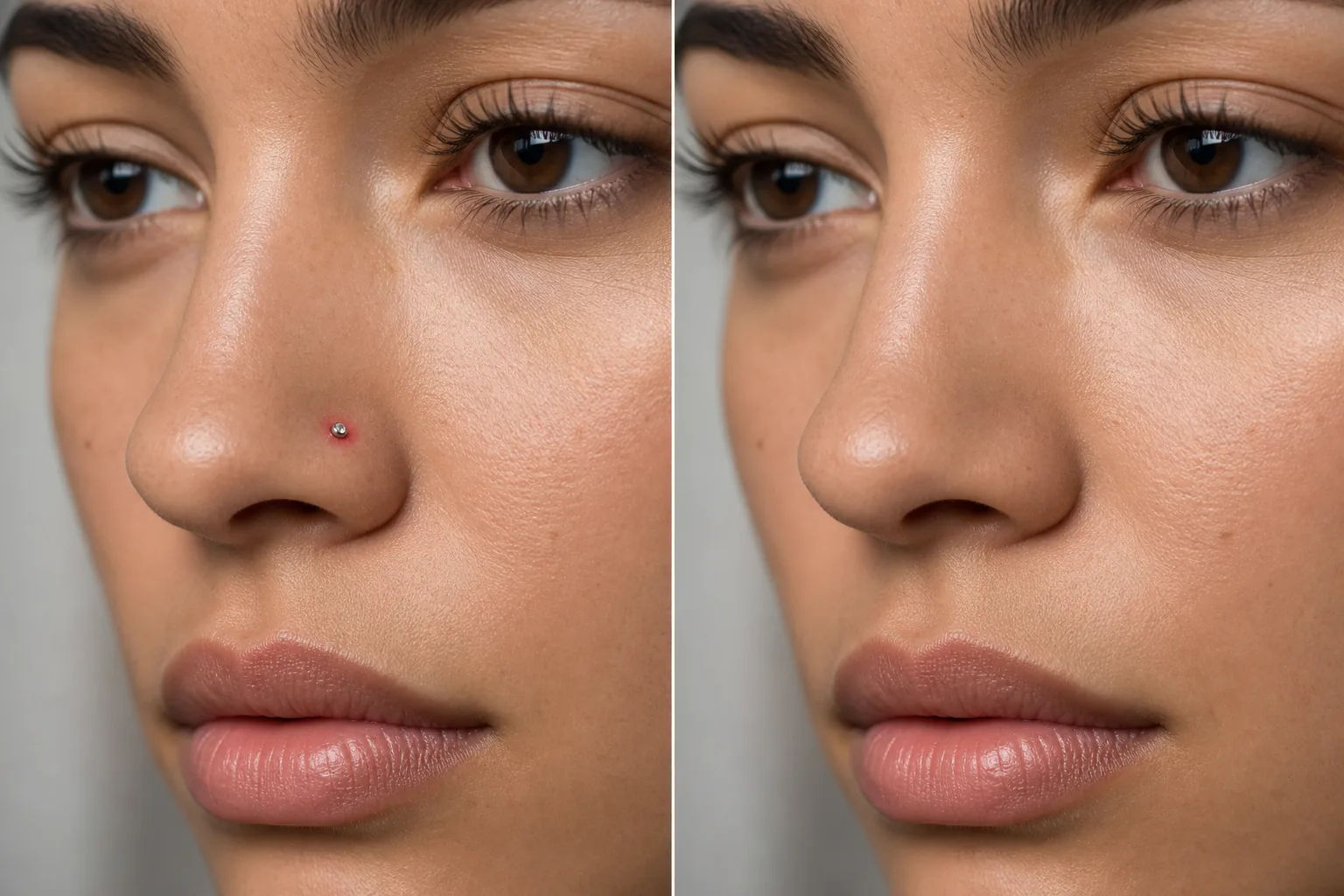
ピアスにプロフェッショナルバージョンが必要な場合
写真からピアスを消すには、Web版・iOS版・Android版のいずれかでMagic Eraserを開き、顔写真をアップロードして、ジュエリー(スタッド、リング、ボディピアス)と、それが落とす影をブラシでなぞって「Erase(消去)」をタップします。AIがピアスの跡を埋め、その下にある自然な肌、小鼻のカーブ、耳の軟骨を再現します。無料で、登録も不要です。証明写真やパスポート写真、社員証、清潔感が求められるフォーマルな顔写真などでよく使われる工程で、撮り直さなくても同じ撮影データからそうしたバージョンを作れます。 ピアスは個人的なスタイルの選択ですが、プロの状況では、顔写真のきれいな外観バージョンが必要な場合があります。企業の ID バッジ、保守的な業界の顔写真、軍や政府の写真、特定のキャスティングコール、祖父母の家族の肖像画などはすべて、ピアスのないバージョンを作成するリクエストを生成します。個別の撮影セッションでピアスを取り外したり再挿入したりするのではなく、デジタル削除により 1 回の撮影から両方のバージョンが作成されます。課題は、ピアスが顔の目立つ部分にある小さくて細かいオブジェクトであることです。ノーズ スタッドは光が鼻に当たる場所に位置し、リップ リングは笑顔が注目を集める場所に位置します。説得力のない削除はすぐにわかります。 Magic Eraser の AI は、特定の課題に対処します。ジュエリーとそれが落とす影を除去し、ピアスの穴や跡を埋め、ジュエリーが覆っていた自然な皮膚、鼻孔の曲線、または耳の軟骨を再構築します。
3ステップでピアスを外す
- 1
写真をアップロードする
ウェブ、iOS、または Android で Magic Eraser を開き、削除するピアスを含む顔写真またはポートレートをアップロードします。
- 2
ピアスをブラシで覆う
ジュエリーと目に見えるピアスホールをペイントします。完全に除去するには、ジュエリーによって投影される影も含めてください。小さなスタッドの場合は、スタッドと穴だけを覆うタイトなブラシが最適です。リングやフープの場合は、目に見えるジュエリーの領域全体をカバーします。
- 3
消去して確認する
「消去」をタップすると、AI がピアスを削除し、自然な皮膚、鼻孔の形状、耳の輪郭を再構築します。ズームインして、その領域が自然に見え、跡やアーチファクトが残っていないことを確認します。きれいな外観のバージョンをエクスポートします。
こんな方に最適
- 保守的な業界の企業の顔写真
- 政府および軍の証明写真
- クリーンな外観を指定するキャスティング提出物
- 服装規定ポリシーのある学校での写真
- 1 回のセッションでピアスのあるバージョンとピアスのないバージョンの両方を作成する
- 従来の雇用主向けの求職用写真
- 親戚の要望による家族の正式な肖像画
- 宝石類が問題を引き起こす可能性があるパスポートやビザの写真
自然なピアス除去のヒント
ノーズスタッドと小さなピアスは最も簡単に取り外しできます。ジュエリーは小さいので、周囲の皮膚がはっきりと参照できます。鼻輪と鼻中隔ピアスの場合、AI は鼻孔の曲線と軟骨の形状を再構築します。リング全体と影を選択範囲に含めます。リップリングは唇の表面と色を再構築する必要があります。AI は周囲の唇の色調と一致させます。眉毛ピアスは AI に眉毛と皮膚の再構築を任せます。眉の周囲がはっきりしている場合、結果が最も自然になります。耳のピアス(標準的なローブスタッド)は簡単に取り外しできます。イヤーゲージや伸びたピアスは、耳たぶの形状をさらに再構築する必要があります。同じ人に複数のピアスがある場合は、[消去] をタップする前にすべてのピアスをブラシで拭きます。一貫した結果を得るために、AI がピアスを同時に処理します。ジュエリーを付けていなくてもピアスホールが見える場合(鼻や耳にある黒い点)、同じ方法でブラシで覆います。
よくある質問
- 納得のいく鼻輪の取り外しができるでしょうか?
- はい。 AI はリングを除去し、自然な鼻孔の形状と皮膚を再構築します。周囲の鼻領域が再構成の適切な参照となる場合、結果は自然に見えます。
- 伸びた耳のピアスにも効果がありますか?
- 小型から中程度に伸びたピアスの場合、AI は自然な耳たぶの形状を再構築します。非常に大きなゲージではさらに再構築が必要となり、再構築された領域にわずかな平滑化が見られる場合があります。
- いくつかのピアスを残し、他のピアスを外すことはできますか?
- はい。取り除きたい特定のピアスのみをブラシで磨きます。たとえば、鼻リングを外している間、イヤリングはそのままにしておいておきます。
- ピアスの除去は無料ですか?
- はい。 Magic Eraser の無料枠では、ヘッドショットやポートレートからのピアス除去がカバーされています。写真をアップロードし、ジュエリーにブラシをかけて、きれいな結果をエクスポートします。
- 証明写真やパスポート写真用にピアスを消せますか?
- はい。これはこの機能が使われる最も多い理由のひとつです。スタッドやリングをブラシでなぞって「Erase」をタップすれば、同じ写真から清潔感のあるバージョンが作れます。ただし注意点として、証明写真やパスポートの発行機関によっては、写真が普段の見た目と一致することを求めていたり、独自のルールを設けていたりする場合があります。編集した写真を提出する前に、該当する要件を必ず確認してください。
- スマホで写真からピアスを消すにはどうすればいいですか?
- モバイルブラウザ、またはiOS版・Android版アプリでMagic Eraserを開き、カメラロールから顔写真を読み込んで、ピンチ操作でピアス部分を拡大します。指でジュエリーの部分だけをなぞって「Erase」をタップしてください。ここでは拡大が大切です。鼻ピアスやリップリングは小さく、残したい肌のすぐ隣にあるため、近づいて作業すれば唇や小鼻の縁に触れずにジュエリーだけをカバーできます。
- 複数のピアスを、跡を残さずに消せますか?
- はい。耳に並んだピアスや、鼻と唇の組み合わせなど、ジュエリーを一つひとつブラシでなぞると、AIがそれぞれの下にある肌や軟骨を再現します。ジュエリーに加えて、それが残す小さな穴やくぼみまでなぞると、最もきれいに仕上がります。うっすら跡が残ったら、拡大してその箇所だけをなぞってください。大きく広げられたボディピアスは小さなスタッドより難しく、耳たぶを完全に再現するには2回目のブラシがけが必要になる場合があります。