
Retouching Kulit Alami
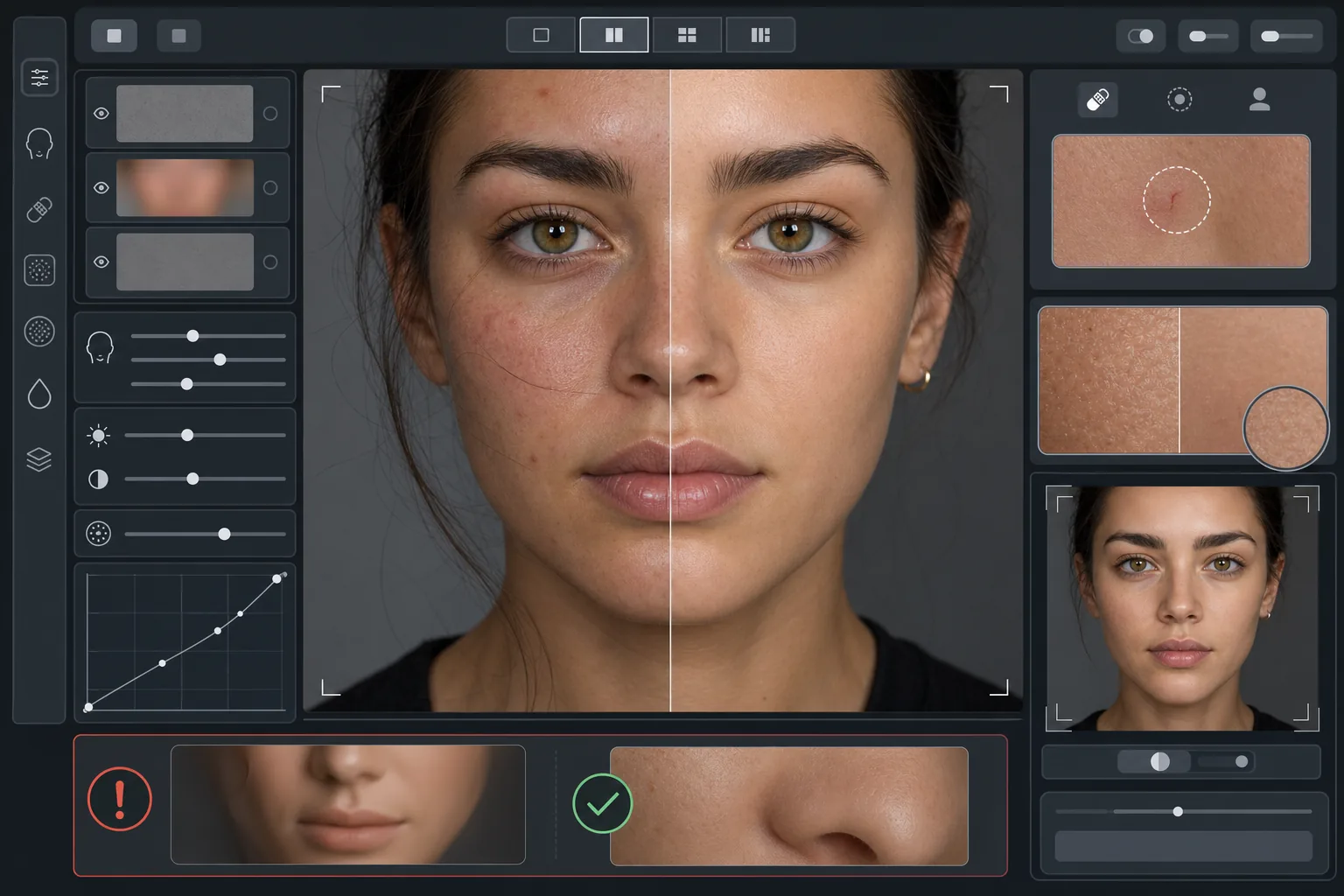
Sempurnakan potret tanpa tampilan plastik. Templat ini menghilangkan noda sementara, meratakan warna kulit, dan menghaluskan ketidakrataan pencahayaan sambil sengaja mempertahankan pori-pori, garis halus, dan tekstur alami yang membuat kulit terlihat nyata. Hasilnya adalah potret di mana subjek tampil sebagai versi terbaik dirinya di hari terbaiknya — bukan manekin yang dibuat oleh AI.
Coba templat ini gratisPortrait template preview
Apa yang dilakukan templat ini
Menerapkan retouching kulit berbasis frekuensi yang memisahkan tekstur dari warna. AI Enhance menghilangkan ketidaksempurnaan sementara (jerawat, kemerahan, lingkaran hitam di bawah mata) sambil mempertahankan tekstur kulit yang halus — pori-pori, bulu halus, dan variasi alami — yang dibaca mata sebagai autentik. Magic Eraser menangani penghapusan titik tertentu ketika peningkatan AI terlalu luas, seperti menghapus satu goresan atau gigitan serangga tanpa memengaruhi kulit di sekitarnya. Efek keseluruhannya adalah kulit yang merata dan tampak sehat yang lolos uji zoom.
Pengaturan templat
| Intensitas retouching | Alami — menargetkan noda dan kemerahan, mempertahankan tekstur |
| Pelestarian pori-pori | Penuh — mempertahankan seluruh tekstur kulit alami pada level piksel |
| Perataan warna | Sedang — mengurangi belang dan kemerahan tanpa meratakan variasi warna |
| Koreksi bawah mata | Halus — mencerahkan lingkaran hitam tanpa menghilangkan bayangan alami |
| Penghalusan pencahayaan | Mengisi bayangan keras dan mengurangi titik terang dari flash langsung |
| Resolusi keluaran | Sesuai masukan (mempertahankan seluruh detail untuk pemotongan dan zoom) |
Cara menggunakan templat ini
Unggah foto potret
Gunakan potret dengan pencahayaan bagus di mana wajah berada dalam fokus yang tajam. Templat ini bekerja paling baik ketika tekstur kulit alami terlihat pada aslinya — gambar dengan fokus lembut atau yang terkompresi berat memberikan lebih sedikit tekstur untuk dipertahankan AI.
Terapkan retouching alami
AI Enhance mengidentifikasi noda sementara, kemerahan yang tidak merata, dan ketidakrataan warna lalu memperbaikinya sambil menjaga tekstur kulit di bawahnya tetap utuh sepenuhnya. Pori-pori, garis halus, dan variasi warna alami tetap terlihat — hanya ketidaksempurnaan yang berubah.
Koreksi area tertentu secara setempat
Gunakan Magic Eraser untuk setiap tanda individu yang tersisa yang ingin Anda hapus — goresan yang sedang sembuh, ruam sementara, atau sehelai rambut yang melintang di wajah. Setiap penghapusan menyatu dengan tekstur kulit alami di sekitarnya.
Tinjau pada zoom penuh dan ekspor
Zoom ke 100% untuk memastikan tekstur kulit utuh — pori-pori harus terlihat dan alami. Jika ada area yang tampak terlalu halus, kurangi intensitas retouching dan proses ulang. Ekspor pada resolusi penuh untuk mempertahankan detail alami.
Tips pro untuk hasil terbaik
- ✓Mulailah dengan intensitas retouching terendah dan tingkatkan hanya jika diperlukan — lebih mudah menambah penghalusan daripada memulihkan tekstur yang sudah hilang akibat pemrosesan.
- ✓Untuk subjek dengan jerawat atau rosasea, templat ini menghapus noda satu per satu tanpa mengubah warna kulit di bawahnya — hasilnya terlihat seperti hari kulit bersih, bukan orang yang berbeda.
- ✓Hindari menumpuk templat ini dengan filter kecantikan kamera ponsel — penghalusan bawaan pada banyak kamera ponsel sudah mengurangi tekstur, dan pemrosesan ganda menciptakan tampilan plastik yang ingin dihindari templat ini.
- ✓Jika memungkinkan, ambil gambar dalam format RAW dan konversikan ke JPEG sebelum mengunggah — RAW menangkap lebih banyak data tekstur kulit yang dapat dipertahankan AI selama retouching.
Pertanyaan umum
Apa bedanya ini dengan filter kecantikan yang menghaluskan kulit?
+
Filter kecantikan menerapkan blur seragam yang menghapus pori-pori, garis halus, dan tekstur alami — menciptakan tampilan plastik yang tak salah lagi. Templat ini menggunakan pemrosesan berbasis frekuensi yang memisahkan tekstur dari warna, menghapus noda dari lapisan warna sambil membiarkan lapisan tekstur tidak tersentuh. Hasilnya terlihat seperti kulit asli, bukan permukaan yang dirender.
Apakah ini akan mengubah bentuk fitur wajah?
+
Tidak. Templat ini hanya memengaruhi tampilan permukaan kulit — warna, noda, dan kerataan pencahayaan. Templat ini tidak pernah membentuk ulang hidung, rahang, mata, atau struktur wajah mana pun. Subjek terlihat persis seperti dirinya, hanya dengan kulit yang lebih bersih dan pencahayaan yang lebih merata.
Bisakah saya menggunakan ini untuk headshot profesional dan karya portofolio?
+
Ya. Standar retouching alami memenuhi ekspektasi profesional untuk headshot korporat, portofolio akting, profil kencan, dan media sosial di mana keaslian penting. Subjek akan terlihat seperti fotonya saat bertemu langsung — yang merupakan inti dari retouching alami.
Kulit lebih baik, tetap Anda
Unggah sebuah potret dan dapatkan retouching kulit alami yang mempertahankan tekstur dalam hitungan detik. Tanpa tampilan plastik, tanpa penghalusan yang aneh — hanya Anda di hari terbaik Anda.
Coba gratisRelated templates
More portrait templates for your workflow.
Templat retouching potret sekolah sesuai usia. Penghapusan noda alami, latar belakang yang konsisten, dan keluaran standar buku tahunan dengan pemrosesan batch untuk seluruh kelas.
Templat potret hewan peliharaan berkualitas studio. Menangani pinggiran bulu, melepas kalung anjing dan pawang, mengganti latar belakang, dan mempertajam mata anjing, kucing, dan hewan lainnya.
Sempurnakan foto bayi baru lahir dan bayi dengan warna hangat yang lembut, penghalusan kulit yang lembut, penghilangan penyangga dan gangguan, serta ukuran siap cetak untuk pengumuman dan seni dinding.
Perbaiki foto kehamilan dengan penghalusan kulit yang lembut, pencahayaan cahaya lembut, penyederhanaan latar belakang, dan gradasi warna yang hangat untuk tampilan potret kehamilan yang abadi.
Rapikan potret keluarga dengan menghilangkan gangguan latar belakang, memperbaiki pencahayaan yang tidak merata, menghaluskan kulit secara alami, dan memastikan semua orang tampil terbaik dalam bingkai yang sama.