
Terapkan filter foto AI online untuk tampilan sinematik, anime, potret, dan kreatif dalam hitungan detik
Gunakan alat Filter AI Magic Eraser untuk mengubah foto dengan gaya sekali ketuk untuk potret, konten media sosial, gambar mini, gambar gaya hidup, dan aset pemasaran kreatif. Cobalah filter foto berbasis anime, sinematik, retro, dan suasana hati tanpa alur kerja pengeditan yang rumit.
Magic Eraser Filter AI menerapkan gaya kreatif sekali ketuk ke foto menggunakan AI. Ini mengubah potret, gambar gaya hidup, dan konten sosial dengan tampilan sinematik, anime, retro, dan berbasis suasana hati — yang biasa digunakan oleh pembuat konten, pengelola media sosial, dan pemasar yang membutuhkan gaya visual khas tanpa pengeditan manual.


Gaya filter AI
Buka gaya filter secara langsung
Mulai dengan gaya filter AI populer atau jelajahi seluruh pustaka untuk menemukan lebih banyak tampilan.
Ubah satu gambar sumber menjadi beberapa arah kreatif
Filter AI membantu Anda menjelajahi tampilan berbeda dari satu foto tanpa harus membuat ulang pengeditan setiap saat. Cobalah perubahan suasana hati, gaya potret, dan perlakuan warna yang lebih ekspresif untuk iterasi konten yang lebih cepat.
Buka Filter AI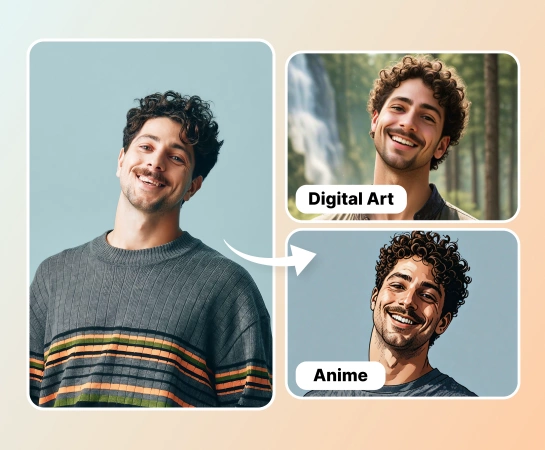
Buat konten bergaya lebih cepat daripada penilaian warna manual
Daripada menyesuaikan corak, kontras, dan suasana hati secara manual untuk setiap aset, pilih filter dan segera pratinjau transformasinya. Hal ini berguna bagi tim yang memproduksi grafik sosial, konten pembuat konten, dan variasi kampanye yang cepat.
Buka Filter AI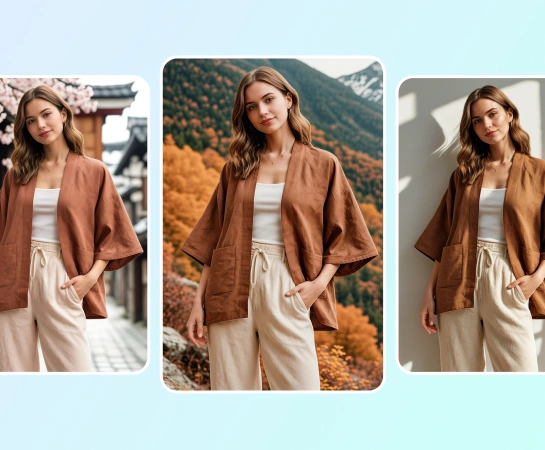
Gunakan filter foto AI untuk potret, postingan sosial, dan visual produk
Dari fotografi gaya hidup dan potret hingga gambar mini dan konten e-niaga, Filter AI memudahkan untuk mencocokkan suasana tertentu. Ini berfungsi dengan baik ketika Anda membutuhkan tampilan yang sinematik, halus, menyenangkan, atau mengikuti tren.
Buka Filter AI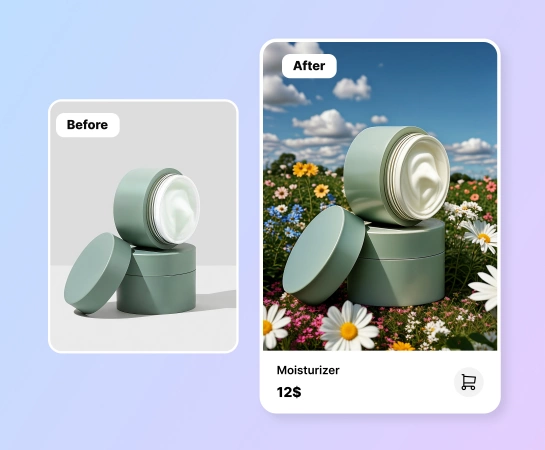
Lanjutkan mengedit setelah filter diterapkan
Setelah gaya diterapkan, lanjutkan dengan alur kerja Magic Eraser lainnya seperti Hapus Latar Belakang, AI Enhance, Desain, atau AI Create. Hal ini menjadikan AI Filter sebagai langkah praktis pertama dalam alur produksi konten yang lebih besar.
Buka Filter AI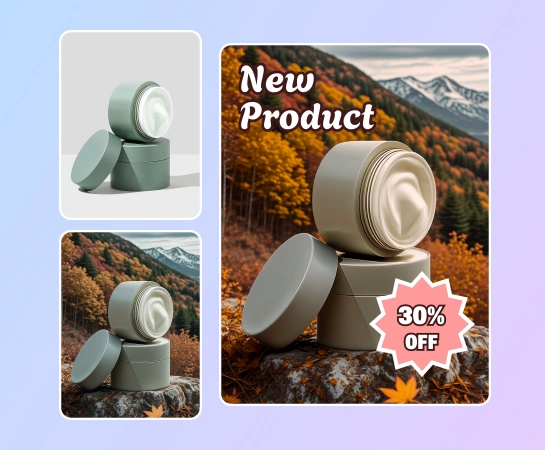
Cara menerapkan filter AI
Unggah foto
Mulailah dengan potret, gambar produk, foto gaya hidup, atau foto apa pun yang ingin Anda ubah gayanya dengan AI.
Pilih penyaring
Telusuri tampilan yang tersedia seperti anime, sinematik, retro, potret, atau gaya AI berbasis suasana hati lainnya.
Pratinjau hasilnya
Biarkan Magic Eraser menerapkan filter AI yang dipilih sehingga Anda dapat membandingkan gambar asli dengan versi bergaya.
Unduh atau lanjutkan mengedit
Ekspor gambar yang difilter atau pindahkan ke alat lain seperti AI Enhance, Hapus Latar Belakang, atau Desain.
Semua alat pengeditan gambar AI yang Anda perlukan
Jelajahi kemampuan pengeditan utama yang saat ini tersedia di Magic Eraser Web, mulai dari pembersihan dan penyempurnaan hingga pembuatan dan desain.

Penyaring AI
Terapkan tampilan kreatif yang didukung AI pada gambar sehari-hari dengan alur kerja penataan gaya satu ketukan yang lebih cepat.

Gaya potret
Berikan potret tampilan yang lebih sinematik, halus, ceria, atau mengikuti tren tanpa penilaian manual.

Filter berbasis suasana hati
Ganti corak visual suatu gambar dengan cepat saat Anda memerlukan nuansa kampanye atau estetika platform yang berbeda.

Pratinjau sekali ketuk
Pilih filter dan lihat hasilnya diperbarui dengan cepat sehingga Anda dapat mengulangi beberapa tampilan dengan lebih mudah.
AI Enhance
Bersihkan ketajaman, warna, dan kejernihan setelah memfilter saat gambar memerlukan hasil akhir yang lebih halus.

Hapus Latar Belakang
Ambil gambar yang difilter ke dalam alur kerja potongan saat Anda membutuhkan komposisi produk yang lebih bersih atau ekspor yang transparan.

Desain
Tempatkan gambar Anda yang difilter ke dalam tata letak desain sederhana untuk iklan, postingan, gambar mini, dan konten sosial.

AI Buat
Pasangkan visual yang dihasilkan dengan gaya filter untuk menjelajahi lebih banyak arah kreatif dalam satu tumpukan pengeditan.
Pertanyaan yang sering diajukan
Unggah foto, pilih filter yang Anda inginkan, dan biarkan Magic Eraser menerapkan gaya yang dipilih secara otomatis. Anda kemudian dapat membandingkan sebelum dan sesudah, mendownload hasilnya, atau melanjutkan mengeditnya.
Filter AI dirancang untuk gaya kreatif seperti tampilan potret, suasana sinematik, estetika retro, perawatan yang terinspirasi anime, dan transformasi visual lainnya bergantung pada templat yang tersedia di aplikasi.
Filter AI berfungsi dengan baik untuk potret, foto gaya hidup, konten sosial, visual produk, gambar mini, dan aset kreator yang memerlukan tampilan lebih kuat atau identitas visual yang lebih khas.
Ya. Setelah menerapkan filter, Anda dapat melanjutkan ke alat Web Magic Eraser lainnya seperti AI Enhance, Hapus Latar Belakang, Desain, atau alur kerja lainnya tergantung pada kebutuhan Anda selanjutnya.
Alurnya biasanya sederhana: unggah gambar, pilih filter, pratinjau hasilnya, bandingkan tampilan baru dengan gambar asli, dan ekspor atau lanjutkan pengeditan.