
Pembersihan Potret Keluarga
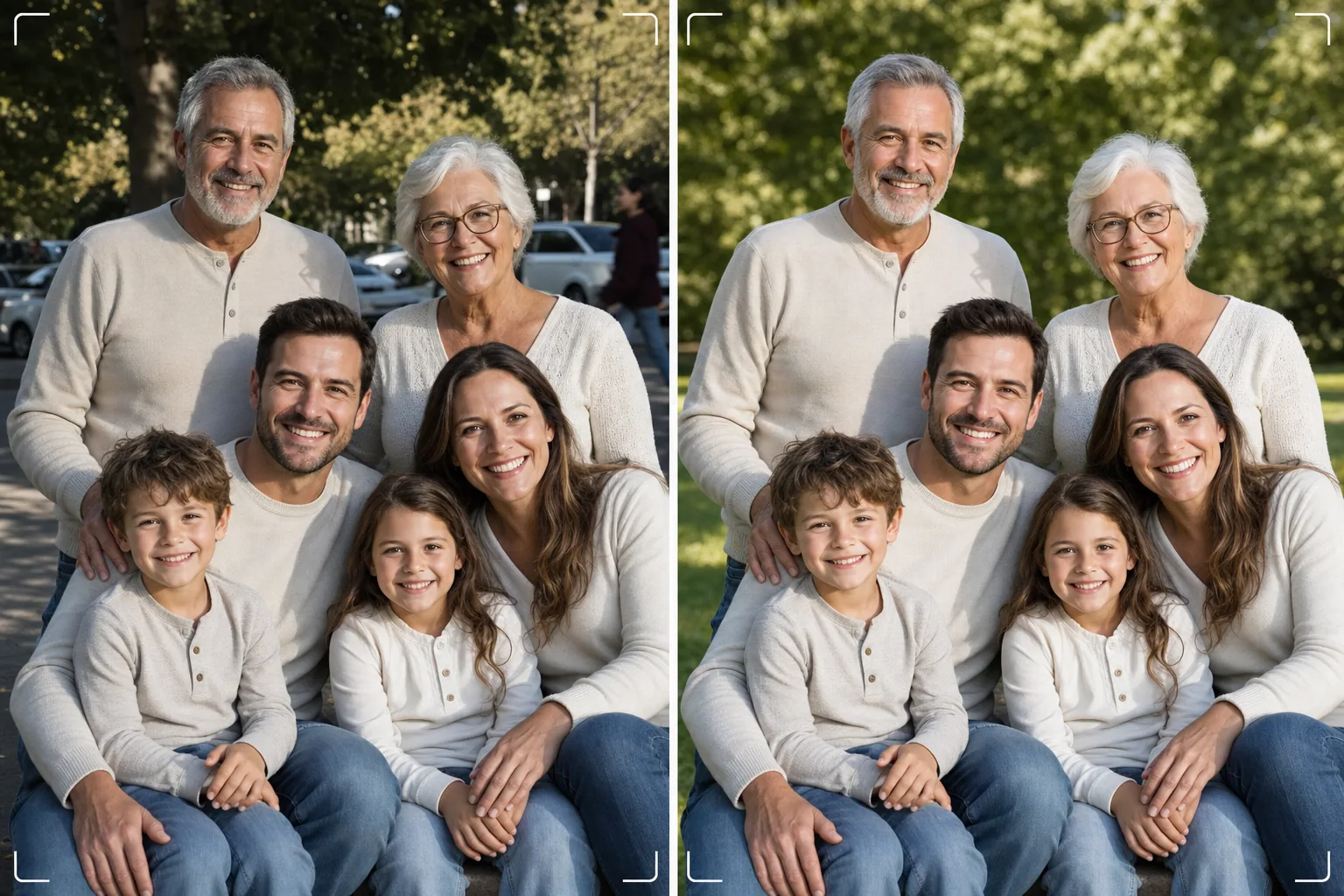
Dapatkan foto keluarga yang sempurna tanpa perlu seratus kali jepretan. Templat ini menghilangkan gangguan latar belakang, memperbaiki pencahayaan yang tidak merata di seluruh kelompok, mengurangi noda secara alami di setiap wajah, dan membersihkan ketidaksempurnaan kecil yang membuat foto kelompok yang bagus tidak bisa menjadi luar biasa.
Coba templat ini gratisPortrait template preview
Apa yang dilakukan templat ini
Memecahkan masalah universal foto keluarga — membuat semua orang tampil bagus dalam satu bingkai. Magic Eraser menghilangkan penyusup foto, tempat sampah, papan tanda keluar, kabel listrik, mobil yang diparkir, dan gangguan lain yang merusak komposisi kelompok yang sebenarnya bagus. AI Enhance memperbaiki pencahayaan tidak merata yang terjadi saat sebagian anggota keluarga berada di tempat teduh sementara yang lain di bawah sinar matahari langsung, membawa semua orang ke pencahayaan yang konsisten dan menarik. Penghalusan kulit alami mengurangi noda, lingkaran hitam di bawah mata, dan kemerahan di setiap wajah tanpa membuat siapa pun tampak diretus secara artifisial. Hasilnya adalah potret keluarga yang Anda bayangkan saat mengumpulkan semua orang.
Pengaturan templat
| Pembersihan latar belakang | Mendeteksi dan menghapus gangguan secara otomatis (orang, tanda, objek) |
| Penyeimbangan pencahayaan | Pencahayaan merata di semua subjek (pengisian bayangan + pemulihan sorotan) |
| Peningkatan kulit | Pengurangan noda alami per wajah (mempertahankan ciri khas) |
| Koreksi warna | White balance terpadu pada foto kelompok dengan pencahayaan campuran |
| Penajaman | Penajaman sadar wajah (memprioritaskan mata dan senyuman) |
| Resolusi keluaran | Sisi panjang 6000px (cetak dinding pada 300 DPI hingga 20×13 inci) |
Cara menggunakan templat ini
Unggah foto keluarga
Unggah foto kelompok yang diambil saat pertemuan keluarga, hari libur, reuni, atau sesi potret. Templat ini menangani kelompok dari dua hingga tiga puluh orang. Untuk hasil terbaik, pilih bingkai di mana paling banyak wajah menatap kamera dengan ekspresi menyenangkan — templat memperbaiki latar belakang dan pencahayaan tetapi tidak dapat mengubah ekspresi wajah atau mata yang terpejam.
Hapus gangguan latar belakang
Magic Eraser mengidentifikasi dan menghapus orang asing, tanda yang mengganggu, sampah, kendaraan, dan elemen lain yang tidak diinginkan dari belakang kelompok keluarga. AI merekonstruksi latar belakang secara alami, mengisi rumput, langit, dinding, atau lantai di belakang objek yang dihapus.
Seimbangkan pencahayaan dan sempurnakan wajah
AI Enhance memperbaiki perbedaan pencahayaan antaranggota keluarga — tidak ada lagi separuh kelompok di tempat teduh dan separuhnya menyipitkan mata di bawah matahari. Setiap wajah mendapatkan pengurangan noda individual dan pencerahan mata yang halus sambil mempertahankan ciri khas dan tampilan alami setiap orang.
Ekspor untuk cetak atau berbagi
Unduh pada sisi panjang 6000px untuk cetakan dinding besar, atau 2000px untuk media sosial dan kartu ucapan digital. Templat mengeluarkan dalam sRGB untuk tampilan layar atau Adobe RGB untuk pencetakan profesional. Beberapa rasio pemotongan (4:5, 5:7, 8:10) tersedia untuk ukuran bingkai umum.
Tips pro untuk hasil terbaik
- ✓Ambil tiga hingga lima jepretan secara cepat berturut-turut. Pilih yang paling banyak orang membuka mata dan berekspresi alami — templat menangani semua hal lainnya, tetapi ekspresi dan status mata terbuka tidak dapat diubah setelahnya.
- ✓Tempatkan keluarga di tempat teduh terbuka — di bawah kanopi pohon atau di sisi bayangan bangunan — daripada di area campuran matahari dan teduh. Ini memberi templat titik awal yang tercahaya merata sehingga menghasilkan peningkatan paling alami.
- ✓Untuk kelompok besar (sepuluh orang atau lebih), atur orang dalam barisan bertingkat dengan anggota yang lebih tinggi di belakang. Penyusunan berlapis yang alami ini menciptakan kedalaman dan memastikan setiap wajah terlihat. Templat dapat mencerahkan wajah di barisan belakang yang sedikit lebih gelap karena jaraknya dari sumber cahaya.
Pertanyaan umum
Apakah ini bisa memperbaiki mata terpejam atau ekspresi buruk?
+
Tidak. Templat menyempurnakan pencahayaan, menghapus gangguan, dan menghaluskan kulit, tetapi tidak dapat mengubah ekspresi wajah, membuka mata yang terpejam, atau mengatur ulang posisi orang. Pilih bingkai dengan ekspresi terbaik sebelum mengunggah — templat membuat bingkai itu tampak sebaik mungkin.
Bagaimana dengan kelompok reuni besar?
+
Templat menangani kelompok hingga sekitar tiga puluh orang. Untuk kelompok yang sangat besar, peningkatan wajah individual menjadi lebih halus karena ukuran wajah yang lebih kecil dalam bingkai, tetapi pembersihan latar belakang dan koreksi pencahayaan sepenuhnya efektif pada ukuran kelompok berapa pun.
Bisakah saya menghapus seseorang dari foto keluarga?
+
Ya, Magic Eraser dapat menghapus individu tertentu dari kelompok. Pilih orang yang ingin Anda hapus dan AI akan merekonstruksi latar belakang di belakangnya. Ini bekerja paling baik saat orang tersebut berada di tepi kelompok daripada di tengah di antara yang lain.
Potret keluarga sempurna hanya berjarak satu pembersihan
Unggah foto kelompok Anda dan dapatkan potret keluarga yang bersih, tercahaya merata, disempurnakan secara alami, siap untuk dipajang di dinding.
Coba gratisRelated templates
More portrait templates for your workflow.
Templat retouching potret sekolah sesuai usia. Penghapusan noda alami, latar belakang yang konsisten, dan keluaran standar buku tahunan dengan pemrosesan batch untuk seluruh kelas.
Templat potret hewan peliharaan berkualitas studio. Menangani pinggiran bulu, melepas kalung anjing dan pawang, mengganti latar belakang, dan mempertajam mata anjing, kucing, dan hewan lainnya.
Template retouching kulit alami yang menghilangkan noda sekaligus menjaga pori-pori dan tekstur. Pencahayaan merata, tanpa tampilan plastik — hanya tampilan kamera yang lebih baik.
Sempurnakan foto bayi baru lahir dan bayi dengan warna hangat yang lembut, penghalusan kulit yang lembut, penghilangan penyangga dan gangguan, serta ukuran siap cetak untuk pengumuman dan seni dinding.
Perbaiki foto kehamilan dengan penghalusan kulit yang lembut, pencahayaan cahaya lembut, penyederhanaan latar belakang, dan gradasi warna yang hangat untuk tampilan potret kehamilan yang abadi.