
Sekolah Potret Retouching
Berikan setiap siswa potret yang membuat mereka merasa puas sambil menjaga tampilan tetap alami dan sesuai usia. Templat ini menangani masalah umum dalam fotografi sekolah — noda sementara, pencahayaan yang tidak merata sepanjang sesi, dan latar belakang yang tidak konsisten — serta menghasilkan gambar siap buku tahunan dengan kualitas profesional yang seragam untuk setiap siswa di satu kelas.
Coba templat ini gratisPortrait template preview
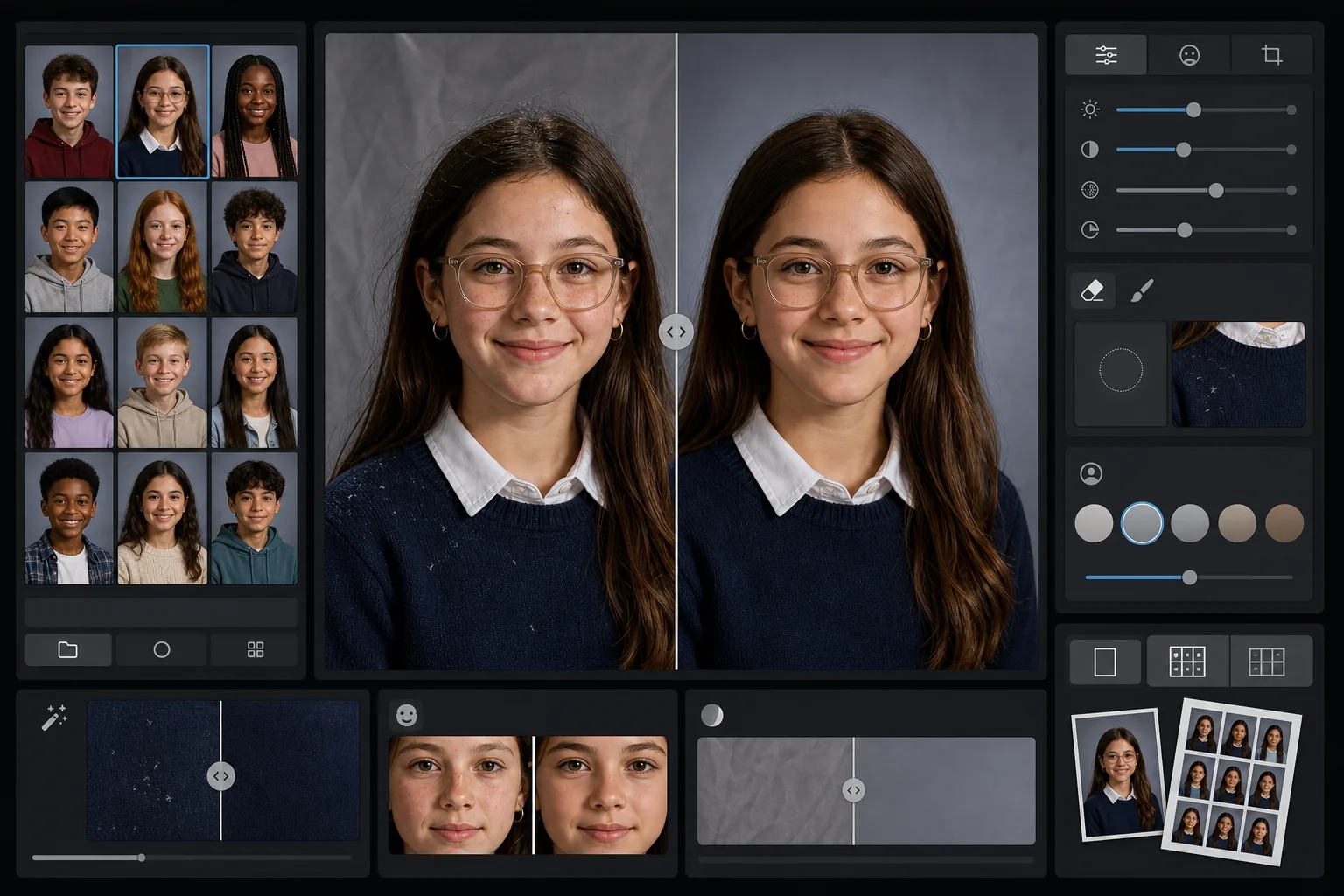
Apa yang dilakukan templat ini
Menerapkan retouching lembut yang sesuai usia pada potret sekolah, yang menghaluskan noda sementara sambil mempertahankan penampilan alami setiap siswa. AI Enhance mengoreksi pencahayaan yang tidak merata dan pergeseran warna yang terjadi saat memotret puluhan siswa dengan pengaturan pencahayaan yang sama sepanjang satu sesi. Magic Eraser menghilangkan rambut yang tercecer di pakaian, tepi kerah yang miring, dan kerutan latar belakang pada backdrop portabel.
Pengaturan templat
| Tingkat retouching | Ringan — hanya menghilangkan noda sementara, mempertahankan bintik dan fitur alami |
| Ukuran keluaran | 1200×1500px (potret standar 4:5, 300 DPI pada ukuran dompet) |
| Normalisasi latar belakang | Menyamakan nada backdrop di semua gambar dalam satu batch |
| Koreksi pencahayaan | Otomatis — mengompensasi pergeseran cahaya sepanjang sesi pemotretan |
| Konsistensi warna | White balance seragam di semua potret yang diproses |
| Pembersihan detail yang tercecer | Menghilangkan rambut yang terbang di bahu, serat kain, dan kerutan backdrop |
Cara menggunakan templat ini
Unggah potret kelas
Unggah satu potret atau seluruh batch kelas. Templat menangani gambar individual maupun grup, menerapkan standar retouching yang sama pada semua foto demi bagian buku tahunan yang konsisten.
Terapkan retouching yang sesuai usia
AI Enhance dengan lembut menghaluskan noda sementara seperti jerawat atau goresan sambil menjaga setiap siswa tetap tampak seperti dirinya sendiri. Bintik, tanda lahir, behel, dan kacamata selalu dipertahankan — tujuannya adalah versi yang rapi dari penampilan asli mereka.
Normalkan pencahayaan dan latar belakang
Kondisi pencahayaan berubah sepanjang sesi potret seiring pengaturan yang bergeser. Templat mengoreksi pencahayaan dan white balance agar setiap siswa tampak diterangi secara konsisten, dan nada backdrop cocok di seluruh batch.
Bersihkan dan ekspor
Magic Eraser menghilangkan gangguan kecil — serat kain pada sweter gelap, sehelai rambut yang melintang di dahi, kerutan pada backdrop portabel. Ekspor pada resolusi standar buku tahunan untuk cetak atau JPEG beresolusi lebih rendah untuk galeri online sekolah.
Tips ahli untuk hasil terbaik
- ✓Proses seluruh batch kelas bersama-sama alih-alih satu per satu — templat menggunakan grup untuk mengalibrasi pencahayaan dan warna yang konsisten di semua potret.
- ✓Untuk siswa yang memakai kacamata, foto asli sebaiknya menunjukkan siswa sedikit menundukkan dagu untuk meminimalkan silau — peningkatan dengan AI bekerja paling baik saat mata terlihat di balik lensa.
- ✓Jalankan batch uji 5-10 potret sebelum memproses seluruh sekolah untuk memastikan tingkat retouching memenuhi standar komite buku tahunan Anda.
- ✓Simpan berkas asli yang belum di-retouch di samping versi yang telah diproses — sebagian orang tua lebih menyukai foto yang sama sekali belum diedit untuk penggunaan pribadi.
Pertanyaan umum
Apakah retouching ini cocok untuk anak-anak dan remaja?
+
Ya. Templat ini dirancang khusus untuk subjek usia sekolah. Templat hanya menghilangkan noda sementara seperti jerawat di hari pemotretan — tidak pernah membentuk ulang fitur, mengubah warna kulit, atau menerapkan jenis penghalusan yang digunakan dalam retouching kecantikan dewasa. Setiap siswa tetap tampak seperti dirinya sendiri.
Bisakah saya memproses satu kelas atau sekolah sekaligus?
+
Ya. Unggah hingga ratusan potret dalam satu batch. Templat menerapkan standar retouching yang identik dan menormalkan pencahayaan, warna, serta konsistensi latar belakang di setiap gambar sehingga bagian buku tahunan tampak seragam.
Apakah ini akan menghilangkan behel, kacamata, atau alat bantu dengar?
+
Tidak. Templat dirancang untuk mempertahankan semua fitur permanen dan semipermanen termasuk behel, kacamata, alat bantu dengar, dan perangkat medis. Templat hanya menangani noda permukaan sementara dan gangguan lingkungan seperti serat kain dan kerutan backdrop.
Hadirkan potret siap buku tahunan dalam hitungan menit
Unggah potret sekolah secara individual atau per kelas dan dapatkan gambar yang konsisten, di-retouch secara alami, dan siap cetak. Setiap siswa tampil di sisi terbaiknya.
Coba gratisRelated templates
More portrait templates for your workflow.
Templat potret hewan peliharaan berkualitas studio. Menangani pinggiran bulu, melepas kalung anjing dan pawang, mengganti latar belakang, dan mempertajam mata anjing, kucing, dan hewan lainnya.
Template retouching kulit alami yang menghilangkan noda sekaligus menjaga pori-pori dan tekstur. Pencahayaan merata, tanpa tampilan plastik — hanya tampilan kamera yang lebih baik.
Sempurnakan foto bayi baru lahir dan bayi dengan warna hangat yang lembut, penghalusan kulit yang lembut, penghilangan penyangga dan gangguan, serta ukuran siap cetak untuk pengumuman dan seni dinding.
Perbaiki foto kehamilan dengan penghalusan kulit yang lembut, pencahayaan cahaya lembut, penyederhanaan latar belakang, dan gradasi warna yang hangat untuk tampilan potret kehamilan yang abadi.
Rapikan potret keluarga dengan menghilangkan gangguan latar belakang, memperbaiki pencahayaan yang tidak merata, menghaluskan kulit secara alami, dan memastikan semua orang tampil terbaik dalam bingkai yang sama.