
Cahaya Lembut Bayi & Baru Lahir
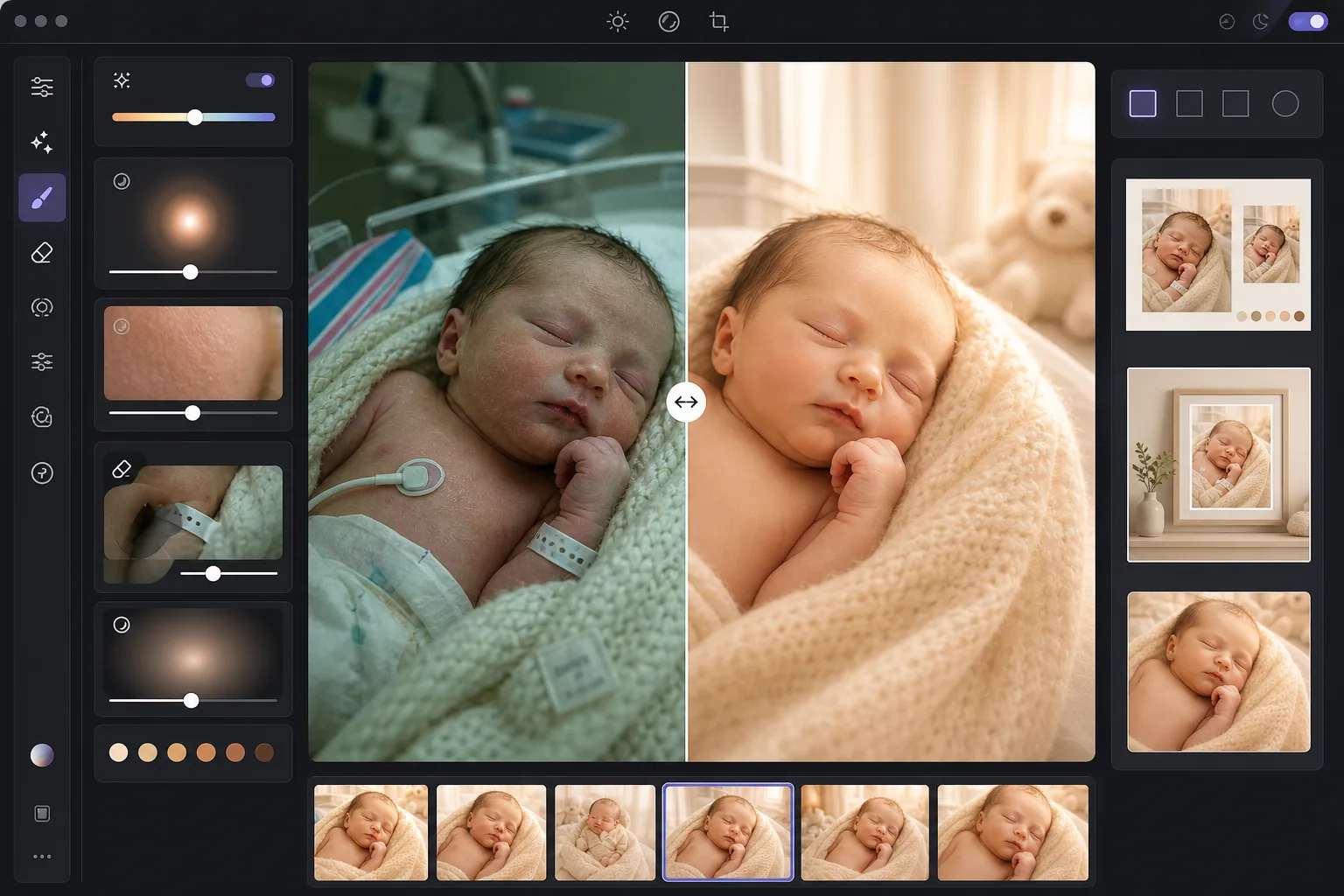
Berikan foto bayi baru lahir dan bayi kualitas yang lembut, hangat, dan halus layaknya sesi studio profesional. Templat ini menerapkan peningkatan kehangatan yang lembut, penghalusan kulit halus yang sesuai untuk fotografi bayi, menghilangkan prop yang mengganggu dan kekacauan latar belakang, serta menyesuaikan ukuran hasil untuk pengumuman kelahiran, cetakan dinding, dan berbagi di media sosial.
Coba templat ini gratisPortrait template preview
Apa yang dilakukan templat ini
Mengubah foto mentah bayi baru lahir dan bayi — baik dari ponsel di rumah sakit maupun dari sesi foto di rumah — menjadi gambar lembut dan bercahaya yang disayangi orang tua. AI Enhance menambahkan nada hangat lembut yang menonjolkan kulit bayi baru lahir, mengangkat bayangan tanpa kehilangan suasana lembut, dan menerapkan cahaya bersinar halus yang menyelimuti gambar dengan kehangatan. Penghalusan kulit dikalibrasi khusus untuk bayi — meratakan kemerahan berbercak yang umum pada kulit bayi baru lahir sekaligus mempertahankan detail bulu halus yang membuat foto bayi terasa otentik. Magic Eraser menghilangkan gelang rumah sakit, selang infus, kabel monitor, tepi popok, klip empeng, dan kekacauan latar belakang di kamar bayi.
Pengaturan templat
| Warmth | +10 kehangatan dengan pergeseran midtone keemasan (dioptimalkan untuk kulit bayi baru lahir) |
| Soft glow | Pendar bercahaya pada sorotan (radius 40px, opasitas 25%) |
| Skin smoothing | Dikalibrasi untuk bayi (mengurangi bercak, mempertahankan bulu halus) |
| Shadow lift | +0,5 EV pada bayangan dengan transisi mulus (tanpa pemulihan kasar) |
| Vignette | Vinyet hangat lembut (menarik perhatian ke tengah, penggelapan tepi 15%) |
Cara menggunakan templat ini
Unggah foto bayi atau bayi baru lahir
Unggah foto bayi baru lahir, bayi, atau balita yang diambil di rumah sakit, di rumah, atau di studio. Templat ini menyesuaikan diri dengan berbagai lingkungan pencahayaan — lampu fluoresen rumah sakit yang tajam, cahaya jendela kamar bayi yang lembut, atau pencahayaan rumah yang campuran. Gambar dari ponsel maupun kamera profesional sama-sama didukung.
Terapkan kehangatan dan cahaya lembut
AI Enhance menambahkan nada emas hangat pada midtone dan cahaya bersinar lembut pada sorotan, menciptakan kualitas seperti mimpi dan halus yang diasosiasikan dengan fotografi bayi baru lahir profesional. Area bayangan diangkat dengan lembut untuk menampilkan detail pada selimut bedong dan rambut gelap tanpa menciptakan tampilan yang datar dan terlalu diproses.
Haluskan kulit dan hilangkan gangguan
Penghalusan kulit bayi meratakan kemerahan berbercak dan pengelupasan kering yang umum pada kulit bayi baru lahir sekaligus mempertahankan bulu halus dan tekstur kulit alami. Magic Eraser menghilangkan gelang rumah sakit, kabel monitor, tepi popok yang mengintip dari bedong, label pada selimut, dan benda latar belakang seperti keranjang cucian atau stopkontak listrik.
Ekspor untuk cetakan dan pengumuman
Unduh dalam beberapa ukuran: 5x7 dan 4x6 untuk kartu pengumuman kelahiran, 8x10 dan 11x14 untuk cetakan dinding berbingkai, dan 1080x1080 persegi untuk pengumuman kelahiran di Instagram. Semua hasil berada pada 300 DPI untuk cetakan yang tajam pada kertas foto atau kertas karton.
Tips profesional untuk hasil terbaik
- ✓Cahaya terbaik untuk foto bayi baru lahir adalah cahaya jendela yang lembut dan tidak langsung dari satu arah. Jika Anda memotret di rumah, tempatkan bayi di dekat jendela besar dengan tirai tipis pada pagi atau sore hari. Templat menonjolkan cahaya alami ini dengan indah, sedangkan sinar matahari langsung yang tajam menciptakan bayangan yang harus dikoreksi dengan lebih susah payah.
- ✓Untuk foto rumah sakit dengan pencahayaan fluoresen dari atas, templat menghilangkan rona warna hijau dan menghangatkan gambar secara signifikan. Namun, bayangan tajam dari lampu fluoresen di langit-langit akan tetap terlihat sebagai area gelap yang sedikit terangkat di bawah dagu dan hidung. Meminta perawat mematikan lampu langit-langit dan menggunakan cahaya jendela atau lampu yang lembut menghasilkan titik awal yang jauh lebih baik.
- ✓Saat menghilangkan gelang rumah sakit, posisikan gelang agar berada di permukaan pergelangan tangan yang terlihat, bukan melilit dan sebagian tersembunyi. Gelang yang terlihat sepenuhnya lebih mudah dihilangkan dengan bersih oleh AI dibandingkan gelang yang menghilang di balik lipatan kulit.
- ✓Untuk foto bayi baru lahir berpose dengan bedong dan prop, templat mempertahankan tekstur selimut rajut, keranjang anyaman, dan alas bulu sambil hanya menghaluskan kulit bayi. Proses dulu satu gambar uji untuk memastikan tekstur bedong tetap terjaga sebelum memproses seluruh sesi secara batch.
Pertanyaan umum
Apakah penghalusan kulit aman untuk foto bayi baru lahir?
+
Penghalusan kulit dikalibrasi khusus untuk kulit bayi. Ia mengurangi bercak merah berbercak, tanda lahir bangau, dan pengelupasan kering yang umum pada minggu-minggu pertama tanpa menghilangkan bulu halus (lanugo), detail alis, dan bulu mata mungil yang membuat foto bayi baru lahir terasa nyata. Hasilnya tampak seperti kulit yang sehat dan merata, bukan boneka yang diairbrush.
Bisakah ini memperbaiki foto rumah sakit dari ponsel?
+
Ya, dan ini adalah salah satu kasus penggunaan yang paling umum. Kamar rumah sakit memiliki pencahayaan fluoresen tajam yang membuat kulit bayi baru lahir tampak kehijauan dan menciptakan bayangan dari atas yang kurang menarik. Templat mengoreksi rona warna, melembutkan bayangan, menghangatkan nada keseluruhan, dan menghilangkan peralatan medis yang terlihat, mengubah foto ponsel yang terlihat klinis menjadi potret yang hangat dan intim.
Ukuran cetak apa saja yang didukung oleh hasilnya?
+
Templat menghasilkan keluaran pada 300 DPI, yang mendukung cetakan tajam pada 5x7, 8x10, 11x14, dan 16x20 inci tergantung resolusi gambar asli. Foto ponsel standar 12 megapiksel dapat menghasilkan cetakan tajam hingga 11x14 inci. Gambar kamera beresolusi lebih tinggi mendukung 16x20 dan lebih besar.
Ubah momen berharga menjadi potret abadi
Unggah foto bayi baru lahir dan bayi, lalu dapatkan gambar yang lembut, hangat, dan bergaya profesional, siap untuk pengumuman kelahiran, cetakan dinding, dan berbagi di media sosial.
Coba gratisRelated templates
More portrait templates for your workflow.
Templat retouching potret sekolah sesuai usia. Penghapusan noda alami, latar belakang yang konsisten, dan keluaran standar buku tahunan dengan pemrosesan batch untuk seluruh kelas.
Templat potret hewan peliharaan berkualitas studio. Menangani pinggiran bulu, melepas kalung anjing dan pawang, mengganti latar belakang, dan mempertajam mata anjing, kucing, dan hewan lainnya.
Template retouching kulit alami yang menghilangkan noda sekaligus menjaga pori-pori dan tekstur. Pencahayaan merata, tanpa tampilan plastik — hanya tampilan kamera yang lebih baik.
Perbaiki foto kehamilan dengan penghalusan kulit yang lembut, pencahayaan cahaya lembut, penyederhanaan latar belakang, dan gradasi warna yang hangat untuk tampilan potret kehamilan yang abadi.
Rapikan potret keluarga dengan menghilangkan gangguan latar belakang, memperbaiki pencahayaan yang tidak merata, menghaluskan kulit secara alami, dan memastikan semua orang tampil terbaik dalam bingkai yang sama.