
Seni Saluran YouTube
Desain spanduk saluran YouTube yang tampak tajam di setiap layar — dari monitor desktop 2560px hingga pemotongan di ponsel. Templat ini menangani perhitungan zona aman yang rumit sehingga merek, teks, dan foto pembuat konten Anda ditampilkan dengan benar di TV, desktop, tablet, dan ponsel tanpa terpotong.
Coba templat ini gratisSocial Media template preview
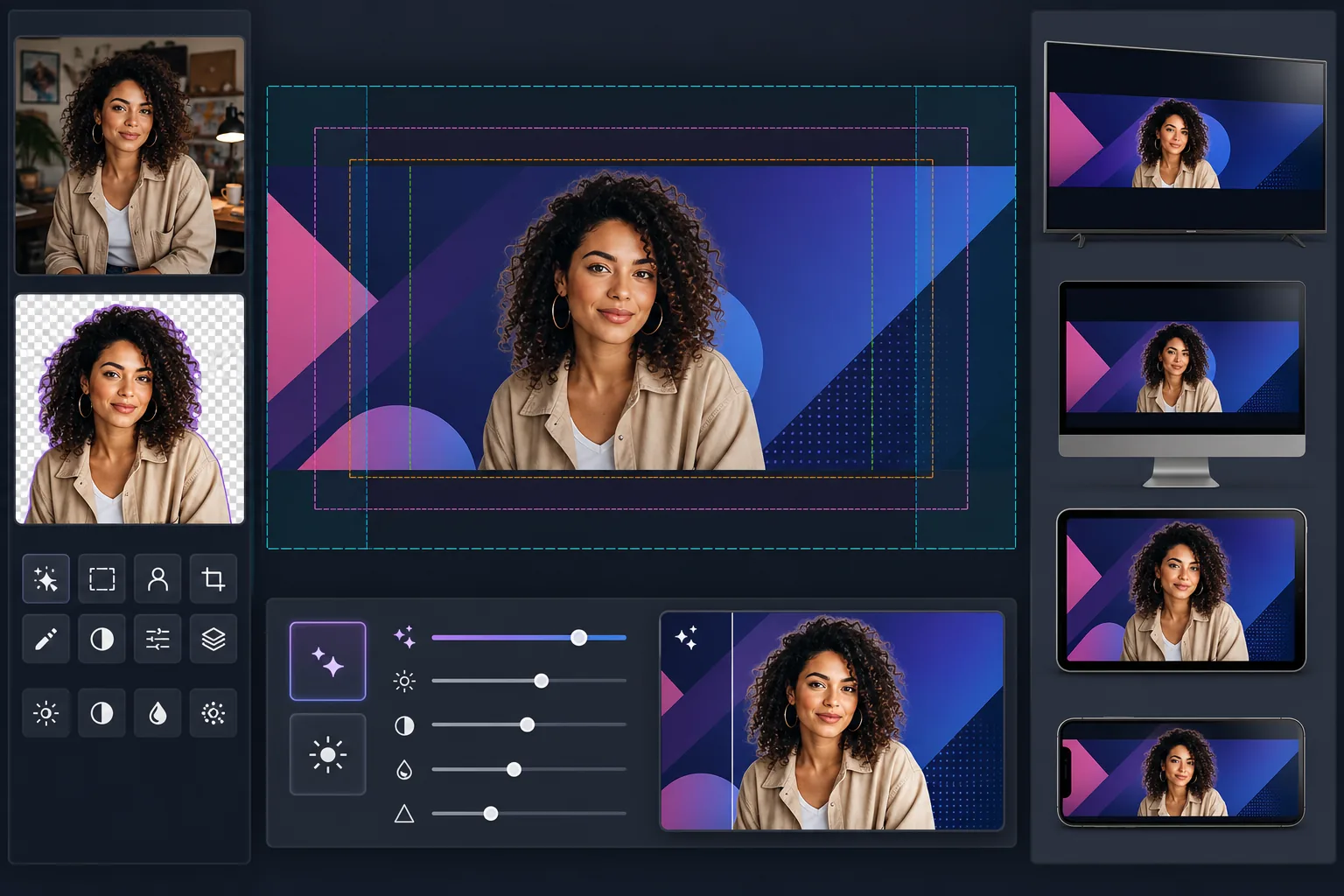
Apa yang dilakukan templat ini
Membuat seni saluran YouTube pada ukuran kanvas penuh 2560×1440px dengan konten yang diposisikan di dalam zona aman YouTube. Background Eraser mengekstrak potret pembuat konten dengan rapi untuk dikomposisikan di atas latar belakang bermerek, dan AI Enhance memastikan spanduk akhir tetap tajam pada ukuran tampilan resolusi tinggi YouTube. Templat ini memperhitungkan empat zona pemotongan berbeda yang diterapkan YouTube di TV, desktop, tablet, dan perangkat seluler.
Pengaturan templat
| Ukuran kanvas | 2560×1440px (ukuran unggahan yang diwajibkan YouTube) |
| Zona aman (semua perangkat) | Area tengah 1546×423px (selalu terlihat) |
| Area terlihat di desktop | 2560×423px (lebar penuh, strip tengah) |
| Ruang warna | sRGB (standar web untuk tampilan YouTube yang konsisten) |
| Format file | PNG untuk grafik/teks, JPEG 95% untuk spanduk fotografi |
| Ukuran file maksimum | 6MB (batas unggahan YouTube) |
Cara menggunakan templat ini
Unggah foto pembuat konten atau aset merek Anda
Unggah foto potret, logo, atau citra merek. Untuk saluran yang berfokus pada pembuat konten, foto wajah yang bersih atau foto setengah badan bekerja paling baik. Background Eraser akan memisahkan Anda dari latar belakang apa pun untuk penempatan yang fleksibel.
Ekstrak dan posisikan subjek Anda
Background Eraser menghapus latar belakang asli, memberi Anda potongan yang bersih. Posisikan foto pembuat konten atau logo Anda di dalam zona aman 1546×423px — area tengah yang dijamin terlihat di setiap perangkat, dari ponsel hingga smart TV.
Tingkatkan resolusi dan kejernihan
AI Enhance memperbesar dan mempertajam komposisi akhir agar tampak tajam pada lebar 2560px. Tepi teks tetap tajam, gradien tetap mulus, dan elemen fotografi mempertahankan detail alaminya pada resolusi tampilan penuh YouTube.
Pratinjau dan ekspor
Pratinjau bagaimana spanduk akan muncul di ponsel (potongan 1546×423px), desktop (potongan 2560×423px), dan TV (tampilan penuh 2560×1440px). Ekspor sebagai PNG untuk desain padat teks atau JPEG untuk spanduk fotografi, dengan tetap di bawah batas ukuran file 6MB YouTube.
Tips profesional untuk hasil terbaik
- ✓Pertahankan semua elemen penting — wajah Anda, nama saluran, dan tagline — di dalam zona aman tengah 1546×423px. Ini adalah satu-satunya area yang dijamin terlihat di setiap perangkat. Apa pun di luarnya akan terpotong di ponsel.
- ✓Hindari menempatkan teks atau logo di sudut kanan bawah spanduk. YouTube menumpangkan foto profil dan tombol langganan Anda di area tersebut pada desktop, yang dapat menutupi konten Anda.
- ✓Gunakan warna kontras tinggi dan font tebal berukuran besar untuk teks apa pun di spanduk Anda. YouTube mengompresi seni saluran secara agresif, dan teks tipis atau berkontras rendah menjadi tidak terbaca, terutama di perangkat seluler.
- ✓Desain area luar (di luar zona aman) sebagai perpanjangan dari latar belakang Anda — warna solid, gradien, atau versi buram dari gambar utama Anda bekerja dengan baik. Area ini muncul di TV dan monitor desktop lebar tetapi tidak boleh berisi informasi penting.
Pertanyaan umum
Mengapa YouTube membutuhkan gambar sebesar itu untuk spanduk yang tipis?
+
YouTube menggunakan satu gambar di berbagai perangkat yang sangat berbeda. TV menampilkan kanvas penuh 2560×1440px. Desktop menampilkan strip horizontal 2560×423px. Tablet menampilkan sedikit lebih sedikit, dan ponsel memotong hanya area tengah 1546×423px. Kanvas besar memastikan seni Anda tampak tajam di setiap layar tanpa memerlukan unggahan terpisah.
Apakah nama saluran saya akan terpotong di ponsel?
+
Tidak jika Anda menjaganya di dalam zona aman. Templat menandai area tengah 1546×423px yang terlihat di setiap perangkat. Posisikan nama saluran, tagline, dan branding penting apa pun di dalam zona ini, dan akan ditampilkan dengan benar di mana saja.
Bisakah saya memperbarui seni saluran untuk kampanye musiman?
+
Ya. Simpan templat dasar dengan warna merek dan penempatan logo Anda, lalu tukar citra latar belakang atau warna aksen untuk pembaruan musiman, peluncuran video, atau pencapaian. Penempatan zona aman tetap konsisten di berbagai versi.
Buat spanduk YouTube yang berfungsi di setiap layar
Unggah foto atau aset merek Anda dan buat seni saluran yang dioptimalkan untuk perangkat dalam hitungan menit. Tidak perlu perangkat lunak desain.
Coba gratisRelated templates
More social media templates for your workflow.
1080×1080px पर इंस्टाग्राम-अनुकूलित वर्गाकार क्रॉप टेम्पलेट। साफ़ पृष्ठभूमि, जीवंत रंग और फ़ीड में स्पष्ट विवरण।
डेस्कटॉप के लिए 820×312px और मोबाइल क्रॉप के लिए 640×360px पर फेसबुक कवर फोटो टेम्पलेट। प्रोफ़ाइल चित्र ओवरलैप और सीटीए बटन प्लेसमेंट के लिए उचित सुरक्षित क्षेत्रों के साथ स्वच्छ ब्रांड छवियां।
सटीक 1500×500px आयाम पर पेशेवर Twitter/X हेडर छवियां बनाएं। प्रोफ़ाइल चित्र ओवरलैप के लिए खाते, डार्क मोड और लाइट मोड दोनों में काम करते हैं।
प्राकृतिक त्वचा चिकनाई, पृष्ठभूमि सफाई, प्रकाश सुधार और सूक्ष्म रंग ग्रेडिंग के साथ डेटिंग प्रोफ़ाइल फ़ोटो को बेहतर बनाएं जो प्रामाणिक दिखता है - फ़िल्टर नहीं किया गया।
साफ़ पृष्ठभूमि, इष्टतम 2:3 ऊर्ध्वाधर आयाम, जीवंत रंग वृद्धि और पिन-तैयार संरचना के साथ स्क्रॉल-स्टॉपिंग Pinterest पिन छवियां बनाएं।
साफ़ पृष्ठभूमि, बोल्ड विषय फ़्रेमिंग और प्रोफ़ाइल ग्रिड स्थिरता के लिए अनुकूलित 9:16 लंबवत आयामों के साथ आकर्षक टिकटॉक वीडियो कवर फ़ोटो बनाएं।