
Foto Sampul Facebook
Buat foto sampul Facebook yang terlihat rapi baik di desktop maupun seluler. Templat ini menangani perbedaan yang rumit antara tampilan desktop 820×312px dan pemangkasan seluler 640×360px — memastikan pesan merek, gambar, dan ajakan bertindak Anda terlihat di setiap perangkat tanpa tersembunyi di balik foto profil atau tombol tindakan.
Coba templat ini gratisSocial Media template preview
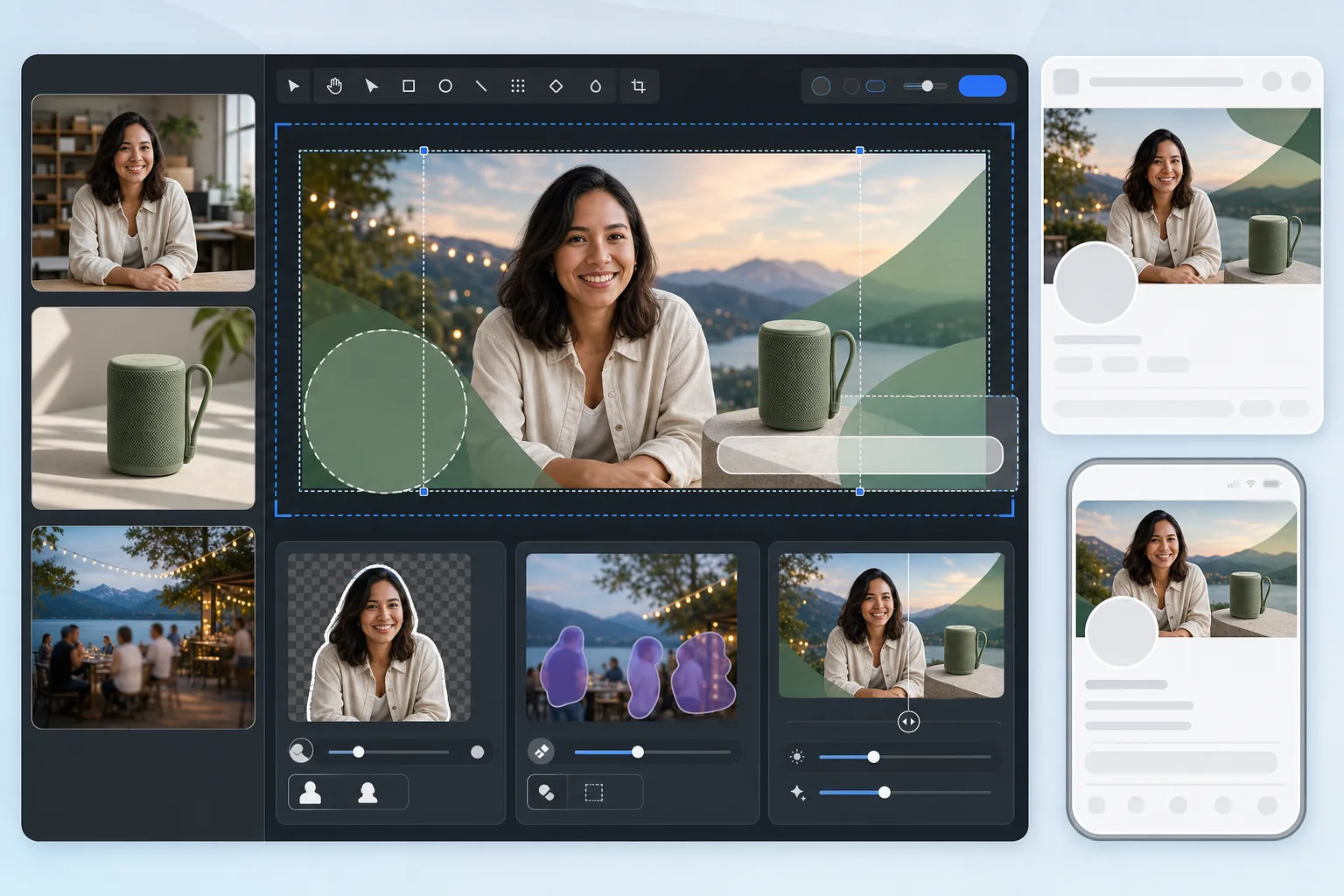
Apa yang dilakukan templat ini
Menghasilkan foto sampul Facebook yang dioptimalkan untuk tampilan desktop (820×312px) maupun seluler (640×360px). Templat ini memperhitungkan tumpang tindih foto profil di sisi kiri, tombol tindakan di sebelah kanan, dan rasio aspek yang berbeda antar perangkat. Background Eraser mengekstrak orang atau produk dengan rapi untuk penggabungan, Magic Eraser menghapus elemen yang mengganggu dari latar belakang pemandangan, dan AI Enhance menjaga gambar tetap tajam setelah kompresi Facebook.
Pengaturan templat
| Kanvas unggah | 820×360px (mencakup pemangkasan desktop dan seluler) |
| Area terlihat di desktop | 820×312px (lebih lebar, lebih pendek) |
| Area terlihat di seluler | 640×360px (lebih sempit, lebih tinggi — pemangkasan tengah) |
| Tumpang tindih foto profil | Lingkaran 170×170px di kiri bawah (desktop) |
| Format file | PNG untuk grafik, JPEG 85% untuk foto (prakompresi) |
| Profil warna | sRGB (Facebook menghapus profil lain saat diunggah) |
Cara menggunakan templat ini
Unggah gambar sampul Anda
Mulailah dengan foto, grafik merek, atau potret yang ingin Anda gabungkan. Foto berorientasi lanskap dengan lebar minimal 820px bekerja paling baik. Templat akan memandu Anda tentang di mana konten aman untuk ditempatkan.
Bersihkan komposisi
Gunakan Background Eraser untuk mengekstrak orang atau produk untuk ditempatkan di atas latar belakang bermerek. Magic Eraser menghapus elemen yang tidak diinginkan seperti orang yang nyelonong ke dalam foto, papan tanda, atau kekacauan dari foto pemandangan atau acara.
Tempatkan konten di zona aman
Jaga konten penting — teks, wajah, logo — di area tengah yang terlihat baik di desktop maupun seluler. Hindari sudut kiri bawah (tumpang tindih foto profil di desktop) dan tepi kanan (tombol tindakan).
Ekspor dengan prakompresi
Templat mengekspor pada 820×360px dengan pengaturan kompresi yang dioptimalkan. Facebook mengompresi ulang semua unggahan, jadi ekspor menerapkan penajaman awal yang ringan dan kualitas JPEG yang cermat agar bertahan dari kompresi ganda tanpa banding atau buram.
Tips pro untuk hasil terbaik
- ✓Desain pada kanvas 820×360px tetapi tempatkan semua konten penting dalam zona tengah 580×280px. Ini adalah area tumpang tindih yang terlihat baik di desktop maupun seluler tanpa halangan apa pun dari foto profil atau tombol.
- ✓Hindari menempatkan teks lebih kecil dari 24px pada foto sampul Anda. Facebook mengompresi gambar sampul dengan berat, dan teks kecil menjadi buram dan tidak terbaca setelah diunggah — terutama di layar seluler.
- ✓Untuk halaman bisnis, koordinasikan foto sampul Anda dengan tombol CTA ('Pesan Sekarang', 'Belanja Sekarang', dll.) yang muncul di sisi kanan. Sisakan ruang visual untuk tombol agar tidak tumpang tindih dengan desain Anda.
- ✓Perbarui foto sampul Anda untuk kampanye, musim, atau acara. Facebook menampilkan unggahan sampul di linimasa halaman Anda sebagai sebuah postingan, yang memberikan jangkauan organik tambahan pada pembaruan tersebut di luar sekadar header halaman.
Pertanyaan umum
Mengapa foto sampul saya terlihat berbeda di seluler?
+
Facebook memangkas foto sampul secara berbeda berdasarkan perangkat. Desktop menampilkan 820×312px (lebar dan pendek), sementara seluler menampilkan pemangkasan tengah 640×360px (lebih sempit tetapi lebih tinggi). Konten di tepi paling kiri dan kanan terlihat di desktop tetapi terpotong di seluler. Panduan zona aman templat memastikan konten penting Anda bertahan di kedua pemangkasan.
Apakah Facebook akan memburamkan foto sampul saya?
+
Facebook mengompresi ulang setiap gambar yang diunggah. Templat mengatasi hal ini dengan menerapkan penajaman awal yang ringan dan menggunakan tingkat kualitas JPEG optimal yang bertahan dari kompresi ganda. Mengunggah sebagai PNG alih-alih JPEG juga membantu, karena konversi sisi server Facebook dari PNG sering menghasilkan hasil yang lebih baik daripada mengompresi ulang JPEG yang sudah terkompresi.
Bisakah saya menggunakan teks pada foto sampul Facebook saya?
+
Ya, Facebook telah menghapus 'aturan teks 20%' untuk foto sampul. Namun, jaga teks tetap besar (minimal 24px) dan berkontras tinggi karena kompresi Facebook. Gunakan hamparan zona aman templat untuk memastikan teks Anda tidak tersembunyi di balik foto profil di desktop atau terpotong di seluler.
Buat sampul Facebook yang berfungsi di setiap perangkat
Unggah foto atau aset merek Anda dan dapatkan gambar sampul yang dioptimalkan untuk tampilan desktop dan seluler dalam hitungan detik.
Coba gratisRelated templates
More social media templates for your workflow.
1080×1080px पर इंस्टाग्राम-अनुकूलित वर्गाकार क्रॉप टेम्पलेट। साफ़ पृष्ठभूमि, जीवंत रंग और फ़ीड में स्पष्ट विवरण।
सुरक्षित क्षेत्र गाइडों के साथ 2560×1440px पर YouTube बैनर टेम्पलेट। क्रिएटर फ़ोटो, डिवाइस-अवेयर लेआउट और ब्रांड-संगत चैनल आर्ट के लिए साफ़ पृष्ठभूमि हटाना।
सटीक 1500×500px आयाम पर पेशेवर Twitter/X हेडर छवियां बनाएं। प्रोफ़ाइल चित्र ओवरलैप के लिए खाते, डार्क मोड और लाइट मोड दोनों में काम करते हैं।
प्राकृतिक त्वचा चिकनाई, पृष्ठभूमि सफाई, प्रकाश सुधार और सूक्ष्म रंग ग्रेडिंग के साथ डेटिंग प्रोफ़ाइल फ़ोटो को बेहतर बनाएं जो प्रामाणिक दिखता है - फ़िल्टर नहीं किया गया।
साफ़ पृष्ठभूमि, इष्टतम 2:3 ऊर्ध्वाधर आयाम, जीवंत रंग वृद्धि और पिन-तैयार संरचना के साथ स्क्रॉल-स्टॉपिंग Pinterest पिन छवियां बनाएं।
साफ़ पृष्ठभूमि, बोल्ड विषय फ़्रेमिंग और प्रोफ़ाइल ग्रिड स्थिरता के लिए अनुकूलित 9:16 लंबवत आयामों के साथ आकर्षक टिकटॉक वीडियो कवर फ़ोटो बनाएं।