
Twitter/X हेडर फ़ोटो
एक ऐसी हेडर छवि डिज़ाइन करें जो हर डिवाइस और हर मोड में परिष्कृत दिखे। यह टेम्पलेट Twitter द्वारा आवश्यक सटीक 1500×500px आयामों को संभालता है, प्रोफ़ाइल चित्र के ओवरलैप क्षेत्र का ध्यान रखता है ताकि अहम सामग्री कभी छिपे नहीं, और सुनिश्चित करता है कि आपका बैनर डार्क मोड और लाइट मोड दोनों में शानदार दिखे।
इस टेम्पलेट को मुफ़्त आज़माएंSocial Media template preview
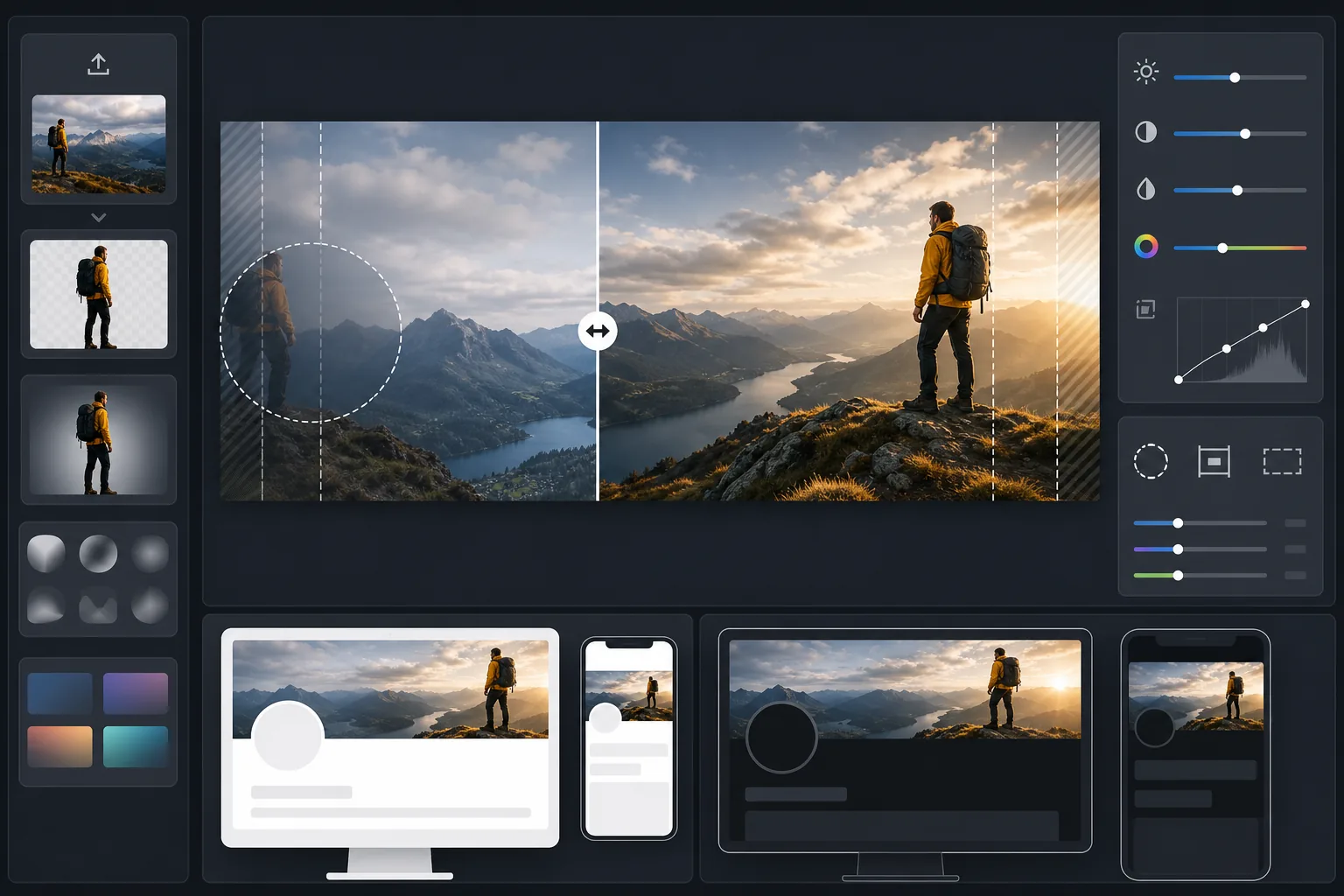
यह टेम्पलेट क्या करता है
आपकी फ़ोटो को Twitter/X द्वारा आवश्यक सटीक 1500×500px बैनर आकार में संसाधित करता है, ऐसी बुद्धिमान क्रॉपिंग के साथ जो चेहरों और अहम सामग्री को दृश्यमान सुरक्षित क्षेत्र में रखती है। Background Eraser साफ़-सुथरी रचनाओं के लिए विषयों को अलग कर सकता है, जबकि AI Enhance आपके फ़ॉलोअर्स को दिखने वाली डार्क और लाइट मोड दोनों पृष्ठभूमियों के लिए कंट्रास्ट और रंग को अनुकूलित करता है।
टेम्पलेट सेटिंग्स
| आउटपुट आकार | 1500×500px (3:1 Twitter/X हेडर अनुपात) |
| सुरक्षित क्षेत्र | बायाँ 25% आरक्षित — डेस्कटॉप और मोबाइल पर प्रोफ़ाइल चित्र ओवरलैप से बचाता है |
| किनारा मिश्रण | गहरे या हल्के की ओर कोमल फ़ेड (मोड के अनुसार अनुकूलित) |
| रंग अनुकूलन | डार्क मोड (#15202B) और लाइट मोड (#FFFFFF) कंट्रास्ट के लिए दोहरा-परीक्षित |
| फ़ाइल प्रारूप | 92% गुणवत्ता पर JPEG (Twitter की 5MB अपलोड सीमा के भीतर) |
| टेक्स्ट सुरक्षित क्षेत्र | केंद्रीय 50% क्षैतिज पट्टी — मोबाइल पर ऊपर/नीचे क्रॉप से बचाता है |
इस टेम्पलेट का उपयोग कैसे करें
अपनी स्रोत छवि अपलोड करें
लैंडस्केप-उन्मुख फ़ोटो या ग्राफ़िक का उपयोग करें। चौड़े पैनोरमिक शॉट, शहर के दृश्य और क्षैतिज रचनाएँ सबसे अच्छा काम करती हैं। टेम्पलेट अत्यधिक 3:1 आस्पेक्ट अनुपात में क्रॉप करेगा, इसलिए लंबे विषयों या ऊर्ध्वाधर रूप से केंद्रित सामग्री से बचें।
अहम सामग्री को सुरक्षित क्षेत्र में रखें
टेम्पलेट बाएँ 25% को प्रोफ़ाइल चित्र ओवरलैप क्षेत्र और बाहरी किनारों को मोबाइल क्रॉप क्षेत्र के रूप में चिह्नित करता है। आपकी सबसे महत्वपूर्ण दृश्य सामग्री बैनर के दाएँ-मध्य क्षेत्र में होनी चाहिए।
डार्क और लाइट मोड के लिए अनुकूलित करें
AI Enhance कंट्रास्ट को समायोजित करता है ताकि बैनर डार्क मोड की लगभग काली पृष्ठभूमि और लाइट मोड की सफ़ेद पृष्ठभूमि दोनों के सामने तीखे किनारों से बचे। किनारा मिश्रण कठोर कटाव के बजाय एक सहज संक्रमण बनाता है।
निर्यात करें और अपलोड करें
अनुकूलित 1500×500px JPEG डाउनलोड करें और सीधे Twitter/X पर अपलोड करें। फ़ाइल का आकार इस तरह रखा गया है कि वह रेटिना डिस्प्ले पर तीखे विवरण बनाए रखते हुए 5MB सीमा से काफ़ी नीचे रहे।
सर्वोत्तम परिणामों के लिए पेशेवर सुझाव
- ✓अंतिम रूप देने से पहले अपने हेडर का पूर्वावलोकन फ़ोन और डेस्कटॉप दोनों पर करें — Twitter मोबाइल पर ऊपर और नीचे के किनारों को अधिक आक्रामक रूप से क्रॉप करता है, प्रत्येक किनारे से लगभग 10% काटता है।
- ✓टेक्स्ट या चेहरों को निचले-बाएँ चतुर्थांश में रखने से बचें, जहाँ डेस्कटॉप पर आपका प्रोफ़ाइल चित्र, नाम और बायो ओवरले होते हैं।
- ✓बैनर के किनारों पर ऐसे रंगों का उपयोग करें जो #15202B (डार्क मोड) और #FFFFFF (लाइट मोड) दोनों से कंट्रास्ट करें — मध्यम-टोन के नीले, हरे और गर्म ग्रे दोनों संदर्भों में अच्छा काम करते हैं।
- ✓यदि किसी व्यक्ति वाली फ़ोटो का उपयोग कर रहे हैं, तो उसे फ़्रेम के दाएँ तिहाई हिस्से में रखें ताकि वह बाईं ओर आपके प्रोफ़ाइल चित्र के साथ दिखता रहे।
सामान्य प्रश्न
प्रोफ़ाइल चित्र वास्तव में कहाँ ओवरलैप करता है?
+
डेस्कटॉप पर, आपका गोलाकार प्रोफ़ाइल चित्र हेडर के निचले-बाएँ कोने पर ओवरलैप करता है, जो बैनर के सबसे बाएँ 20% के निचले लगभग 60% हिस्से को ढकता है। मोबाइल पर, ओवरलैप समान है पर थोड़ा खिसका हुआ। टेम्पलेट का सुरक्षित क्षेत्र दोनों लेआउट का ध्यान रखता है।
क्या मेरा हेडर डार्क मोड में अच्छा दिखेगा?
+
हाँ। टेम्पलेट आपके बैनर को डार्क मोड पृष्ठभूमि (#15202B) और लाइट मोड पृष्ठभूमि (#FFFFFF) दोनों के विरुद्ध परीक्षण करता है। किनारा मिश्रण दोनों मोड में सहज संक्रमण सुनिश्चित करता है, इसलिए आप उस झटकेदार कठोर-किनारे वाले प्रभाव से बचते हैं जो अनुकूलित न किए गए हेडर दिखाते हैं।
यदि Twitter हेडर आयाम बदल दे तो क्या होगा?
+
1500×500px विनिर्देश 2017 से और X में रीब्रांड के दौरान स्थिर रहा है। यदि आयाम बदलते हैं, तो हम टेम्पलेट को अपडेट करेंगे। वर्तमान आउटपुट किसी भी छोटे बैनर आकार में भी साफ़-सुथरे ढंग से छोटा हो जाता है।
हर Twitter प्रोफ़ाइल विज़िट पर अलग दिखें
अपनी छवि अपलोड करें और सेकंडों में एक बिल्कुल सही आकार वाला, डार्क-मोड-तैयार Twitter हेडर पाएं। न Photoshop, न आयामों का अनुमान।
मुफ़्त आज़माएंRelated templates
More social media templates for your workflow.
1080×1080px पर इंस्टाग्राम-अनुकूलित वर्गाकार क्रॉप टेम्पलेट। साफ़ पृष्ठभूमि, जीवंत रंग और फ़ीड में स्पष्ट विवरण।
सुरक्षित क्षेत्र गाइडों के साथ 2560×1440px पर YouTube बैनर टेम्पलेट। क्रिएटर फ़ोटो, डिवाइस-अवेयर लेआउट और ब्रांड-संगत चैनल आर्ट के लिए साफ़ पृष्ठभूमि हटाना।
डेस्कटॉप के लिए 820×312px और मोबाइल क्रॉप के लिए 640×360px पर फेसबुक कवर फोटो टेम्पलेट। प्रोफ़ाइल चित्र ओवरलैप और सीटीए बटन प्लेसमेंट के लिए उचित सुरक्षित क्षेत्रों के साथ स्वच्छ ब्रांड छवियां।
प्राकृतिक त्वचा चिकनाई, पृष्ठभूमि सफाई, प्रकाश सुधार और सूक्ष्म रंग ग्रेडिंग के साथ डेटिंग प्रोफ़ाइल फ़ोटो को बेहतर बनाएं जो प्रामाणिक दिखता है - फ़िल्टर नहीं किया गया।
साफ़ पृष्ठभूमि, इष्टतम 2:3 ऊर्ध्वाधर आयाम, जीवंत रंग वृद्धि और पिन-तैयार संरचना के साथ स्क्रॉल-स्टॉपिंग Pinterest पिन छवियां बनाएं।
साफ़ पृष्ठभूमि, बोल्ड विषय फ़्रेमिंग और प्रोफ़ाइल ग्रिड स्थिरता के लिए अनुकूलित 9:16 लंबवत आयामों के साथ आकर्षक टिकटॉक वीडियो कवर फ़ोटो बनाएं।