
स्टॉक फोटो तैयारी
अपनी फ़ोटो को पहले ही सबमिशन में स्टॉक एजेंसियों से स्वीकृत कराएँ। यह टेम्पलेट ऐसे ट्रेडमार्क, लोगो और ब्रांडेड तत्वों को हटाता है जो अस्वीकृति का कारण बनते हैं, उन तकनीकी खामियों को साफ करता है जो गुणवत्ता समीक्षा में विफल होती हैं, और Shutterstock, Adobe Stock, Getty और iStock द्वारा आवश्यक सटीक विनिर्देशों में फ़ाइलें निर्यात करता है — स्टॉक लाइब्रेरी से फ़ोटो अस्वीकृत होने के सबसे आम कारणों को समाप्त करता है।
यह टेम्पलेट मुफ़्त आज़माएँDesign template preview
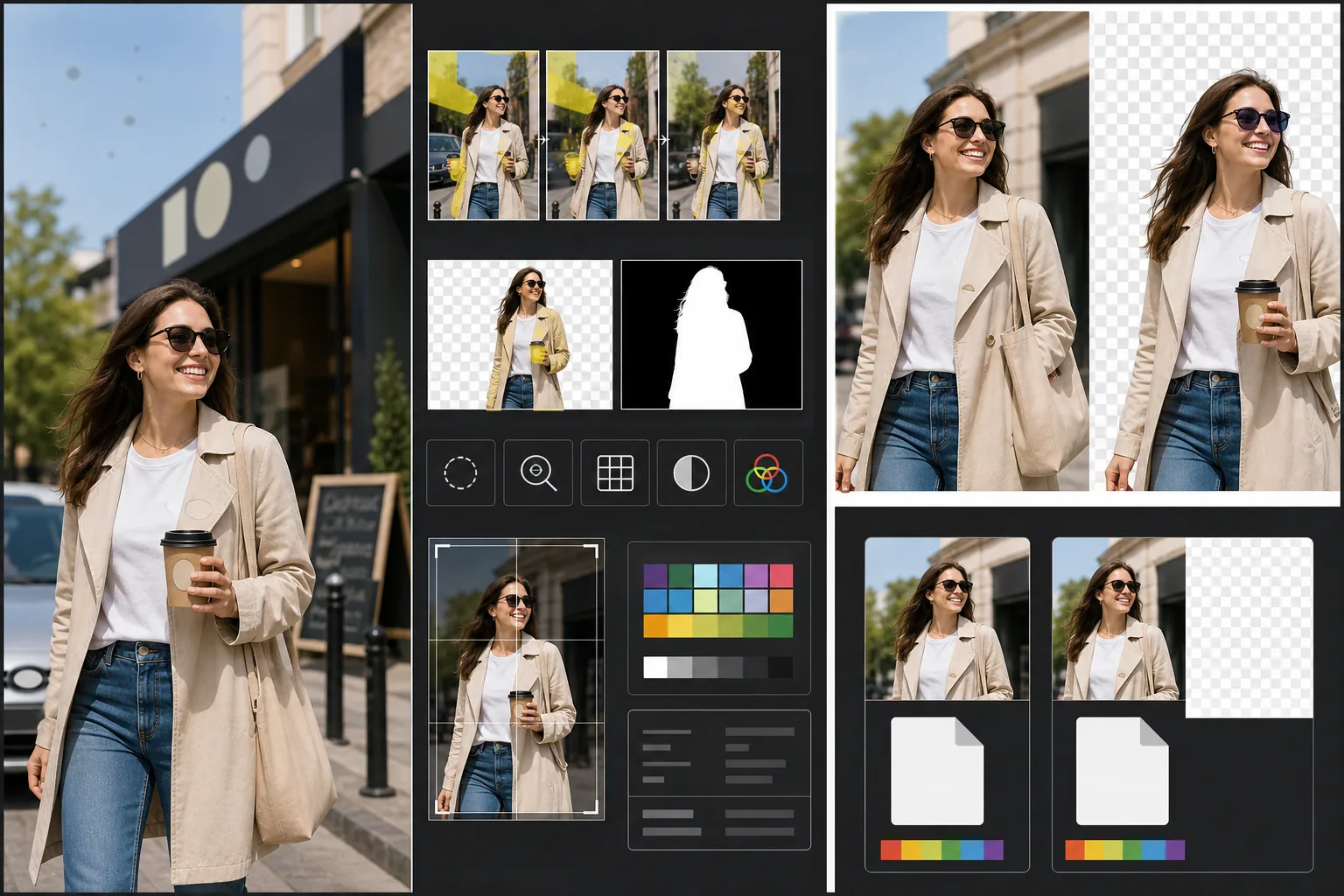
यह टेम्पलेट क्या करता है
उन विशिष्ट तकनीकी और कानूनी आवश्यकताओं को संबोधित करता है जो स्टॉक फोटो अस्वीकृति का कारण बनती हैं। Magic Eraser ऐसे दृश्यमान ट्रेडमार्क, ब्रांड लोगो, उत्पाद लेबल और ब्रांडेड साइनेज का पता लगाकर हटाता है जिनके लिए संपत्ति अनुमति की आवश्यकता होती या जो सीधे अस्वीकृति का कारण बनते। इसमें कपड़ों के लोगो, कार के प्रतीक चिह्न, दुकान के साइनेज और पैकेजिंग पर ब्रांड नाम शामिल हैं। Background Eraser कटआउट उपयोग के लिए बनाई गई छवियों के लिए स्वच्छ पृथक्करण प्रदान करता है, जिससे RGB छवि और स्टॉक एजेंसियों द्वारा आवश्यक एक अलग अल्फा मास्क दोनों उत्पन्न होते हैं। तकनीकी गुणवत्ता जांच शोर स्तर, तीक्ष्णता, वर्णक्रमीय विपथन और सेंसर धूल के धब्बों की पुष्टि करती है — ये सभी सामान्य अस्वीकृति कारक हैं — और AI जो सुधार सकता है वह करता है, साथ ही उन समस्याओं को चिह्नित करता है जिनके लिए दोबारा शूट करने की आवश्यकता होती है। अंतिम निर्यात फ़ाइल प्रारूप, रंग प्रोफ़ाइल, रिज़ॉल्यूशन और मेटाडेटा एम्बेडिंग के लिए एजेंसी विनिर्देशों से मेल खाता है।
टेम्पलेट सेटिंग्स
| ट्रेडमार्क पहचान | दृश्यमान लोगो, ब्रांड नाम और उत्पाद लेबल को स्वचालित रूप से पहचानें और हटाएँ |
| तकनीकी गुणवत्ता जांच | शोर, तीक्ष्णता, वर्णक्रमीय विपथन और सेंसर धूल की पुष्टि करें |
| पृथक्करण मास्क | कटआउट छवियों के लिए अल्फा चैनल उत्पन्न करें (पारदर्शिता के साथ PNG) |
| रंग प्रोफ़ाइल | sRGB (अधिकांश स्टॉक एजेंसियों द्वारा आवश्यक) |
| मेटाडेटा | शीर्षक, विवरण और कीवर्ड के लिए IPTC फ़ील्ड एम्बेड करें |
| आउटपुट प्रारूप | अधिकतम गुणवत्ता पर JPEG (स्तर 12) या TIFF (दोषरहित, Getty द्वारा पसंदीदा) |
इस टेम्पलेट का उपयोग कैसे करें
अपनी फ़ोटो अपलोड करें
वह फ़ोटो अपलोड करें जिसे आप स्टॉक एजेंसियों को सबमिट करना चाहते हैं। यह टेम्पलेट RAW, JPEG, TIFF और PNG फ़ाइलें स्वीकार करता है। उपलब्ध उच्चतम गुणवत्ता वाला संस्करण अपलोड करें — स्टॉक एजेंसियाँ पूर्ण रिज़ॉल्यूशन पर तकनीकी गुणवत्ता का मूल्यांकन करती हैं और बार-बार सहेजने से होने वाले संपीड़न दोष दिखाने वाली छवियों को अस्वीकार कर देती हैं।
ट्रेडमार्क और ब्रांड हटाएँ
Magic Eraser छवि में दृश्यमान ट्रेडमार्क, लोगो, ब्रांड नाम और उत्पाद लेबल के लिए स्कैन करता है। पता लगाए गए आइटम समीक्षा के लिए हाइलाइट किए जाते हैं। स्वीकृत हटाव AI द्वारा प्रत्येक ट्रेडमार्क के पीछे की सतह को पुनर्निर्मित करते हुए निष्पादित किए जाते हैं — कपड़े के लोगो के नीचे कपड़े की बुनाई, प्रतीक चिह्न के नीचे कार की बॉडी, दुकान के साइनेज के नीचे दीवार की सतह।
तकनीकी गुणवत्ता जांच चलाएँ
यह टेम्पलेट छवि का उन तकनीकी समस्याओं के लिए विश्लेषण करता है जो आमतौर पर स्टॉक एजेंसी अस्वीकृति का कारण बनती हैं: छाया क्षेत्रों में शोर, अपर्याप्त तीक्ष्णता, उच्च-कंट्रास्ट किनारों पर वर्णक्रमीय विपथन, सेंसर धूल के धब्बे और वाइट बैलेंस त्रुटियाँ। ठीक की जा सकने वाली समस्याएँ स्वचालित रूप से ठीक हो जाती हैं। न ठीक होने वाली समस्याएँ (जैसे गंभीर मोशन ब्लर) चिह्नित कर दी जाती हैं ताकि आप सबमिट करने से पहले जान सकें।
एजेंसी मेटाडेटा के साथ निर्यात करें
अपनी लक्षित एजेंसी चुनें और टेम्पलेट उस एजेंसी के पसंदीदा प्रारूप और विनिर्देशों में निर्यात करता है। शीर्षक, विवरण और कीवर्ड के लिए IPTC मेटाडेटा फ़ील्ड निर्यात से पहले एम्बेड किए जा सकते हैं। फ़ाइल Shutterstock, Adobe Stock, Getty/iStock, या Alamy योगदानकर्ता पोर्टल पर सीधे अपलोड करने के लिए तैयार है।
सर्वोत्तम परिणामों के लिए प्रो टिप्स
- ✓शुरू से ही ट्रेडमार्क को ध्यान में रखकर शूट करें। हालाँकि AI लोगो को प्रभावी ढंग से हटाता है, कम ब्रांडेड तत्वों वाले दृश्यों में कम इनपेंटिंग की आवश्यकता होती है और वे अधिक स्वाभाविक दिखते हैं। कपड़ों के लेबल को अंदर की ओर मोड़ें, बिना ब्रांड वाले प्रॉप्स चुनें, और जब संभव हो तो दुकान के साइनेज को बाहर रखने के लिए कैमरे को स्थित करें।
- ✓अपने कैमरे द्वारा उत्पादित उच्चतम रिज़ॉल्यूशन पर सबमिट करें। स्टॉक एजेंसियाँ खोज परिणामों को आंशिक रूप से रिज़ॉल्यूशन के अनुसार रैंक करती हैं — एक ही खोज क्वेरी के लिए 50-मेगापिक्सेल छवि 12-मेगापिक्सेल छवि के ऊपर दिखाई देती है क्योंकि खरीदार लचीली क्रॉपिंग और बड़े-प्रारूप उपयोग के लिए बड़ी फ़ाइलें पसंद करते हैं।
- ✓जब संभव हो तो अपनी स्टॉक फ़ोटो में लोगों को शामिल करें। पहचाने जा सकने वाले मानव विषयों (मॉडल रिलीज़ के साथ) वाली छवियाँ बिना लोगों वाले समान दृश्यों की तुलना में लगातार अधिक राजस्व अर्जित करती हैं। टेम्पलेट का त्वचा रीटचिंग न्यूनतम रहने के लिए कैलिब्रेट किया गया है, जिसे स्टॉक एजेंसियाँ अत्यधिक संपादित त्वचा की तुलना में पसंद करती हैं।
सामान्य प्रश्न
क्या कार का प्रतीक चिह्न हटाना स्वाभाविक दिखेगा?
+
हाँ। AI प्रतीक चिह्न के पीछे कार की बॉडी का पुनर्निर्माण करता है — पेंट रंग, परावर्तन और सतह की वक्रता का मिलान करते हुए। सामान्य प्रतीक चिह्न स्थानों (फ्रंट ग्रिल, ट्रंक, व्हील सेंटर) के लिए, पुनर्निर्माण बहुत स्वच्छ होता है। असामान्य स्थान या बहुत बड़े प्रतीक चिह्नों के किनारों पर एक त्वरित मैन्युअल टच-अप की आवश्यकता हो सकती है।
क्या यह मेरे सबमिशन के लिए कीवर्ड उत्पन्न कर सकता है?
+
यह टेम्पलेट IPTC मेटाडेटा फ़ील्ड एम्बेड करता है जहाँ आप शीर्षक, विवरण और कीवर्ड दर्ज कर सकते हैं। यह स्वतः कीवर्ड उत्पन्न नहीं करता — स्टॉक कीवर्ड अनुकूलन एक विशेष कौशल है जो इस बात पर निर्भर करता है कि खरीदार कैसे खोजते हैं, और स्वतः उत्पन्न कीवर्ड अक्सर उन व्यावसायिक अवधारणाओं को छोड़ देते हैं जो बिक्री को बढ़ावा देती हैं।
यह किन एजेंसियों का समर्थन करता है?
+
निर्यात प्रीसेट Shutterstock, Adobe Stock, Getty Images, iStock, Alamy, Dreamstime और 500px को कवर करते हैं। प्रत्येक प्रीसेट उस विशिष्ट एजेंसी की सबमिशन आवश्यकताओं के लिए सही फ़ाइल प्रारूप, रंग प्रोफ़ाइल, अधिकतम फ़ाइल आकार और मेटाडेटा एम्बेडिंग को कॉन्फ़िगर करता है।
अपनी फ़ोटो को पहले ही सबमिशन में स्वीकृत कराएँ
फ़ोटो अपलोड करें और ट्रेडमार्क हटाए गए, गुणवत्ता सत्यापित और प्रारूप आवश्यकताएँ पूरी की गई स्टॉक-एजेंसी-तैयार फ़ाइलें प्राप्त करें।
मुफ़्त आज़माएँRelated templates
More design templates for your workflow.
वेब, प्रिंट, सोशल मीडिया और ऐप आइकन के लिए साफ किनारे परिशोधन और बहु-आकार निर्यात के साथ पारदर्शी पीएनजी लोगो बनाएं। मुद्रित लोगो और डिजिटल फ़ाइलों की तस्वीरों पर काम करता है।
लेखक विपणन और प्रकाशक प्रचार के लिए 3डी परिप्रेक्ष्य, छाया प्रतिपादन और जीवनशैली पृष्ठभूमि के साथ यथार्थवादी पुस्तक कवर मॉकअप तैयार करें।
पॉडकास्ट कवर आर्ट डिज़ाइन करें जो पृष्ठभूमि प्रतिस्थापन, होस्ट पोर्ट्रेट अलगाव और टाइपोग्राफी-तैयार लेआउट के साथ ऐप्पल पॉडकास्ट और स्पॉटिफाई विनिर्देशों को पूरा करता है।
एआई अपस्केलिंग, कैनवास विस्तार, रंग-सटीक प्रूफिंग और प्रिंट-रेडी फ़ाइल निर्यात के साथ बड़े प्रारूप वाली प्रिंटिंग के लिए डिजिटल कला और तस्वीरें तैयार करें।